IBM Informix Audit Log
An IBM Informix Audit Log is essential for ensuring accountability, detecting unauthorized actions, and maintaining compliance with regulatory frameworks such as GDPR, HIPAA, and PCI DSS.
IBM Informix offers a built-in auditing subsystem that records system and user activities, creating a verifiable history of events. When paired with DataSunrise, organizations gain a unified audit log management solution that streamlines compliance, enhances visibility, and enforces zero-trust data governance.
What Is Audit Log?
An audit log is a chronological record of system and user activities that captures every critical action performed within a database or application. It serves as a foundational element for database security, compliance, and operational transparency. Each entry typically includes details such as who performed the action, when it occurred, what was done, and whether it succeeded or failed.
In the context of databases like IBM Informix, the audit log functions as a secure evidence trail. It helps administrators detect unauthorized access, investigate anomalies, and demonstrate compliance with frameworks like SOX, HIPAA, and GDPR.
A properly configured audit log enables:
- Continuous monitoring of database operations
- Early detection of security breaches
- Reliable reconstruction of events during investigations
- Proof of policy adherence for auditors and regulators
Informix’s audit log is particularly effective when combined with advanced platforms like DataSunrise, which centralizes audit collection, applies masking for sensitive fields, and offers automated compliance reporting.
Setting Up the Informix Audit Log
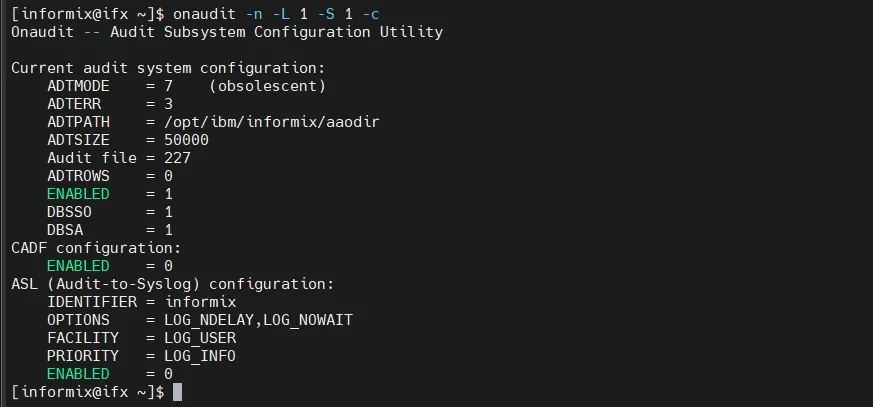
To enable and manage auditing, Informix provides the onaudit and onshowaudit utilities. Below are the typical steps for activation and verification.
Step 1: Enable Auditing
Run the following commands as the Informix administrator:
onaudit -L 1        # Enable auditing for all sessions
onaudit -A 1        # Activate audit for all users
onaudit -n          # Start a new audit log file
onaudit -c          # Confirm current configuration
You can verify results with:
onshowaudit
For granular control, use audit masks:
onaudit -a -u hr_admin -e ACTB
This command logs only table access (ACTB) events performed by hr_admin.
Refer to IBM Informix Audit Utility documentation for extended configuration details.
For additional insights into auditing, visit Aim of a DB Audit Trail and Learning Rules and Audit.
Analyzing and Managing Audit Logs
Once the audit log is active, administrators can query or export it for deeper analysis.
Filtering Audit Records
onshowaudit | grep ACTB
Archiving Logs
To prevent storage overflow, schedule periodic archiving:
mv $INFORMIXDIR/aaodir/audit.log /secure/audit/archive/audit_$(date +%F).log
onaudit -n
Common Audit Codes
| Code | Description |
|---|---|
| ACTB | Table access |
| ADML | Database modification |
| ACCT | Connection attempt |
| DROO | Object deletion |
| UPRV | Privilege usage |
These records allow teams to trace database events comprehensively and meet forensic and compliance requirements.
To enhance protection, you can also integrate Database Firewall capabilities to block malicious queries before they are executed.
Enhancing the Informix Audit Log with DataSunrise
While Informix’s onaudit tool covers foundational monitoring, it has limitations in visualization, scalability, and multi-environment consistency.
DataSunrise extends Informix audit log functionality into a Centralized Data Compliance Platform with powerful automation, analytics, and real-time control.
1. Unified Audit Management
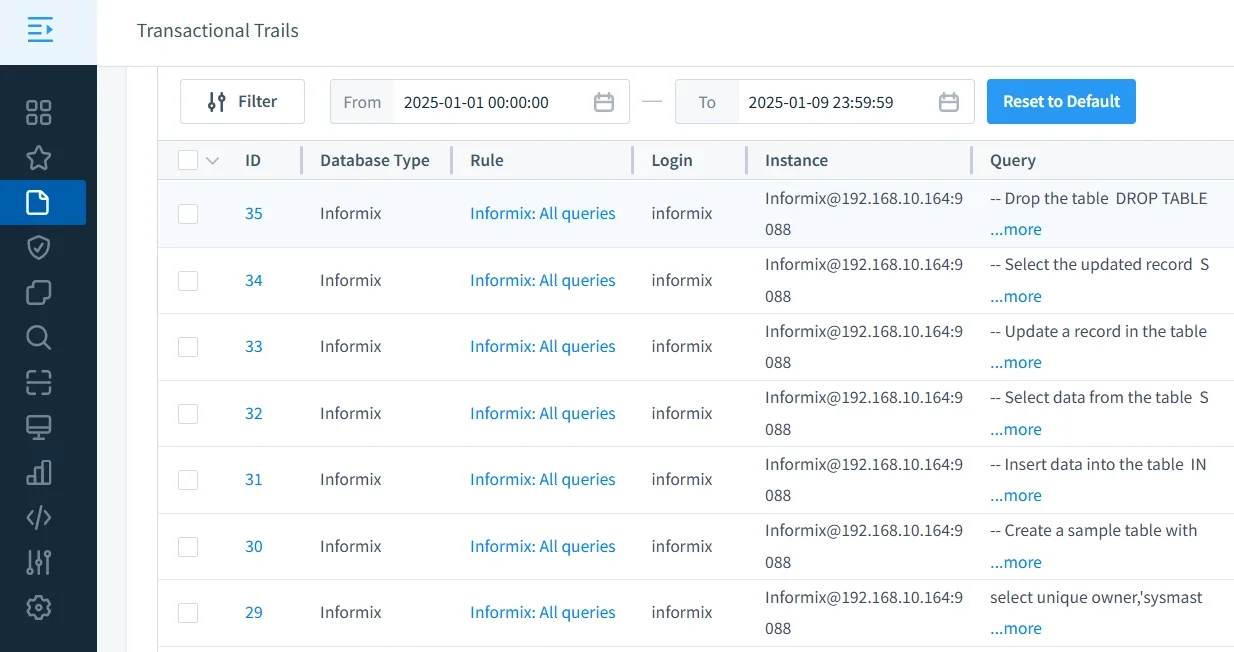
DataSunrise Audit Logs consolidate logs from multiple Informix instances into a single, centralized dashboard.
Instead of managing logs separately across servers, administrators gain a holistic view of all activities in one interface. This eliminates manual aggregation and simplifies both security reviews and compliance audits.
With unified management:
- Audit events from hybrid environments (cloud and on-prem) are seamlessly integrated.
- Administrators can search, filter, and analyze events in real time.
- Cross-database comparisons highlight irregularities and access pattern anomalies.
- Security teams can correlate Informix activity with other systems for complete visibility.
This centralized model not only improves operational efficiency but also ensures that every audit event is traceable across your organization’s data infrastructure.
2. Compliance Autopilot
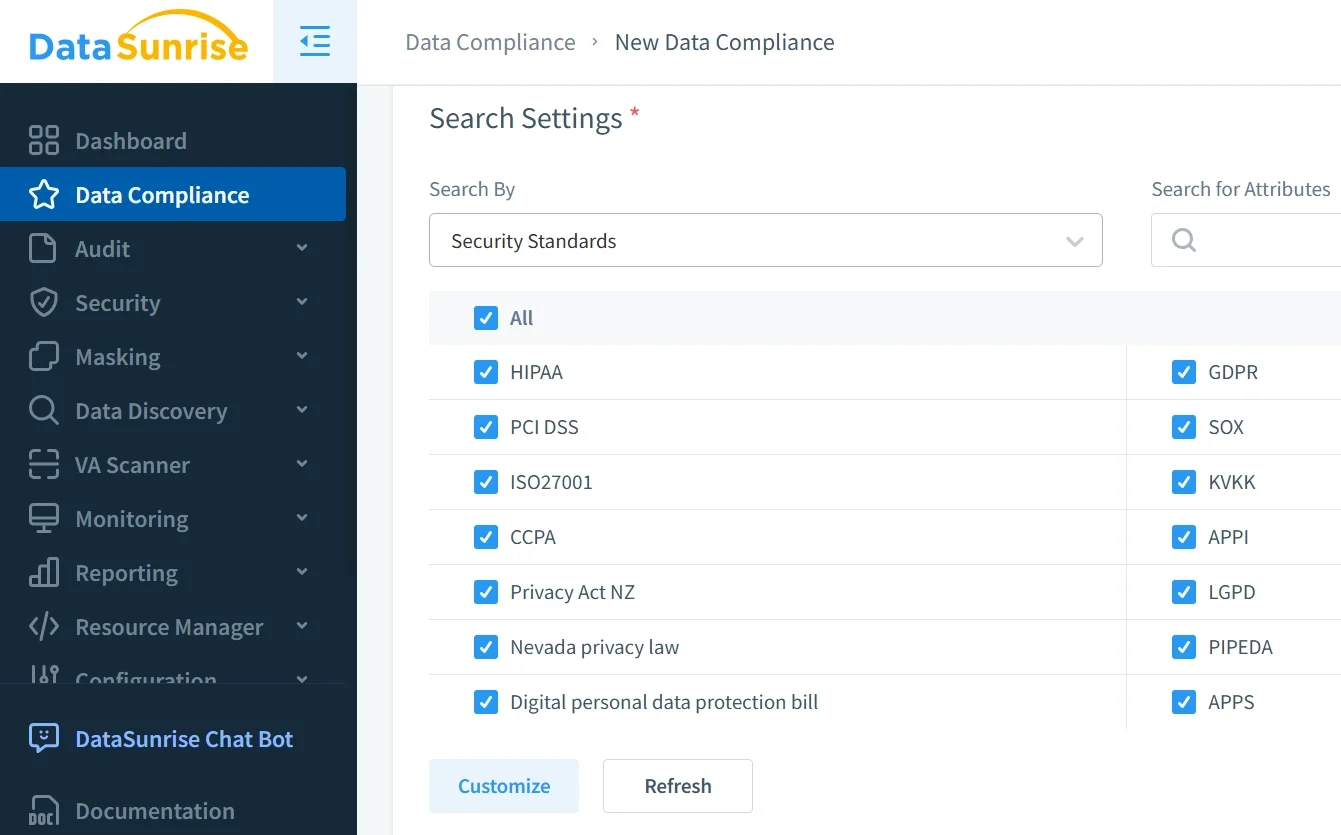
With the Compliance Manager, DataSunrise automatically aligns audit configurations with major regulatory frameworks such as SOX, HIPAA, and GDPR.
Through Continuous Regulatory Calibration, the system periodically adjusts audit settings to match the latest compliance requirements, removing the need for manual updates.
Key capabilities include:
- Automated policy generation based on database type and compliance goals.
- Continuous verification of logging scope to ensure that no sensitive activity is missed.
- Generation of ready-to-submit compliance evidence and audit-ready reports.
- Predefined compliance templates to simplify the setup for GDPR, HIPAA, PCI DSS, and SOX.
By automating compliance alignment, organizations reduce the administrative burden while ensuring full adherence to evolving data protection standards.
3. Intelligent Analytics
Behavior Analytics in DataSunrise uses advanced algorithms to interpret audit log data, identify behavioral anomalies, and reveal hidden security risks.
This analytical layer transforms static audit records into actionable intelligence.
Core analytical functions:
- Detect unusual query patterns that indicate insider threats or misuse.
- Identify spikes in failed logins or unexpected schema changes.
- Correlate access frequency with data sensitivity to detect policy violations.
- Visualize trends in data access, enabling predictive analysis for future risks.
By turning audit data into insight, DataSunrise enhances Informix’s security posture and helps security teams make informed, data-driven decisions faster.
4. Real-Time Alerts and Reports
Real-Time Notifications empower teams to respond immediately to suspicious activities.
DataSunrise integrates with communication and monitoring systems such as Slack, SIEM platforms, and email, ensuring critical alerts reach the right personnel without delay.
Capabilities include:
- Instant alerts for abnormal activities, privilege escalations, or unauthorized data reads.
- Automated report scheduling for daily, weekly, or monthly audits.
- Audit summaries with visual dashboards to simplify compliance reviews.
- Export options for reports in PDF, CSV, and JSON formats for integration with corporate audit tools.
This proactive approach enables early threat mitigation and continuous compliance evidence collection. Learn more about automated auditing workflows in Generating Reports in DataSunrise.
5. Seamless Deployment
Supporting over 40 data platforms, DataSunrise offers unmatched flexibility in how it is deployed.
It operates in non-intrusive modes — proxy, sniffer, and log-based — meaning it does not interfere with normal database operations.
Deployment advantages:
- Works across hybrid infrastructures — cloud, on-prem, or containerized environments.
- Requires no changes to existing Informix configuration files or database code.
- Supports scaling from a single instance to multi-region, enterprise-grade deployments.
- Provides consistent auditing behavior across all supported platforms, ensuring standardization.
This design allows teams to integrate DataSunrise with Informix effortlessly, achieving zero-touch deployment and immediate operational results. More details can be found in Deployment Modes of DataSunrise.
Business Impact
| Benefit | Description |
|---|---|
| Reduced Compliance Overhead | Automates collection and report generation, minimizing manual effort and reducing audit preparation time. |
| Unified Oversight | Centralizes Informix logs with those from other platforms under one consistent security and compliance policy. |
| Faster Incident Response | Detects anomalies and threats in real time using adaptive analytics and behavior monitoring. |
| Long-Term Compliance Proof | Provides verifiable audit evidence for regulators and auditors through automated reports. |
| Operational Efficiency | Removes the need for manual scripting, scheduling, and log rotation by introducing intelligent automation. |
Conclusion
The IBM Informix Audit Log is vital for maintaining transparency, security, and regulatory assurance. Yet, managing it manually can be complex across large environments.
Integrating DataSunrise transforms Informix audit logs into an autonomous compliance ecosystem — with continuous monitoring, AI-driven anomaly detection, and centralized audit intelligence.
Protect Your Data with DataSunrise
Secure your data across every layer with DataSunrise. Detect threats in real time with Activity Monitoring, Data Masking, and Database Firewall. Enforce Data Compliance, discover sensitive data, and protect workloads across 50+ supported cloud, on-prem, and AI system data source integrations.
Start protecting your critical data today
Request a Demo Download Now