IBM Informix Regulatory Compliance
In today's regulated business environment, maintaining regulatory compliance for enterprise databases has become essential. According to Gartner's 2024 Compliance Management Report, organizations with automated compliance frameworks detect regulatory violations 89% faster and reduce compliance-related costs by up to 68%. For enterprises using IBM Informix, implementing robust regulatory compliance has evolved into a business-critical necessity.
With regulatory penalties averaging $4.3 million per violation in 2024 and organizations facing multiple frameworks simultaneously—including GDPR, HIPAA, PCI DSS, and SOX—manual compliance approaches have become inadequate. IBM's Informix security documentation provides guidance on native security features, but comprehensive compliance often requires enhanced solutions.
This guide explores IBM Informix's native compliance capabilities and demonstrates how DataSunrise's Compliance Autopilot transforms regulatory adherence into an automated advantage.
Understanding Regulatory Compliance for IBM Informix
Regulatory compliance for IBM Informix ensures database security operations align with legal and industry standards through data protection, role-based access controls, audit trails, and retention policies.
Key Compliance Challenges in Informix Environments
Organizations face challenges including multi-regulation alignment (GDPR, HIPAA, PCI DSS), evolving requirements, performance balancing, documentation burden, and technical complexity requiring specialized expertise.
Native Informix Regulatory Compliance Capabilities
IBM Informix includes built-in features supporting regulatory compliance through security policies and monitoring mechanisms.
1. Informix Security Auditing with onaudit
The onaudit utility enables administrators to track database activities for regulatory validation:
# Comprehensive compliance audit setup
onaudit -n -L 1 -A 1 -S 1 -c
This configuration:
-n: Initiates new audit log file-L 1: Activates auditing for all sessions-A 1: Enables auditing for admin users-S 1: Mandates DBSSO user auditing-c: Confirms applied configuration
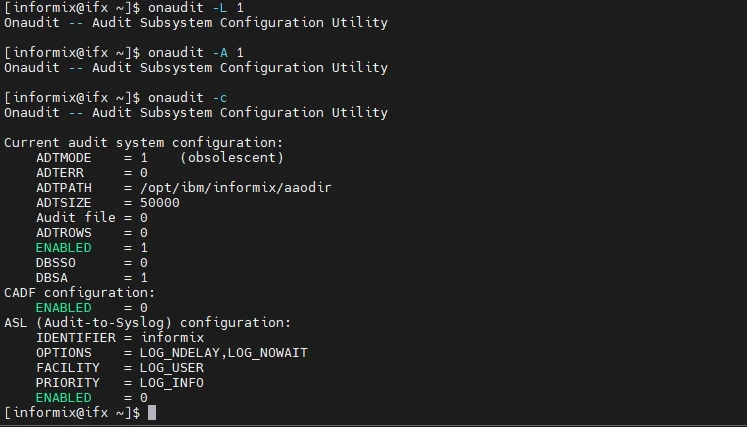
2. Reviewing Compliance Audit Logs
Examine captured audit logs for compliance data:
onshowaudit
onshowaudit | grep "ACTB"    # Access Table events
For detailed audit code interpretation, refer to IBM's audit record formats.
Limitations of Native Informix Compliance Tools
| Native Feature | Key Limitation | Compliance Impact |
|---|---|---|
| Audit Configuration | Manual setup required | Time-consuming implementation |
| Regulatory Mapping | No automated framework mapping | Difficult to demonstrate specific compliance |
| Multi-Instance Management | Per-instance configuration | Inconsistent policies across enterprise |
| Compliance Reporting | Manual log analysis | Resource-intensive audit preparation |
| Real-Time Validation | Batch-oriented review | Delayed violation detection |
| Sensitive Data Discovery | Manual identification | Critical data may remain unprotected |
Enhanced Regulatory Compliance with DataSunrise
DataSunrise's Database Regulatory Compliance Manager enhances compliance through Zero-Touch Compliance Automation and Intelligent Policy Orchestration, delivering Autonomous Compliance Orchestration with Continuous Regulatory Calibration.
Implementing DataSunrise for Informix Regulatory Compliance
1. Connect to Informix Instance
Establish a secure connection through the administrative interface. DataSunrise's Hybrid Architecture Integration supports all deployment models including on-premise, cloud, and hybrid configurations.
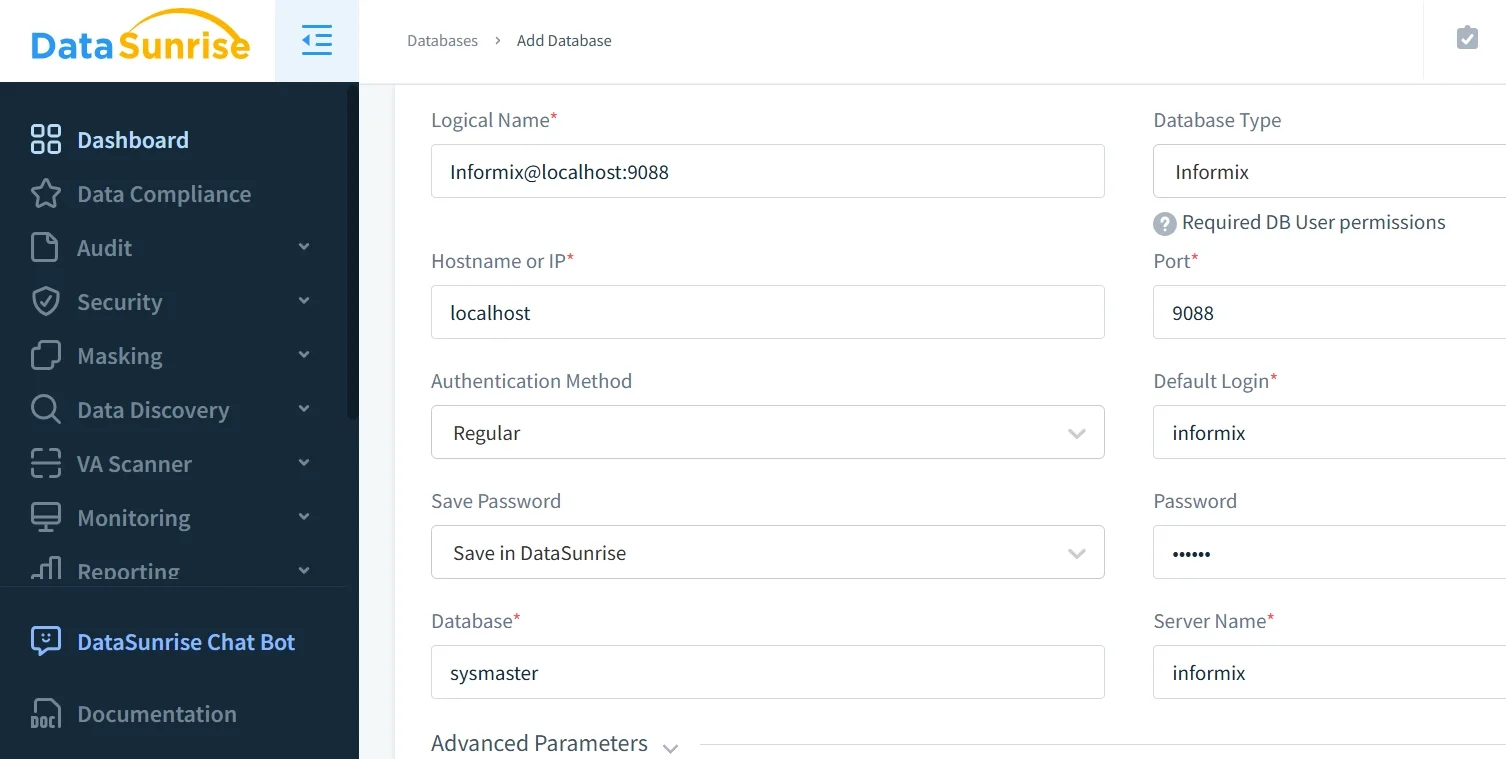
2. Auto-Discover Sensitive Data
DataSunrise's data discovery engine automatically identifies PII, PHI, financial data, and custom patterns—providing up to 95% greater coverage than manual approaches.
3. Configure Compliance Rules with No-Code Automation
Create compliance policies through No-Code Policy Automation with pre-configured templates for GDPR, HIPAA, PCI DSS, and SOX. The platform automatically maps data to regulatory requirements and configures monitoring and alerts.
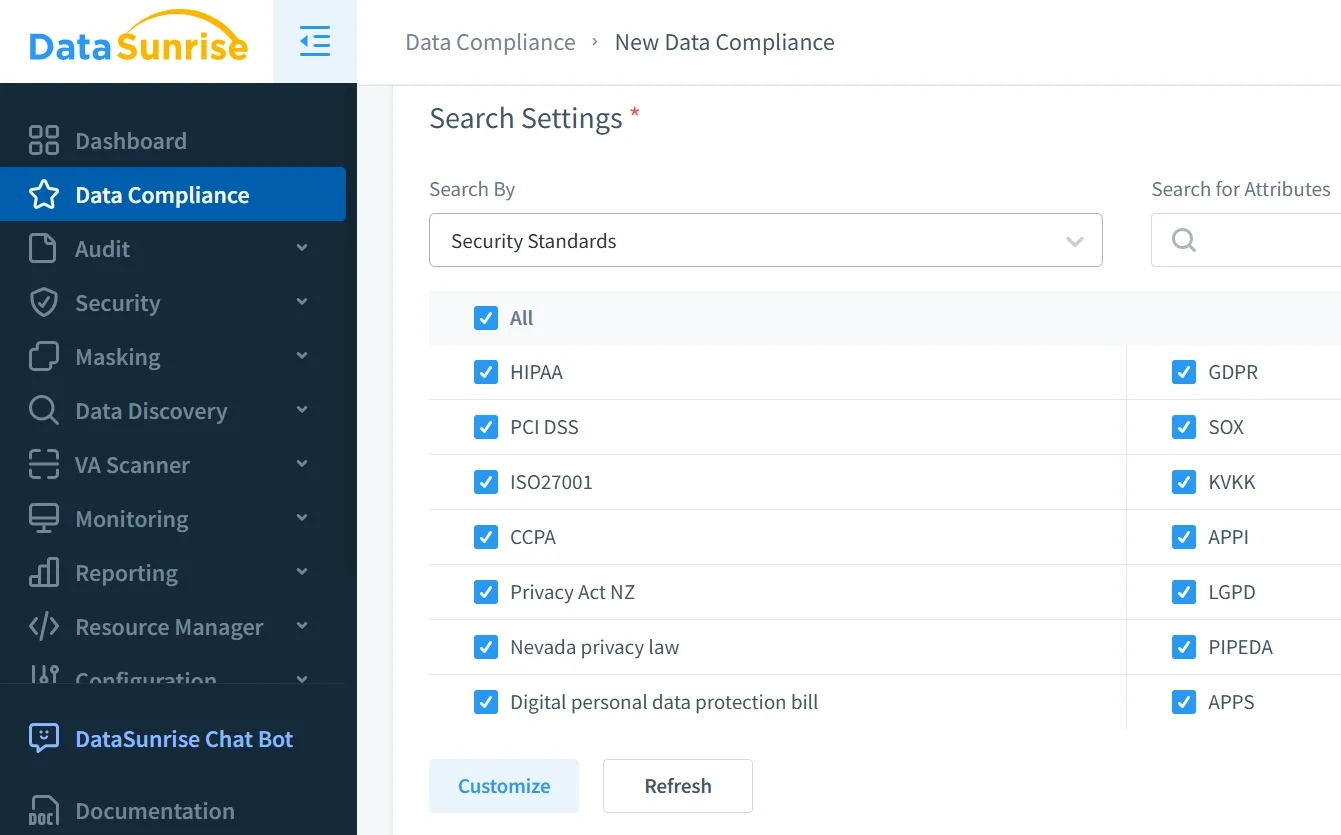
4. Review Comprehensive Compliance Status
Access real-time dashboards showing compliance scores, gap analysis, violation tracking, and remediation guidance.
Key Advantages of DataSunrise for Informix Compliance
DataSunrise provides transformative enhancements over native Informix compliance capabilities:
Compliance Autopilot: Continuous Regulatory Calibration automatically updates policies for GDPR, HIPAA, PCI DSS, SOX, CCPA, LGPD, and APPI compliance.
Automated Compliance Reporting: Generate audit-ready reporting instantly with regulatory mapping, access matrices, audit trails, and compliance certificates.
Real-Time Compliance Monitoring: Continuous validation with instant violation detection, drift monitoring, user behavior analysis, and multi-channel alerts.
Surgical Precision Masking: Dynamic data masking with context-aware protection, format-preserving masking, and integrated audit logging.
Cross-Platform Compliance Framework: Consistent policies across 40+ data storage platforms with unified management and centralized dashboards.
Best Practices for Informix Regulatory Compliance
- Compliance Mapping: Document controls linked to regulatory requirements with regular risk assessments
- Data-Centric Strategy: Apply tiered data security protection based on data sensitivity
- Automated Validation: Use scheduled assessments and automated remediation workflows
- Documentation: Maintain audit-ready policy records and evidence collection
- Implement DataSunrise: Achieve rapid deployment, continuous monitoring, and automated reporting
Conclusion
As regulatory requirements expand in complexity, implementing comprehensive compliance for IBM Informix has become essential across all industries. While Informix provides foundational capabilities through onaudit and security features, modern enterprises require sophisticated automation for multi-regulation compliance with threat detection capabilities.
DataSunrise transforms Informix regulatory compliance from a burden into an automated advantage. Through Zero-Touch Compliance Automation, Intelligent Policy Orchestration, and Continuous Regulatory Calibration, DataSunrise enables simultaneous compliance across GDPR, HIPAA, PCI DSS, SOX, and other frameworks.
With comprehensive automated compliance reporting and real-time validation, DataSunrise provides robust compliance infrastructure protecting sensitive data while meeting regulatory obligations. The platform's flexible deployment modes support on-premise, cloud, and hybrid Informix environments.
Protect Your Data with DataSunrise
Secure your data across every layer with DataSunrise. Detect threats in real time with Activity Monitoring, Data Masking, and Database Firewall. Enforce Data Compliance, discover sensitive data, and protect workloads across 50+ supported cloud, on-prem, and AI system data source integrations.
Start protecting your critical data today
Request a Demo Download Now