
Sensitive Data Protection in MySQL
MySQL is the backbone for customer apps, reporting dashboards, and internal analytics. That also makes it a favorite place for sensitive data to accumulate: emails, phone numbers, government IDs, payment details, addresses, and HR fields like salary. The real risk usually isn’t a movie-style breach. It’s everyday operations—production snapshots copied into dev/test, exports sent to vendors, or broad SELECT queries run from BI tools.
Effective protection in MySQL is a layered discipline, not a single feature. You need to know where sensitive data lives, reduce who can see it, and keep evidence that your controls work. Masking—especially static masking for non-production copies—is one of the fastest ways to reduce exposure without breaking workflows.
What Counts as Sensitive Data in MySQL?
Start with a clear definition of what must be protected. Most organizations begin with Personally Identifiable Information such as names, emails, phone numbers, addresses, and government identifiers. Then extend scope to “business-sensitive” fields (salary, account status, internal notes, pricing tiers) that can expose an individual or reveal confidential context.
Don’t rely on tribal knowledge or “we think it’s in this table.” Use automated data discovery to locate and classify sensitive columns across schemas, including free-text fields that tend to hide unexpected PII.
Why Static Masking Is a Core Control for MySQL
Data masking replaces sensitive values with safe substitutes while keeping schemas and relationships usable. In MySQL, masking typically shows up in three forms:
Static masking creates a permanently masked copy of the dataset. It is designed for dev/test, analytics sandboxes, training, and vendor sharing.
Dynamic masking masks query results in real time, often used in production to limit what non-privileged users can see.
In-place masking transforms data directly in a target environment when de-identification must be permanent.
This article focuses on static masking because it solves the most common operational problem: “We need production-like data in non-production environments, but we can’t bring real identities with it.” Static masking is covered in detail here: static data masking.
If you can only fix one thing this quarter, stop cloning raw production data into dev/test. Static masking gives teams realistic datasets without turning non-production into an ungoverned leak zone.
Static Masking Workflow for MySQL
The goal is simple: produce a safe dataset that behaves like production (schema, distributions, joins, constraints) but contains no real identities. Treat it as a repeatable pipeline step within test data management, not a one-time clean-up.
Step 1: Create a safe target (copy first, mask second)
Static masking should run against a target schema or database that is explicitly non-production. Many teams create the baseline copy using MySQL tools and then apply masking. For reference, MySQL’s official mysqldump documentation explains common export patterns used for environment refreshes.
Before you move data anywhere, confirm your MySQL baseline security posture (secure accounts, connection hygiene, privilege model). MySQL’s official Security Guidelines are a solid checklist for the basics.
Step 2: Decide what must remain consistent
Static masking succeeds when it preserves usability. Identify columns that drive application behavior:
Join keys (customer_id, account_id): masking must preserve relationships or tests will fail in strange ways.
Unique fields (email, username): masked values must remain unique if the schema enforces constraints.
Format-dependent fields (card numbers, phones): output must satisfy validation rules.
When selecting masking methods, match technique to column behavior. Practical patterns are summarized here: masking types.
Step 3: Apply masking policies with DataSunrise
DataSunrise provides a centralized database security layer where you define what should be masked and how. Even when your primary goal is static masking for non-production, teams often start by defining masking scope and policies using the same object selection approach they use for dynamic enforcement.
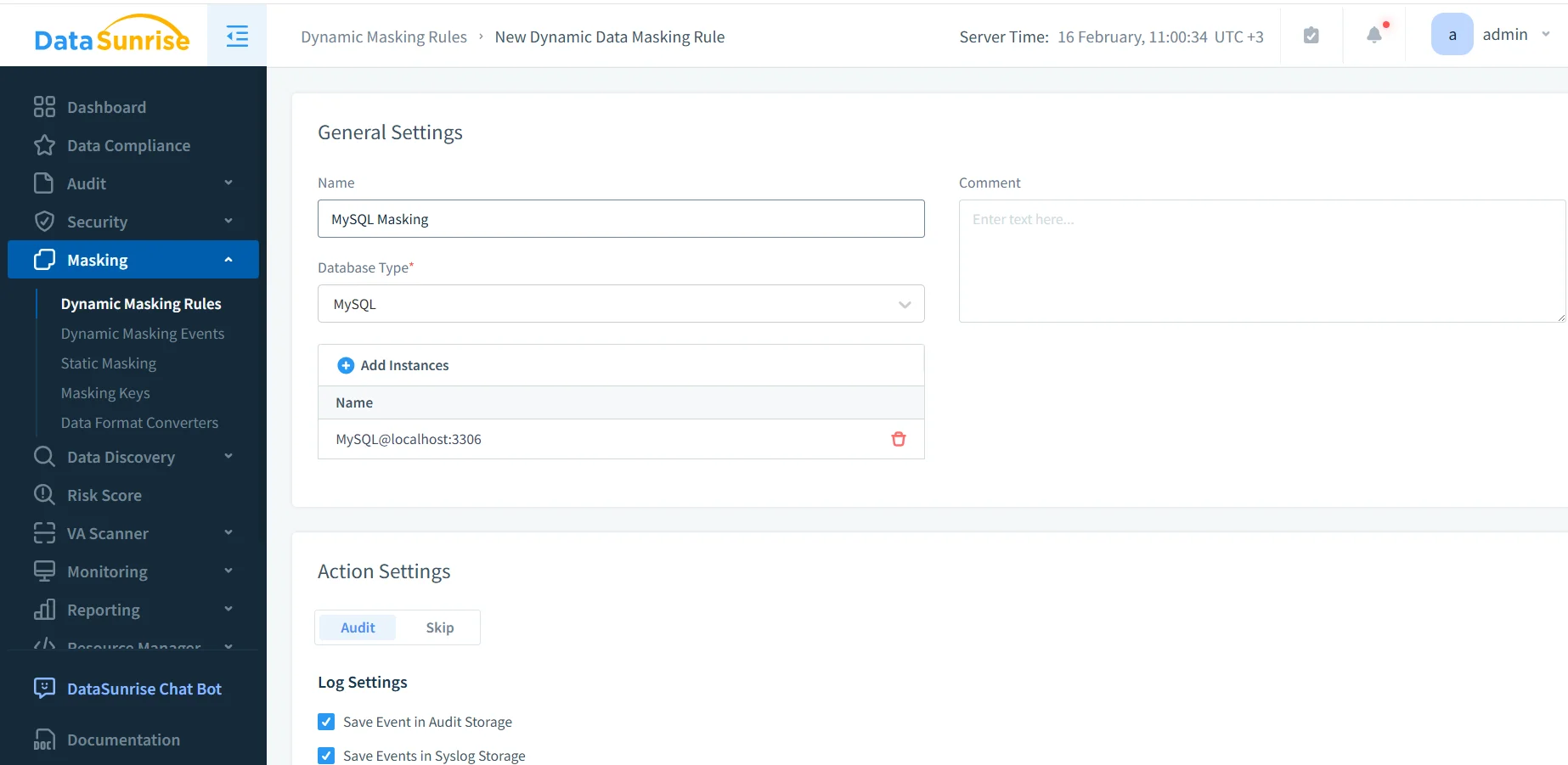
For environments that need query-time protection as well, dynamic data masking can be applied in production. DataSunrise is commonly deployed as a reverse proxy so policies apply consistently across BI tools, admin consoles, and scripts without rewriting applications.
Step 4: Select columns and define the masking scope
This is where real safety happens: select the schemas, tables, and columns that contain sensitive information, then assign methods appropriate to each field.
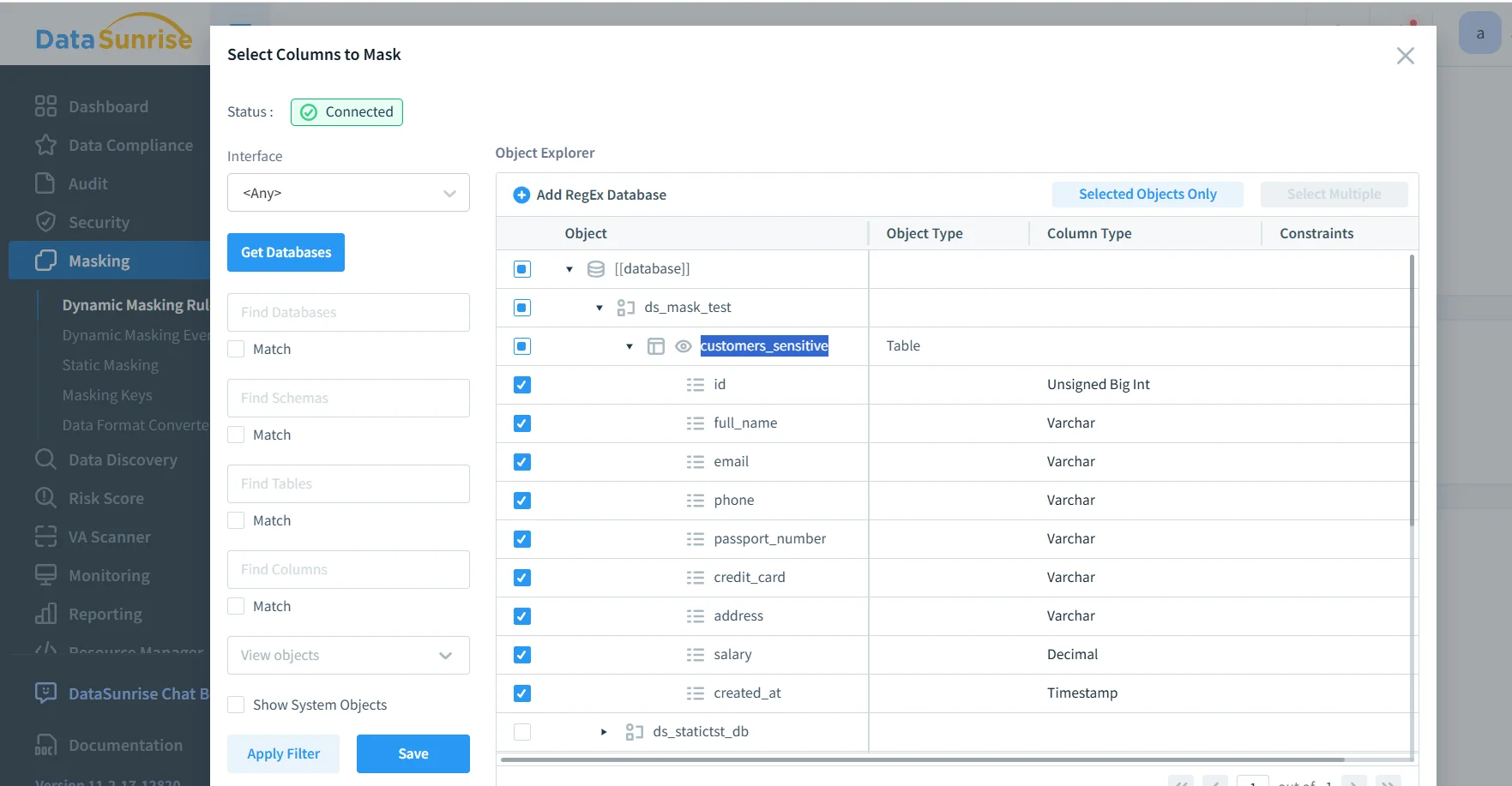
Select the MySQL columns that must be masked, such as email, phone, passport number, credit card, and salary.
Access should still be controlled even in non-production. Enforce RBAC, use granular access controls, and apply the principle of least privilege so masked datasets are only visible to the teams that need them.
Static masking is irreversible in the target dataset. Never point your masking task at production schemas, and never treat “target” as a place you can safely experiment without backups.
Step 5: Validate results with before-and-after checks
Validation needs to be concrete. Run the same query against the source dataset and the masked target dataset. Confirm sensitive values are transformed, and confirm joins and constraints still behave normally.
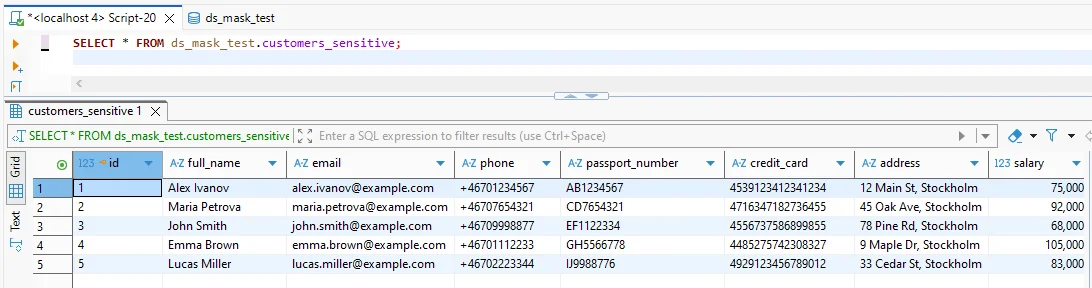
Before masking: sensitive fields appear in clear text and should not be shared outside controlled production access.
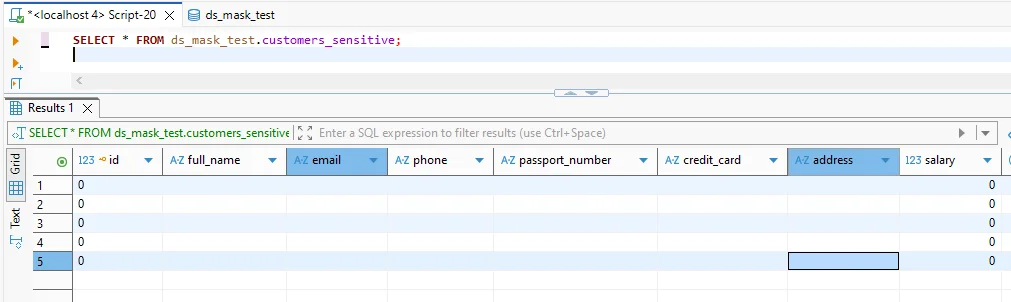
After masking: sensitive columns return masked values while preserving the table structure for application compatibility.
Turn validation into evidence. Enable audit logs and keep an auditable record of what task ran, when it ran, and what policy it used. For governance teams, this is the practical “why it matters” part of data audit and helps support consistent database activity monitoring in both production and non-production.
Defense-in-Depth: What Masking Should Be Paired With
Masking prevents exposure through normal access paths. It should still be combined with hardening and detection controls:
Encrypt storage and backups with database encryption so leaked copies aren’t immediately readable.
Block abusive query patterns using a database firewall and targeted security rules against SQL injections.
Continuously assess weaknesses with vulnerability assessment so privilege drift and configuration gaps don’t quietly bypass your intent.
Compliance: Make Controls Provable
Compliance requirements usually don’t demand a specific product—they demand outcomes: minimized exposure, restricted access, and verifiable enforcement. Use a structured map of data compliance regulations to align your controls to risk categories, then apply framework-specific rules where applicable (for example, GDPR for personal data and PCI DSS for cardholder data).
To reduce manual reporting pain, many teams standardize evidence collection via the DataSunrise Compliance Manager and produce repeatable outputs using report generation.
Conclusion
Sensitive data protection in MySQL works best when it’s treated as a lifecycle. Discover sensitive fields, produce masked copies through static masking for non-production, enforce dynamic masking where production read access must be restricted, and back everything with monitoring, auditing, encryption, and prevention controls.
If your environment extends beyond MySQL, DataSunrise supports 40+ data platforms, making it easier to keep policies consistent as your stack grows. For a hands-on evaluation, you can request a guided DataSunrise demo.
Protect Your Data with DataSunrise
Secure your data across every layer with DataSunrise. Detect threats in real time with Activity Monitoring, Data Masking, and Database Firewall. Enforce Data Compliance, discover sensitive data, and protect workloads across 50+ supported cloud, on-prem, and AI system data source integrations.
Start protecting your critical data today
Request a Demo Download Now