Sensitive Data Protection in TiDB
TiDB gives teams a distributed SQL platform that can handle transactional workloads, analytics, and operational reporting in the same environment. That flexibility is useful until production data starts showing up in more places than anyone intended. Support teams query live tables, analysts export results into dashboards, and lower environments quietly inherit copies of the same records. When that happens, customer details, payment fields, addresses, identifiers, and internal notes begin to travel well beyond the application that originally collected them.
The right response is not a single control. It is a protection model built around data masking, discovery, access governance, and verification. In TiDB, that usually starts with data discovery so teams can locate sensitive columns and classify personally identifiable information before it leaks into the wrong workflow. If you want more platform background, the official TiDB GitHub repository is a useful technical reference alongside this guide.
What sensitive data exposure looks like in TiDB
Sensitive data problems in TiDB often begin with normal-looking SQL. A single query can return full names, emails, phone numbers, national identifiers, card details, address lines, IP addresses, and support notes in one result set. Nothing about the query looks especially dramatic, which is exactly why the exposure is dangerous: ordinary operational access becomes a quiet delivery mechanism for data that should have been restricted, transformed, or removed.

Basic access controls help, but access alone does not solve the real problem. Teams still need field-level protection that works alongside role-based access control and the principle of least privilege. Otherwise, a user who legitimately reaches a table can still see values that have no business appearing in that workflow.
Start by identifying the columns that create the highest operational and compliance risk—contact information, government identifiers, payment fields, addresses, and free-text notes—then validate each protection control against the real queries and tools your teams already use.
A practical protection framework for TiDB
Protecting sensitive data in TiDB works best when you treat it as a layered process rather than a one-off masking rule. The table below shows how the major controls fit together.
| Protection Layer | Main Goal | Typical Control |
|---|---|---|
| Discovery | Find risky columns before they spread | Classify fields and map them to compliance requirements |
| Production visibility | Protect live query results | Apply dynamic masking to sensitive fields |
| Non-production safety | Create safe copies for QA, testing, and analytics | Use static masking for target datasets |
| Special-case modification | Change stored values directly when appropriate | Use in-place masking only when the use case truly requires it |
| Evidence and oversight | Prove that protection actually ran | Record events with database activity monitoring, audit logs, and a defensible audit trail |
This layered model changes the conversation. Instead of asking whether a table should be visible or invisible, teams can decide how each environment and role should see the data. That approach is much more realistic for distributed SQL platforms where multiple tools, services, and business units all interact with the same records.
Protecting copied datasets with static masking
One of the most common weak points in TiDB deployments is the non-production copy. Development teams want realism. QA wants representative data. External testers want a full workflow without fake edge cases. If organizations respond by copying production directly, they create a second data protection problem instead of solving the first one.
Static masking is the safer route. It reads data from the source instance, applies the selected masking methods, and writes transformed values into the target dataset. That gives teams a usable copy without dragging raw production truth into every staging or testing environment.
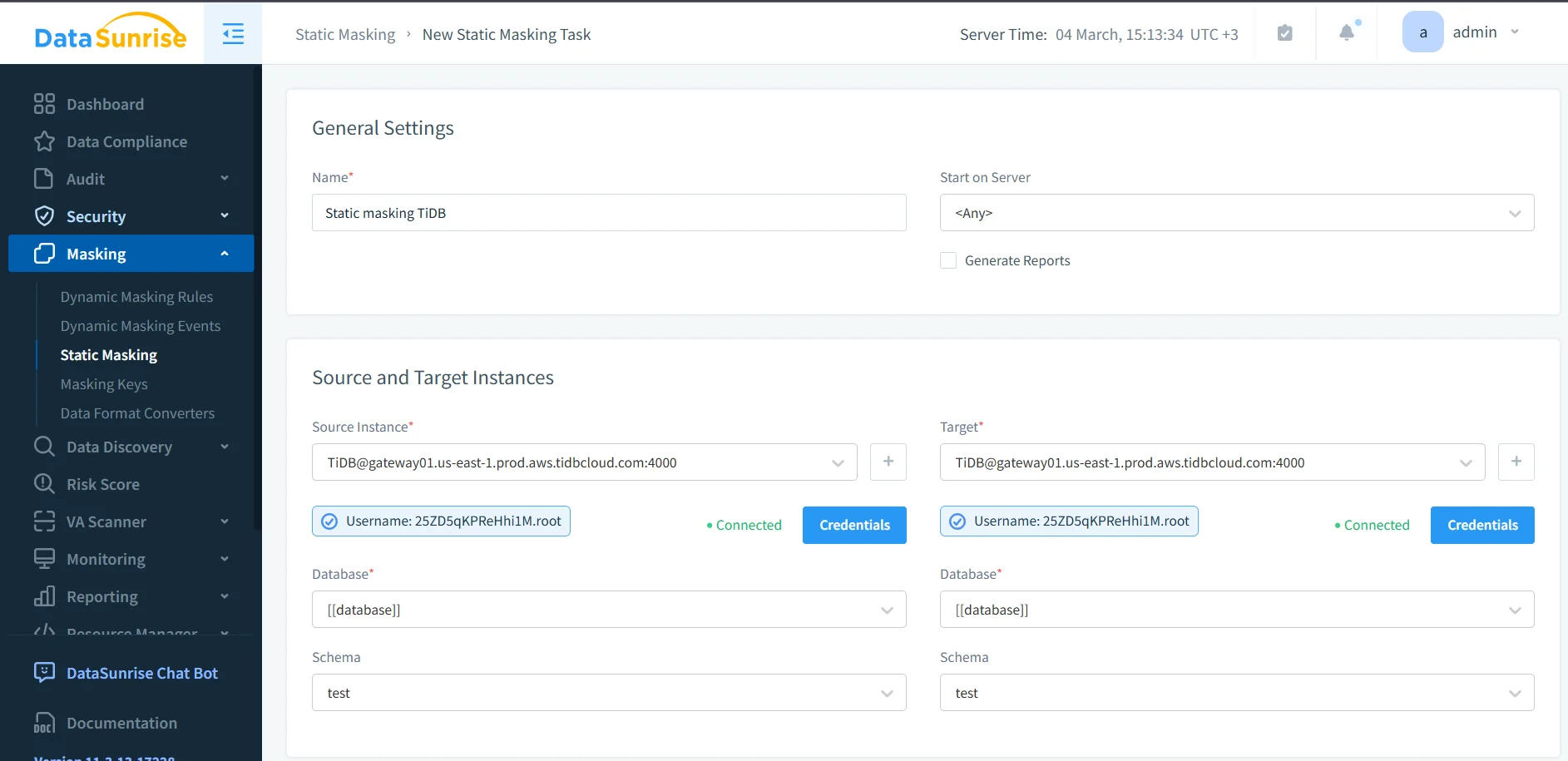
In practice, that means choosing the correct source and target instances, validating credentials, and selecting the right database and schema before the task runs. It also means choosing a masking technique that preserves what the target workload still needs. Some columns need full redaction. Others benefit from deterministic replacement, pattern-preserving substitution, or generalization that keeps logic intact without exposing the original value.
Sensitive data protection can fail even when the masking task completes successfully. If the chosen method breaks joins, filters, application logic, or reporting rules, teams will bypass the protected copy and fall back to unsafe data handling. Always test the output against real workflows before promoting it to regular use.
Operational proof matters as much as the policy
A rule that exists on paper is not the same thing as a control that runs in production. Teams need to verify when the masking task started, how long it ran, whether it completed successfully, and which target dataset it produced. That is where task visibility and operational review become essential.
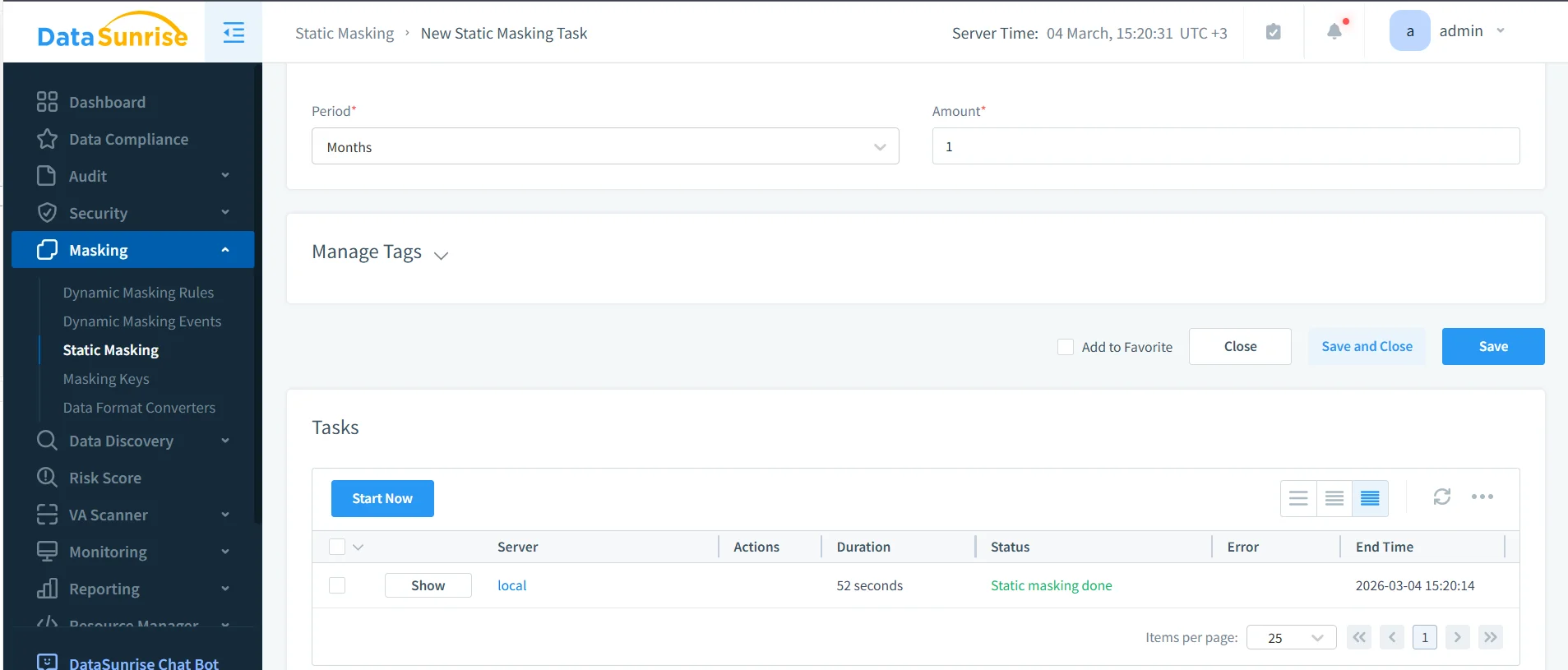
Once the task completes, validate the copied dataset with the same SQL clients, ETL jobs, dashboards, QA scripts, and service accounts that will use it later. A lightweight validation query is often enough to confirm that sensitive columns no longer contain the original values, but still preserve the structure required for testing or analytics.
SELECT
  id,
  full_name,
  email,
  phone,
  national_id,
  card_number,
  card_exp,
  address_line,
  ip_addr,
  notes,
  created_at
FROM ds_masking_demo;
Supporting controls around masking
Masking works better when it sits inside a broader security model. Teams often formalize review and approval with the audit guide and align policy decisions with the security guide. Query paths can also be hardened with a database firewall, targeted security rules against SQL injections, and periodic vulnerability assessment checks. That combination helps stop the familiar nonsense where one protected path is quietly undermined by another weak access route.
At scale, organizations also need a consistent operating model. DataSunrise supports 40+ data platforms, which matters when TiDB is only one part of a mixed environment. A broader database security program can then feed reporting into Compliance Manager instead of forcing teams to stitch evidence together by hand.
Where sensitive data protection delivers compliance value
Field-level protection in TiDB is not only about security hygiene. It also reduces the operational pain of proving compliance when personal, healthcare, payment, or financial data appears in live results and copied environments.
| Framework | Typical TiDB Risk | Protection Outcome |
|---|---|---|
| GDPR | Personal data appears in reports, support workflows, and copied datasets | Supports data minimization and controlled disclosure |
| HIPAA | Healthcare-related records reach non-clinical tools and downstream environments | Limits unnecessary exposure of protected health information |
| PCI DSS | Cardholder data leaks through query results, exports, or copied test systems | Restricts visibility of payment details |
| SOX | Financial records spread too widely across reporting and non-production use | Improves accountability and controlled handling |
Conclusion
Sensitive data protection in TiDB is most effective when discovery, masking, monitoring, and verification all work together. The sequence is straightforward: identify risky columns, decide how each environment should handle them, apply the appropriate masking model, and validate the result with real tools instead of theoretical examples.
That approach gives teams something much more useful than a checkbox. It gives them a repeatable way to protect live query results, build safer copied datasets, and reduce the chances that ordinary SQL access turns into avoidable exposure. In other words, it keeps TiDB flexible without letting that flexibility become the reason sensitive data wanders off into places it never should have reached.
Protect Your Data with DataSunrise
Secure your data across every layer with DataSunrise. Detect threats in real time with Activity Monitoring, Data Masking, and Database Firewall. Enforce Data Compliance, discover sensitive data, and protect workloads across 50+ supported cloud, on-prem, and AI system data source integrations.
Start protecting your critical data today
Request a Demo Download Now