Static Data Masking in TiDB
TiDB works well for high-volume transactional workloads, analytics, and operational reporting, which is exactly why teams often reuse production data outside the original application boundary. Developers want realistic test environments. QA teams want full datasets. Analysts want representative records for validation. That convenience creates an obvious risk: once production data spreads into lower environments, raw customer details, payment fields, and internal notes tend to travel with it.
This is where data masking matters. For TiDB environments, static data masking is the right choice when you need a sanitized copy of a dataset for development, testing, analytics, or vendor access. Instead of masking values only at query time, static masking creates a protected target dataset where sensitive fields are permanently transformed. That gives teams a usable copy without exposing the original secrets.
This article explains how static masking works in TiDB with DataSunrise, how to configure a masking task, how to validate the masked output, and how to avoid the usual mistakes that turn a safe copy into a compliance headache. For platform background, you can also review the official TiDB GitHub repository.
Why static masking matters in TiDB
Production TiDB clusters often contain more than application rows. They store personally identifiable information, payment details, address data, free-text notes, and operational metadata that should never appear unchanged in a non-production environment. Granting direct access to production is risky. Cloning production without protection is worse. Static masking solves that problem by generating a safe copy that preserves structure and business usefulness while removing the sensitive truth of each field.
That makes static masking different from dynamic masking, which transforms query results on the fly, and different from in-place masking, which changes stored values directly in the original dataset. In TiDB, static masking is usually the best option when teams need full database copies for QA, staging, reporting validation, or external partner testing.
When to use static masking instead of other controls
Use static masking when the goal is to distribute a safe dataset rather than to restrict live access to production. A few common use cases stand out:
- Creating development or QA copies from production schemas
- Providing realistic data for functional or regression testing
- Supporting third-party testing without exposing real customer records
- Reducing risk in analytics sandboxes and internal labs
Before defining the task, identify the fields that carry the highest exposure. Use data discovery to locate risky columns, and map those findings to PII and other regulated data types. Teams typically start with full_name, email, phone, national_id, card_number, address_line, and notes, but free-text columns often hide more trouble than neatly named fields.
Start with the columns that create the biggest operational and compliance risk—contact data, government identifiers, payment fields, addresses, and note fields—then validate the masked copy with real test cases before handing it to developers or vendors.
How static masking works with DataSunrise and TiDB
In a static masking workflow, DataSunrise reads data from a source TiDB instance, applies masking methods to the selected fields, and writes the transformed results into a target instance or target dataset. The source remains intact. The target becomes the sanitized environment that teams can use for lower-risk workloads.
This approach works well with broader access controls, role-based access control, and the principle of least privilege. Instead of debating who should see raw production data, you provide a dataset that already strips out the sensitive truth. That shifts the problem from endless permission exceptions to controlled data preparation, which is frankly the saner way to run a non-production estate.
1. Create a new static masking task
The first step is to create a new static masking task in DataSunrise. Define the task name, choose the execution server if needed, and decide whether you want reporting enabled. A clear task name matters because masked datasets multiply over time, and nobody enjoys deciphering mystery jobs later.
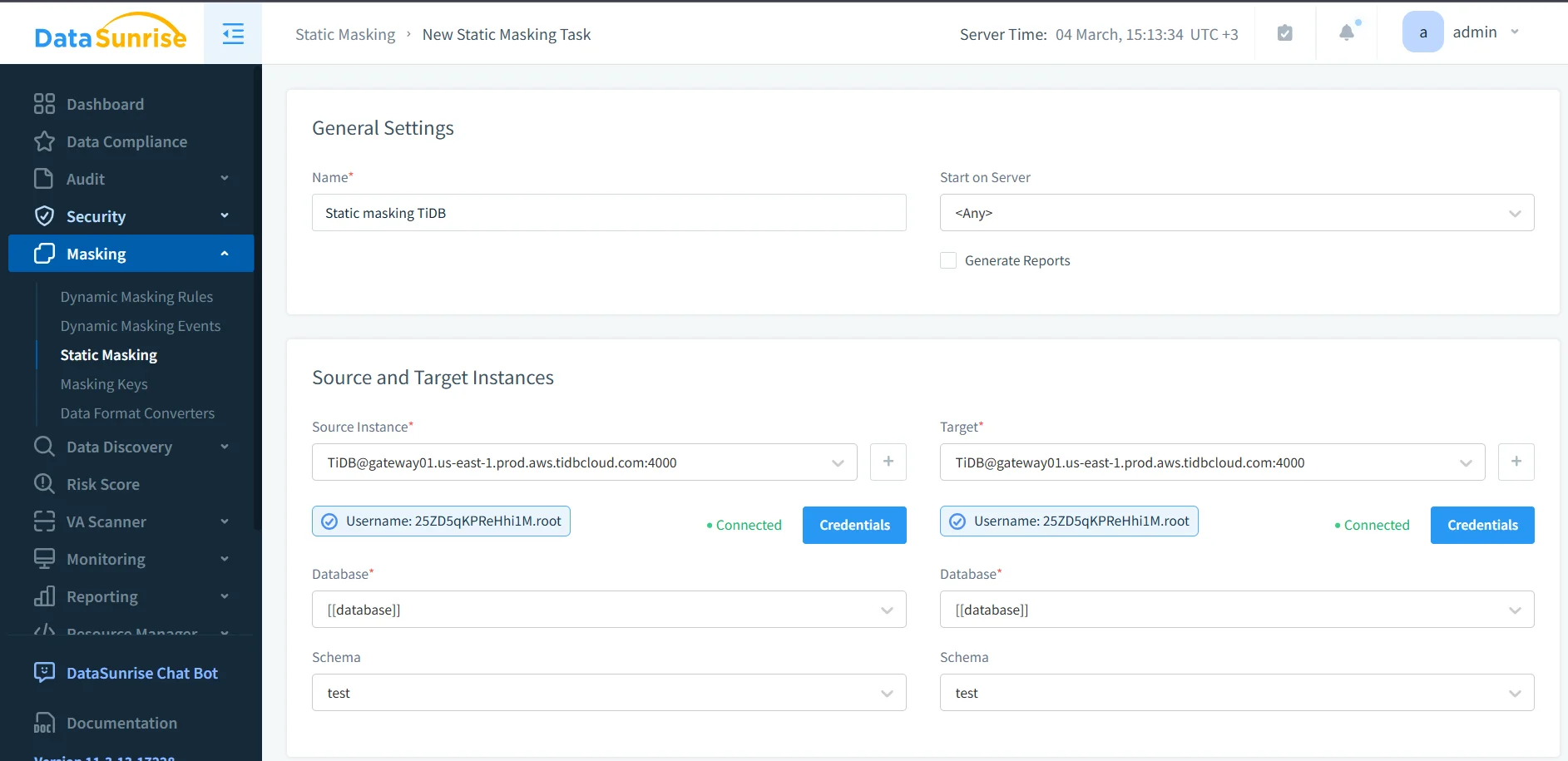
At this stage, align the masking task with the rest of your security workflow. Teams usually connect the process with database activity monitoring, maintain an audit trail, and centralize events in audit logs. If you need a structured review process, the audit guide is a good place to formalize how masking tasks are approved and verified.
2. Define the source and target TiDB instances
Next, choose the source TiDB instance and the target instance. This is where static masking becomes operationally useful: the source holds the real data, while the target receives the transformed copy. You also choose the relevant database and schema, confirm credentials, and validate connectivity before running the task.
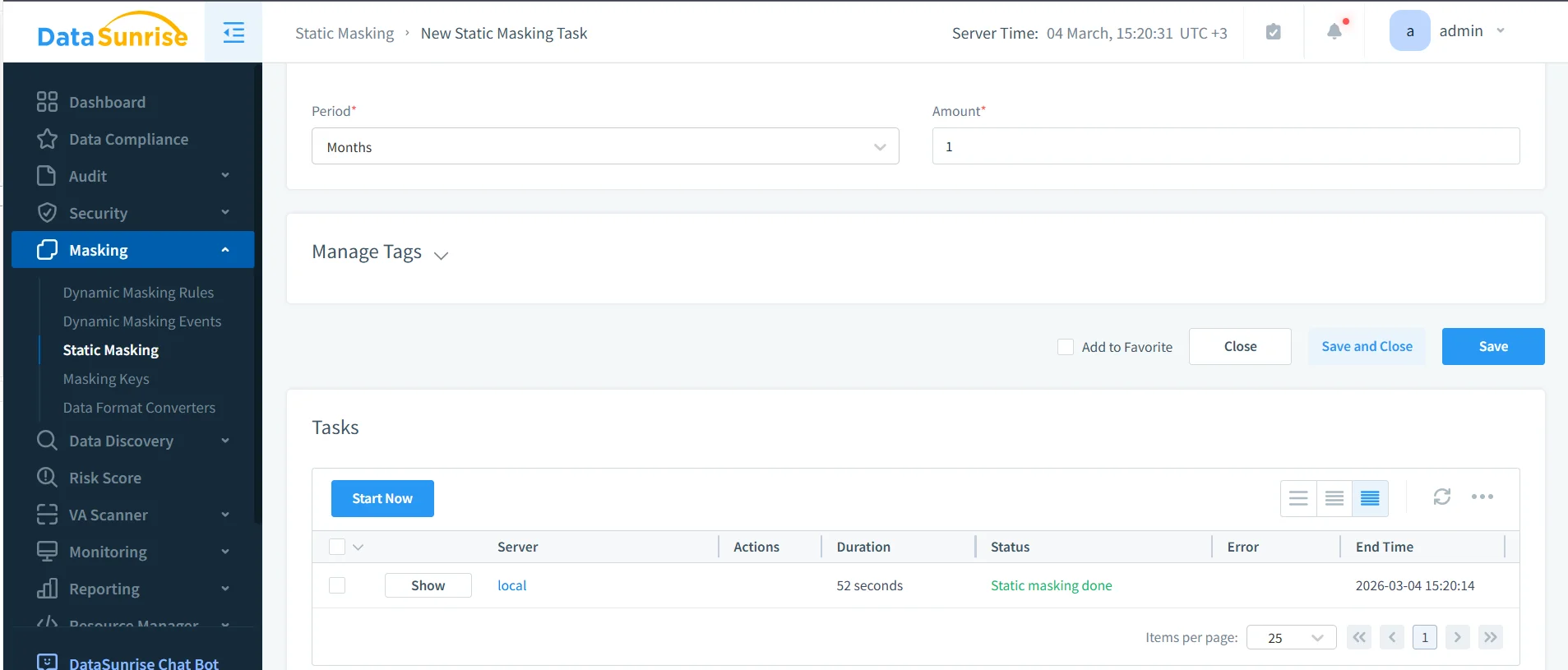
That separation is what makes static masking so valuable. Instead of exposing live production tables, you create a target dataset designed for safe reuse. Organizations often combine this workflow with database firewall policies, security rules against SQL injections, and periodic vulnerability assessment to reduce the risk of copying unsafe structures or exposing the target environment later.
3. Apply masking methods to sensitive columns
After you define source and target instances, assign masking methods to the fields that need protection. Not every column needs the same treatment. Some values should disappear entirely, while others can preserve structure for application testing or analytics. For example, an email field may need partial transformation, a national ID may require full redaction, and a payment field may need a format-preserving substitute so test logic still works.
Design masking rules around business use cases, not wishful thinking. When the test environment needs referential integrity, keep transformations consistent. For QA workflows that only need realistic formats, use synthetic replacements. Before a target dataset leaves your organization, remove anything that could reconstruct the original person or transaction.
Static masking changes the target dataset permanently. If you choose the wrong masking method, you can break joins, validation logic, analytics, or application behavior. Always test on a representative subset before you refresh an entire lower environment.
4. Validate the sanitized TiDB output
Once the task runs, validate the masked target dataset with real queries. This step matters because static masking is not finished when the job says “completed.” It is finished when the target data remains useful for the intended workload and no longer exposes the original sensitive values.
A simple validation query might look like this:
SELECT
  id,
  full_name,
  email,
  phone,
  national_id,
  card_number,
  card_exp,
  address_line,
  ip_addr,
  notes,
  created_at
FROM ds_masking_demo;

Run the validation through the same tools your teams will actually use: SQL clients, integration tests, ETL jobs, QA scripts, and reporting dashboards. That is the only way to confirm the masked copy still supports real work.
Security and compliance benefits of static masking in TiDB
Static masking reduces the blast radius of non-production access. Instead of handing teams a production clone packed with secrets, you give them a controlled copy that supports development and testing without carrying the raw customer truth. That reduces accidental exposure, lowers insider risk, and makes audits much less painful.
It also aligns well with broader governance initiatives. Organizations can connect masking workflows to the security guide, use Compliance Manager for documentation and evidence, and extend the same model across 40+ data platforms when TiDB is only one part of the data estate.
| Regulation | Why Static Masking Helps | Control Objective |
|---|---|---|
| GDPR | Limits exposure of personal data in non-production environments | Support data minimization and privacy protection |
| HIPAA | Reduces the chance of protected health data appearing in lower systems | Safeguard sensitive healthcare information |
| PCI DSS | Prevents cardholder data from spreading into dev and test copies | Restrict exposure of payment data |
| SOX | Supports controlled handling of financial records in downstream environments | Preserve accountability and governance |
Conclusion
Static data masking in TiDB is one of the cleanest ways to support development, QA, and testing without dragging raw production secrets into every lower environment. The process is straightforward: discover sensitive fields, create a masking task, define source and target instances, apply the right transformations, and validate the sanitized result.
With DataSunrise, teams can turn that process into a repeatable security practice instead of a manual cleanup exercise. You protect the source, you deliver a usable target, and you reduce the chances that a harmless-looking test environment becomes the place where real customer data leaks. Which, as history keeps demonstrating, is how far too many organizations learn this lesson the hard way.
Protect Your Data with DataSunrise
Secure your data across every layer with DataSunrise. Detect threats in real time with Activity Monitoring, Data Masking, and Database Firewall. Enforce Data Compliance, discover sensitive data, and protect workloads across 50+ supported cloud, on-prem, and AI system data source integrations.
Start protecting your critical data today
Request a Demo Download Now