YugabyteDB Audit Tools
Introduction
In the evolving world of distributed databases, YugabyteDB Audit Tools play a crucial role in maintaining security, ensuring compliance, and providing insights into database activity. YugabyteDB offers built-in audit capabilities while also supporting advanced third-party monitoring solutions to meet diverse business needs.
Native Audit Tools in YugabyteDB
YugabyteDB provides two primary audit mechanisms tailored to its dual API architecture. These tools help track database actions efficiently, ensuring transparency and security.
1. YSQL Audit Logging (PostgreSQL-Compatible)
YSQL audit logging relies on the PostgreSQL Audit Extension (pgaudit) to provide in-depth session and object tracking.
-- Enable comprehensive audit logging
CREATE EXTENSION IF NOT EXISTS pgaudit;
SET pgaudit.log = 'all, -misc';
SET pgaudit.log_parameter = ON;
Configurable Audit Parameters
- Categories: Focus on specific operations
- READ: SELECT and COPY operations
- WRITE: INSERT, UPDATE, DELETE
- DDL: Schema modifications
- ROLE: Privilege changes
Sample YSQL Audit Log Output
| event_time | user_name | database | client_ip | action | object_name | command_text | success |
|---|---|---|---|---|---|---|---|
| 2025-02-17 10:15:30 | admin | sales_db | 192.168.1.1 | READ | customers | SELECT * FROM customers WHERE id=1; |
TRUE |
| 2025-02-17 10:20:10 | sales_app | sales_db | 192.168.1.10 | WRITE | orders | INSERT INTO orders (id, amount) VALUES (1001, 500); |
TRUE |
| 2025-02-17 10:25:45 | admin | sales_db | 192.168.1.1 | DDL | orders | ALTER TABLE orders ADD COLUMN status TEXT; |
TRUE |
| 2025-02-17 10:30:00 | dba_user | sales_db | 192.168.1.20 | ROLE | N/A | GRANT SELECT ON customers TO sales_role; |
TRUE |
2. YCQL Audit Logging (Cassandra-Compatible)
For YCQL, YugabyteDB offers a flexible audit logging system with configurable options.
# Enable YCQL audit logging
--ycql_enable_audit_log=true
--ycql_audit_included_categories=DDL,AUTH
Supported Audit Categories
- QUERY: Select statements
- DML: Data manipulation operations
- DDL: Schema modifications
- AUTH: Authentication events
Sample YCQL Audit Log Output
| timestamp | user_name | keyspace | client_ip | category | query_text | success |
|---|---|---|---|---|---|---|
| 2025-02-17 10:05:15 | app_user | ecommerce | 192.168.1.5 | QUERY | SELECT * FROM products WHERE category='Electronics'; |
TRUE |
| 2025-02-17 10:10:25 | admin | ecommerce | 192.168.1.1 | DML | UPDATE orders SET status='shipped' WHERE id=5001; |
TRUE |
| 2025-02-17 10:22:00 | dba_user | ecommerce | 192.168.1.10 | DDL | CREATE INDEX idx_orders_status ON orders(status); |
TRUE |
| 2025-02-17 10:40:30 | unknown | ecommerce | 192.168.2.50 | AUTH | LOGIN ATTEMPT: user=invalid_user |
FALSE |
For deeper insights, explore YugabyteDB’s security documentation.
Advanced Monitoring with DataSunrise
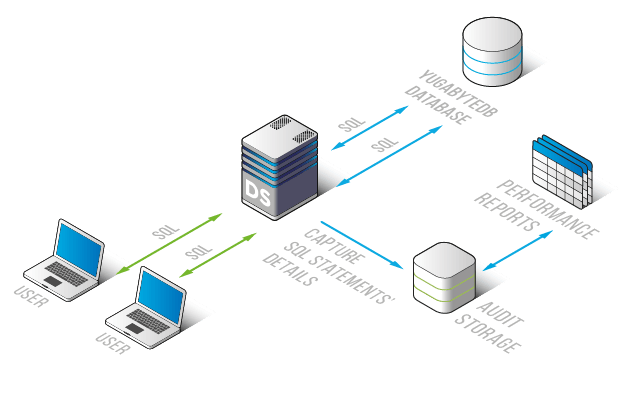
While native tools provide essential tracking, DataSunrise enhances monitoring with real-time database activity tracking, security analytics, and compliance reporting.
Key Features of DataSunrise
Deployment Strategies for Maximum Security
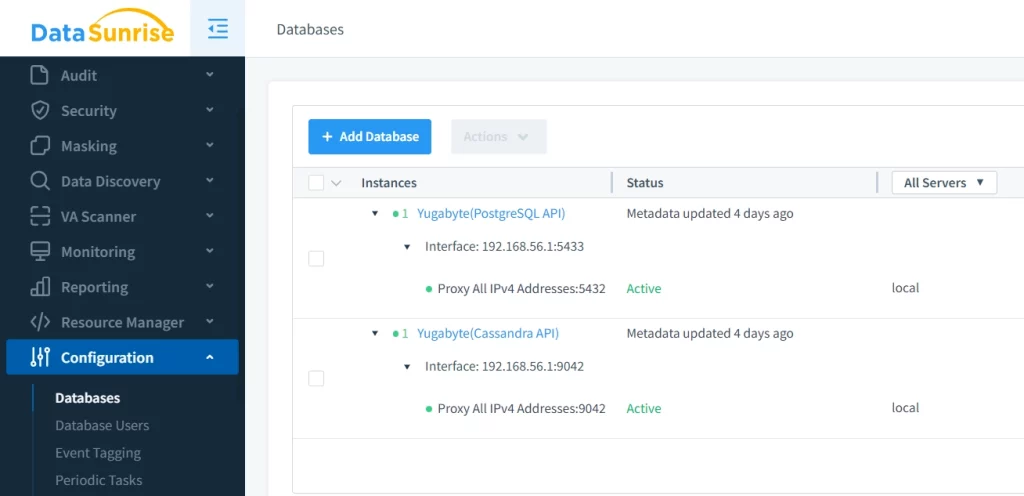
- Proxy Mode Configuration
- Intercepts and monitors database traffic
- Introduces minimal performance overhead
- Provides granular access controls
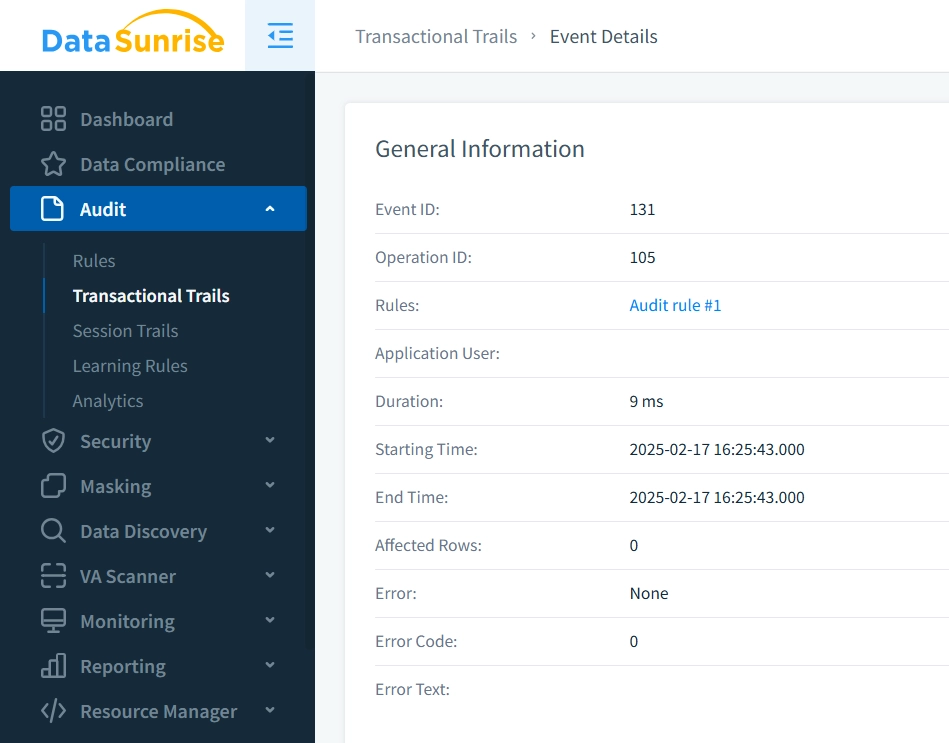
- Custom Audit Rules for Precise Monitoring
- Define tailored monitoring parameters
- Set real-time alert conditions
- Configure detailed logging preferences
Conclusion: Strengthening YugabyteDB Security with Audit Tools
A strong database security strategy requires multiple layers of protection. YugabyteDB Audit Tools provide robust native tracking, while advanced solutions like DataSunrise enhance security through detailed analytics and real-time monitoring. By leveraging these tools together, businesses can achieve comprehensive database protection and compliance.
If you wish to explore ways to improve your database security, download or schedule a DataSunrise demo for a hands-on experience with advanced auditing solutions.