Azure Cloud Storage Audit Trail
In today's cloud-first data landscape, implementing robust audit trails for Azure Cloud Storage has become a critical security requirement. According to Microsoft's 2024 Digital Defense Report, cloud storage attacks have increased by 58% year-over-year, with inadequate audit trail implementation identified as a primary vulnerability.
With data breach costs reaching an average of $4.88 million in 2024, establishing proper audit trails for cloud storage systems is essential for both security and compliance. Azure Cloud Storage offers native auditing capabilities, but organizations often require more sophisticated solutions to satisfy stringent compliance requirements and protect sensitive data across distributed cloud environments.
This article explores Azure Cloud Storage's native audit trail features and demonstrates how DataSunrise can enhance cloud storage security monitoring with Zero-Touch Compliance Automation.
Understanding Azure Cloud Storage Audit Trail
An Azure Cloud Storage audit trail creates a comprehensive chronological record of all storage operations performed within your cloud environment. This systematic recording captures who accessed what data, when they accessed it, what changes were made, and from which locations—essential for maintaining data security oversight.
The audit trail system captures various activities:
- File Operations: Upload, download, modify, and delete operations on blobs and containers
- Access Events: Authentication attempts, permission changes, and shared access signature usage
- Administrative Actions: Storage account configuration changes and security policies updates
- Data Movement: Cross-region replication and data management lifecycle events
Native Azure Cloud Storage Audit Trail Capabilities
Azure Cloud Storage includes several built-in features for implementing audit trails through access controls and monitoring mechanisms.
1. Azure Monitor Integration for Storage Audit Trail
Configure comprehensive audit trail capabilities through diagnostic settings:
# Enable storage audit trail via Azure CLI
az monitor diagnostic-settings create \
  --name "CloudStorage-Audit-Trail" \
  --resource "/subscriptions/{subscription-id}/resourceGroups/{resource-group}/providers/Microsoft.Storage/storageAccounts/{storage-account}" \
  --logs '[{
    "category": "StorageRead",
    "enabled": true,
    "retentionPolicy": {"enabled": true, "days": 365}
  }, {
    "category": "StorageWrite",
    "enabled": true,
    "retentionPolicy": {"enabled": true, "days": 365}
  }]' \
  --workspace "/subscriptions/{subscription-id}/resourceGroups/{resource-group}/providers/Microsoft.OperationalInsights/workspaces/{workspace-name}"
2. Analyzing Cloud Storage Audit Trail Logs
Examine captured audit data through Azure Monitor using KQL:
// Query cloud storage audit trail for the past 24 hours
StorageBlobLogs
| where TimeGenerated > ago(24h)
| project TimeGenerated, OperationName, AccountName, ContainerName,
    BlobName, ClientIpAddress, HttpStatusCode, ResponseBodySize
| order by TimeGenerated desc
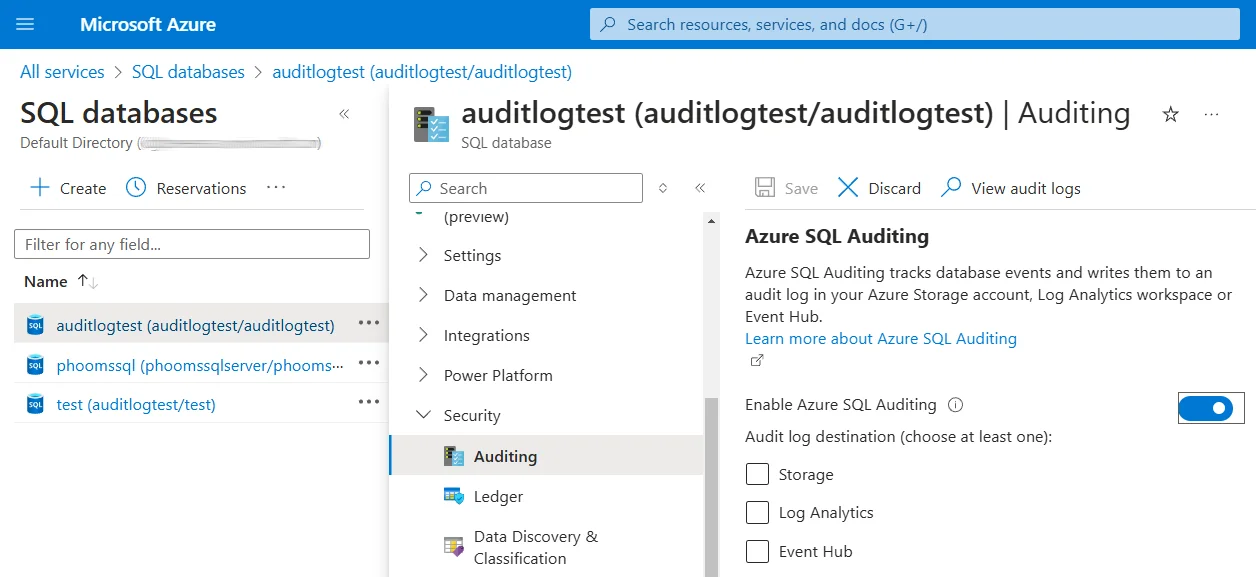
3. Azure Portal Web Interface for Audit Trail Review
The Azure Portal provides an intuitive interface for accessing audit trail information without requiring specialized query language expertise:
- Storage Insights: Navigate to your storage account and select "Insights" under Monitoring for visual audit dashboards
- Metrics Dashboard: Use "Metrics" to view real-time performance data and operation statistics
- Logs Interface: Access "Logs" to run custom KQL queries against audit trail data
- Activity Log: Review administrative operations and configuration changes
- Alerts Configuration: Set up automated notifications for suspicious audit trail patterns
Limitations of Native Azure Cloud Storage Audit Trails
While Azure Cloud Storage provides essential audit functionality, organizations with advanced requirements encounter several limitations:
| Native Feature | Key Limitation | Business Impact |
|---|---|---|
| Diagnostic Logs | Limited contextual information about file content | Challenging to understand security implications |
| Access Analysis | Basic operation logging without behavioral analysis | Difficulty identifying sophisticated attack patterns and security threats |
| Retention Management | Azure Monitor storage constraints and costs | May not satisfy long-term compliance requirements for database security |
| Real-Time Intelligence | Threshold-based alerts with limited context | Delayed response to complex security incidents |
Enhanced Cloud Storage Audit Trails with DataSunrise
DataSunrise significantly enhances cloud storage security monitoring through Autonomous Compliance Orchestration and sophisticated analytics designed for distributed cloud environments. Unlike basic logging approaches, DataSunrise delivers enterprise-grade database activity monitoring with comprehensive audit logs analysis.
Setting Up DataSunrise for Azure Cloud Storage Audit Trail
1. Connect to Azure Cloud Storage Environment
Establish a secure connection between DataSunrise and your Azure Cloud Storage through the intuitive interface, supporting Blob Storage, File Storage, and other Azure storage services.
2. Create Cloud Storage-Specific Audit Rules
Configure customized audit rules to monitor specific containers, file types, and user activities based on your security requirements.
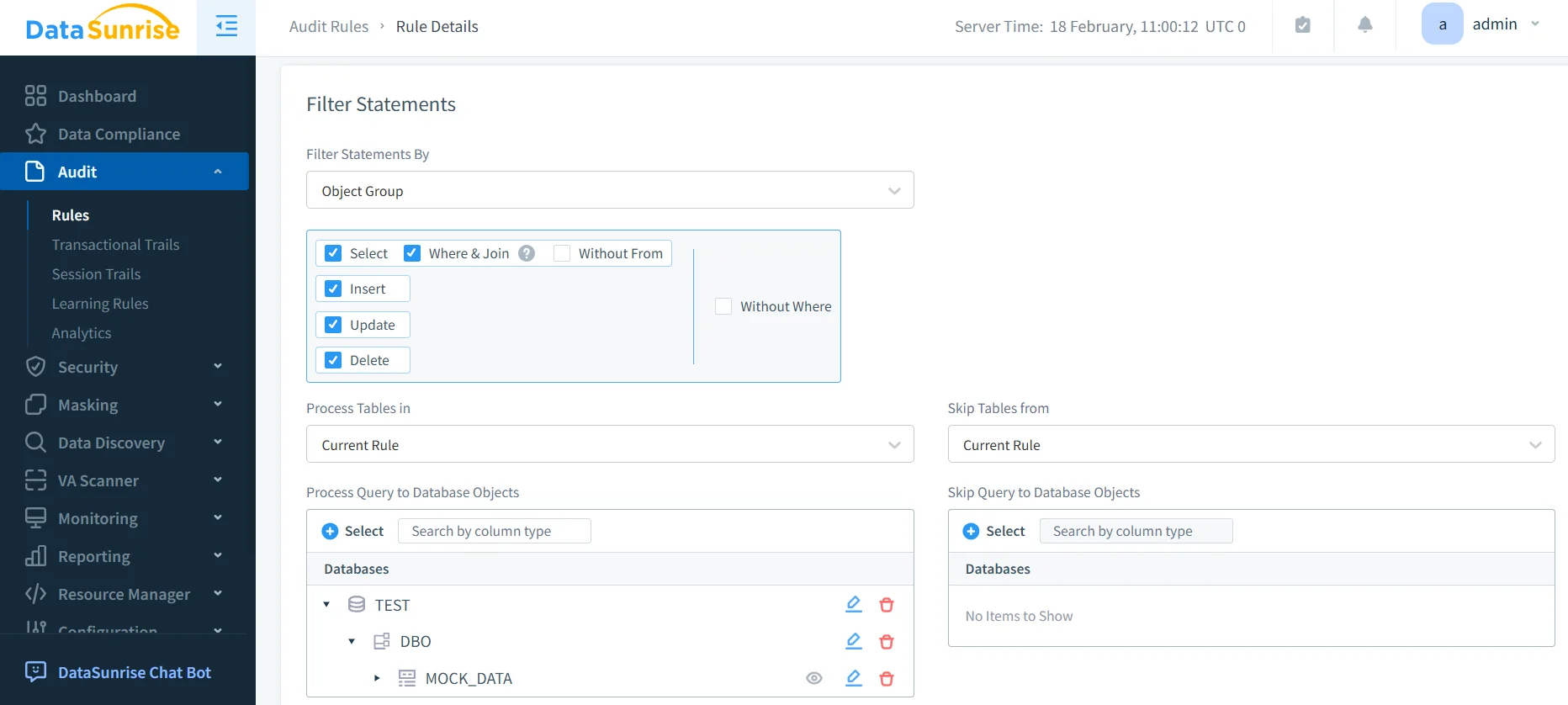
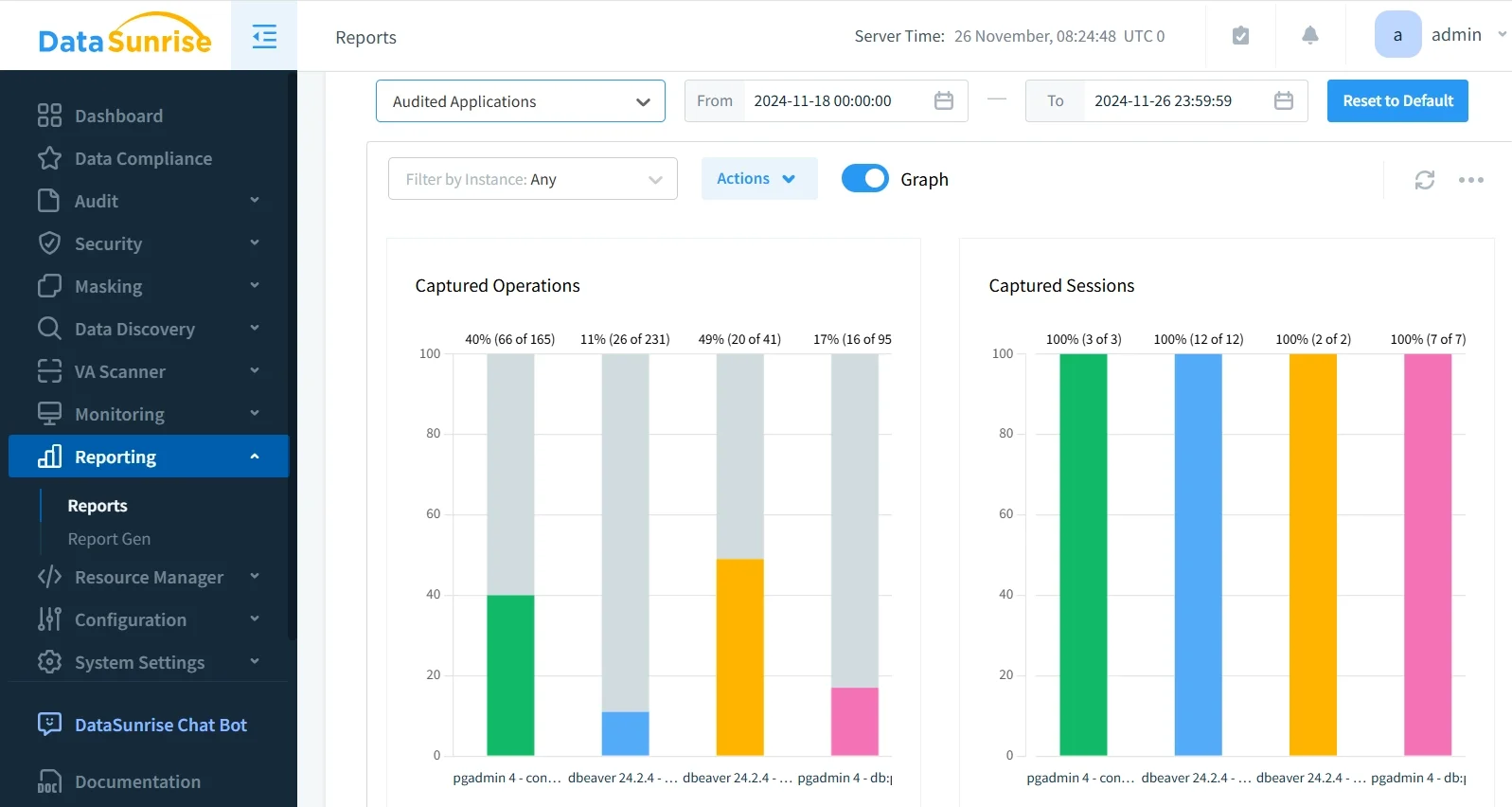
3. Review Comprehensive Audit Trail Results
Access detailed audit information through DataSunrise's unified dashboard with advanced filtering, real-time monitoring, and intelligent correlation capabilities.
Key Advantages of DataSunrise for Azure Cloud Storage
- Auto-Discover & Classify: Automatically identify and classify sensitive data using NLP algorithms and machine learning
- No-Code Policy Automation: Create sophisticated policies without complex coding, reducing implementation time from weeks to hours
- Real-Time Notifications: Receive immediate alerts for suspicious activities with contextual information
- User Behavior Analysis: Establish baselines and automatically detect anomalies using ML algorithms
- Automated Compliance Reporting: Generate pre-configured reports for GDPR, HIPAA, PCI DSS, and SOX
- Dynamic Data Masking: Protect sensitive files in real-time while maintaining functionality
- Cross-Platform Visibility: Monitor cloud storage alongside databases from a unified console with support for over 40 data storage platforms
Best Practices for Azure Cloud Storage Audit Trail Implementation
1. Performance-Optimized Strategy
Apply detailed audit trails to critical containers while using sampling for high-volume operations. Balance comprehensive monitoring with bandwidth and compute resource utilization.
2. Data-Centric Configuration
Focus auditing on containers containing PII, financial data, or regulated information. Monitor bulk downloads and unusual access patterns. Implement role-based access controls to ensure proper audit scope.
3. Enhanced Implementation with DataSunrise
Deploy DataSunrise's security suite to extend beyond native capabilities with intelligent policy orchestration and continuous data protection. Leverage vulnerability assessment tools to identify potential security gaps in your cloud storage configuration.
Conclusion
As organizations increasingly rely on Azure Cloud Storage for business-critical data, implementing robust audit trails has become essential for security and compliance. While Azure offers foundational capabilities through Azure Monitor, organizations with complex requirements benefit significantly from enhanced solutions like DataSunrise.
DataSunrise provides comprehensive security designed for cloud storage environments, offering Zero-Touch Data Protection with advanced audit trails, real-time monitoring, and Continuous Compliance Alignment. With flexible deployment modes, DataSunrise transforms cloud storage audit trails from basic logging into strategic security assets.
Protect Your Data with DataSunrise
Secure your data across every layer with DataSunrise. Detect threats in real time with Activity Monitoring, Data Masking, and Database Firewall. Enforce Data Compliance, discover sensitive data, and protect workloads across 50+ supported cloud, on-prem, and AI system data source integrations.
Start protecting your critical data today
Request a Demo Download Now