Azure Cloud Storage Regulatory Compliance

In today's cloud-first enterprise landscape, implementing robust regulatory compliance for Azure Cloud Storage has become essential for organizations managing sensitive data. According to IBM's 2024 Cost of a Data Breach Report, organizations with comprehensive cloud storage compliance frameworks detect violations 89% faster and reduce regulatory fines by up to 68%.
With cloud storage breaches costing an average of $4.88 million in 2024, establishing proper regulatory frameworks for Azure Cloud Storage is critical. While Azure provides native compliance capabilities, organizations often require advanced solutions to satisfy stringent requirements across multiple frameworks.
This guide explores Azure Cloud Storage's native compliance features and demonstrates how DataSunrise can enhance data protection through Zero-Touch Compliance Automation.
Native Azure Cloud Storage Compliance Capabilities
Azure Cloud Storage includes several built-in features for implementing regulatory compliance that monitor data access, track modifications, and enforce security policies.
1. Azure Policy for Compliance Governance
Azure Policy enables automated compliance enforcement across storage accounts:
# Create storage account compliance policy
New-AzPolicyDefinition -Name "StorageAccountCompliance" `
  -DisplayName "Enforce Storage Account Security Settings" `
  -Policy '{
    "if": {
      "field": "Microsoft.Storage/storageAccounts/supportsHttpsTrafficOnly",
      "notEquals": "true"
    },
    "then": {
      "effect": "deny"
    }
  }'
2. Testing Compliance Scenarios
Execute sample operations to validate compliance monitoring:
# Create compliant storage account
$storageAccount = New-AzStorageAccount `
  -ResourceGroupName "ComplianceRG" `
  -Name "compliancestorage001" `
  -EnableHttpsTrafficOnly $true `
  -MinimumTlsVersion "TLS1_2"

# Upload sensitive data with metadata
Set-AzStorageBlobContent `
  -File "customer_data.csv" `
  -Container "sensitive-data" `
  -Metadata @{
    "DataClassification"="Confidential";
    "ComplianceFramework"="GDPR,HIPAA"
  }
3. Azure Portal Web Interface for Compliance Management
The Azure Portal provides an intuitive interface for managing storage compliance without requiring specialized technical expertise:
- Navigate to your storage account and select "Compliance" under the Security section
- Review policy assignments and compliance status through the "Policy" dashboard
- Access "Activity log" to monitor administrative operations and configuration changes
- Use "Metrics" to track storage access patterns and potential compliance violations
- Configure automated alerts for policy violations and security incidents
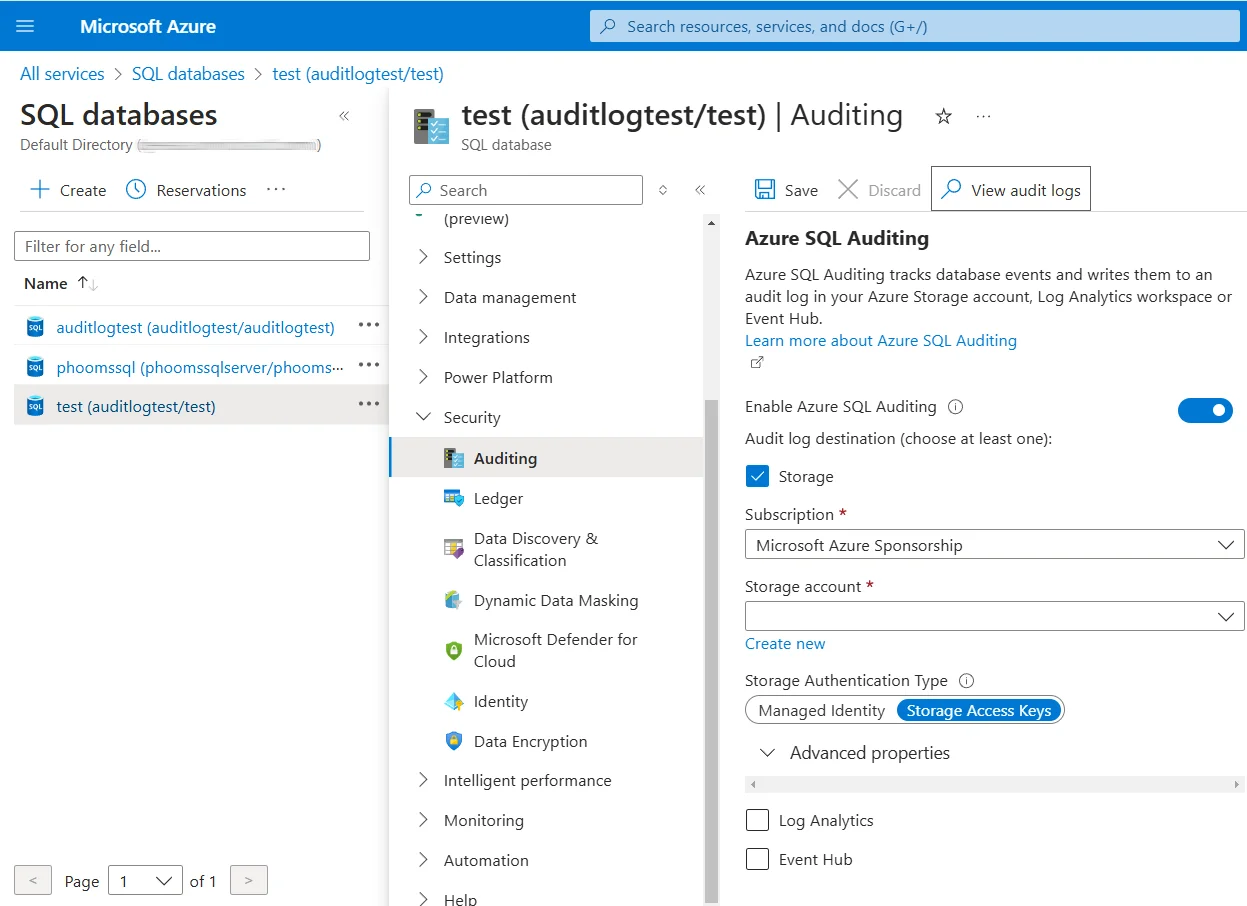
This web-based interface enables compliance officers and security teams to monitor regulatory adherence through visual dashboards and automated reporting tools.
Enhanced Azure Cloud Storage Compliance with DataSunrise
While Azure provides foundational compliance capabilities, DataSunrise significantly enhances cloud storage regulatory compliance through Autonomous Compliance Orchestration and sophisticated automation designed specifically for cloud storage environments. Unlike basic policy enforcement, DataSunrise delivers enterprise-grade data compliance regulations monitoring with comprehensive audit logs analysis.
Setting Up DataSunrise for Azure Cloud Storage Compliance
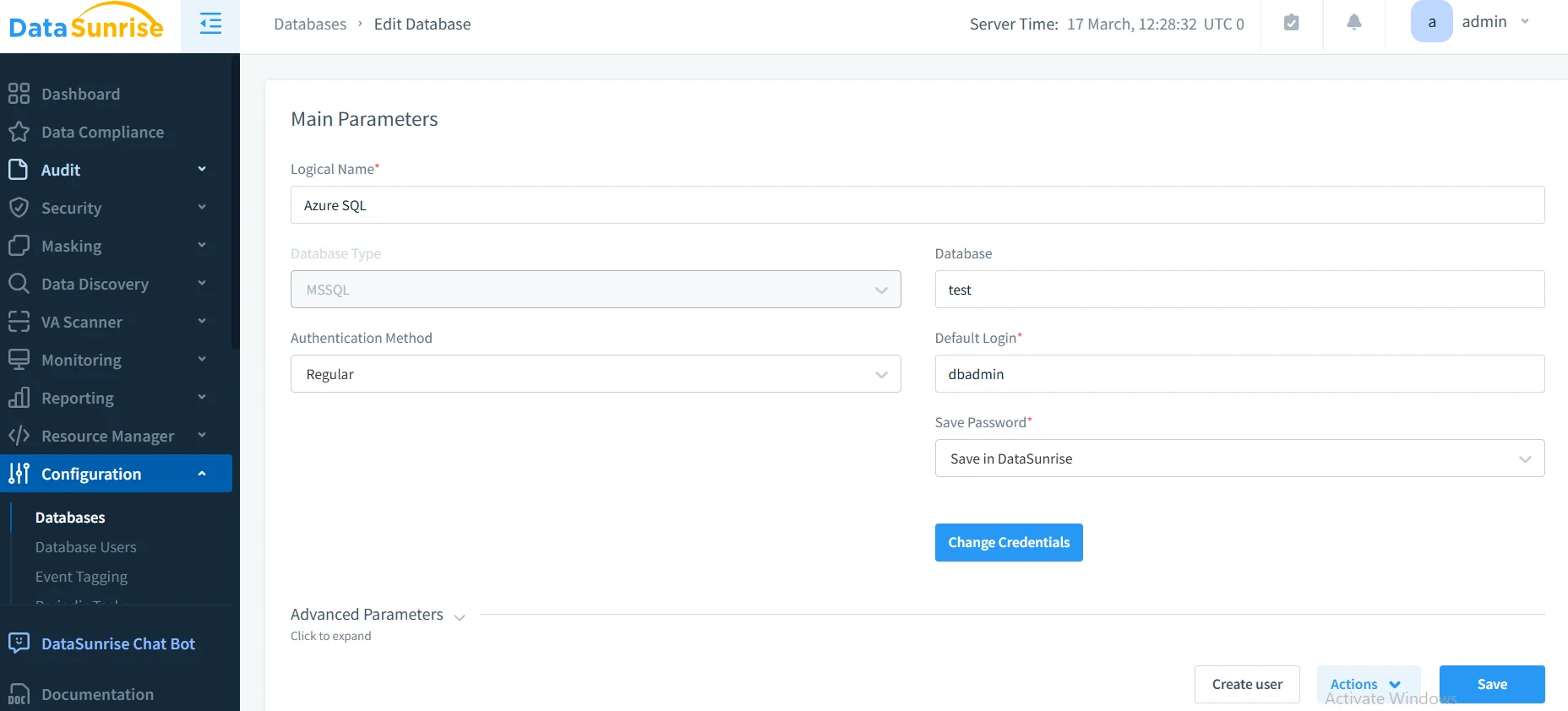
1. Connect to Azure Storage Environment: Establish secure connections between DataSunrise and your Azure Storage accounts. DataSunrise supports all Azure Storage types including Blob Storage, File Storage, Queue Storage, and Table Storage.
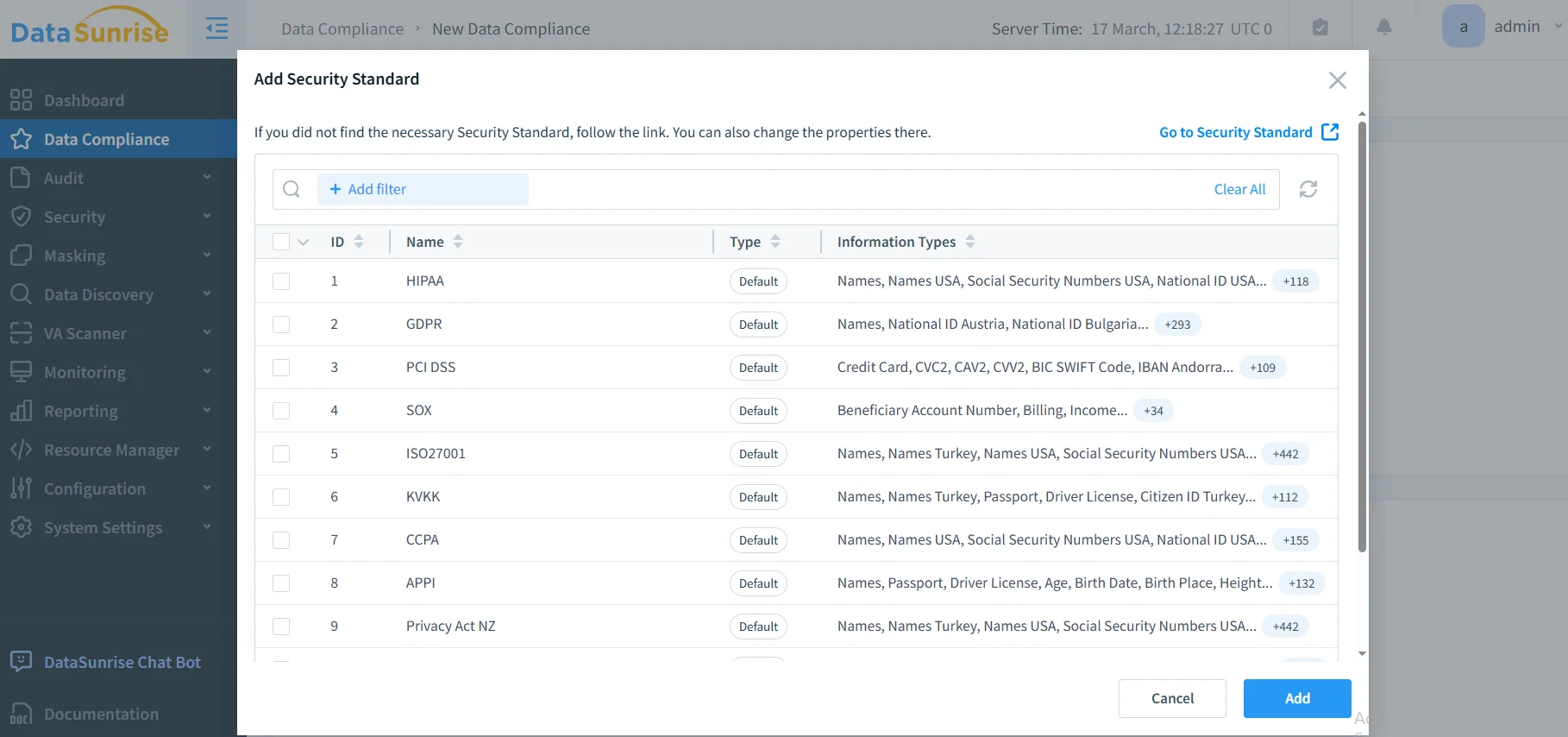
2. Configure Compliance-Driven Policies: Create sophisticated compliance rules using DataSunrise's No-Code Policy Automation interface for GDPR compliance, HIPAA compliance, and PCI DSS compliance.
3. Monitor Regulatory Adherence: Access comprehensive compliance monitoring through DataSunrise's unified dashboard with real-time notifications and automated reporting.
Key Advantages of DataSunrise for Azure Cloud Storage
DataSunrise provides significant enhancements over Azure's native compliance capabilities:
- Auto-Discover & Classify: Automatically identify and classify sensitive data using NLP algorithms and machine learning
- No-Code Policy Automation: Create sophisticated compliance policies without writing complex code
- Continuous Compliance Monitoring: Receive immediate alerts for compliance violations with recommended remediation actions
- Behavioral Analytics: Establish baselines for normal storage access patterns and detect anomalies
- Dynamic Data Masking: Protect sensitive data fields in real-time while maintaining application functionality
- Cross-Platform Integration: Monitor compliance across both cloud and on-premises storage from a unified console with support for over 40 data storage platforms
Compliance Framework Implementation
DataSunrise automates adherence across major regulatory frameworks:
GDPR Compliance: Automated data subject rights management, consent tracking, and breach notification within 72-hour requirements.
HIPAA Compliance: PHI protection with automated identification, role-based access controls, and comprehensive audit trails.
PCI DSS Compliance: Cardholder data discovery, network segmentation monitoring, and continuous security validation.
Best Practices for Azure Cloud Storage Regulatory Compliance
To maximize compliance effectiveness, consider these strategic practices:
1. Data-Centric Compliance Strategy
- Focus comprehensive monitoring on containers with regulated data
- Implement continuous scanning for new sensitive data
- Apply detailed controls to high-risk data while using standard monitoring for operational files
2. Performance-Optimized Configuration
- Align compliance strategies with Azure Storage access tiers
- Ensure data residency requirements across geographic regions
- Implement automated lifecycle management aligned with regulatory requirements
3. Enhanced Implementation with DataSunrise
- Deploy DataSunrise Security Suite for comprehensive capabilities beyond native Azure tools
- Leverage machine learning for predictive compliance monitoring
- Utilize unified compliance management across heterogeneous environments
Business Benefits of Comprehensive Compliance
| Benefit | Description |
|---|---|
| Risk Mitigation | Proactively identify compliance violations before regulatory fines |
| Automated Adherence | Streamline requirements with automated policy enforcement |
| Operational Efficiency | Reduce manual compliance overhead through intelligent automation |
| Stakeholder Trust | Demonstrate commitment to data protection and regulatory compliance |
Conclusion
As organizations increasingly rely on Azure Cloud Storage for business-critical data, implementing robust regulatory compliance has become essential. While Azure provides foundational capabilities through Azure Policy and Monitor integration, organizations with complex requirements benefit significantly from enhanced solutions like DataSunrise.
DataSunrise provides comprehensive compliance capabilities designed for cloud storage environments, offering Zero-Touch Compliance Automation with advanced monitoring and automated reporting. With flexible deployment modes, DataSunrise transforms Azure Cloud Storage compliance from reactive policy enforcement into proactive strategic assets.
Protect Your Data with DataSunrise
Secure your data across every layer with DataSunrise. Detect threats in real time with Activity Monitoring, Data Masking, and Database Firewall. Enforce Data Compliance, discover sensitive data, and protect workloads across 50+ supported cloud, on-prem, and AI system data source integrations.
Start protecting your critical data today
Request a Demo Download Now