Data Audit for Azure Cloud Storage
In today's cloud-first landscape, organizations face mounting pressure to protect their data assets across distributed storage environments. Cloud storage administrators and security professionals must implement robust monitoring and verification processes, making data audit for Azure Cloud Storage an essential component of modern security strategies.
While Microsoft Azure Storage provides native auditing tools, integrating advanced third-party solutions can enhance and streamline your auditing process. Recent cybersecurity research highlights that cloud storage breaches increased by 45% in 2024, underscoring the importance of a strong auditing framework for unstructured data environments. Azure Storage security best practices emphasize the critical role of comprehensive monitoring in protecting sensitive data.
In this article, you will find a step-by-step guide into Azure Storage's native auditing capabilities, as well as a brief exploration of DataSunrise's features for enhancing compliance and data security across structured, semi-structured, and unstructured data storage platforms.
Native Azure Cloud Storage Auditing Capabilities
Microsoft Azure Storage includes built-in auditing tools that allow administrators to monitor storage activities such as blob access, file modifications, and authentication attempts. The key components of Azure Storage auditing include:
1. Azure Storage Analytics Logging
Before diving into monitoring, you'll need to activate the auditing features through Azure portal or programmatic configuration:
# Enable storage analytics logging
$ctx = New-AzStorageContext -StorageAccountName "enterprisestorage" -StorageAccountKey $key
Set-AzStorageServiceLoggingProperty -ServiceType Blob -LoggingOperations read,write,delete -RetentionDays 90 -Context $ctx
2. Testing with Sample Operations
To ensure your audit setup is functioning correctly, you can run these sample operations to generate audit logs:
# Upload test files to generate access logs
$blob = Set-AzStorageBlobContent -File "test-document.pdf" -Container "audit-test" -Blob "test-document.pdf" -Context $ctx

# Download operations for read auditing
Get-AzStorageBlobContent -Container "audit-test" -Blob "test-document.pdf" -Destination "downloaded-file.pdf" -Context $ctx
3. Reviewing Storage Audit Logs
Once your operations are complete, examine the collected audit logs using Azure Monitor or direct log access:
# Query storage logs via Azure Monitor
$logs = Get-AzLog -ResourceId "/subscriptions/{subscription-id}/resourceGroups/{rg}/providers/Microsoft.Storage/storageAccounts/{account}" -StartTime (Get-Date).AddDays(-7)
- Filter the logs for specific operations or users
- Azure Storage log format includes request details, response codes, and timing information
4. Azure Portal Web Interface for Audit Review
The Azure Portal provides an intuitive interface for accessing audit information without writing PowerShell commands:
- Navigate to your storage account in the Azure Portal
- Select "Monitoring" under the navigation menu to view metrics and logs
- Use "Activity log" to review administrative operations performed on the storage account
- Access "Insights" for pre-built monitoring workbooks with visualization
- Configure "Alerts" for automated notifications of suspicious activities
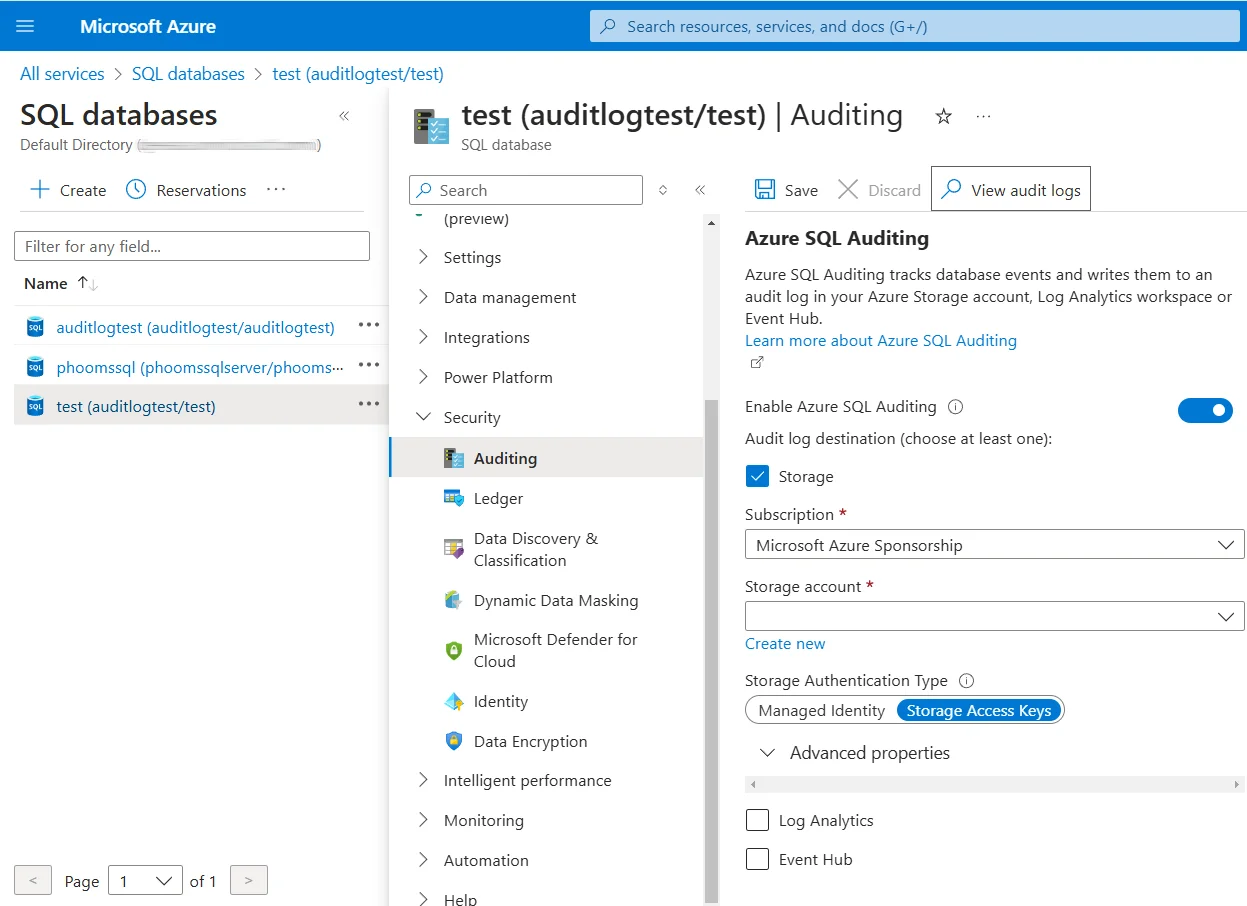
This web-based interface makes it easier for administrators and security teams to monitor storage activities without specialized scripting expertise.
You can refer to Microsoft official documentation for more information about available logging configurations
Enhanced Data Audit and Security for Azure Storage with DataSunrise
Although Azure Storage's native analytics provide basic auditing, they may not meet the demands of production environments requiring robust compliance and security across diverse data types. DataSunrise enhances Azure Storage with a comprehensive suite of features designed to meet stringent regulatory requirements. Unlike basic storage logging, it integrates seamlessly with Zero-Touch Data Protection, offering highly customizable audit rules, security policies, and compliance reporting, along with advanced threat detection and real-time alerts.
Advantages of DataSunrise for Azure Storage
Fast and Easy Setup: With a range of deployment options, DataSunrise simplifies the setup process, allowing you to begin monitoring your Azure Storage activity right away. Skip the complexity of manual log configurations and enjoy an intuitive, user-friendly interface with Seamless Cloud Integration.
Comprehensive Audit Rules: DataSunrise offers flexible audit rules that provide extensive customization options for cloud storage environments. You can apply rules to specific Azure Storage containers, file types, and sensitive data patterns, and schedule audits to run at precise times. This Auto-Discover & Mask capability automates compliance reporting and reduces manual effort typically required for audit logs analysis.
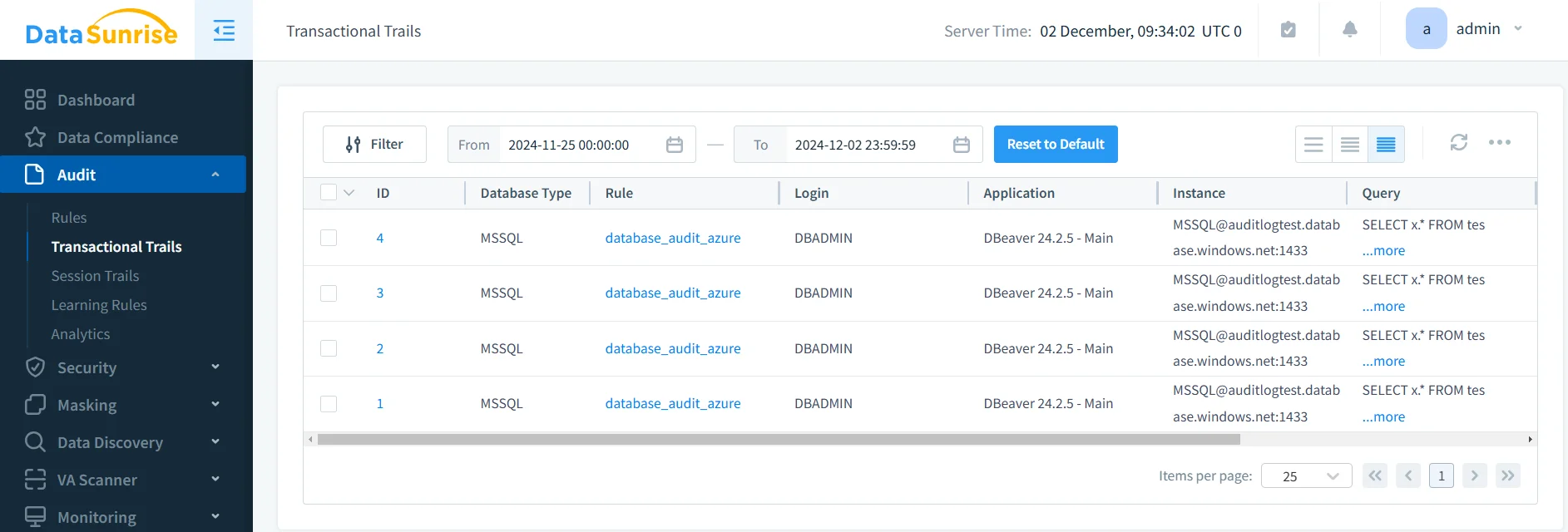
Advanced Threat Protection: DataSunrise goes beyond basic auditing with features like real-time notifications, customizable security rules, and behavioral analytics for detecting potential threats across cloud storage platforms.
Centralized Monitoring: DataSunrise provides a unified solution for data activity monitoring, supporting Azure Storage and over 40 other data storage platforms including cloud storage systems (AWS S3, Google Cloud Storage, Azure Cloud Storage). This ensures consistency in access controls across all your data environments.
Business Benefits of Data Auditing for Azure Cloud Storage
Implementing data auditing for Azure Storage provides multiple business advantages:
| Benefit | Description |
|---|---|
| Risk Mitigation | Proactively identify and address data breaches or compliance violations before they become costly issues across structured and unstructured data |
| Simplified Audits | Automate audit tasks with No-Code Policy Automation, reducing the time and effort spent on manual reviews and enhancing operational efficiency |
| Increased Trust | Demonstrate your commitment to data security and compliance through Comprehensive Sensitive Data Detection, building trust with customers and stakeholders |
| Improved Operational Efficiency | Streamline data management processes with Intelligent Policy Orchestration, which leads to better decision-making and more efficient operations |
| Competitive Edge | Strengthen your competitive position by adopting secure, compliant data practices with Continuous Regulatory Calibration that enhance your reputation |
Conclusion
As cloud storage platforms like Azure Storage continue to manage sensitive business data across diverse formats, robust audit capabilities are essential for ensuring security and compliance. While Azure Storage offers strong management features, it is crucial to supplement these with additional solutions to meet evolving compliance standards.
DataSunrise provides a comprehensive data auditing solution for Azure Storage, addressing the compliance and security challenges businesses face across heterogeneous cloud environments. Through real-time monitoring, intelligent analytics, and broad platform compatibility, DataSunrise delivers the robust audit infrastructure needed to maintain security and meet regulatory requirements across all data types.
Protect Your Data with DataSunrise
Secure your data across every layer with DataSunrise. Detect threats in real time with Activity Monitoring, Data Masking, and Database Firewall. Enforce Data Compliance, discover sensitive data, and protect workloads across 50+ supported cloud, on-prem, and AI system data source integrations.
Start protecting your critical data today
Request a Demo Download Now