Data Masking in PostgreSQL
PostgreSQL has become a default choice for transactional systems because it’s reliable, extensible, and unapologetically good at handling real workloads. The problem is that “real workloads” usually include Personally Identifiable Information (PII)—names, emails, phone numbers, passports, and payment-related data—spread across tables that multiple teams need to query.
And breaches are not a theoretical risk. The IBM Cost of a Data Breach Report highlights how expensive incidents have become, which is why masking is now a baseline control for privacy and security programs—not a “nice-to-have.”
This article explains data masking for PostgreSQL in practical terms, then walks through a step-by-step dynamic masking setup using DataSunrise. Finally, because real life is messy, we’ll cover pragmatic guidance for static masking in MySQL—often used to produce safe, realistic datasets for development and testing.
What data masking actually does
Masking transforms sensitive values so they’re no longer directly readable, while keeping the data usable for analytics, troubleshooting, QA, and day-to-day operations. Done properly, it reduces exposure without breaking applications or forcing teams to work blind.
Common approaches include redaction, partial masking (like showing last 4 digits), hashing, and format-preserving substitutions. DataSunrise summarizes these patterns in its overview of masking types.
Mask what people don’t need, not what you think looks “sensitive.” Start with PII, credentials, financial fields, and anything regulated or contractually protected.
Dynamic vs. static masking: when each matters
Dynamic masking modifies results at query time without changing the stored data. This is ideal for production PostgreSQL where you want different users (or roles) to see different levels of detail. Learn more about Dynamic Data Masking.
Static masking creates a sanitized copy where sensitive values are permanently replaced. This is common in Dev/Test pipelines and downstream analytics stacks—especially when datasets are exported or replicated. DataSunrise covers the workflow in its guide to Static Data Masking and In-Place Masking.
Dynamic masking is not a substitute for access control. If a user can run arbitrary queries with elevated privileges, they can still cause damage. Combine masking with role-based access control and strict permission hygiene.
Step-by-step: Dynamic data masking for PostgreSQL with DataSunrise
Before you start, make sure DataSunrise is deployed in a mode that fits your environment. Most teams use proxy-based or agent-based deployment depending on topology and latency requirements; see Deployment Modes of DataSunrise for options.
Step 1: Create a new Dynamic Masking Rule
In the DataSunrise console, go to Masking → Dynamic Masking Rules and create a new rule. Select PostgreSQL as the database type and attach the correct instance.
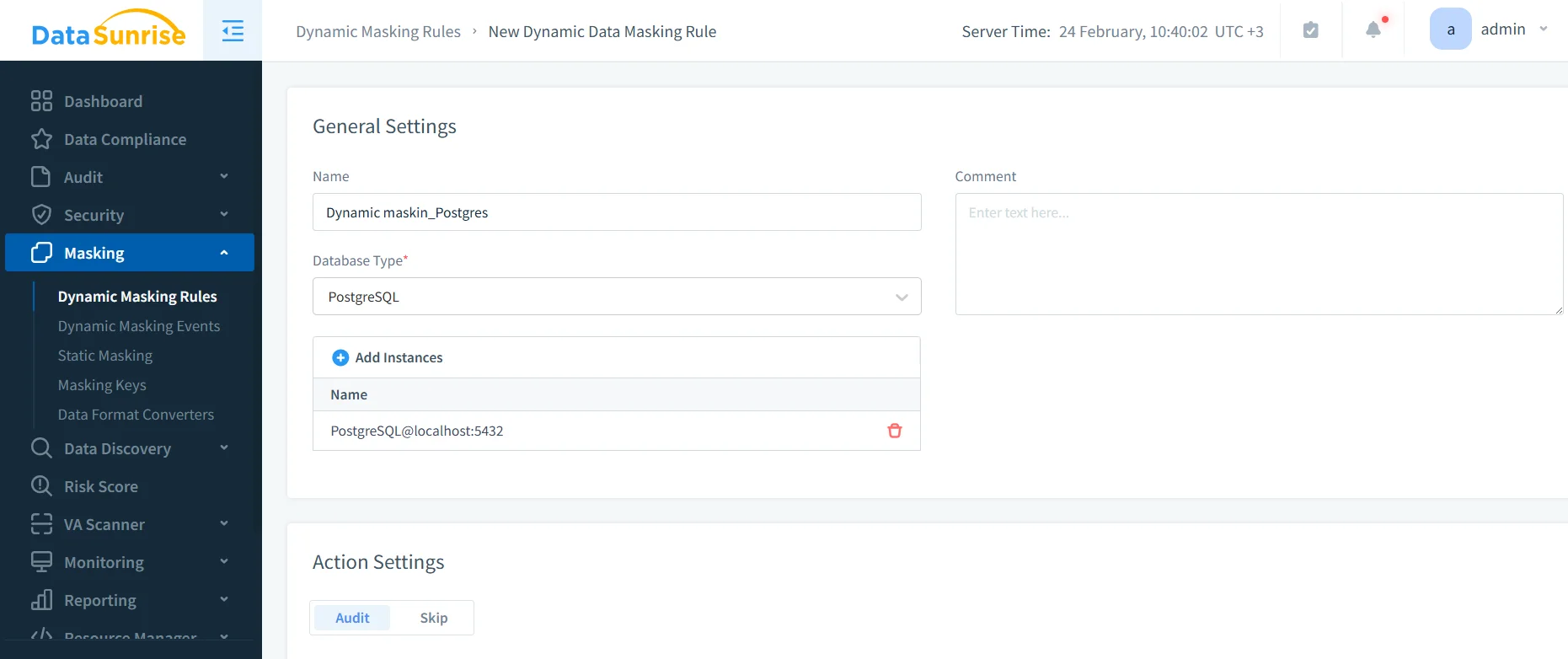
Creating a PostgreSQL dynamic masking rule: name, database type, and instance assignment in DataSunrise.
At this point, you’re defining “where masking applies” and “under what conditions.” Treat this like policy design, not checkbox theater.
Step 2: Select the columns to mask
Use the object explorer to pick the schemas/tables/columns that contain sensitive data. If you’re unsure where sensitive fields live, pair this step with Data Discovery so you’re not relying on tribal knowledge and vibes.
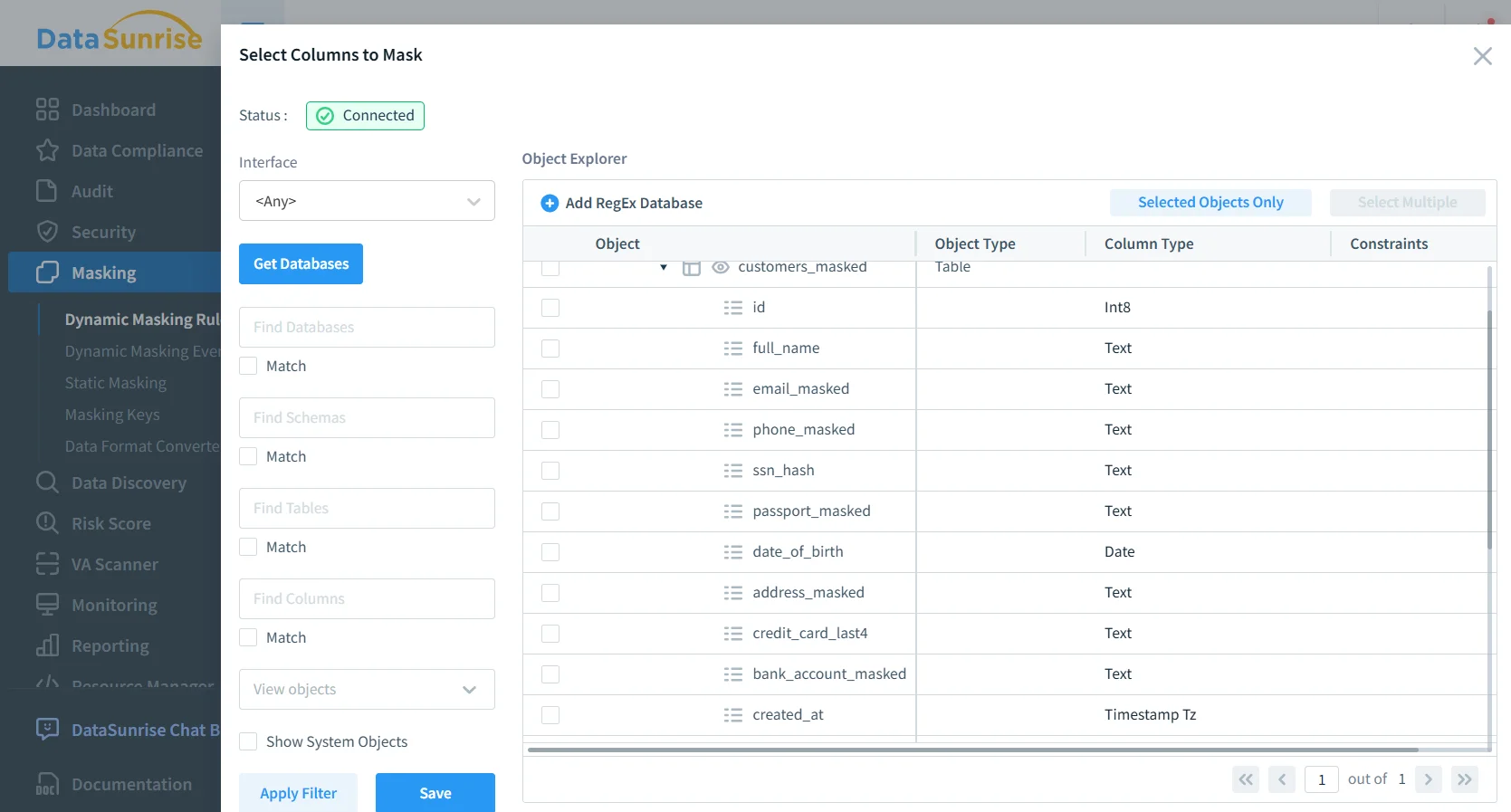
Selecting sensitive columns (email, phone, SSN hash, passport, bank account) for dynamic masking enforcement.
Masking policies are easier to maintain when you standardize naming (e.g., email, phone, passport_number) and tag sensitive columns consistently during schema design.
Step 3: Assign masking methods and conditions
For each column, choose a strategy that matches how the application uses it:
- Emails: partial masking (keep domain or first character)
- Phone numbers: show last digits only
- Passport / SSN: full redaction or hashing
- Bank account / IBAN: partial masking with last 4 visible
Where possible, keep masked output consistent to preserve joins and troubleshooting workflows. This becomes critical when teams do correlated analysis across logs, reports, and customer cases.
Step 4: Validate that results are masked
Run a controlled query as a user who should see masked data. You should observe transformed values in the result set, while privileged users retain full visibility.

Under the hood, this approach complements PostgreSQL’s native controls (like Row Level Security) rather than replacing them. If you use RLS, PostgreSQL’s documentation is a good reference: PostgreSQL Row Security Policies.
Step 5: Monitor and audit masked access
Masking answers “what does the user see,” but you still need “what did they try to access.” Pair masking with Database Activity Monitoring and centralize evidence in Audit Logs. For implementation guidance, DataSunrise provides an Audit Guide.
If you can’t prove who accessed what (and when), you don’t have “compliance,” you have wishful thinking. Always log access to masked and unmasked objects.
Practical static masking for MySQL Dev/Test datasets
Many organizations run PostgreSQL in production but still have MySQL in legacy apps, reporting layers, or downstream ETL. Static masking is often the fastest way to provision safe data for developers, QA, and analysts—without giving them production secrets.
A solid static masking workflow looks like this:
- Inventory sensitive tables using Data Discovery and schema reviews.
- Define masking rules aligned with your Principle of Least Privilege model.
- Create a masked copy for Dev/Test using Static Data Masking (or In-Place Masking when required).
- Preserve referential integrity with deterministic masking for keys used across tables.
- Validate usability through Test Data Management practices and automated checks for data-driven testing.
When masked datasets still need realistic distributions (not just “XXXX”), consider augmenting with synthetic data generation for non-key attributes like addresses or free-text fields.
Security controls that make masking stronger
Masking is most effective when it’s part of a layered security posture:
- Enforce baseline policies using the Security Guide.
- Reduce injection risk with security rules against SQL injections.
- Automate controls mapping and reporting via the Compliance Manager.
The Compliance Imperative
Masking supports regulatory requirements by reducing exposure of sensitive fields and tightening access visibility across environments.
| Regulation | Typical Requirement | How masking helps |
|---|---|---|
| GDPR | Protect personal data and limit unnecessary access | Reduces exposure of PII in query results and test data |
| HIPAA | Safeguard PHI and enforce confidentiality controls | Masks patient identifiers for non-clinical access patterns |
| PCI DSS | Protect cardholder and payment-adjacent data | Hides account values while preserving operational usability |
| SOX | Control access to financial and payroll data | Limits exposure of salaries and banking fields in reports |
Conclusion: safer PostgreSQL, saner teams
Data masking in PostgreSQL is about keeping production usable while reducing the blast radius of curiosity, mistakes, and malicious access. Dynamic masking protects live query results without rewriting stored data. Static masking (often in MySQL Dev/Test flows) makes safe datasets available to teams who need realism without risk.
Protect Your Data with DataSunrise
Secure your data across every layer with DataSunrise. Detect threats in real time with Activity Monitoring, Data Masking, and Database Firewall. Enforce Data Compliance, discover sensitive data, and protect workloads across 50+ supported cloud, on-prem, and AI system data source integrations.
Start protecting your critical data today
Request a Demo Download Now