Data Masking Tools and Techniques for PostgreSQL
PostgreSQL is the backbone of countless production systems billing, customer portals, HR, healthcare, and analytics. The problem is that production-grade databases tend to accumulate sensitive data like Personally Identifiable Information (PII), payroll fields, bank details, and other regulated identifiers that should never be casually exposed to every SQL user (or every “temporary” data export).
That’s why modern database security programs treat data masking as a practical control, not a compliance checkbox. The IBM Cost of a Data Breach Report is a solid reminder that data exposure is expensive—especially when it happens through the boring paths: shared dumps, stale staging, and overly broad access.
This guide breaks down the most effective tools and techniques for masking PostgreSQL data, including dynamic masking for production access and static masking for non-production copies. You’ll also get practical guidance for static masking in MySQL, since Dev/Test environments often involve mixed stacks.
Data Masking Basics for PostgreSQL
Masking means transforming sensitive values so they’re no longer directly readable—while keeping data usable for troubleshooting, testing, and analytics. At a high level, most PostgreSQL masking strategies fall into two categories:
- Dynamic masking: Data is transformed at query time, without changing what’s stored. See Dynamic Data Masking.
- Static masking: Data is permanently transformed in a copy (schema/database/environment) used outside production. See Static Data Masking.
If data is leaving production (exports, replicas, staging refreshes), static masking is the safer default. If you must protect production reads without altering stored values, dynamic masking is the right tool.
Masking Techniques That Actually Work
Different data types require different transformations. If you apply one blunt method everywhere, you’ll either break workflows or deliver “masked” data that still leaks meaning.
1) Redaction and partial masking
Best for fields that should never be fully visible outside a narrow set of roles (SSNs, passport numbers), or where limited visibility is acceptable (last 4 digits of an account). These are the simplest and most common patterns.
2) Hashing and tokenization
Best when teams need matching and correlation (“same customer,” “same bank account”) without seeing the original value. Tokenization is especially useful when you need stable identifiers across datasets.
3) Format-preserving substitutions and synthetic values
Best for Dev/Test realism. You preserve the look and constraints of the data (length, type, format) without keeping any real identifiers. This pairs well with synthetic data generation.
Masking should protect privacy without breaking integrity. If a column participates in joins or constraints, use deterministic methods that preserve relationships—random replacement is how you turn every QA run into a mystery.
Tooling Options: Native Controls vs. Dedicated Masking
PostgreSQL has strong access control primitives, but access controls alone don’t guarantee safe output. If a user can SELECT a column, the raw data is returned unless you add a dedicated masking layer.
A mature setup combines:
- Access governance: use Role-Based Access Control (RBAC) and the Principle of Least Privilege.
- Discovery: identify sensitive fields with Data Discovery.
- Masking enforcement: apply dynamic/static policies with DataSunrise masking capabilities.
- Monitoring and evidence: centralize Audit Logs and Database Activity Monitoring.
Dynamic Masking in PostgreSQL with DataSunrise
Dynamic masking is ideal when you need production access for support, reporting, or internal analytics—but cannot allow unrestricted visibility into PII or financial fields. DataSunrise supports consistent policy enforcement across supported platforms and multiple deployment patterns; see Deployment Modes of DataSunrise for options.
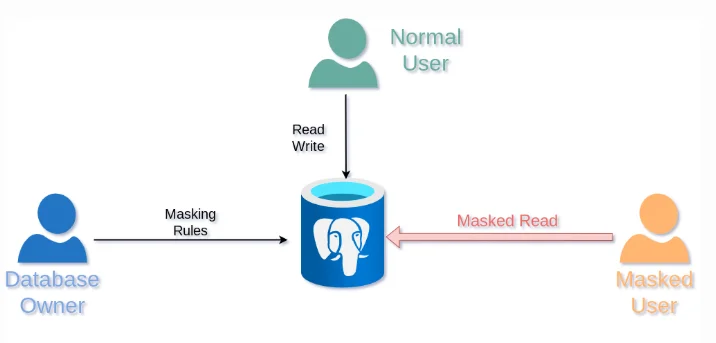
Dynamic masking flow: rules applied to PostgreSQL return masked results for restricted users.
Step-by-step: Create a dynamic masking rule
- Create rule: Go to Masking → Dynamic Masking Rules and create a new rule for PostgreSQL.
- Scope: Select database instance and define which schemas/tables/columns should be masked.
- Methods: Apply masking methods (redaction/partial/tokenization) appropriate to each column.
- Conditions: Define who sees masked output (roles/users/apps/networks), aligned to RBAC.
- Test: Validate outputs using the same client context your users actually use.
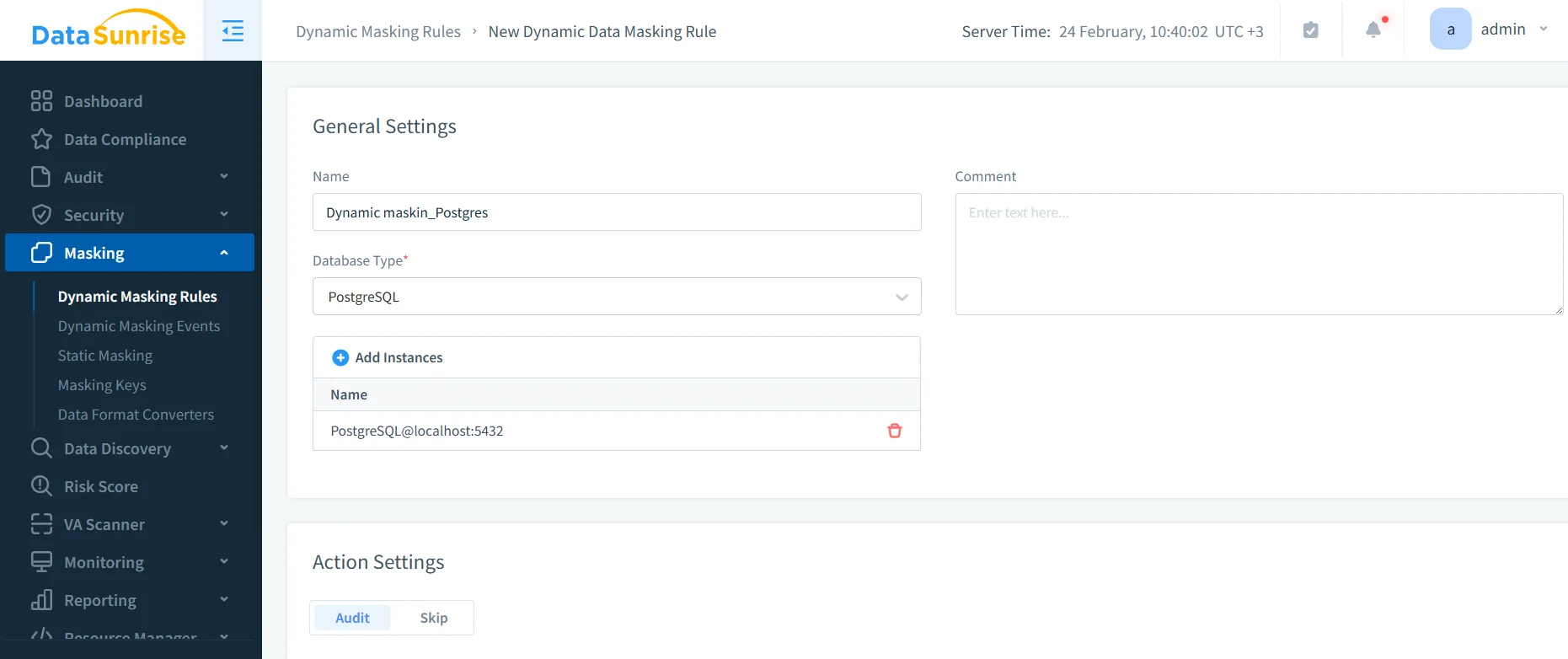
Creating a PostgreSQL dynamic masking rule in the DataSunrise UI.
-- Example validation query (run under different users/roles)
SELECT *
FROM masking_test.employee_sensitive
LIMIT 50;
Pair masking with auditing. If you can’t prove who accessed what and when, you don’t have governance—you have vibes. Start with the Audit Guide and keep an immutable audit trail.
Dynamic masking is not a substitute for security hardening. If credentials are compromised or permissions are mis-scoped, masked data can still be abused. Enforce policy, audit access, and reduce attack surface.
Static Masking in PostgreSQL with DataSunrise
Static masking is the best way to protect data outside production. It creates a safe copy for Dev/Test, CI, reporting sandboxes, and training. The result is permanently sanitized—no special proxy or runtime enforcement required.
Step-by-step: Create a static masking task
- Create task: Open Masking → Static Masking and create a new task.
- Source/Target: Choose the source (production clone) and target (masked schema/database).
- Rules: Apply masking rules for sensitive columns (email, phone, passport, SSN, salary, bank fields).
- Run: Execute the task and confirm completion.
- Validate: Query the target tables and verify integrity (joins, constraints, key uniqueness).
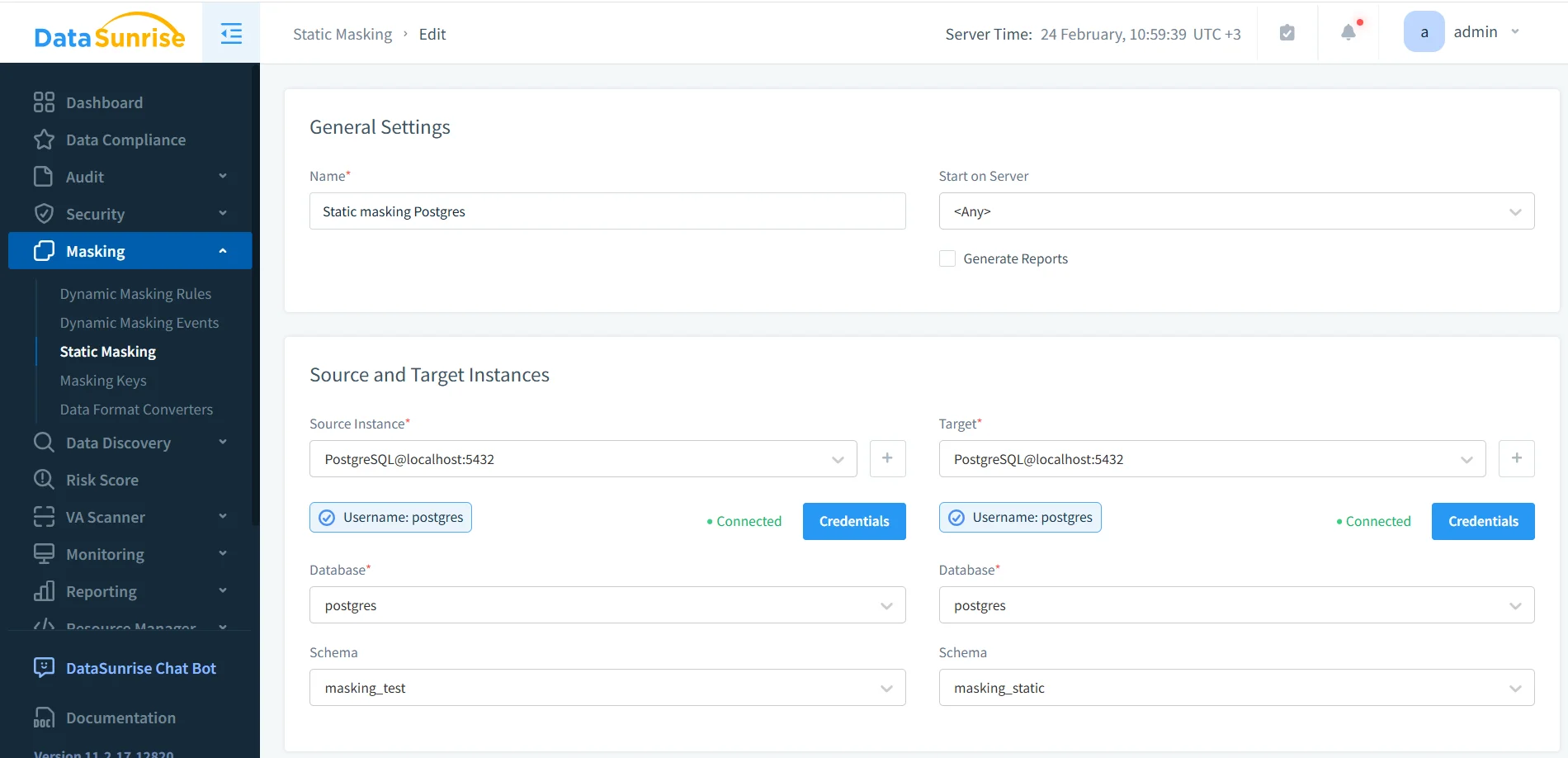
-- Validate masked dataset (target schema)
SELECT *
FROM masking_static.employee_sensitive
LIMIT 50;
If you must sanitize data in place (for example, controlled environments with strict storage constraints), DataSunrise also supports in-place masking. For most teams, masking into a separate target remains the safer operational pattern.
For repeatable refresh pipelines, generate a clean target from export/restore first, then run static masking. PostgreSQL’s pg_dump reference is here: PostgreSQL: pg_dump.
Static Masking in MySQL: Practical Dev/Test Insights
Static masking in MySQL follows the same core idea: sanitize a copy and preserve usability. Where teams get burned is in details—collations, strict mode behavior, and application-level validations.
- Data types and formats: Preserve expected formats (emails, phone shapes, lengths) to prevent UI/API validation failures.
- Strict modes: Be careful with “zero” placeholders for dates and numerics; ensure masked values remain valid for inserts/updates.
- Referential integrity: Use deterministic masking for identifiers reused across tables.
- Test realism: Combine static masking with Test Data Management and data-driven testing so QA runs on realistic-but-safe datasets.
If MySQL Dev/Test environments are refreshed periodically, masking must be automated. Manual “we’ll remember later” processes always fail—usually right before an audit or incident review.
Make Masking Enforceable: Security + Compliance Controls
Masking works best as part of a layered security posture. DataSunrise helps you build that layer through:
- Database Activity Monitoring for visibility into access patterns
- Audit Logs for investigations and compliance evidence
- Database Firewall to reduce risky query behavior
- Security Guide for policy baselines and control design
- Security rules against SQL injections to harden the query layer
- Vulnerability Assessment to find weak spots before attackers do
- Database Encryption as a complementary control for data at rest
- Compliance Manager for control mapping and reporting
For regulated environments, static and dynamic masking directly support obligations under GDPR, HIPAA, PCI DSS, and SOX by reducing exposure outside authorized contexts.
Conclusion
Effective PostgreSQL masking is a mix of technique (redaction, tokenization, synthetic substitution), tooling (dynamic vs. static enforcement), and operations (auditing, monitoring, and automation). Use dynamic masking to reduce exposure in production, and static masking to protect every dataset copy that leaves production—especially Dev/Test refreshes and analytics sandboxes.
Protect Your Data with DataSunrise
Secure your data across every layer with DataSunrise. Detect threats in real time with Activity Monitoring, Data Masking, and Database Firewall. Enforce Data Compliance, discover sensitive data, and protect workloads across 50+ supported cloud, on-prem, and AI system data source integrations.
Start protecting your critical data today
Request a Demo Download Now