Elasticsearch Audit Tools

Elasticsearch is widely used for indexing and searching large datasets, but it also stores critical business information that must be monitored for unauthorized access or modification. Tracking these operations is crucial for maintaining security and compliance with standards like GDPR, HIPAA, and PCI DSS.
This article explores native Elasticsearch audit tools and demonstrates how DataSunrise enhances audit visibility, control, and compliance automation.
Importance of Audit Tools
Audit tools are fundamental for ensuring accountability, detecting unauthorized access, and meeting regulatory expectations. In Elasticsearch audit logging, traceability for every query and change helps organizations maintain visibility over their data usage and operations.
Without audit tools, critical questions—such as who accessed which index, when, and from where—remain unanswered. This lack of visibility can lead to compliance failures, data leaks, or undetected insider misuse.
By deploying robust auditing solutions, organizations can:
- Identify abnormal access patterns or security breaches in real time.
- Ensure that data access aligns with internal governance and data security requirements.
- Maintain an immutable record of system activity for data compliance verification.
In complex distributed environments, audit tools also enable correlation between actions across multiple nodes, ensuring a full picture of system integrity and operational accountability.
Native Elasticsearch Audit Tools
Elasticsearch provides a built-in auditing module as part of the X-Pack security features. This module records user activity, access decisions, and system operations, forming the foundation of database activity monitoring.
Enabling Audit Logging
To enable audit logging, configure the following settings in the elasticsearch.yml file:
xpack.security.audit.enabled: true
xpack.security.audit.outputs: [index, logfile]
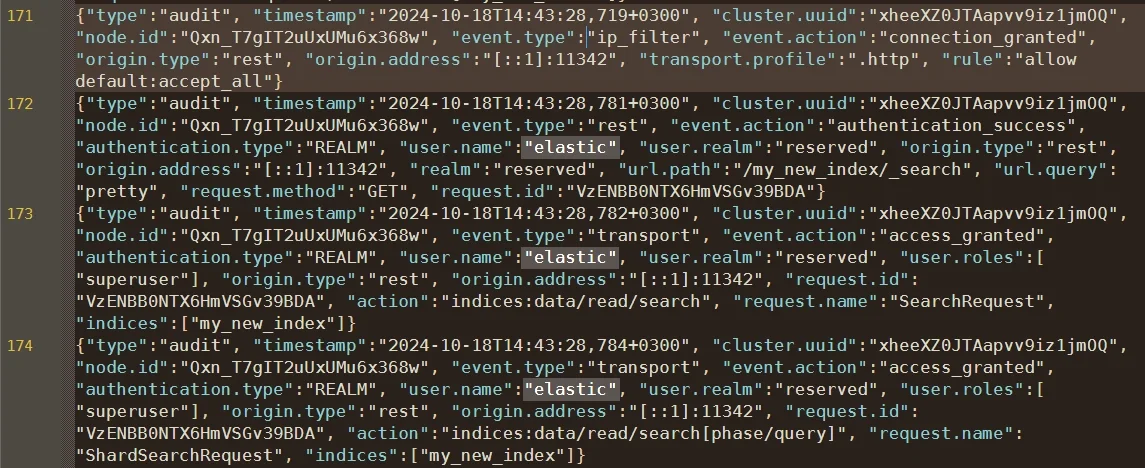
The index output stores audit events in a dedicated internal index (.security_audit_log-*), while logfile outputs them to local log files.
After enabling the feature, restart the Elasticsearch service:
systemctl restart elasticsearch
Once restarted, Elasticsearch will start capturing events such as authentication, role assignment, and index access.
Filtering and Customization
You can refine which events Elasticsearch records by editing include and exclude filters:
xpack.security.audit.logfile.events.exclude: ["run_as_granted", "anonymous_access_denied"]
This reduces noise by omitting less relevant events such as failed anonymous attempts.
Audit indices can also be shipped to the Elastic Stack, Logstash, or Beats for centralized analysis.
In addition, administrators can use more detailed configuration parameters to customize the level of event granularity, such as including only authentication-related actions or specific index operations. For example:
xpack.security.audit.logfile.events.include: ["authentication_success", "access_denied", "access_granted"]
Filtering can also be adjusted per user or realm by defining different logging categories, allowing fine-grained control over what activity is monitored and what is ignored.
Administrators commonly forward these audit indices to centralized monitoring platforms for correlation with Database Activity Monitoring systems or SIEM tools, enabling unified alerting and compliance dashboards.
Using pipelines in Logstash, you can transform raw JSON audit entries into structured fields for advanced visualization in Kibana or third-party analytics systems.
Finally, it’s recommended to enable index lifecycle management (ILM) for audit indices to ensure logs are retained according to organizational retention policies, while automatically deleting outdated data to reduce storage costs and maintain cluster performance.
Extending Elasticsearch Auditing with DataSunrise
DataSunrise complements Elasticsearch’s audit capabilities with centralized management, enhanced security rules, and automated compliance features. It extends monitoring across all data layers—from indices to stored documents—while minimizing manual oversight.
Unified Monitoring and Audit Trails
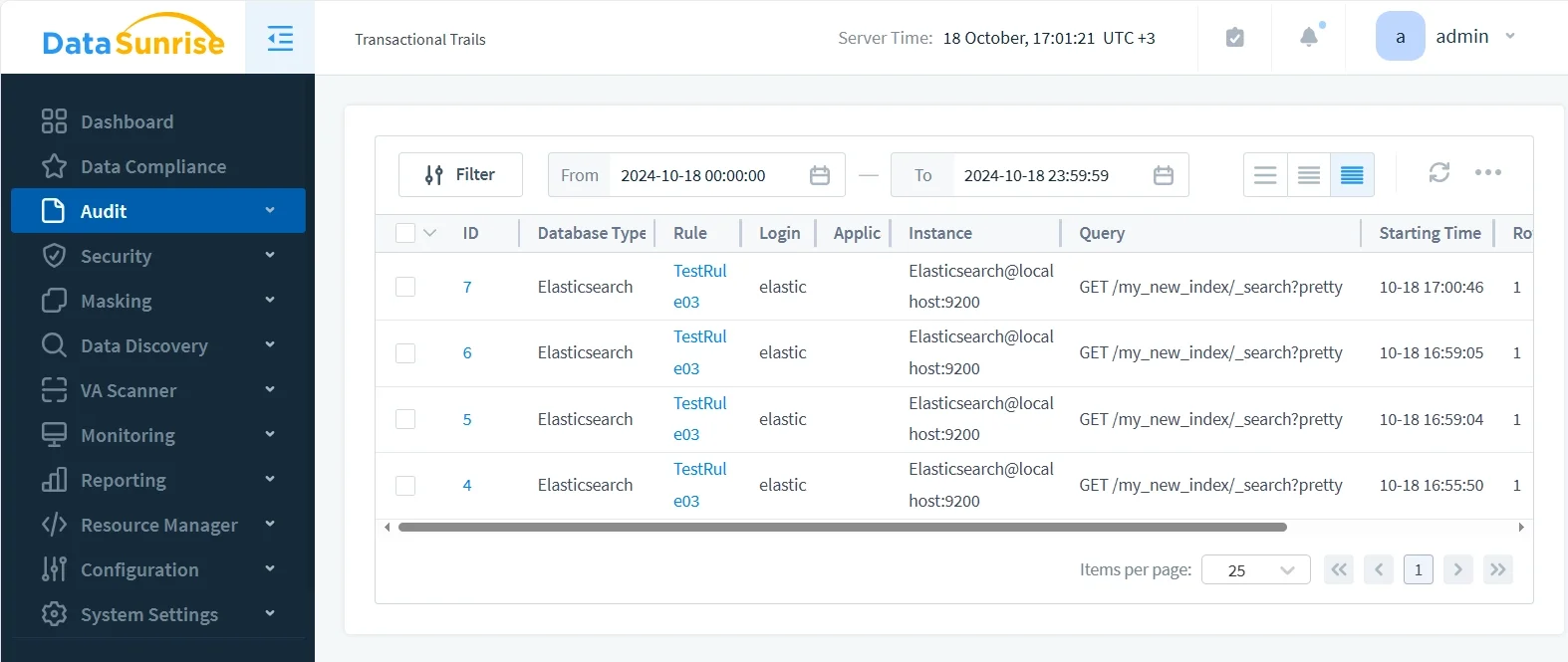
Through its Database Activity Monitoring engine, DataSunrise collects Elasticsearch events in real time. Administrators can filter activity by user, IP, or query type, and correlate Elasticsearch events with other systems such as PostgreSQL, MySQL, or MongoDB.
Granular Audit Rules and Security Policies
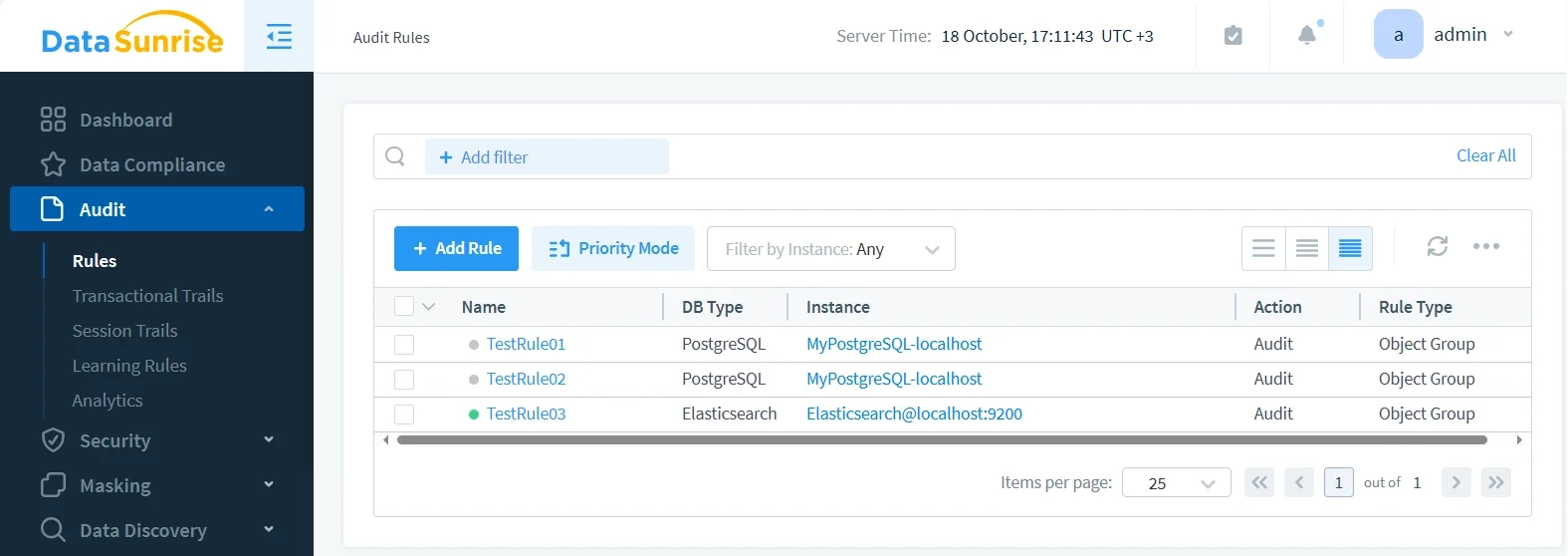
DataSunrise provides granular audit rules that allow administrators to define policies at the index or field level. You can track actions such as document reads, writes, or deletions, and automatically apply data masking for sensitive attributes (like PII or PHI).
Rules can trigger alerts, block suspicious queries, or mask sensitive output dynamically.
Real-Time Threat Detection
Using behavior analytics, DataSunrise identifies anomalies such as unexpected query volumes, unusual IP sources, or mass exports. Suspicious events trigger real-time notifications through Slack or SIEM connectors, ensuring prompt response.
- Detects brute-force login attempts or credential misuse across Elasticsearch nodes.
- Monitors high-frequency or out-of-pattern search queries that may indicate data scraping or reconnaissance.
- Flags large-scale exports or deletions that could signal data exfiltration or insider threats.
- Provides correlation between source IPs, access times, and query context to identify suspicious behavior chains.
By combining event correlation with user profiling, DataSunrise ensures early detection and contextual analysis of abnormal activities before they escalate into breaches.
Automated Compliance Reporting
With the Compliance Manager, organizations can generate reports aligned with GDPR, HIPAA, SOX, and PCI DSS standards. These reports include full audit trails, configuration evidence, and alerts—providing proof of compliance for auditors.
- Automatically maps Elasticsearch audit data to regulatory control requirements for each framework.
- Generates detailed, auditor-ready summaries highlighting access attempts, policy enforcement, and anomalies.
- Schedules recurring compliance scans with automatic evidence collection and report generation.
- Integrates with DataSunrise Compliance Manager dashboards to streamline enterprise compliance documentation.
These automation capabilities reduce the burden of manual audit preparation and ensure that all Elasticsearch activity remains verifiable under regulatory review.
Business Impact
Adopting DataSunrise for Elasticsearch auditing delivers measurable benefits:
| Benefit | Description |
|---|---|
| Reduced Compliance Overhead | Automated reporting and rule enforcement minimize manual review time. |
| Enhanced Data Security | Fine-grained control over index access and query auditing strengthens protection. |
| Regulatory Confidence | Demonstrate ongoing adherence to GDPR, HIPAA, and PCI DSS requirements. |
| Operational Efficiency | Centralized dashboard reduces multi-cluster complexity. |
| Faster Investigations | Unified logs accelerate root cause analysis and incident response. |
Conclusion
Elasticsearch’s built-in audit tools provide valuable visibility but lack the advanced control and scalability needed for enterprise-grade compliance.
By integrating DataSunrise, organizations can automate audit rule enforcement, secure sensitive data, and maintain continuous compliance posture across distributed environments.
For further reading, explore related topics such as Audit Logs, Audit Trails, Database Security, and Data Protection.
Protect Your Data with DataSunrise
Secure your data across every layer with DataSunrise. Detect threats in real time with Activity Monitoring, Data Masking, and Database Firewall. Enforce Data Compliance, discover sensitive data, and protect workloads across 50+ supported cloud, on-prem, and AI system data source integrations.
Start protecting your critical data today
Request a Demo Download Now