Applying Data Governance for Amazon DocumentDB
Organizations increasingly rely on Amazon DocumentDB to store customer records, financial transactions, healthcare information, application metadata, and other business-critical data. As these environments grow, maintaining consistent governance becomes just as important as securing the infrastructure itself. Effective data governance helps organizations understand where sensitive information resides, control who can access it, monitor database activity, and demonstrate compliance with internal policies and external regulations. Organizations implementing governance strategies should also consider broader data management practices and comprehensive data compliance regulations that influence governance requirements.
Amazon DocumentDB includes numerous AWS services that support governance initiatives. Features such as AWS Identity and Access Management (IAM), Amazon VPC, AWS Key Management Service (KMS), AWS CloudTrail, Amazon CloudWatch, automated backups, and resource tagging help organizations establish secure operational controls while improving visibility across their database infrastructure. AWS also provides detailed guidance for Amazon DocumentDB security and operational best practices that can strengthen governance implementations.
However, modern governance extends beyond infrastructure configuration. Organizations must continuously discover regulated information, classify sensitive data, enforce consistent policies, detect unusual database activity, automate compliance workflows, and maintain centralized oversight across cloud, hybrid, and heterogeneous environments. Manual governance processes quickly become difficult to maintain as data volumes and regulatory requirements continue to expand.
This guide explains how to apply data governance for Amazon DocumentDB using both native AWS capabilities and DataSunrise's autonomous governance platform. You'll learn how to build an efficient governance framework that improves visibility, simplifies compliance, strengthens security, and reduces administrative overhead.
What is Amazon DocumentDB Data Governance?
Amazon DocumentDB data governance is the collection of policies, processes, technologies, and operational controls used to manage data throughout its lifecycle. The objective is not only to protect information from unauthorized access, but also to ensure that data remains accurate, discoverable, compliant, and consistently managed across the organization. Effective governance also relies on strong data security practices and continuous database activity monitoring to maintain visibility over sensitive information.
A comprehensive governance strategy typically addresses several core areas:
- Data classification and ownership
- Identity and access management
- Encryption and key management
- Database activity monitoring
- Audit logging and reporting
- Sensitive data discovery
- Regulatory compliance
- Data retention and recovery
- Policy enforcement
- Continuous risk assessment
For Amazon DocumentDB deployments, governance involves multiple AWS services working together rather than a single built-in governance feature. IAM controls administrative permissions, KMS protects encrypted data, CloudTrail records API activity, CloudWatch provides operational monitoring, and AWS Config helps identify configuration drift. Together, these services establish a strong governance foundation while supporting broader access control strategies across enterprise environments.
Despite these capabilities, native AWS services generally operate independently. Organizations often need additional automation to unify governance processes, automatically identify sensitive information, generate governance policies, and continuously evaluate compliance across multiple databases and environments. Platforms that combine Sensitive Data Discovery with centralized governance can significantly reduce manual administration while improving consistency across cloud, hybrid, and heterogeneous infrastructures.
Native Methods to Apply Data Governance for Amazon DocumentDB
Amazon DocumentDB relies on a collection of AWS services rather than a dedicated governance platform. Together, these services provide the building blocks needed to secure infrastructure, manage administrative access, monitor activity, and protect stored information. While each service addresses a different aspect of governance, organizations typically combine several of them to create a comprehensive governance strategy.
Identity and Access Management (IAM)
Governance begins with controlling who can manage database resources. AWS Identity and Access Management (IAM) enables administrators to define granular permissions using policies, roles, and temporary credentials. Organizations can apply the principle of least privilege by granting users only the permissions required for their responsibilities.
IAM policies can also separate administrative and operational roles, integrate with enterprise identity providers, replace long-lived access keys with temporary credentials, and restrict API operations according to job functions. For example, administrators may allow DevOps teams to inspect clusters while preventing them from modifying encryption settings or deleting production environments.
The following policy grants read-only access to Amazon DocumentDB cluster and instance information:
{
  "Version": "2012-10-17",
  "Statement": [
    {
      "Sid": "DocumentDBReadOnlyAccess",
      "Effect": "Allow",
      "Action": [
        "docdb:DescribeDBClusters",
        "docdb:DescribeDBInstances",
        "docdb:DescribeDBClusterSnapshots"
      ],
      "Resource": "*"
    }
  ]
}
Amazon DocumentDB supports IAM policies for controlling management-plane operations. However, administrators should verify whether individual actions support resource-level permissions before restricting them to specific Amazon Resource Names.
Virtual Private Cloud (Amazon VPC)
Amazon DocumentDB clusters operate within an Amazon Virtual Private Cloud (VPC), allowing organizations to isolate database resources from the public internet. Governance controls typically include private subnets, Security Groups, Network Access Control Lists, VPN or AWS Direct Connect connectivity, and bastion hosts for administrative access.
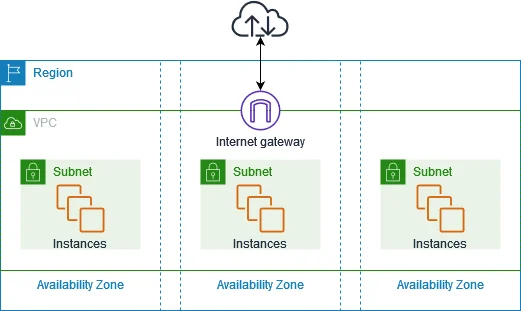
These network controls help ensure that only approved users and applications can communicate with database resources. Amazon DocumentDB uses port 27017 by default, although organizations can select another port during configuration.
The following AWS CLI command creates a dedicated security group:
aws ec2 create-security-group \
  --group-name documentdb-production-sg \
  --description "Security group for the production Amazon DocumentDB cluster" \
  --vpc-id vpc-0123456789abcdef0
Administrators can then permit connections from an application security group rather than exposing the database to an entire IP range:
aws ec2 authorize-security-group-ingress \
  --group-id sg-0123456789abcdef0 \
  --protocol tcp \
  --port 27017 \
  --source-group sg-0fedcba9876543210
Using another Security Group as the source limits access to workloads associated with that group. This approach provides stronger governance than allowing unrestricted access from 0.0.0.0/0.
AWS Key Management Service (KMS)
Protecting stored information is a fundamental component of data governance. Amazon DocumentDB supports encryption at rest through AWS Key Management Service (KMS), enabling organizations to safeguard database storage, backups, and snapshots without modifying applications.
Administrators can choose between AWS-managed and customer-managed KMS keys. Customer-managed keys provide greater control over permissions, rotation, lifecycle management, and auditing.
The following command creates a customer-managed KMS key:
aws kms create-key \
  --description "KMS key for Amazon DocumentDB governance" \
  --key-usage ENCRYPT_DECRYPT \
  --origin AWS_KMS
After creating the key, administrators can assign a recognizable alias:
aws kms create-alias \
  --alias-name alias/documentdb-governance \
  --target-key-id 12345678-1234-1234-1234-123456789012
The key can then be selected when creating an encrypted cluster:
aws docdb create-db-cluster \
  --db-cluster-identifier governed-documentdb-cluster \
  --engine docdb \
  --master-username docdbadmin \
  --manage-master-user-password \
  --storage-encrypted \
  --kms-key-id alias/documentdb-governance
Encryption status should be validated periodically rather than assumed indefinitely. AWS Config provides the DOCDB_CLUSTER_ENCRYPTED managed rule, which marks clusters as noncompliant when storage encryption is disabled.
TLS Encryption in Transit
Amazon DocumentDB also protects data while it travels across the network by supporting Transport Layer Security. Clients authenticate the database server before establishing encrypted sessions, helping prevent eavesdropping, interception, and man-in-the-middle attacks.
TLS is enabled by default for Amazon DocumentDB clusters. Applications should use the current AWS certificate bundle and validate the server certificate when connecting.
The certificate bundle can be downloaded with the following command:
wget https://truststore.pki.rds.amazonaws.com/global/global-bundle.pem
A typical MongoDB Shell connection can be configured as follows:
mongosh \
  "mongodb://docdbadmin@cluster-name.cluster-abcdefghijkl.us-east-1.docdb.amazonaws.com:27017/?tls=true&replicaSet=rs0&readPreference=secondaryPreferred&retryWrites=false" \
  --tlsCAFile global-bundle.pem \
  --password
Applications can use an equivalent connection string:
mongodb://username:password@cluster-name.cluster-abcdefghijkl.us-east-1.docdb.amazonaws.com:27017/?tls=true&replicaSet=rs0&readPreference=secondaryPreferred&retryWrites=false
Credentials should not be embedded directly in production source code. Organizations should retrieve them from a controlled secrets-management system or use another approved credential mechanism.
AWS CloudTrail
Effective governance requires visibility into administrative actions. AWS CloudTrail records API calls performed against Amazon DocumentDB resources, creating a history of management-plane operations.
Recorded events may include cluster creation and deletion, snapshot operations, parameter group changes, and other actions performed through the AWS Management Console, AWS CLI, or AWS SDKs. CloudTrail captures Amazon DocumentDB API activity automatically, although organizations must configure trails and storage policies when they require long-term centralized retention.
The following command retrieves recent Amazon DocumentDB management events:
aws cloudtrail lookup-events \
  --lookup-attributes \
    AttributeKey=EventSource,AttributeValue=rds.amazonaws.com \
  --max-results 50
Results can be narrowed to a specific management operation:
aws cloudtrail lookup-events \
  --lookup-attributes \
    AttributeKey=EventName,AttributeValue=CreateDBClusterSnapshot \
  --max-results 20
CloudTrail should not be confused with Amazon DocumentDB database auditing. CloudTrail records operations against AWS resources, while DocumentDB audit logging captures supported database events such as authentication and data definition activity.
Amazon CloudWatch
Amazon CloudWatch provides continuous operational monitoring for Amazon DocumentDB clusters. Administrators can track metrics such as CPU utilization, memory availability, storage usage, database connections, read and write throughput, replica lag, and backup-related conditions.
Amazon DocumentDB publishes operational metrics to the AWS/DocDB CloudWatch namespace. These metrics can be reviewed through the AWS console, AWS CLI, CloudWatch API, or monitoring integrations.
The following command retrieves average CPU utilization for a DocumentDB instance:
aws cloudwatch get-metric-statistics \
  --namespace AWS/DocDB \
  --metric-name CPUUtilization \
  --dimensions Name=DBInstanceIdentifier,Value=my-docdb-instance \
  --statistics Average \
  --period 300 \
  --start-time 2026-07-15T00:00:00Z \
  --end-time 2026-07-16T00:00:00Z
Administrators can create an alarm when CPU utilization exceeds a defined threshold:
aws cloudwatch put-metric-alarm \
  --alarm-name documentdb-high-cpu \
  --alarm-description "Amazon DocumentDB CPU utilization exceeds 80 percent" \
  --namespace AWS/DocDB \
  --metric-name CPUUtilization \
  --dimensions Name=DBInstanceIdentifier,Value=my-docdb-instance \
  --statistic Average \
  --period 300 \
  --evaluation-periods 3 \
  --threshold 80 \
  --comparison-operator GreaterThanThreshold
CloudWatch alarms help teams identify performance or availability risks before they affect production workloads. However, operational metrics do not replace detailed database activity monitoring or sensitive data governance.
AWS Config
AWS Config continuously evaluates infrastructure configurations against defined governance and compliance rules. Organizations can use it to determine whether encryption remains enabled, required tags are present, and approved configurations remain intact.
For example, the following command creates an AWS Config rule that checks whether Amazon DocumentDB clusters use storage encryption:
aws configservice put-config-rule \
  --config-rule '{
    "ConfigRuleName": "documentdb-cluster-encrypted",
    "Description": "Checks whether Amazon DocumentDB clusters use storage encryption",
    "Source": {
      "Owner": "AWS",
      "SourceIdentifier": "DOCDB_CLUSTER_ENCRYPTED"
    }
  }'
The compliance status can then be reviewed with:
aws configservice get-compliance-details-by-config-rule \
  --config-rule-name documentdb-cluster-encrypted \
  --compliance-types NON_COMPLIANT
AWS Config also provides a REQUIRED_TAGS managed rule that checks whether supported resources contain specified governance tags. It can evaluate up to six tag keys.
A tagging rule can be created as follows:
aws configservice put-config-rule \
  --config-rule '{
    "ConfigRuleName": "required-governance-tags",
    "Description": "Checks whether resources contain required governance tags",
    "InputParameters": "{\"tag1Key\":\"Environment\",\"tag2Key\":\"Owner\",\"tag3Key\":\"Compliance\"}",
    "Source": {
      "Owner": "AWS",
      "SourceIdentifier": "REQUIRED_TAGS"
    }
  }'
Configuration history helps administrators determine when changes occurred and whether those changes introduced policy violations or configuration drift.
Automated Backups and Snapshots
Reliable recovery procedures are an essential part of any governance strategy. Amazon DocumentDB supports automated backups, configurable retention periods, point-in-time recovery, and manual cluster snapshots.
Organizations should select retention periods according to recovery objectives, legal requirements, and internal policies. AWS security guidance commonly expects a DocumentDB backup retention period of at least seven days, while Amazon DocumentDB supports retention periods of up to 35 days.
The following command updates the automated backup retention period to seven days:
aws docdb modify-db-cluster \
  --db-cluster-identifier governed-documentdb-cluster \
  --backup-retention-period 7 \
  --preferred-backup-window 02:00-03:00 \
  --apply-immediately
Administrators can create a manual cluster snapshot before major changes:
aws docdb create-db-cluster-snapshot \
  --db-cluster-identifier governed-documentdb-cluster \
  --db-cluster-snapshot-identifier governed-documentdb-snapshot-2026-07-16
Amazon DocumentDB supports creating manual cluster snapshots through both the AWS Management Console and AWS CLI.
Snapshot status can be checked with:
aws docdb describe-db-cluster-snapshots \
  --db-cluster-snapshot-identifier governed-documentdb-snapshot-2026-07-16 \
  --query "DBClusterSnapshots[0].Status" \
  --output text
Available recovery points can also be reviewed directly from the cluster metadata:
aws docdb describe-db-clusters \
  --db-cluster-identifier governed-documentdb-cluster \
  --query "DBClusters[0].{
    BackupRetentionPeriod:BackupRetentionPeriod,
    EarliestRestorableTime:EarliestRestorableTime,
    LatestRestorableTime:LatestRestorableTime
  }"
These controls help organizations meet business continuity objectives, satisfy retention requirements, and simplify disaster recovery planning. Backup configurations and restoration procedures should still be tested regularly. A snapshot that nobody has ever restored is merely optimism wearing an ARN.
Applying Data Governance for Amazon DocumentDB with DataSunrise
While Amazon DocumentDB provides strong infrastructure governance through AWS services, enterprise governance requires continuous visibility into sensitive information, automated policy enforcement, centralized monitoring, and ongoing regulatory alignment. DataSunrise extends Amazon DocumentDB with autonomous governance capabilities that reduce manual administration while improving security and compliance across the entire data lifecycle.
Unlike solutions that require administrators to configure and maintain separate governance controls manually, DataSunrise delivers Zero-Touch Data Governance that continuously discovers sensitive information, generates governance policies, monitors database activity, and maintains compliance across Amazon DocumentDB and heterogeneous environments.
The following workflow illustrates a typical governance implementation.
Step 1. Connect Your Amazon DocumentDB Cluster
Begin by connecting your Amazon DocumentDB instance to DataSunrise. The platform supports flexible deployment through Proxy, Native Log, and Sniffer modes, allowing organizations to introduce governance controls without modifying existing applications.
After the connection is established, DataSunrise begins collecting the metadata required for governance operations. This enables the platform to analyze database structures, monitor activity, and prepare the environment for discovery, auditing, masking, and compliance automation.
Step 2. Automatically Discover Sensitive Data
One of the first governance tasks is identifying where regulated information resides. Manual inspection of collections is slow, inconsistent, and difficult to maintain as databases evolve.
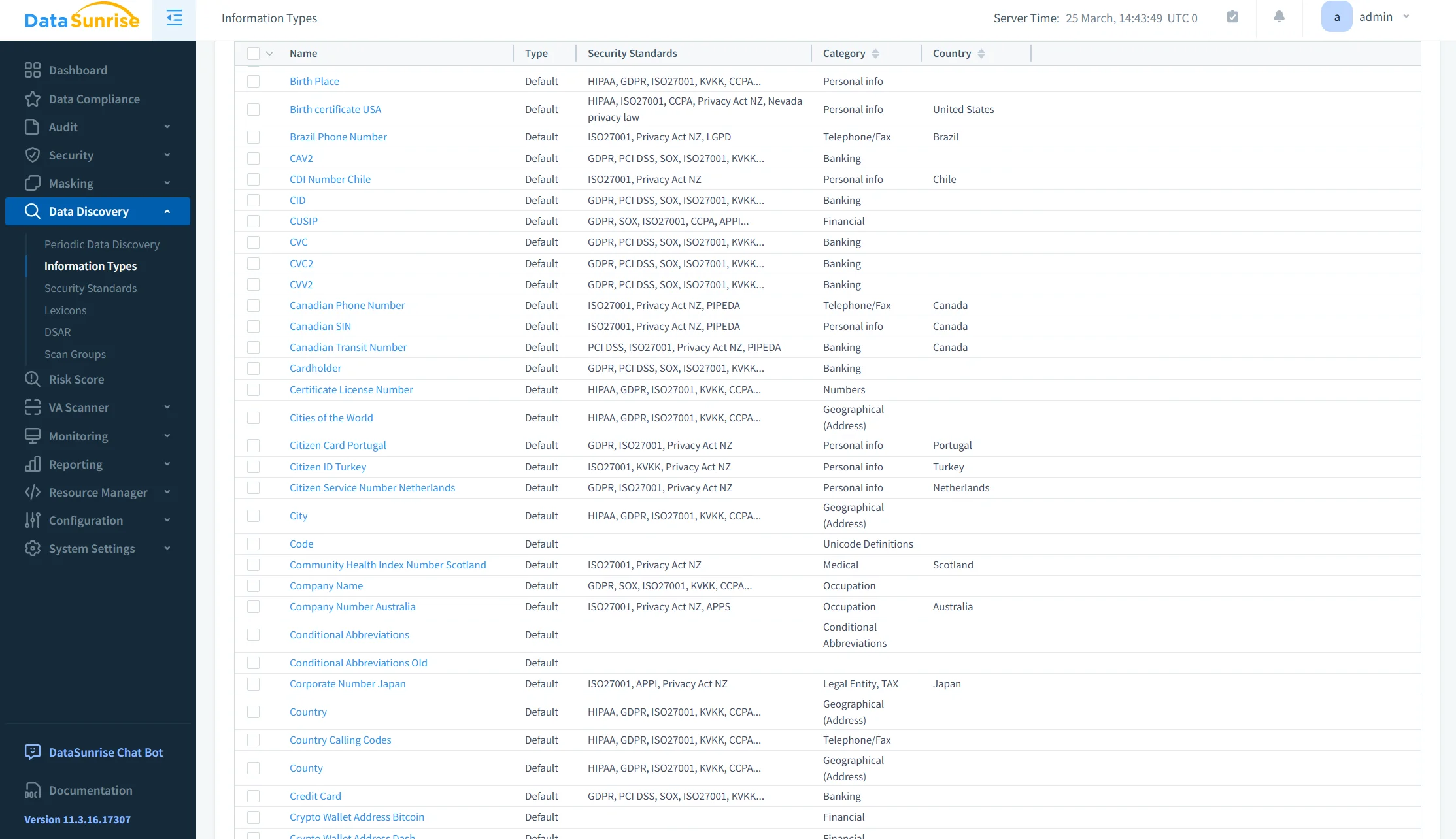
DataSunrise performs Sensitive Data Discovery across Amazon DocumentDB databases and automatically identifies personally identifiable information, protected health information, financial records, payment card data, customer identifiers, and custom business-sensitive fields.
Discovery policies can also classify information according to regulations and standards such as GDPR, HIPAA, PCI DSS, SOX, CCPA, ISO 27001, SOC 2, and NIST. This provides organizations with a structured inventory of regulated data and improves visibility into where sensitive information is stored.
Step 3. Generate Governance Policies Automatically
Once sensitive information has been identified, DataSunrise can generate governance policies automatically. This removes the need for administrators to create and maintain dozens of individual rules manually.
Automatic Policy Generation creates controls based on discovered sensitive data, applies consistent policies across multiple databases, defines access restrictions, configures auditing, creates masking policies, and standardizes governance across environments.
This approach reduces deployment time, minimizes configuration errors, and helps ensure that newly discovered sensitive information receives appropriate protection without lengthy manual rule design.
Step 4. Enable Compliance Autopilot
Modern regulations change continuously, making manual governance maintenance increasingly difficult. Policies that were valid during the initial deployment may become outdated as legal requirements, internal standards, and data environments evolve.
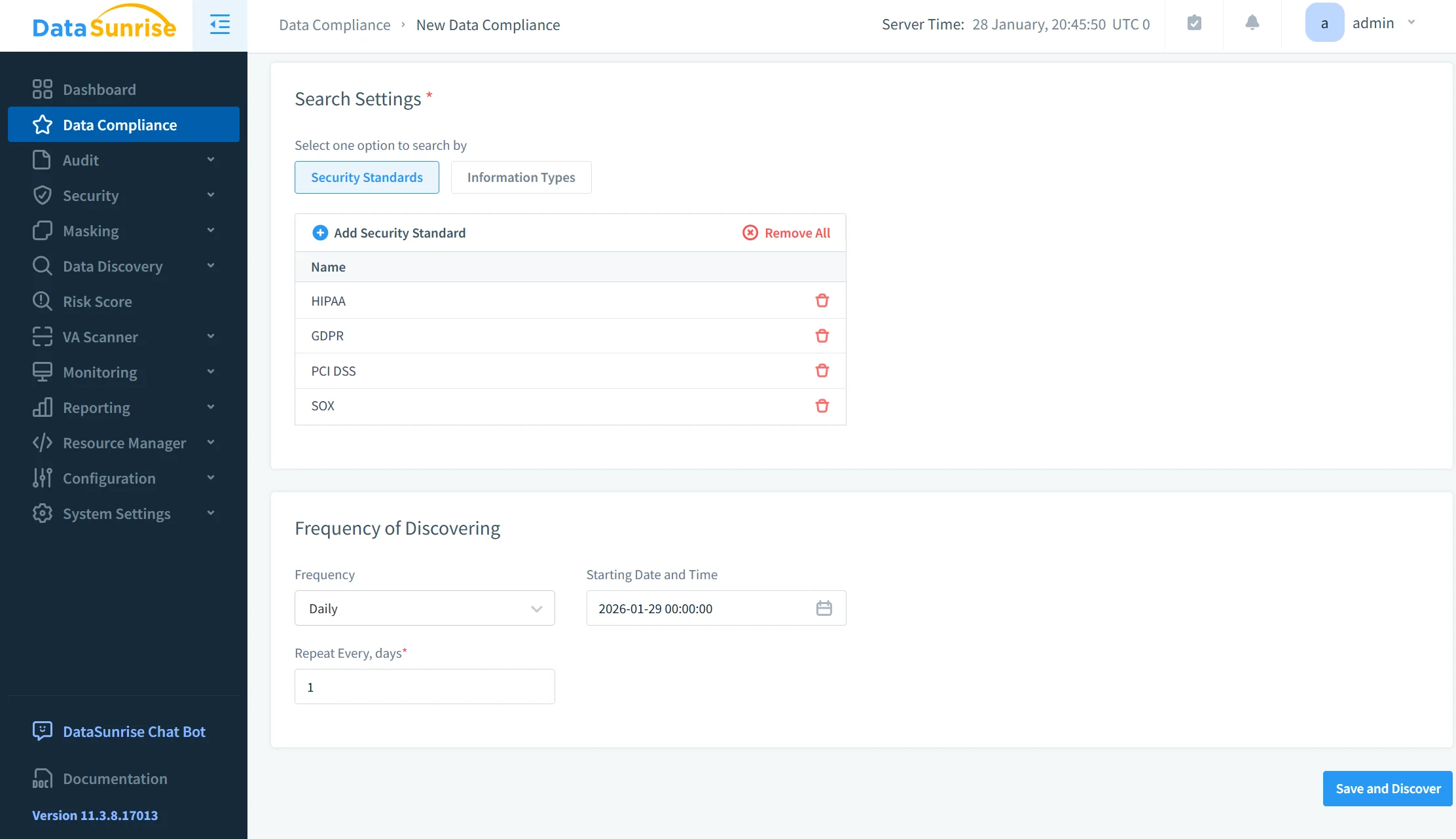
DataSunrise Compliance Autopilot continuously aligns governance policies with frameworks such as GDPR, HIPAA, PCI DSS, SOX, CCPA, ISO 27001, SOC 2, and NIST.
Instead of reviewing hundreds of settings manually, administrators receive continuously updated recommendations and policy adjustments. This helps reduce compliance gaps, improve regulatory readiness, and lower the administrative effort required to maintain governance controls.
Step 5. Monitor Database Activity Continuously
Governance requires visibility into how data is actually accessed and used. Infrastructure logs may show that an API action occurred, but they do not always provide detailed insight into database-level behavior.
DataSunrise provides centralized Database Activity Monitoring that captures database logins, query execution, read operations, updates, deletes, administrative commands, privilege changes, and failed access attempts.
This database-level visibility allows administrators to understand who accessed sensitive information, what operations were performed, when the activity occurred, and whether the behavior matched established policies.
Administrators can search, filter, and investigate recorded events through a centralized dashboard, improving incident response and compliance analysis.
Step 6. Protect Sensitive Information with Dynamic Masking
Governance is not limited to identifying sensitive information. Organizations must also control how that information is displayed to different users and applications.
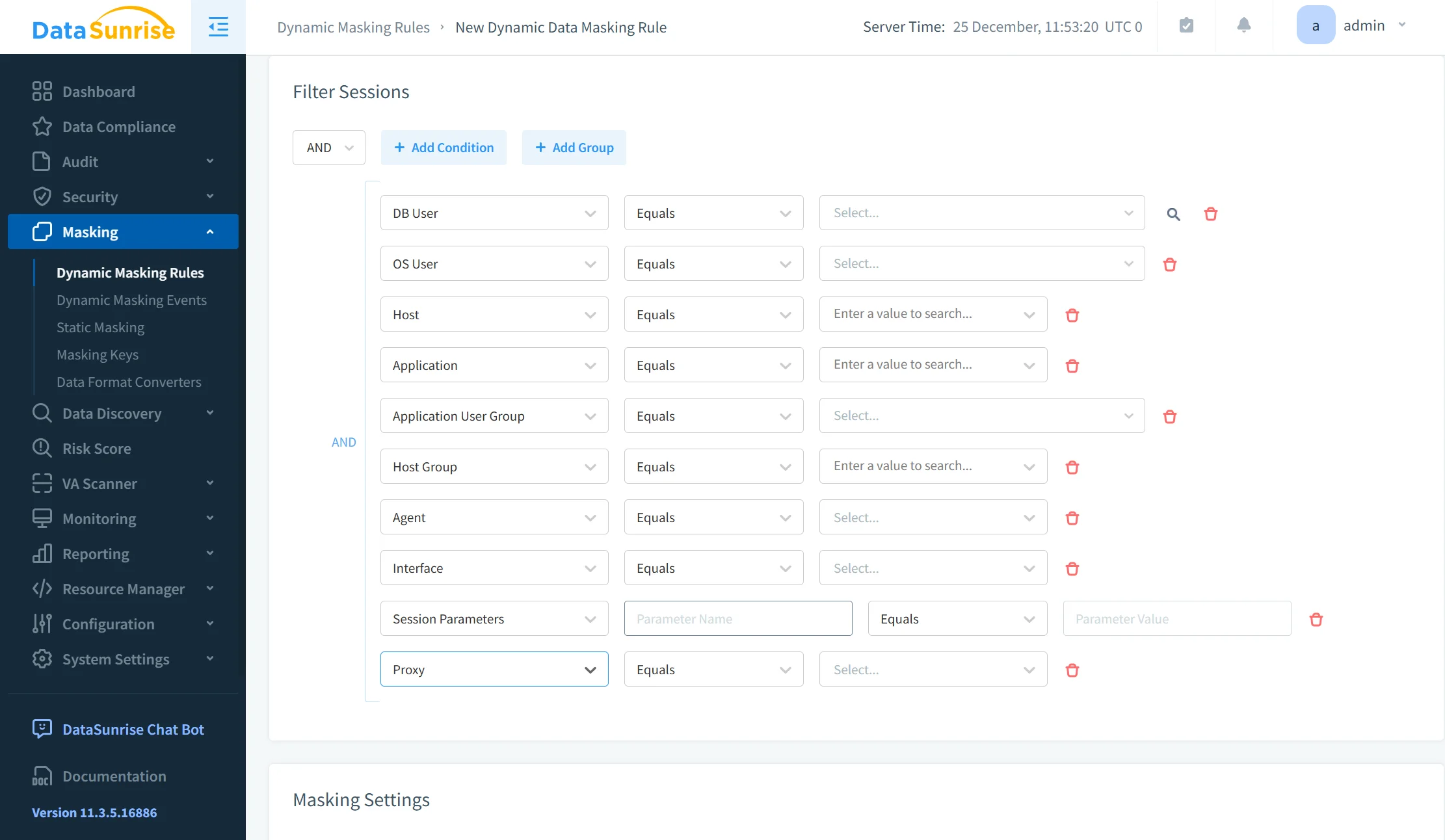
DataSunrise Dynamic Data Masking obscures sensitive values according to governance policies. The platform can mask customer names, email addresses, credit card numbers, national identifiers, healthcare information, and financial records.
Authorized users continue working with the original data, while unauthorized or lower-privileged users see masked values. Policies are enforced transparently without changing the underlying database contents or requiring application code modifications.
This enables organizations to reduce exposure while preserving normal business workflows.
Step 7. Continuously Detect Governance Risks
Governance controls must adapt as users, applications, and access patterns change. Static rules alone may fail to identify behavior that is technically permitted but operationally suspicious.
DataSunrise evaluates database activity using Machine Learning Audit Rules and User Behavior Analytics. These capabilities identify unusual query volume, privilege misuse, large data exports, access outside normal business hours, unexpected administrative operations, and potential insider threat indicators.
By comparing current behavior with established usage patterns, the platform can surface governance risks before they develop into security incidents or regulatory violations.
Step 8. Generate Audit-Ready Governance Reports
Preparing evidence for audits often requires extensive manual work. Security and compliance teams must collect logs, review access history, document policy violations, and demonstrate that governance controls remain effective.
DataSunrise automates this process by generating governance reports that include database activity history, sensitive data inventories, policy violations, compliance status, administrative actions, access records, security events, and governance summaries.
These reports can be exported for auditors, internal reviews, management assessments, and regulatory inspections. Automated reporting reduces documentation effort, improves consistency, and helps organizations respond more quickly to audit requests.
Business Benefits of DataSunrise for Amazon DocumentDB Data Governance
| Benefit | Business Impact |
|---|---|
| Zero-Touch Data Governance | Reduces manual governance work through automation |
| Sensitive Data Discovery | Identifies regulated data across DocumentDB collections |
| Compliance Autopilot | Keeps policies aligned with changing requirements |
| Automatic Policy Generation | Removes repetitive manual rule creation |
| Continuous Regulatory Calibration | Updates controls as compliance demands evolve |
| Machine Learning Audit Rules | Detects unusual database behavior |
| Centralized Activity Monitoring | Provides unified visibility across databases |
| Dynamic Data Masking | Protects sensitive data without application changes |
| Unified Policy Management | Standardizes governance across mixed environments |
| Audit-Ready Reporting | Speeds up evidence collection and audit preparation |
Conclusion
Amazon DocumentDB provides a strong foundation for data governance through AWS IAM, Amazon VPC, AWS KMS encryption, TLS, CloudTrail, CloudWatch, AWS Config, automated backups, and resource tagging. These services help organizations secure infrastructure, control administrative access, monitor operational activity, and establish essential governance controls.
However, enterprise data governance extends well beyond infrastructure management. Organizations must continuously discover sensitive information, classify regulated data, automate governance policies, monitor database activity, detect abnormal behavior, maintain regulatory alignment, and generate audit-ready reports across multiple environments.
DataSunrise enhances Amazon DocumentDB data governance through Zero-Touch Data Governance, Sensitive Data Discovery, Compliance Manager, Automatic Policy Generation, Continuous Regulatory Calibration, Machine Learning Audit Rules, Dynamic Data Masking, centralized Database Activity Monitoring, and unified policy management. These capabilities significantly reduce manual governance effort while improving visibility, compliance readiness, and security across cloud, hybrid, and heterogeneous infrastructures.
The result is a comprehensive governance framework that strengthens data protection, accelerates compliance initiatives, simplifies audits, and enables organizations to manage Amazon DocumentDB with consistent, enterprise-grade governance.
Protect Your Data with DataSunrise
Secure your data across every layer with DataSunrise. Detect threats in real time with Activity Monitoring, Data Masking, and Database Firewall. Enforce Data Compliance, discover sensitive data, and protect workloads across 50+ supported cloud, on-prem, and AI system data source integrations.
Start protecting your critical data today
Request a Demo Download Now