How to Ensure Compliance for Amazon DocumentDB
Organizations must ensure compliance for Amazon DocumentDB when storing personal, financial, healthcare, or other regulated information. Effective compliance requires more than enabling encryption or retaining occasional logs. It depends on controlled access, continuous database activity monitoring, reliable recovery, and defensible evidence for auditors as part of a comprehensive database security strategy.
Amazon DocumentDB provides native controls through AWS Identity and Access Management, AWS Key Management Service, Amazon CloudWatch, AWS CloudTrail, automated backups, and network isolation. These capabilities create a strong technical foundation for regulatory compliance while strengthening overall database security.
However, AWS follows a shared responsibility model. AWS protects the managed infrastructure, while customers remain responsible for their data, identities, configurations, access policies, and regulatory processes. A compliant AWS service does not automatically make every deployment compliant. That would be wonderfully convenient, but regulators rarely reward wishful architecture. Organizations should also follow the Amazon DocumentDB security best practices to reduce operational and compliance risks.
This guide explains how to configure native Amazon DocumentDB controls and extend them with DataSunrise.
Understanding Amazon DocumentDB Compliance
Amazon DocumentDB compliance involves applying technical and organizational controls that protect regulated data throughout its lifecycle. These controls help organizations safeguard sensitive information, maintain accountability, and demonstrate adherence to industry regulations during audits and security assessments. A comprehensive compliance strategy typically includes strong identity and access management, encryption of data at rest and in transit, continuous database activity monitoring, secure backup and recovery procedures, and regular validation of security configurations.
The specific compliance requirements depend on the type of data being processed. Organizations handling personal information may need to comply with GDPR or CCPA, while healthcare providers and their partners often follow HIPAA requirements. Businesses processing payment card data typically align with PCI DSS, and publicly traded companies frequently implement controls that support SOX. In addition, many organizations adopt broader data compliance regulations and security frameworks such as ISO 27001, SOC 2, or the NIST Cybersecurity Framework to establish consistent security and governance practices across their environments.
Amazon DocumentDB provides several native capabilities that help organizations build a compliant database environment. These include AWS Identity and Access Management (IAM) for controlling administrative access, AWS Key Management Service (KMS) for database encryption, Transport Layer Security (TLS) for securing network communications, Amazon CloudWatch Logs for database auditing, AWS CloudTrail for tracking administrative API activity, automated backups, snapshot management, and Virtual Private Cloud (VPC) isolation. While these features provide an essential security foundation, organizations remain responsible for configuring them correctly, monitoring compliance continuously, and maintaining evidence that demonstrates regulatory adherence under AWS's shared responsibility model. Applying the principle of least privilege and regularly reviewing security controls further strengthens an organization's overall compliance posture.
Native Methods to Ensure Compliance for Amazon DocumentDB
1. Classify Sensitive Information
The first step toward ensuring compliance is understanding what data is stored within Amazon DocumentDB and identifying which information is subject to regulatory protection. Organizations should maintain an up-to-date inventory of personal, financial, healthcare, or other sensitive information stored across databases and collections. This inventory should include data owners, authorized users and applications, retention requirements, geographic residency restrictions, and the regulatory frameworks that apply to each dataset.
Although Amazon DocumentDB does not provide native regulatory data classification, administrators can inspect collection structures and sample documents through MongoDB-compatible tools. The following MongoDB Shell commands list available databases and collections:
show dbs

use customer_records

show collections
Administrators can also review a limited sample of documents to identify fields that may contain regulated information:
db.customers.find(
  {},
  {
    full_name: 1,
    email: 1,
    phone: 1,
    payment_reference: 1,
    medical_record_id: 1
  }
).limit(10)
Because Amazon DocumentDB does not automatically classify sensitive information according to an organization's compliance requirements, businesses typically rely on application metadata, resource tagging, governance processes, or external data discovery solutions to maintain visibility into regulated data. During this assessment, organizations should also apply data minimization principles by removing obsolete records, duplicate datasets, unnecessary personal information, and outdated test data to reduce compliance risk and simplify ongoing governance.
2. Enable Encryption at Rest
Encryption at rest is one of the fundamental security controls for protecting regulated information stored in Amazon DocumentDB. The service supports storage encryption through AWS Key Management Service (AWS KMS), protecting database storage, indexes, automated backups, snapshots, and replicas associated with encrypted clusters.
The following AWS CLI command creates an encrypted Amazon DocumentDB cluster using a customer-managed KMS key:
aws docdb create-db-cluster \
  --db-cluster-identifier compliance-docdb \
  --engine docdb \
  --master-username compliance_admin \
  --master-user-password 'ReplaceWithSecurePassword' \
  --storage-encrypted \
  --kms-key-id arn:aws:kms:us-east-1:123456789012:key/example-key-id
Administrators can verify the encryption configuration of an existing cluster with the following command:
aws docdb describe-db-clusters \
  --db-cluster-identifier compliance-docdb \
  --query "DBClusters[0].{Encrypted:StorageEncrypted,KmsKeyId:KmsKeyId}"
Since encryption settings are defined when a cluster is created, existing unencrypted clusters generally require migration to newly encrypted environments rather than enabling encryption afterward.
Organizations subject to regulatory requirements should consider using customer-managed KMS keys to maintain greater control over key rotation, lifecycle management, permissions, and auditing. Security teams should also restrict administrative access to encryption keys, separate database administration from key administration responsibilities, periodically review KMS key policies, enable automatic key rotation where appropriate, and record all key management activities through AWS CloudTrail.
Automatic key rotation can be enabled with the following command:
aws kms enable-key-rotation \
  --key-id arn:aws:kms:us-east-1:123456789012:key/example-key-id
3. Require TLS for Data in Transit
Protecting information while it travels between applications and Amazon DocumentDB is equally important. Amazon DocumentDB supports Transport Layer Security (TLS), which encrypts network communications and helps prevent interception of sensitive information during transmission. Although new DocumentDB clusters typically enable TLS by default, administrators should periodically verify that secure connections remain enforced through the cluster parameter group.
A secure MongoDB Shell connection can be established with TLS certificate validation:
mongosh "mongodb://app_user:password@cluster-endpoint:27017/appdb\
?tls=true\
&replicaSet=rs0\
&readPreference=secondaryPreferred\
&retryWrites=false" \
  --tlsCAFile global-bundle.pem
Administrators can review the TLS parameter configured for a DocumentDB cluster parameter group:
aws docdb describe-db-cluster-parameters \
  --db-cluster-parameter-group-name compliance-docdb-parameters \
  --query "Parameters[?ParameterName=='tls']"
Applications should validate the AWS certificate authority bundle instead of simply enabling encrypted connections without certificate verification. Compliance teams should regularly confirm that supported TLS versions are in use, certificates remain current, plaintext connections are rejected, and authentication credentials are not embedded directly within scripts, configuration files, or source code repositories.
Services such as AWS Secrets Manager can further improve compliance by securely storing and rotating database credentials. The following command creates a secret containing DocumentDB credentials:
aws secretsmanager create-secret \
  --name documentdb/compliance-app \
  --secret-string \
  '{"username":"app_user","password":"ReplaceWithSecurePassword"}'
4. Apply Least-Privilege Access
Access management plays a central role in regulatory compliance. Amazon DocumentDB separates access controls into AWS Identity and Access Management (IAM) for administrative operations and database role-based access control for actions performed within individual databases.
Administrative IAM policies should grant only the permissions required for specific operational responsibilities while avoiding broad wildcard permissions whenever possible. The following example IAM policy allows a user to view DocumentDB cluster information without granting modification privileges:
{
  "Version": "2012-10-17",
  "Statement": [
    {
      "Effect": "Allow",
      "Action": [
        "rds:DescribeDBClusters",
        "rds:DescribeDBInstances",
        "rds:DescribeDBClusterParameterGroups",
        "rds:DescribeDBClusterParameters"
      ],
      "Resource": "*"
    }
  ]
}
Inside the database, organizations should create dedicated accounts for administrators, applications, analysts, and monitoring services instead of sharing credentials across multiple users or systems.
The following example creates a read-only compliance account:
use customer_records

db.createUser({
  user: "compliance_reader",
  pwd: passwordPrompt(),
  roles: [
    {
      role: "read",
      db: "customer_records"
    }
  ]
})
A business application that requires write access should receive a separate account:
use customer_records

db.createUser({
  user: "customer_service_app",
  pwd: passwordPrompt(),
  roles: [
    {
      role: "readWrite",
      db: "customer_records"
    }
  ]
})
Administrators can review existing database users with the following command:
use customer_records

db.getUsers()
Regular reviews should identify inactive accounts, excessive privileges, inherited permissions, and unused administrative roles. These reviews become particularly important after personnel changes, application migrations, organizational restructuring, or security incidents.
5. Enable Native Amazon DocumentDB Audit Logging
Database auditing provides the visibility necessary to demonstrate compliance and investigate security incidents. Amazon DocumentDB supports native audit logging that captures authentication events, authorization failures, user management operations, Data Definition Language commands, and Data Manipulation Language read and write operations.
First, configure the cluster parameter group to enable audit logging:
aws docdb modify-db-cluster-parameter-group \
  --db-cluster-parameter-group-name compliance-docdb-parameters \
  --parameters \
  "ParameterName=audit_logs,ParameterValue=all,ApplyMethod=immediate"
Next, enable the export of audit records to Amazon CloudWatch Logs:
aws docdb modify-db-cluster \
  --db-cluster-identifier compliance-docdb \
  --cloudwatch-logs-export-configuration \
  '{"EnableLogTypes":["audit"]}' \
  --apply-immediately
Administrators can verify that audit log exports are enabled:
aws docdb describe-db-clusters \
  --db-cluster-identifier compliance-docdb \
  --query "DBClusters[0].EnabledCloudwatchLogsExports"
Audit logs are exported to CloudWatch Logs in JSON format for searching, filtering, archiving, and integration with monitoring platforms. The following AWS CLI command lists DocumentDB log groups:
aws logs describe-log-groups \
  --log-group-name-prefix "/aws/docdb/"
Organizations should establish audit retention policies that satisfy both regulatory and internal governance requirements while protecting log integrity through restrictive access controls or centralized archival accounts.
A retention policy can be configured with the following command:
aws logs put-retention-policy \
  --log-group-name "/aws/docdb/compliance-docdb/audit" \
  --retention-in-days 365
Effective compliance monitoring should also include automated alerts for repeated authentication failures, privilege modifications, unusually large data retrieval operations, unexpected write activity, and database access occurring outside approved maintenance or business windows.
6. Use CloudTrail for Administrative Activity
While Amazon DocumentDB audit logs capture activity occurring inside the database, AWS CloudTrail records administrative API operations performed against AWS resources. These two logging systems complement one another and together provide a complete picture of database administration and user activity.
The following command creates a CloudTrail trail that delivers events to an Amazon S3 bucket:
aws cloudtrail create-trail \
  --name documentdb-compliance-trail \
  --s3-bucket-name company-compliance-cloudtrail-logs
Logging can then be enabled for the trail:
aws cloudtrail start-logging \
  --name documentdb-compliance-trail
Administrators can verify the current logging status:
aws cloudtrail get-trail-status \
  --name documentdb-compliance-trail
CloudTrail records operations such as cluster creation and deletion, parameter group modifications, snapshot management, security configuration changes, IAM policy updates, audit log configuration changes, and deletion protection settings.
Recent Amazon DocumentDB management events can be reviewed with the following command:
aws cloudtrail lookup-events \
  --lookup-attributes \
  AttributeKey=EventSource,AttributeValue=rds.amazonaws.com \
  --max-results 50
Organizations should retain CloudTrail logs in protected central accounts, implement alerting for high-risk administrative actions, and periodically review infrastructure changes to ensure that security controls remain aligned with compliance requirements.
7. Maintain Backups and Recovery Controls
Reliable backup and recovery capabilities are essential for both operational resilience and regulatory compliance. Amazon DocumentDB supports automated backups, manual snapshots, and point-in-time recovery, allowing organizations to restore databases following accidental deletion, corruption, or security incidents.
The backup retention period can be configured with the following AWS CLI command:
aws docdb modify-db-cluster \
  --db-cluster-identifier compliance-docdb \
  --backup-retention-period 35 \
  --preferred-backup-window "02:00-03:00" \
  --apply-immediately
A manual cluster snapshot can be created before high-risk changes or major deployments:
aws docdb create-db-cluster-snapshot \
  --db-cluster-identifier compliance-docdb \
  --db-cluster-snapshot-identifier compliance-docdb-manual-snapshot
Administrators can review available snapshots with the following command:
aws docdb describe-db-cluster-snapshots \
  --db-cluster-identifier compliance-docdb
A cluster can be restored from a snapshot when recovery is required:
aws docdb restore-db-cluster-from-snapshot \
  --db-cluster-identifier compliance-docdb-restored \
  --snapshot-identifier compliance-docdb-manual-snapshot \
  --engine docdb
Deletion protection should also be enabled for critical production clusters:
aws docdb modify-db-cluster \
  --db-cluster-identifier compliance-docdb \
  --deletion-protection \
  --apply-immediately
Backup retention policies should align with legal obligations, contractual commitments, and organizational recovery objectives. Compliance teams should regularly verify that automated backups remain enabled, retention periods satisfy policy requirements, manual snapshots follow approved lifecycle procedures, cross-account copies are properly secured, restored databases retain encryption settings, and deletion protection remains enabled for production environments.
Recovery testing should also be performed periodically to confirm that backups remain usable during actual recovery scenarios.
8. Continuously Validate Configuration
Compliance is an ongoing process rather than a one-time deployment task. AWS Config continuously evaluates Amazon DocumentDB resources against managed compliance rules, helping organizations detect configuration drift as environments evolve.
For example, administrators can create an AWS Config rule that verifies whether DocumentDB audit logging is enabled:
aws configservice put-config-rule \
  --config-rule '{
    "ConfigRuleName": "documentdb-audit-logging-enabled",
    "Source": {
      "Owner": "AWS",
      "SourceIdentifier": "DOCDB_CLUSTER_AUDIT_LOGGING_ENABLED"
    }
  }'
The compliance status of the rule can then be reviewed:
aws configservice describe-compliance-by-config-rule \
  --config-rule-names documentdb-audit-logging-enabled
AWS Security Hub can be enabled with the following command:
aws securityhub enable-security-hub
Administrators can retrieve Security Hub findings related to Amazon DocumentDB:
aws securityhub get-findings \
  --filters '{
    "ProductFields": [
      {
        "Key": "aws/securityhub/ProductName",
        "Value": "Security Hub",
        "Comparison": "EQUALS"
      }
    ],
    "ResourceType": [
      {
        "Value": "AwsRdsDbCluster",
        "Comparison": "EQUALS"
      }
    ]
  }'
AWS Security Hub complements AWS Config evaluations by continuously assessing controls related to encryption, backup retention, audit logging, TLS enforcement, deletion protection, and network exposure. Together, these services help organizations identify compliance gaps introduced through infrastructure changes, software deployments, or emergency maintenance.
Although passing automated configuration checks provides valuable assurance, organizations should remember that technical compliance checks represent only one component of broader regulatory compliance programs. They should be combined with governance, auditing, documentation, access reviews, incident response procedures, and periodic security assessments.
Automated Amazon DocumentDB Compliance with DataSunrise
Native AWS controls provide an essential foundation for securing Amazon DocumentDB environments. However, organizations managing multiple databases, cloud accounts, and regulatory frameworks often face challenges maintaining consistent policies, collecting audit evidence, and demonstrating continuous compliance. As environments grow, manual compliance processes become increasingly difficult to scale and maintain.
DataSunrise extends Amazon DocumentDB with centralized compliance management, combining Sensitive Data Discovery, Compliance Autopilot, No-Code Policy Automation, automated auditing, dynamic masking, and continuous monitoring within a single platform. This unified approach helps organizations reduce administrative overhead while maintaining consistent security and compliance controls across cloud, on-premises, and hybrid deployments.
1. Connect Amazon DocumentDB
The first step is connecting the Amazon DocumentDB cluster to the DataSunrise platform. After registering the database instance, administrators can immediately begin monitoring activity and applying centralized security policies without modifying existing applications. Flexible deployment modes allow organizations to integrate DataSunrise into cloud-native, on-premises, or hybrid infrastructures while maintaining consistent protection across multiple database platforms.
Centralized instance management simplifies policy administration by allowing security teams to manage Amazon DocumentDB alongside other supported databases from a single interface, reducing operational complexity and ensuring consistent compliance controls.
2. Discover Sensitive Information
After connecting the database, organizations can perform automated Sensitive Data Discovery to identify regulated information stored throughout Amazon DocumentDB collections. The discovery engine scans structured and semi-structured data, including nested document fields, to locate personal information, payment data, healthcare records, authentication credentials, and custom business identifiers.
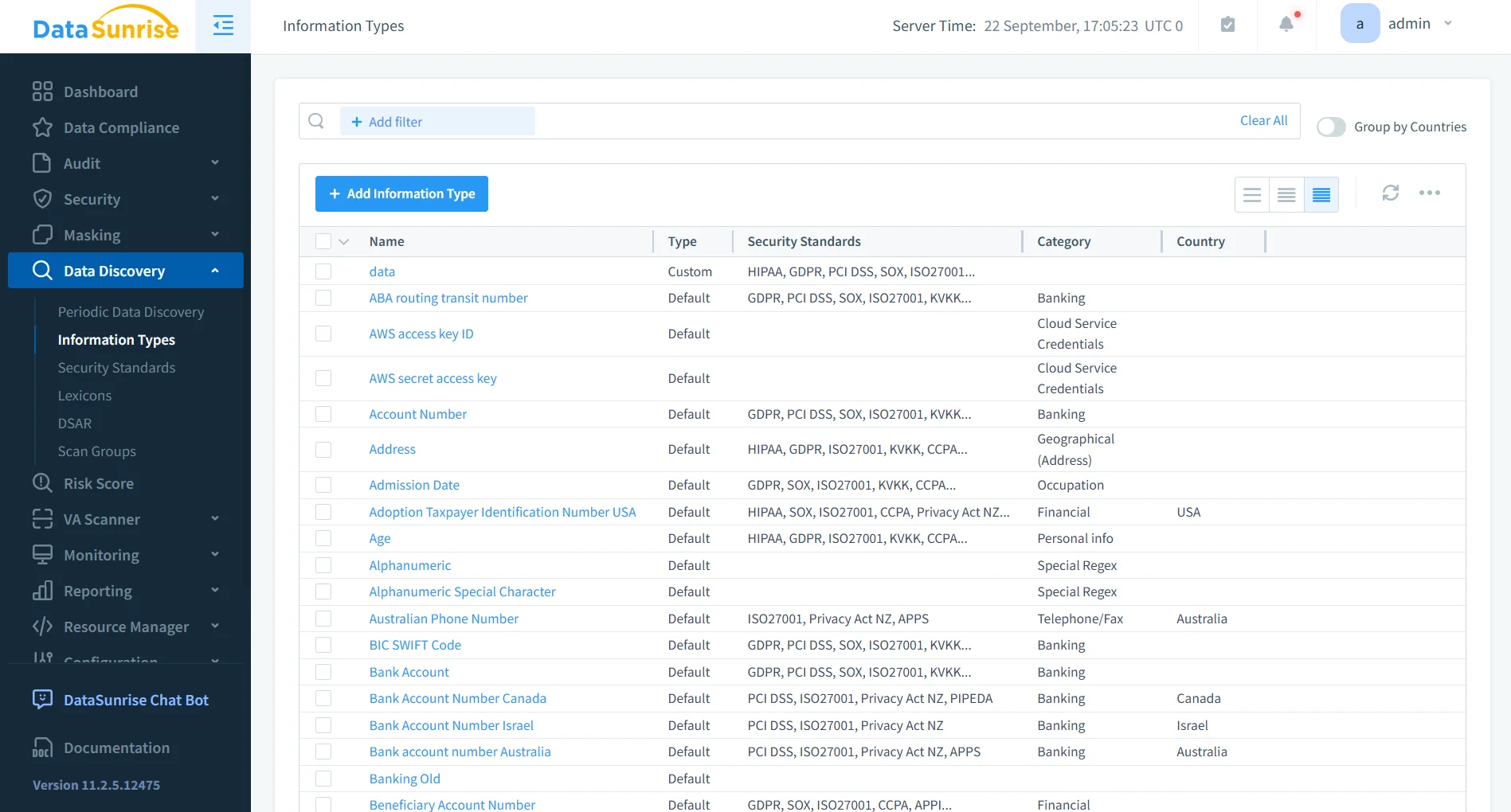
Unlike manual classification processes, DataSunrise allows organizations to define custom sensitive data categories that reflect internal business requirements in addition to common regulatory data types. Scheduled discovery tasks continuously scan for newly created collections and fields, helping reduce compliance gaps as database schemas evolve over time.
3. Generate Compliance Policies
Once sensitive information has been identified, Compliance Manager can automatically generate policies aligned with regulatory frameworks such as GDPR, HIPAA, PCI DSS, SOX, and CCPA. Instead of manually creating hundreds of individual rules, administrators can generate auditing, masking, and security policies based on discovered data and predefined compliance requirements.
Policy generation considers multiple factors, including detected sensitive data categories, database objects, user roles, applicable regulations, access context, and organizational security policies.
Continuous Regulatory Calibration periodically evaluates the environment for newly discovered sensitive data and configuration changes, helping organizations maintain compliance without rebuilding security policies after every database modification.
4. Audit and Protect Sensitive Activity
After compliance policies have been generated, DataSunrise continuously monitors activity involving regulated information. Granular audit rules record database queries, user sessions, connection details, timestamps, affected collections, and administrative operations through a centralized audit interface that simplifies investigation and reporting.
Dynamic Data Masking further strengthens compliance by automatically hiding sensitive information from unauthorized users without requiring modifications to existing applications or database structures. At the same time, the integrated Database Firewall can detect and block unauthorized queries, suspicious extraction attempts, privilege abuse, and other policy violations before sensitive information is exposed.
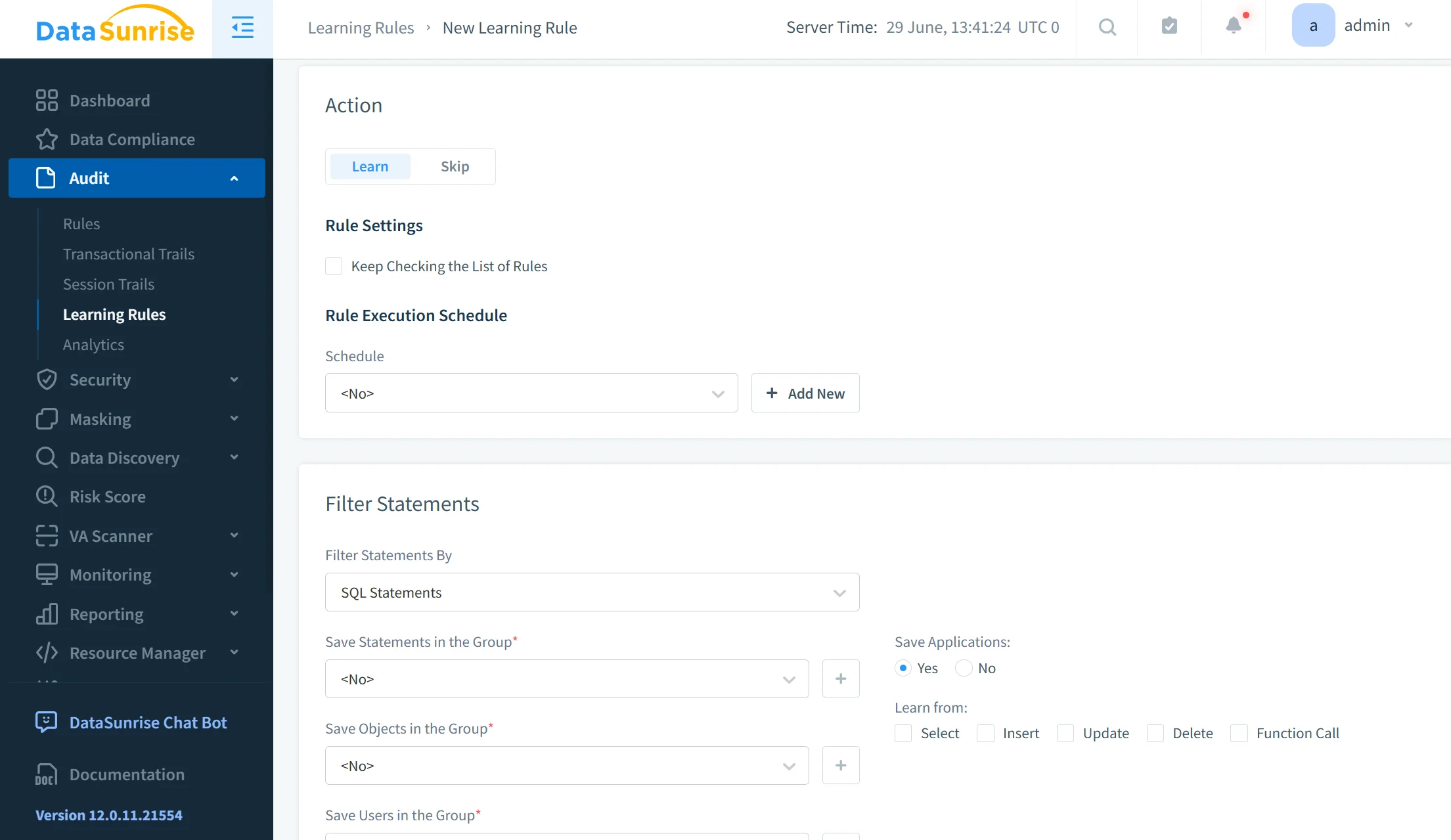
Machine Learning Audit Rules and behavioral analytics continuously evaluate user activity to identify abnormal access patterns that traditional static rules may fail to detect, providing an additional layer of protection against insider threats and compromised accounts.
5. Generate Audit-Ready Evidence
Maintaining audit evidence is often one of the most time-consuming aspects of regulatory compliance. DataSunrise centralizes audit records, compliance findings, policy status, masking activity, security events, and generated reports into a unified interface that simplifies audit preparation.
Compliance reports provide clear evidence showing who accessed regulated information, which collections contain sensitive data, whether masking policies were enforced, what policy violations occurred, how security incidents were investigated, and whether compliance controls remained active throughout the reporting period.
Automated report generation significantly reduces manual evidence collection, shortens audit preparation time, and provides auditors with consistent documentation for regulatory reviews. Instead of manually assembling logs, screenshots, and spreadsheets from multiple AWS services, organizations can generate comprehensive compliance reports directly from a centralized platform, improving both operational efficiency and regulatory readiness.
Business Benefits of DataSunrise for Amazon DocumentDB Compliance
| Benefit | Business Impact |
|---|---|
| Automated compliance workflows | Reduces manual policy maintenance and audit preparation |
| Sensitive data visibility | Identifies regulated information before accidental exposure |
| Centralized governance | Applies consistent controls across heterogeneous platforms |
| Real-time monitoring | Detects suspicious access and policy violations quickly |
| Dynamic protection | Limits sensitive data exposure without changing applications |
| Audit-ready reporting | Simplifies evidence collection for regulatory reviews |
| Flexible deployment | Supports cloud, on-premises, and hybrid architectures |
| Continuous alignment | Identifies compliance drift as data environments change |
| Reduced compliance risk | Improves control coverage while lowering operational overhead |
Conclusion
Amazon DocumentDB provides strong native controls for building a compliant database environment. AWS KMS encryption, TLS, IAM, database RBAC, CloudWatch audit logs, CloudTrail, automated backups, AWS Config, and Security Hub help organizations protect infrastructure and maintain accountability.
However, ensuring compliance for Amazon DocumentDB requires more than enabling isolated AWS features. Teams must discover regulated information, restrict access, monitor database activity, test recovery procedures, detect configuration drift, and retain reliable evidence as part of a broader data compliance strategy.
DataSunrise extends these capabilities through Sensitive Data Discovery, Compliance Autopilot, Automatic Policy Generation, Continuous Regulatory Calibration, dynamic data masking, centralized activity monitoring, and audit-ready reporting.
The result is a unified compliance framework that reduces manual effort, improves visibility, and strengthens protection across Amazon DocumentDB and heterogeneous data environments.
Protect Your Data with DataSunrise
Secure your data across every layer with DataSunrise. Detect threats in real time with Activity Monitoring, Data Masking, and Database Firewall. Enforce Data Compliance, discover sensitive data, and protect workloads across 50+ supported cloud, on-prem, and AI system data source integrations.
Start protecting your critical data today
Request a Demo Download Now