Applying Dynamic Masking in Microsoft SQL Server
Dynamic data masking in Microsoft SQL Server looks simple on paper. In reality, it’s a controlled illusion: the data stays untouched, but what users see gets rewritten at query time. No encryption, no duplication—just selective visibility enforced directly by the database engine, as outlined in the Microsoft Dynamic Data Masking documentation.
This matters because most systems don’t fail at storage security—they fail at exposure. Analysts, developers, and external tools often get more access than they should. Dynamic masking fixes that by enforcing least-privilege visibility without breaking queries or applications, aligning with broader principles described in the SQL Server security overview.
This guide walks through how to apply masking using native SQL Server features, and then shows how to scale it beyond isolated rules into centralized, policy-driven control.
For a deeper understanding of masking strategies, you can also review DataSunrise materials on data masking fundamentals and dynamic data masking approaches, which expand on how masking evolves from a simple feature into a full data protection layer.
Importance of Dynamic Masking
Dynamic data masking is designed to reduce data exposure at the query level without modifying the underlying dataset. It operates as a presentation-layer control, ensuring that sensitive values are obfuscated when accessed by non-privileged users, while preserving full data fidelity in storage.
In production environments, unrestricted access to sensitive fields is rarely required. Roles such as support engineers, analysts, or external integrations typically operate on partial or anonymized data. Without masking, these roles often inherit excessive visibility. Dynamic masking enforces granular access by rewriting result sets at runtime, limiting exposure to only the necessary data elements.
This approach is particularly relevant in shared environments, including reporting systems, analytics platforms, and development pipelines. Instead of maintaining separate sanitized datasets, organizations can apply masking policies directly to production data. This reduces operational overhead while maintaining data usability.
Dynamic masking also supports regulatory compliance. Frameworks such as GDPR, HIPAA, and PCI DSS require strict control over access to sensitive information, including personally identifiable information (PII) and financial data. Masking enables enforcement of these requirements by restricting data visibility based on user roles and permissions, without requiring structural database changes.
Within a broader security architecture, dynamic masking complements other controls. Encryption secures data at rest and in transit. Authentication and authorization mechanisms regulate access. Masking governs how data is exposed after access is granted, addressing the final stage of data interaction.
Without masking, any user with query access may retrieve complete sensitive values, increasing the risk of data leakage, misuse, or non-compliance.
Native Dynamic Data Masking in Microsoft SQL Server
Microsoft SQL Server includes Dynamic Data Masking (DDM) as a built-in feature. It modifies query results at runtime without altering the underlying stored data. Masking is applied at the column level and enforced automatically based on user privileges. This allows administrators to control data exposure without changing application logic or duplicating datasets.
DDM is particularly useful in environments where multiple user roles interact with the same database but require different levels of visibility. Instead of implementing complex access logic in the application layer, masking rules are enforced directly by the database engine during query execution.
Step 1: Create a Table with Masked Columns
Masking rules are defined directly within the table schema using masking functions:
-- Create a table with multiple masked columns
CREATE TABLE Employees (
    ID INT PRIMARY KEY,
    FullName NVARCHAR(100),
    Email NVARCHAR(100) MASKED WITH (FUNCTION = 'email()'),
    Phone NVARCHAR(20) MASKED WITH (FUNCTION = 'partial(2,"XXXX",2)'),
    Salary INT MASKED WITH (FUNCTION = 'default()')
);

-- Verify table structure
SELECT COLUMN_NAME, DATA_TYPE
FROM INFORMATION_SCHEMA.COLUMNS
WHERE TABLE_NAME = 'Employees';
At this stage, masking is embedded into the column definition. Any query executed by a non-privileged user will automatically return transformed values based on these rules.
Each masking function determines how the data is exposed in query results:
- default() returns a fully masked value and is typically used for sensitive numeric or financial fields
- email() partially obscures email addresses while preserving format for usability
- partial() reveals only selected segments of the value, useful for identifiers like phone numbers
- random() replaces numeric values within a defined range, often used for testing or anonymization
These functions provide basic control over how data is presented, but they do not alter the stored values in any way.
Step 2: Insert Test Data
Once the table is created, insert sample records to validate masking behavior:
-- Insert sample employee records
INSERT INTO Employees (ID, FullName, Email, Phone, Salary) VALUES
(1, 'Alice Johnson', '[email protected]', '1234567890', 90000),
(2, 'Bob Smith', '[email protected]', '0987654321', 85000);

-- Validate inserted data as a privileged user
SELECT * FROM Employees;
This data represents typical sensitive fields such as contact information and salary values. It will be used to demonstrate how masking affects query results depending on user permissions.
Step 3: Grant Access to a Restricted User
Dynamic masking is enforced only for users without elevated privileges. Create a user and grant limited access:
-- Create a restricted user without login
CREATE USER test_user WITHOUT LOGIN;

-- Grant read-only access to the Employees table
GRANT SELECT ON Employees TO test_user;

-- Optional: deny elevated permissions explicitly
DENY UNMASK TO test_user;
At this point, the user has read access to the table but does not have permission to bypass masking rules. SQL Server evaluates permissions at query time and determines whether masking should be applied.
Step 4: Query as the Restricted User
Execute a query under the context of the restricted user to observe masking in effect:
-- Switch execution context to restricted user
EXECUTE AS USER = 'test_user';

-- Query masked data
SELECT ID, FullName, Email, Phone, Salary
FROM Employees;

-- Revert back to original execution context
REVERT;
The query returns the same dataset structure, but sensitive fields are masked according to the defined rules. For example, email addresses appear partially hidden, phone numbers are obfuscated, and salary values are replaced.
SQL Server applies masking dynamically at execution time, ensuring that the original data remains unchanged while restricting its visibility. This approach allows organizations to maintain a single source of truth while controlling how sensitive data is exposed across different access layers.
Applying Dynamic Masking with DataSunrise
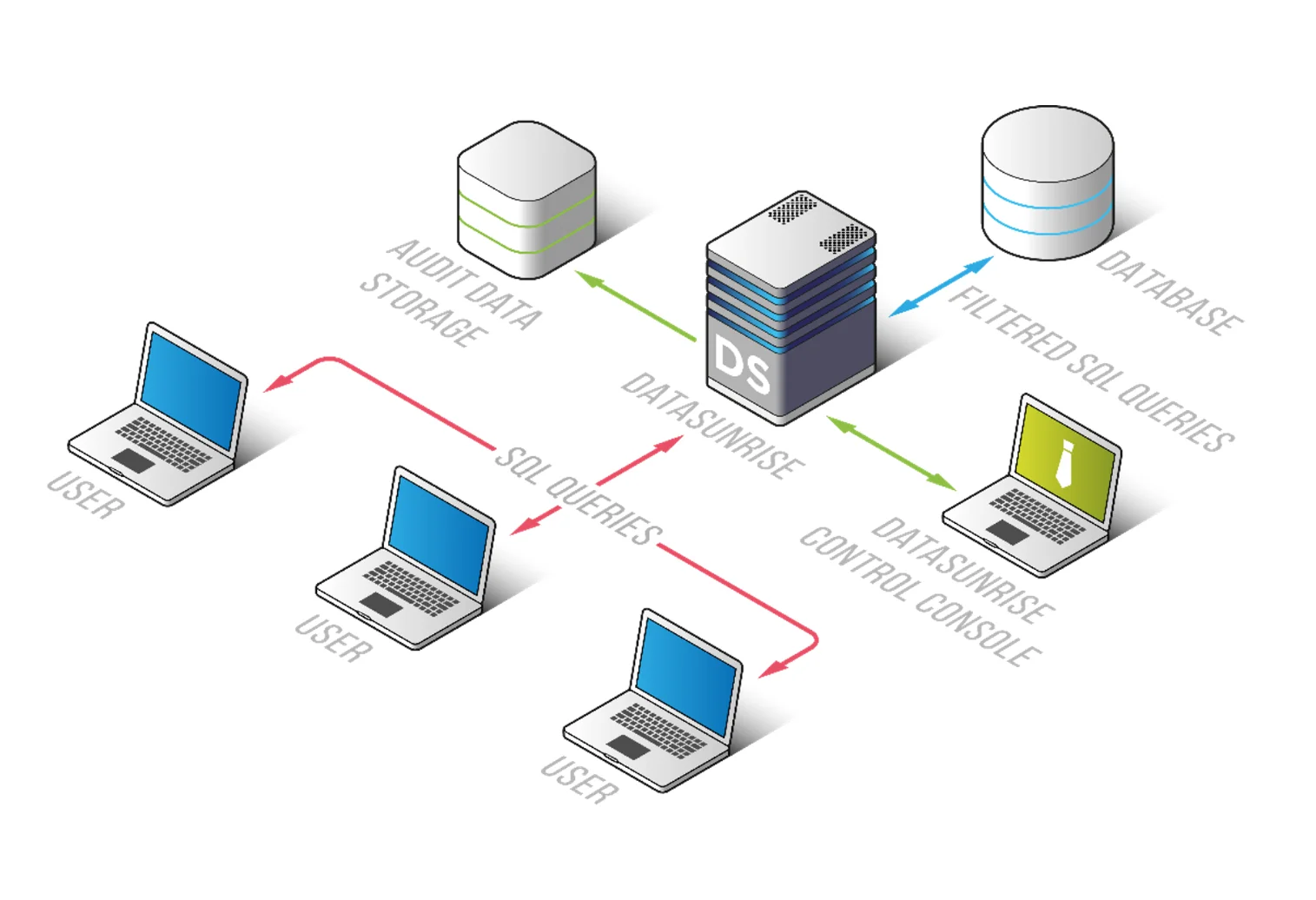
DataSunrise removes masking logic from the database schema and places it into a centralized control layer. Instead of embedding rules inside tables, it introduces a policy-driven approach that operates externally, allowing consistent enforcement across multiple databases and environments.
It deploys Zero-Touch Data Masking with autonomous enforcement across environments, eliminating the need to define masking rules manually for each column. This approach reduces configuration overhead and ensures that masking policies remain consistent even as schemas evolve.
Step 1: Connect SQL Server to DataSunrise
The first step is to register your SQL Server instance within DataSunrise. This can be done using one of several non-intrusive deployment modes:
- Proxy mode, where all traffic is routed through DataSunrise
- Sniffer mode, which analyzes mirrored traffic without affecting connections
- Log-based mode, which uses native database logs
This flexibility allows integration without modifying the database structure or application logic. Once connected, DataSunrise begins observing database activity and prepares for policy enforcement.
Step 2: Run Sensitive Data Discovery
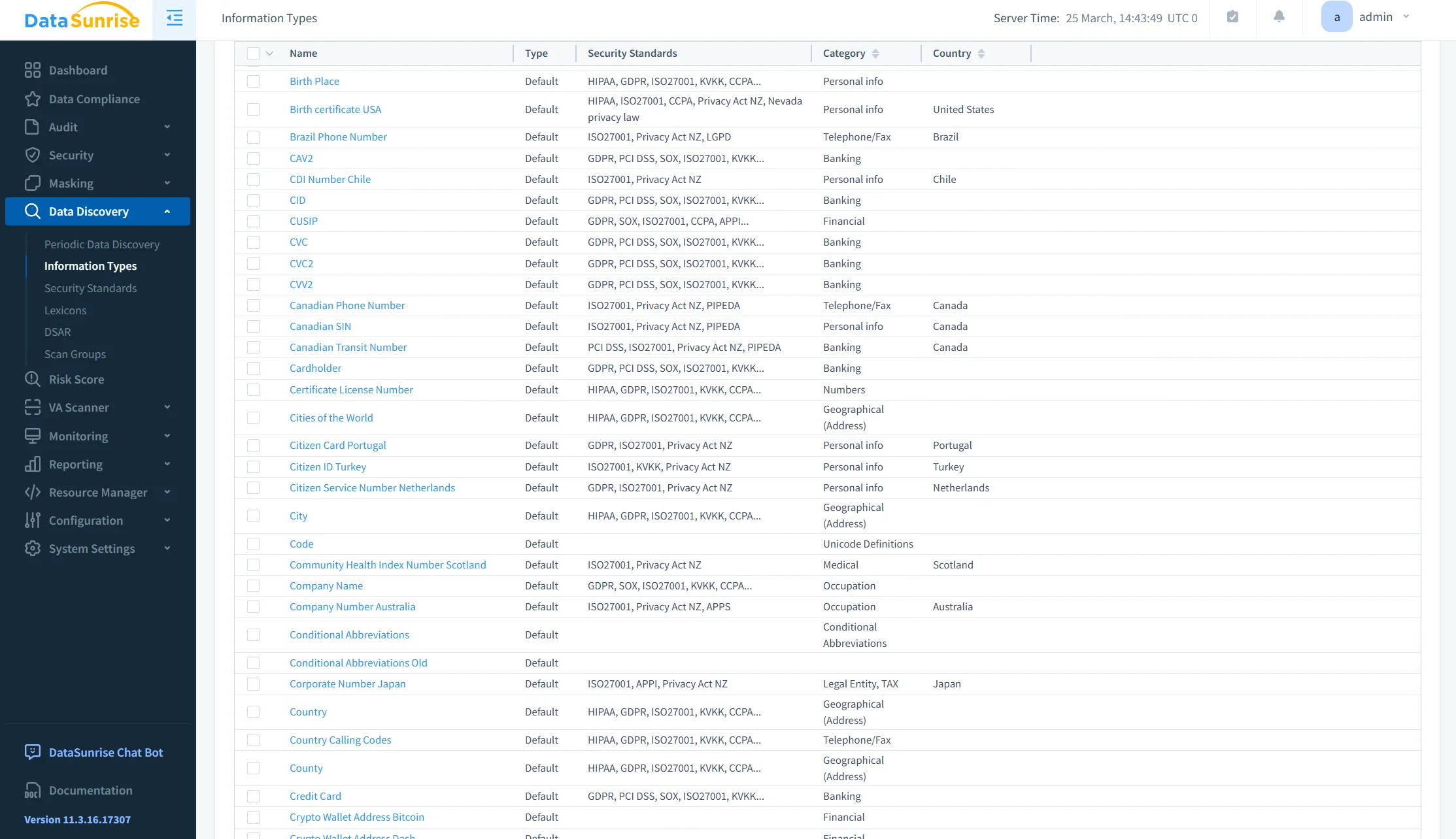
After the connection is established, DataSunrise scans the database to identify sensitive data. This includes personally identifiable information (PII), financial records, credentials, and other regulated data types.
The discovery process uses predefined patterns and classification rules to locate sensitive columns automatically. As a result, administrators do not need to manually inspect schemas or guess where critical data resides.
This step ensures that masking policies are applied to actual risk areas rather than being defined arbitrarily.
Step 3: Create Masking Policies
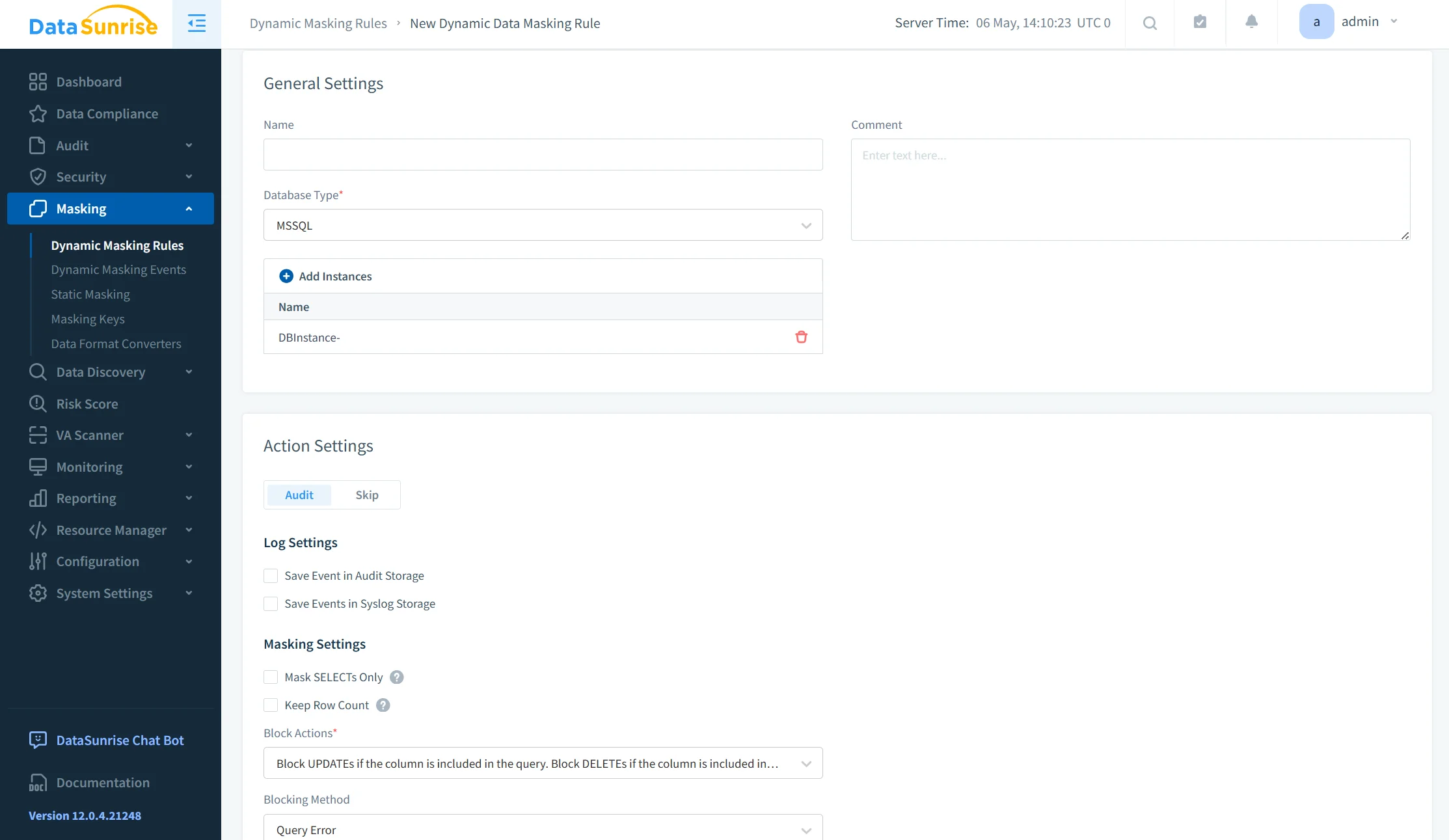
Masking rules are defined through a centralized interface without requiring SQL-level changes. Policies can be configured with fine-grained control over how and when masking is applied.
Typical configuration options include:
- Assigning masking rules based on user roles, individual accounts, or application sources
- Applying conditional logic such as client IP, query type, or session context
- Selecting masking formats, including full masking, partial masking, or custom transformations
Because policies are externalized, they can be updated without altering database schemas or redeploying applications. This significantly improves maintainability in large or dynamic environments.
Step 4: Monitor Access in Real Time
Once masking policies are active, DataSunrise continuously monitors all database interactions. Both masked and unmasked access attempts are recorded and analyzed.
This monitoring provides full visibility into:
- Who accessed specific data
- What queries were executed
- Whether masking was applied or bypassed
The integration with database activity monitoring enables organizations to correlate masking policies with actual user behavior. This not only strengthens security but also supports audit and compliance requirements.
By combining dynamic masking with real-time monitoring, DataSunrise ensures that sensitive data is both protected and traceable across all access layers.
Business Impact of Dynamic Masking
| Area | Impact |
|---|---|
| Risk Reduction | Sensitive data is not fully exposed to unauthorized users, reducing the likelihood of data leaks and misuse. |
| Compliance | Masking policies align with regulations such as GDPR, HIPAA, and PCI DSS, providing audit-ready evidence. |
| Operational Efficiency | Automation replaces manual rule management, lowering administrative overhead and reducing errors. |
| Scalability | Policies are applied consistently across multiple systems, databases, and environments without duplication. |
Conclusion
Dynamic data masking in Microsoft SQL Server provides a baseline mechanism for controlling data exposure at the query level. It enables runtime obfuscation of sensitive fields with minimal configuration and without modifying stored data.
However, it remains a localized feature with limited scope. Masking rules are defined at the schema level, lack centralized management, and do not adapt dynamically to changes in access patterns, environments, or compliance requirements.
DataSunrise extends this capability into a centralized and scalable control layer. Through Zero-Touch Data Masking, policy-based enforcement, and cross-platform integration, it enables consistent protection across databases, applications, and environments. Masking policies are externalized, allowing real-time updates without schema modifications or application changes.
This approach shifts masking from a static configuration task to a dynamic component of data security architecture. By integrating capabilities such as dynamic data masking, data discovery, and database activity monitoring, organizations gain full visibility and control over sensitive data access.
In addition, alignment with data compliance frameworks and enforcement through database security policies ensures that masking is not only applied consistently but also supports regulatory requirements.
The result is controlled data exposure, improved compliance alignment, and operational scalability across the entire data ecosystem.
Protect Your Data with DataSunrise
Secure your data across every layer with DataSunrise. Detect threats in real time with Activity Monitoring, Data Masking, and Database Firewall. Enforce Data Compliance, discover sensitive data, and protect workloads across 50+ supported cloud, on-prem, and AI system data source integrations.
Start protecting your critical data today
Request a Demo Download Now