How to Apply Dynamic Masking in PostgreSQL
PostgreSQL is the workhorse behind a lot of “serious business” systems: customer platforms, billing, HR, healthcare apps, analytics pipelines — you name it. The catch is that serious systems tend to accumulate Personally Identifiable Information (PII) and other sensitive fields everywhere. If the wrong user, contractor, or compromised service account can read raw values, you’ve basically built a breach machine with excellent indexing.
This is why data masking matters. According to IBM’s Cost of a Data Breach Report, incidents are expensive enough that “we’ll fix it later” isn’t a strategy — it’s a future invoice. Dynamic data masking gives you a fast, surgical way to reduce exposure in production PostgreSQL without rewriting the actual data stored in tables.
In this guide, you’ll learn what dynamic masking is, how to implement it step-by-step in DataSunrise, and how to complement it with practical static masking in MySQL for safe Dev/Test datasets.
What dynamic data masking does in PostgreSQL
Dynamic data masking transforms sensitive values at query time. The database keeps the original data intact, but users who don’t meet your policy conditions receive masked output (redacted, partially hidden, tokenized, etc.). This is especially useful when you need production access for support, analytics, or reporting — but you don’t want every SELECT to become a privacy incident.
Dynamic masking works best when paired with strong access controls and role-based access control (RBAC), because masking is about “what users can see,” while access control is about “what users can do.”
If your environment is shared by multiple teams, start dynamic masking with the “obvious stuff” (emails, phones, IDs, financial fields), then expand using discovery results and audit evidence — not gut feelings.
What to mask (and how not to break your app)
Most programs begin with fields that trigger regulatory or contractual pain: names, emails, phone numbers, government IDs, payment-related values, addresses, and birth dates. DataSunrise’s overview of masking types helps map the data type to a safe transformation:
- Partial masking for phones, IBANs, account numbers (keep last 4)
- Redaction for SSNs and passports when visibility is never justified
- Hashing/tokenization when you need consistent matching without revealing the original
Don’t mask columns used as primary keys, join keys, or integrity constraints unless you’re using a deterministic approach that preserves relationships. Random masking will turn your database into a modern art installation.
Step-by-step: Configure dynamic masking for PostgreSQL in DataSunrise
Prerequisite: Deploy DataSunrise in a model that fits your architecture. If you’re choosing between proxy/agent/network modes, start with Deployment Modes of DataSunrise. DataSunrise supports 40+ data platforms, so the same masking policy style can travel with you across PostgreSQL and MySQL.
1) Create a new dynamic masking rule
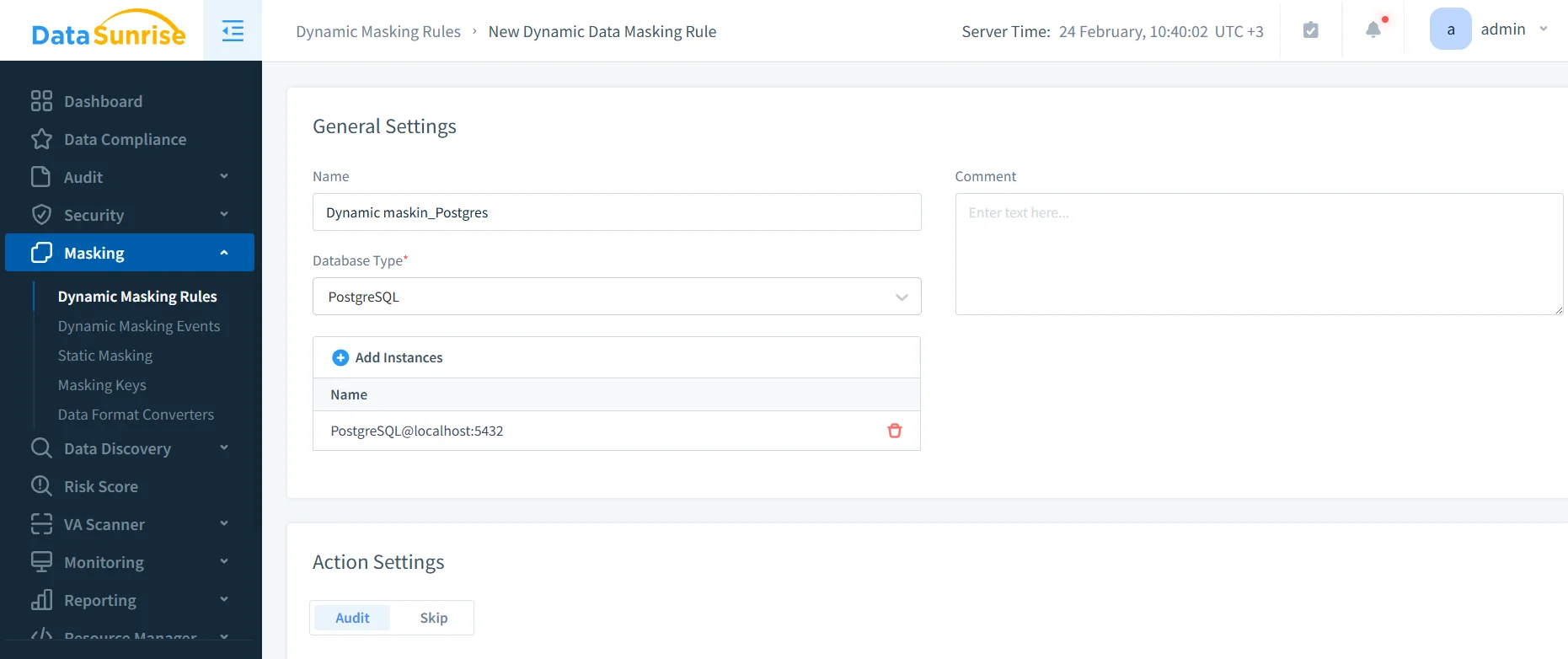
In the DataSunrise UI, navigate to Masking → Dynamic Masking Rules and create a new rule. Choose PostgreSQL as the database type and bind the correct instance.
2) Identify sensitive objects and columns
Select the tables and columns that contain sensitive data. If you’re not 100% sure where the sensitive fields are (most teams aren’t), run Data Discovery first and use the findings to drive the selection.
3) Define masking behavior and scope
For each column, assign an appropriate transformation (redaction, partial masking, hashing/tokenization). Then define who gets masked output: by DB user, role, group, application, source IP range, or other conditions — aligned to your RBAC model.
Treat masking like product design: define “allowed views” for each persona (support, analyst, contractor), then implement rules that match those workflows. You’ll get fewer exceptions and less operational drama.
4) Enable auditing for masked access
Masking is great, but compliance teams will still ask: “Who accessed it?” This is where audit and monitoring stop being optional. Use the Audit Guide to set baselines, store evidence in audit logs, and maintain a defensible audit trail. Pair it with Database Activity Monitoring to track usage patterns and policy effectiveness over time.
5) Test the “before and after”
Validation is simple: run the same query under different identities/contexts and compare results.
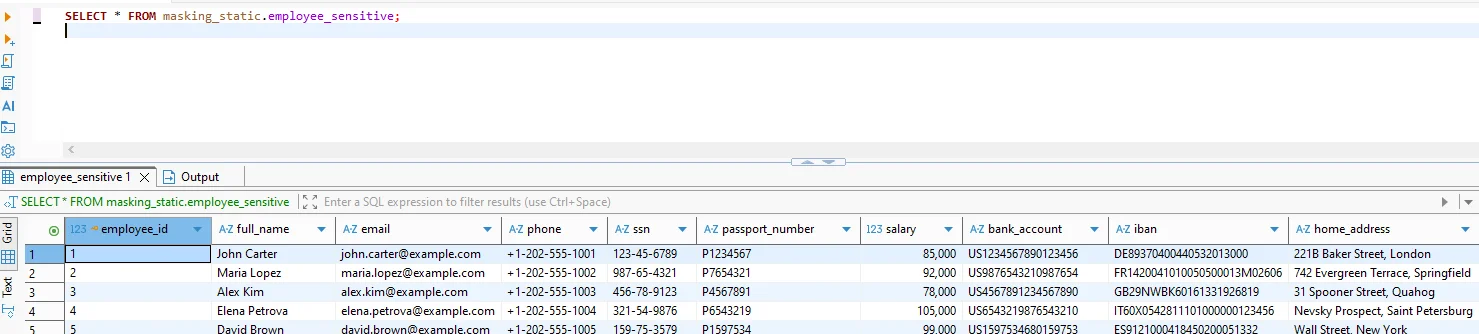

Use a simple query for validation:
-- Baseline (unmasked or privileged context)
SELECT * FROM masking_static.employee_sensitive;

-- Masked output (policy applied / restricted context)
SELECT * FROM masking_test.employee_sensitive;
If you also use PostgreSQL Row Level Security for row visibility rules, keep it aligned with masking policies; PostgreSQL’s RLS documentation is here: PostgreSQL Row Security Policies.
If you don’t test with the exact same client/app context your users use (BI tool, ORM, service account), you’re not testing — you’re doing interpretive theater.
Make it operational: security controls that reinforce masking
Dynamic masking is strongest when it’s part of a layered security posture. Start with the DataSunrise Security Guide, harden query-layer threats with security rules against SQL injections, and enforce perimeter controls using a database firewall. For proactive hygiene, run regular vulnerability assessments so your “masked data” isn’t still exposed through misconfigurations.
Static masking in MySQL: practical guidance for Dev/Test
Dynamic masking protects production access, but Dev/Test is where sensitive data goes to die if you’re careless. Static masking solves this by creating a sanitized copy of MySQL data where sensitive values are permanently replaced. It supports clean test data management and better data-driven testing without leaking real customer information into laptops and CI pipelines.
A reliable static masking workflow typically looks like this:
- Clone or stage the dataset (from production snapshot or staging replica).
- Apply static masking rules using Static Data Masking policies tailored to your schema.
- Preserve relationships (IDs referenced across tables should remain consistent; use deterministic transformations where needed).
- Fill realism gaps with synthetic data generation for non-key fields (addresses, descriptive text), keeping formats believable without being real.
If you must mask in an existing environment rather than creating a fresh copy, use controlled approaches like “mask in place” and validate application behavior immediately after the run.
Compliance alignment: stop guessing, start mapping
Masking is a security control, but it’s also a compliance accelerator. DataSunrise maintains guidance on data compliance regulations and supports common frameworks like GDPR, HIPAA technical safeguards, and PCI DSS, with automation via the DataSunrise Compliance Manager.
Conclusion
Dynamic data masking in PostgreSQL reduces exposure without breaking production workflows: discover sensitive data, define role-aware masking policies, audit access, and reinforce it with layered security controls. Then use static masking in MySQL to keep Dev/Test realistic and safe — without turning your engineers into accidental data brokers.
Protect Your Data with DataSunrise
Secure your data across every layer with DataSunrise. Detect threats in real time with Activity Monitoring, Data Masking, and Database Firewall. Enforce Data Compliance, discover sensitive data, and protect workloads across 50+ supported cloud, on-prem, and AI system data source integrations.
Start protecting your critical data today
Request a Demo Download Now