How to Apply Dynamic Masking in TiDB
TiDB gives teams a distributed SQL platform for transactional workloads, analytics, and operational reporting. That flexibility helps engineers move fast, but it also gives more people direct access to production tables. The trouble starts when analysts, contractors, support teams, or BI tools can query the same live data and see raw customer details they never needed in the first place.
The practical fix is data masking. In production environments, dynamic masking works especially well because it changes query results instead of changing source records. That approach lets teams keep TiDB data intact while limiting what each role can actually see. When you pair masking with data discovery and classification of personally identifiable information (PII), you reduce exposure without crippling the workflows that depend on live data.
This guide explains how to apply dynamic masking in TiDB with DataSunrise, from identifying sensitive fields to validating masked output in production-like conditions. For a deeper look at the database platform itself, you can also review the official TiDB GitHub repository.
Why dynamic masking matters in TiDB
Most TiDB clusters do not serve only one application. Teams connect dashboards, notebooks, SQL clients, ETL jobs, and admin tools to the same environment. That setup creates a simple security problem: users may need to query a table, but they do not need every raw value in the result. Basic access controls help, but they only answer who can reach an object. They do not answer what that user should see after the query runs.
Dynamic masking closes that gap. It works alongside role-based access control and the principle of least privilege so teams can protect high-risk columns without blocking legitimate access to the row itself. For live production workloads, this gives teams a cleaner option than static masking or in-place masking, which fit different use cases.
Step 1: Identify the fields that should never appear in raw query results
Before you write a single masking rule, inspect the data that users can already query. In many TiDB deployments, the obvious fields include full names, emails, phone numbers, payment data, and government identifiers. Less obvious fields often cause even more trouble: address lines, free-text notes, and internal comment columns can leak sensitive fragments that nobody classified properly.
The screenshot below shows exactly why this step matters. A simple query returns names, emails, phone numbers, national IDs, card numbers, addresses, IP addresses, and notes in one result grid. That is not an edge case; that is how production exposure usually looks when nobody has applied a policy yet. Use this review stage to map each field to internal policy and relevant compliance requirements.

Start with the fields that create the biggest operational and compliance risk—email, phone, national identifiers, payment data, and address information—then validate the masked output in real dashboards and SQL clients before you expand the policy to more schemas.
Step 2: Create a dynamic masking rule in DataSunrise
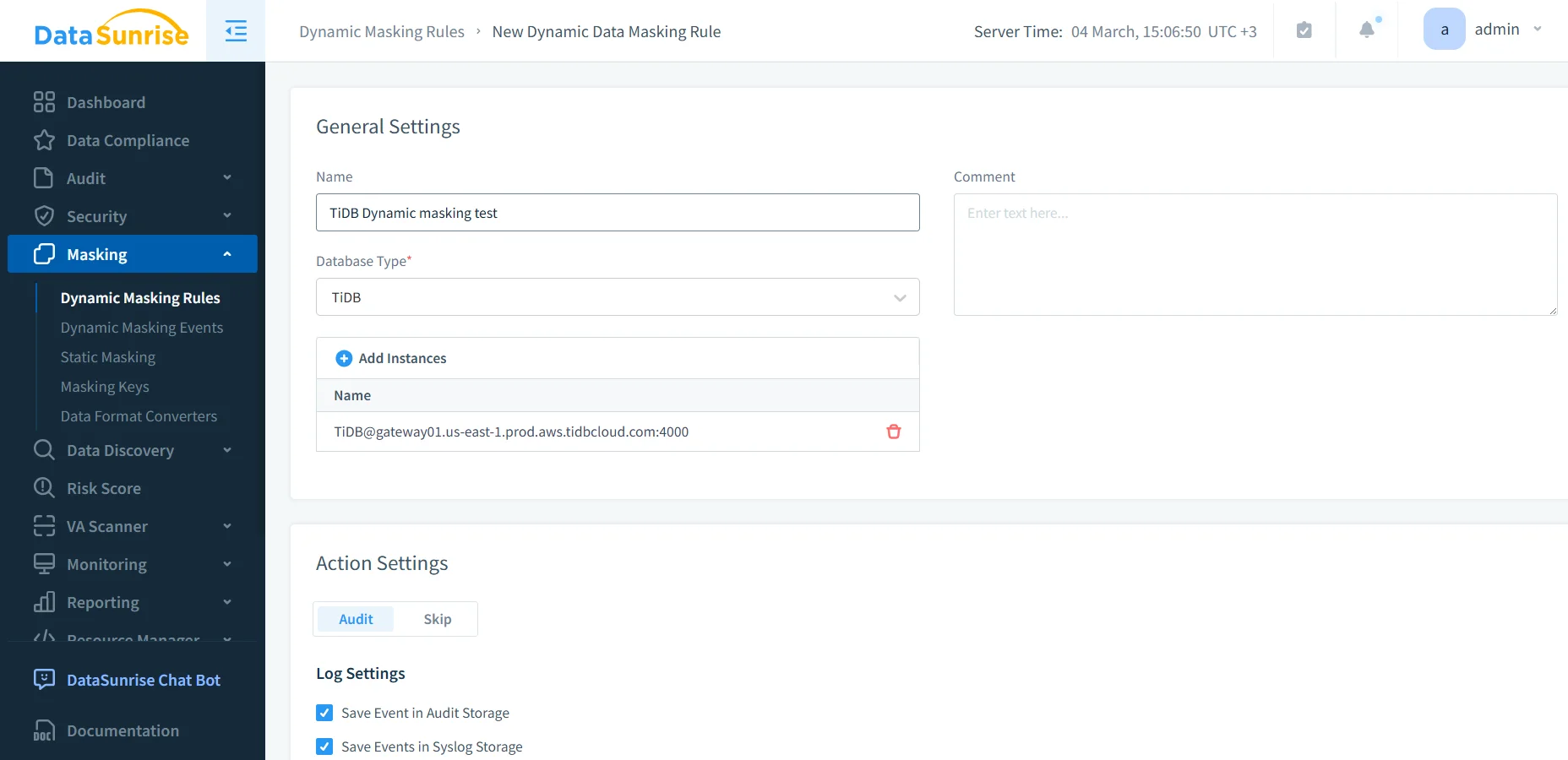
Once you know what needs protection, create a new masking rule in DataSunrise and select TiDB as the database type. Then attach the target instance and define the rule in a way that another administrator can understand later without having to guess what you meant. Good naming sounds boring until six months pass and someone has to debug your policy at 2 a.m.
DataSunrise supports several deployment modes, so teams can place the control layer where it fits their environment. At this point, you should also enable visibility from the start. Tie the rule to database activity monitoring, maintain a proper audit trail, and store the events in centralized audit logs. That combination gives you proof that the rule exists, proof that it runs, and proof that users hit it.
Step 3: Select sensitive columns and assign the right masking behavior
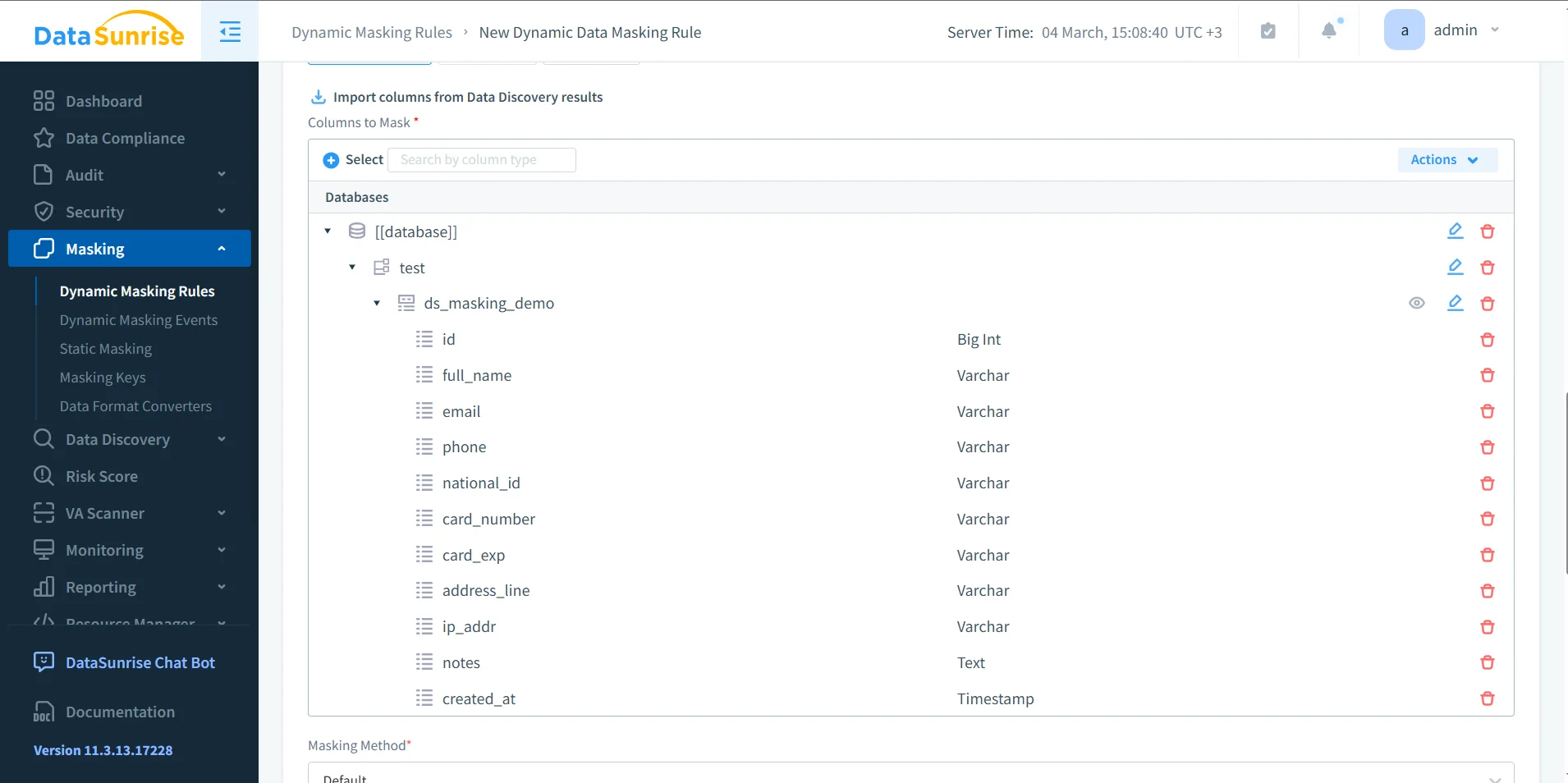
After you create the rule, select the columns that carry real exposure. This is where good policy design matters. Do not mask everything blindly, and do not leave dangerous fields untouched because someone might need them someday. Pick the columns that hold personal, financial, or operationally sensitive data, then define how each field should appear for restricted users.
The column selection screen below shows a common TiDB pattern: full_name, email, phone, national_id, card_number, address_line, ip_addr, and notes. Each one deserves a deliberate choice. Some fields need full redaction. Others can keep a limited format for business use, such as showing only the last four digits of a phone number or preserving the shape of a card field without revealing the actual value.
| Field Type | Suggested Masking Action | Operational Goal |
|---|---|---|
| Partial reveal | Keep domain-level visibility without exposing the full address | |
| Phone | Show last four digits | Support verification tasks while hiding the full number |
| National ID | Full redaction | Block exposure of high-risk identity data |
| Card Number | Format-preserving mask | Keep recognizable structure without revealing payment data |
| Address | Partial mask or generalization | Preserve regional context while reducing privacy risk |
| Notes | Conditional masking | Protect unexpected sensitive text inside comment fields |
Step 4: Test the rule with real queries and real roles
Once the rule exists, test it with the same SQL patterns, dashboards, and service accounts that operate in production. Do not stop at a single admin check in the console. A dynamic masking policy only proves its value when it survives real usage across support tools, BI reports, and operational scripts.
A simple validation query might look like this:
SELECT
  id,
  full_name,
  email,
  phone,
  national_id,
  card_number,
  card_exp,
  address_line,
  ip_addr,
  notes,
  created_at
FROM ds_masking_demo;
Restricted users should see transformed values, while approved users should still see the fields they genuinely need. During rollout, teams often strengthen the policy with a database firewall, targeted security rules against SQL injection, and periodic vulnerability assessment. That layered approach stops the usual nonsense where one weak path undermines the rest of the control set.
Masking the wrong columns can break reporting, support workflows, or application logic if downstream users expect raw values for filtering, exports, or reconciliation. Test service accounts, BI dashboards, saved queries, and admin roles before you enforce rules broadly in production.
Operate masking as part of a broader security program
Dynamic masking works best when teams treat it as a repeatable security practice instead of a one-off checkbox. Use the audit guide to structure review and evidence collection, and use the security guide to align masking with broader policy design. If your organization runs more than TiDB, DataSunrise support for 40+ data platforms makes life much easier because you can apply consistent controls across a mixed estate instead of reinventing the wheel for every database.
That wider view also matters for reporting and governance. Teams can use Compliance Manager to connect controls with evidence and produce cleaner documentation for audits, investigations, and internal reviews. In other words, you stop relying on tribal knowledge and start running an actual database security program.
Compliance value of dynamic masking in TiDB
Dynamic masking helps reduce unnecessary disclosure in production query results, which makes life easier for both security teams and auditors. It does not replace governance, but it turns governance into something practical.
| Regulation | Typical TiDB Exposure Risk | Masking Objective |
|---|---|---|
| GDPR | Personal data appears in reports, ad hoc queries, and support tools | Reduce exposure and support data minimization |
| HIPAA | Operational users may view healthcare data they do not need | Limit visibility of protected health information |
| PCI DSS | Cardholder data can leak into query results and exports | Restrict exposure of payment details |
| SOX | Financial records may spread too widely across reporting access | Preserve accountability and controlled disclosure |
Conclusion: apply dynamic masking in TiDB with control, evidence, and testing
Applying dynamic masking in TiDB comes down to a disciplined sequence. First, identify the fields that create real exposure. Second, create the rule and connect it to the right instance. Third, choose masking actions that preserve business value without exposing secrets. Finally, test the result with the same users, queries, and tools that operate in production.
That approach lets DataSunrise protect live TiDB data without forcing teams to duplicate datasets or rewrite applications. You keep the underlying records intact, you control what each role can see, and you create evidence that the policy actually works. That is what mature data protection looks like: fewer blind spots, fewer accidental leaks, and far fewer opportunities for someone to do something catastrophically stupid with raw production data.
Protect Your Data with DataSunrise
Secure your data across every layer with DataSunrise. Detect threats in real time with Activity Monitoring, Data Masking, and Database Firewall. Enforce Data Compliance, discover sensitive data, and protect workloads across 50+ supported cloud, on-prem, and AI system data source integrations.
Start protecting your critical data today
Request a Demo Download Now