How to Apply Static Masking in IBM Db2
As organizations face mounting regulatory pressure, static data masking has become a critical practice for permanently replacing sensitive values with realistic but fictitious ones—keeping production data safe across development, testing, and analytics workflows. According to IBM’s 2024 Cost of a Data Breach Report, the average breach cost reached $4.88 million, with unmasked non-production environments cited as a significant risk factor.
As a result, this article walks through native IBM Db2 masking techniques and shows how DataSunrise can automate and scale the process across your enterprise.
What Is Static Data Masking and Why Does It Matter for IBM Db2?
Data masking transforms sensitive data into anonymized form that preserves format and structure but cannot be traced back to real values. Unlike dynamic masking—which applies transformations at query time—static masking permanently alters a copied dataset, making it ideal for sharing with development teams, third-party vendors, or analytics pipelines without compliance risk. As a result, it is one of the foundational layers of a robust database security strategy, particularly for organizations that rely on realistic data in non-production environments for test data management.
Applying Static Masking in IBM Db2 with Native SQL Techniques
IBM Db2 has no built-in masking wizard, but standard SQL functions make it possible to implement basic masking manually. Therefore, always work on a non-production copy—never the live database. Before starting, identify which columns fall under your data security policy and require protection.
Next, clone the target table and overwrite sensitive columns using Db2’s built-in string and math functions:
CREATE TABLE HR.EMPLOYEES_STAGING LIKE HR.EMPLOYEES;
INSERT INTO HR.EMPLOYEES_STAGING SELECT * FROM HR.EMPLOYEES;

UPDATE HR.EMPLOYEES_STAGING
SET FIRST_NAME   = 'User_' || CHAR(EMPNO),
    LAST_NAME    = 'Masked',
    EMAIL        = 'user' || CHAR(EMPNO) || '@example.com',
    SSN          = '000-00-' || RIGHT(CHAR(EMPNO + 10000), 4),
    SALARY       = 40000 + (MOD(EMPNO * 137, 60000)),
    CREDIT_CARD  = 'XXXX-XXXX-XXXX-'
                 || RIGHT(REPLACE(CREDIT_CARD, '-', ''), 4);
Before distributing the dataset, verify no real values remain:
-- Should return 0 if masking was fully applied
SELECT COUNT(*) AS UNMASKED_COUNT
FROM HR.EMPLOYEES_STAGING
WHERE EMAIL NOT LIKE '%@example.com';
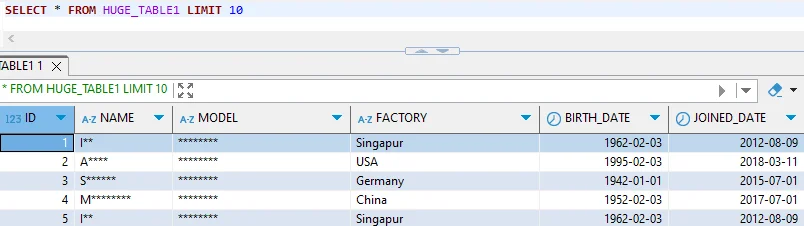
For more details on available functions and configuration options, refer to the IBM Db2 documentation and the IBM Db2 SQL reference.
Enhanced Static Masking for IBM Db2 with DataSunrise
While native SQL masking provides a starting point, DataSunrise automates the full masking lifecycle—from sensitive data discovery to policy enforcement and compliance reporting—through an intuitive interface with multiple deployment modes and no SQL scripting required.
Connect Your IBM Db2 Instance
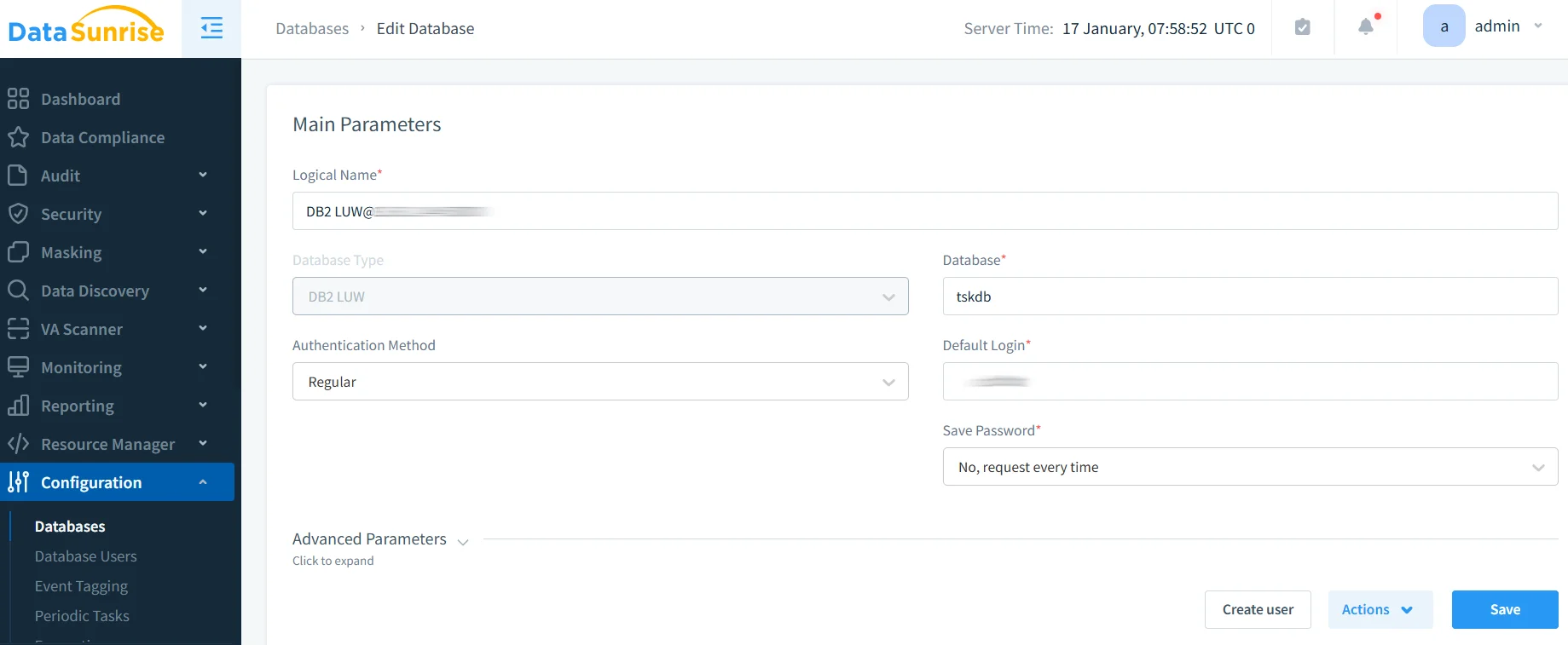
Begin by connecting your Db2 database to DataSunrise through the administrative web interface. Provide the host, port, database name, and credentials. Once connected, the platform catalogs your schemas non-intrusively without impacting database performance.
Discover and Classify Sensitive Data
From there, DataSunrise’s Auto-Discover engine uses NLP and machine learning to automatically identify PII, financial data, and health information across your schema, classifying results against GDPR, HIPAA, and PCI DSS frameworks—eliminating the need for manual column identification.
Create a Static Masking Rule
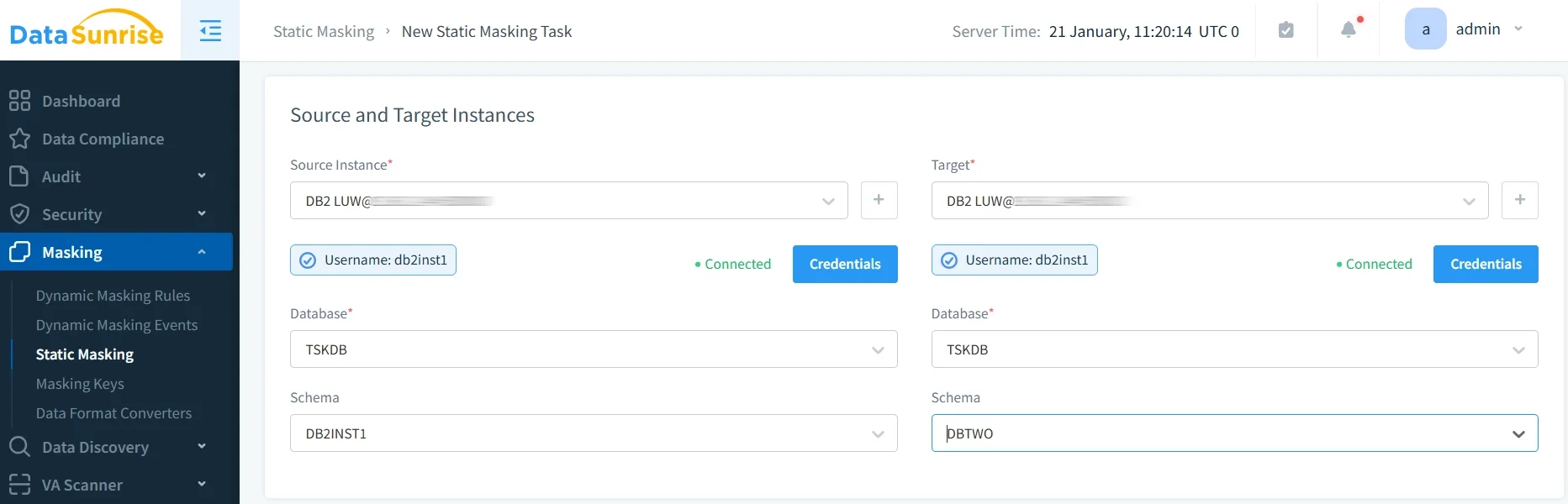
Using the No-Code Policy Automation interface, define which tables and columns to mask and select the appropriate method for each—substitution, shuffling, nullification, or date shifting. You can also configure referential integrity preservation to ensure masked values stay consistent across related tables, all without writing a single line of SQL. Additionally, for teams that need fully fabricated datasets rather than transformed copies, DataSunrise also supports synthetic data generation. Furthermore, masking rules can be scoped per user group, integrating naturally with your existing role-based access controls.
Execute the Masking Job and Review Results
Run the masking job on demand or schedule it to trigger automatically with each production data refresh. DataSunrise then logs every transformation for audit purposes and provides coverage statistics upon completion. Automated compliance reporting subsequently maps the results to applicable regulatory requirements, producing audit-ready documentation in one click. For ongoing protection beyond static masking, real-time notifications and user behavior analytics can be layered on top to detect anomalies in live database activity.
Key Advantages of DataSunrise for IBM Db2 Static Masking
- Automated Data Discovery: AI-driven scanning identifies sensitive columns across the entire schema with no manual effort.
- Flexible Masking Types: Format-preserving substitution, shuffling, nullification, and more—applied per column without custom functions.
- Referential Integrity: Masked values propagate consistently across related tables, keeping test datasets structurally valid.
- Centralized Management: Manage IBM Db2 alongside 40+ other platforms from a single console.
- Compliance Reporting: One-click reports for GDPR, HIPAA, PCI DSS, and SOX.
- LLM and ML Tools: Machine learning algorithms enhance masking accuracy and automate threat detection across your Db2 environment.
Business Benefits of Static Masking for IBM Db2
| Benefit | Description |
|---|---|
| Reduced breach risk | Sensitive data never reaches development or analytics environments in real form. |
| Faster development cycles | Teams receive realistic datasets instantly, without waiting on manual anonymization. |
| Compliance confidence | Documented masking coverage simplifies GDPR, HIPAA, and PCI DSS audits. |
| Safe third-party sharing | Masked data carries no regulatory obligations under most frameworks. |
| Operational efficiency | Automated workflows free DBAs from repetitive manual masking tasks. |
Conclusion
IBM Db2’s native SQL capabilities offer a functional starting point for static masking, but the manual effort required—and the absence of automatic discovery, referential integrity handling, and compliance reporting—limits their scalability.
As a result, DataSunrise closes these gaps with an automated, enterprise-grade static masking platform that works across IBM Db2 and over 40 other data platforms. Schedule a live demo to see Zero-Touch Data Protection in action.
Protect Your Data with DataSunrise
Secure your data across every layer with DataSunrise. Detect threats in real time with Activity Monitoring, Data Masking, and Database Firewall. Enforce Data Compliance, discover sensitive data, and protect workloads across 50+ supported cloud, on-prem, and AI system data source integrations.
Start protecting your critical data today
Request a Demo Download Now