How to Apply Static Masking in PostgreSQL
Static masking in PostgreSQL is one of the safest ways to share realistic data with developers, analysts, and testers without leaking real identities, payroll details, or financial identifiers. Instead of relying on “please be careful” processes, static masking creates a sanitized copy where sensitive fields are permanently transformed. This is especially important when your databases contain Personally Identifiable Information (PII) and other regulated data that should never land in low-trust environments.
Breaches are rarely caused by one dramatic mistake. They’re usually a chain of small, boring oversights: shared dumps, stale staging databases, and overly broad permissions. The IBM Cost of a Data Breach Report is a reminder that those “small” oversights can get very expensive.
This article explains what static masking is, when to use it, and how to apply static masking in PostgreSQL step-by-step with DataSunrise. It also includes practical guidance for static masking in MySQL, because most organizations run mixed database stacks and need consistent data protection across environments.
Static Masking vs. Dynamic Masking in PostgreSQL
Static data masking permanently replaces sensitive values in a target dataset (a copy, schema, or separate environment). That makes it ideal for Dev/Test, CI pipelines, analytics sandboxes, training environments, and any workflow where data will be exported or reused.
Dynamic data masking transforms data at query time in production, without changing what’s stored. It’s a strong fit when you need to protect live reads while keeping production untouched.
If data leaves production (exports, snapshots, replicas, staging refreshes), use static masking. If data must stay in production but not everyone should see it, use dynamic masking.
Plan Your PostgreSQL Static Masking Project
Static masking isn’t complicated, but it is unforgiving if you mask the wrong columns or break relationships. A short planning pass will save you from painful rework later.
- Discover sensitive fields: Use Data Discovery to identify PII and business-sensitive columns across schemas.
- Choose masking logic: Match techniques to use cases with masking types (redaction, partial masking, hashing, tokenization).
- Keep it compliant: Use compliance regulations as a baseline—especially if you handle GDPR, HIPAA, PCI DSS, or SOX scoped data.
- Preserve relationships: Ensure your approach supports joins and referential integrity, especially for IDs used across multiple tables.
Don’t “mask everything” blindly. Randomly masking primary keys or foreign keys can break joins, application logic, and test automation. Use deterministic techniques for relationship-critical columns.
Step-by-Step: How to Apply Static Masking in PostgreSQL with DataSunrise
DataSunrise supports 40+ data platforms, so the same process can be reused across PostgreSQL, MySQL, and other databases. Before you begin, make sure your deployment model fits your architecture using Deployment Modes of DataSunrise.
1) Create a Static Masking Task
In the DataSunrise UI, open Masking → Static Masking and create (or edit) a task. Use a clear, purpose-based name such as Postgres_Dev_Refresh_Static_Masking.
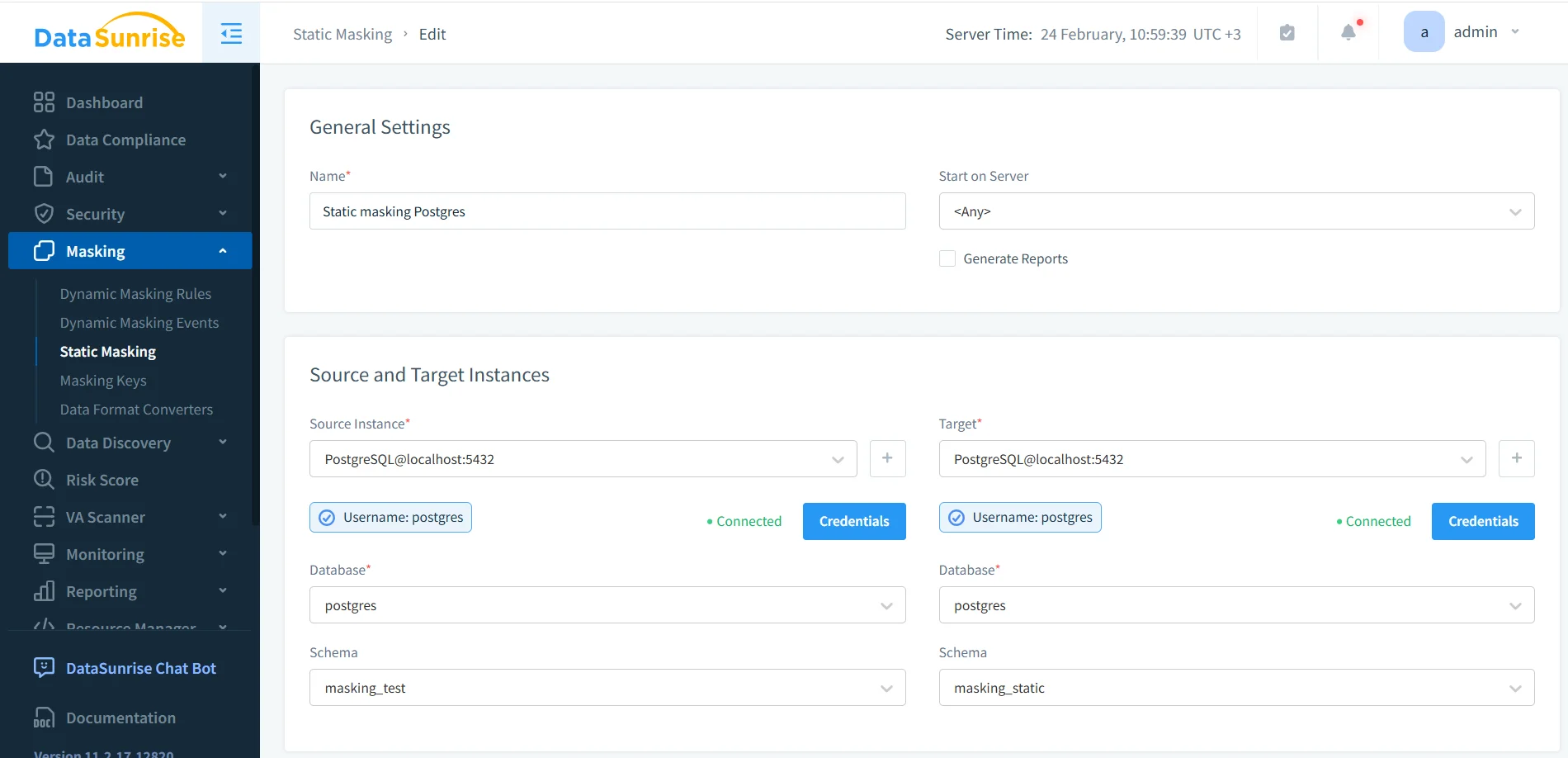
In the same screen, define the source instance, target instance, database, and schema mapping. In the example shown, the source schema is masking_test and the target schema is masking_static.
2) Define Source and Target (Keep Them Separated)
Static masking works because it writes a masked copy into a target. That target can be a different database, a different server, or a separate schema. The important rule: the target is what teams use day-to-day, while the source remains protected and tightly controlled.
If you build Dev/Test refresh pipelines, consider generating the target from a clean export (pg_dump/pg_restore) before masking. PostgreSQL’s official pg_dump documentation is here: PostgreSQL: pg_dump.
3) Choose What to Mask and How
For sensitive columns (email, phone, SSN, passport, salary, bank account, IBAN, address), apply masking methods that preserve usability while removing exposure. If you’re unsure what’s sensitive, use Data Discovery first, then build rules from the results.
If you must sanitize data where it lives (instead of writing a separate target), you can use in-place masking. In most cases, masking a copy is safer and easier to operationalize.
Static masking changes the target dataset permanently. Validate on a small subset first, then run full masking when you’re confident the results won’t break testing, analytics, or constraints.
4) Run the Task and Confirm Completion
Start the static masking job and confirm completion in the Tasks panel. This gives you operational proof that the run finished successfully (and helps troubleshooting when it doesn’t).
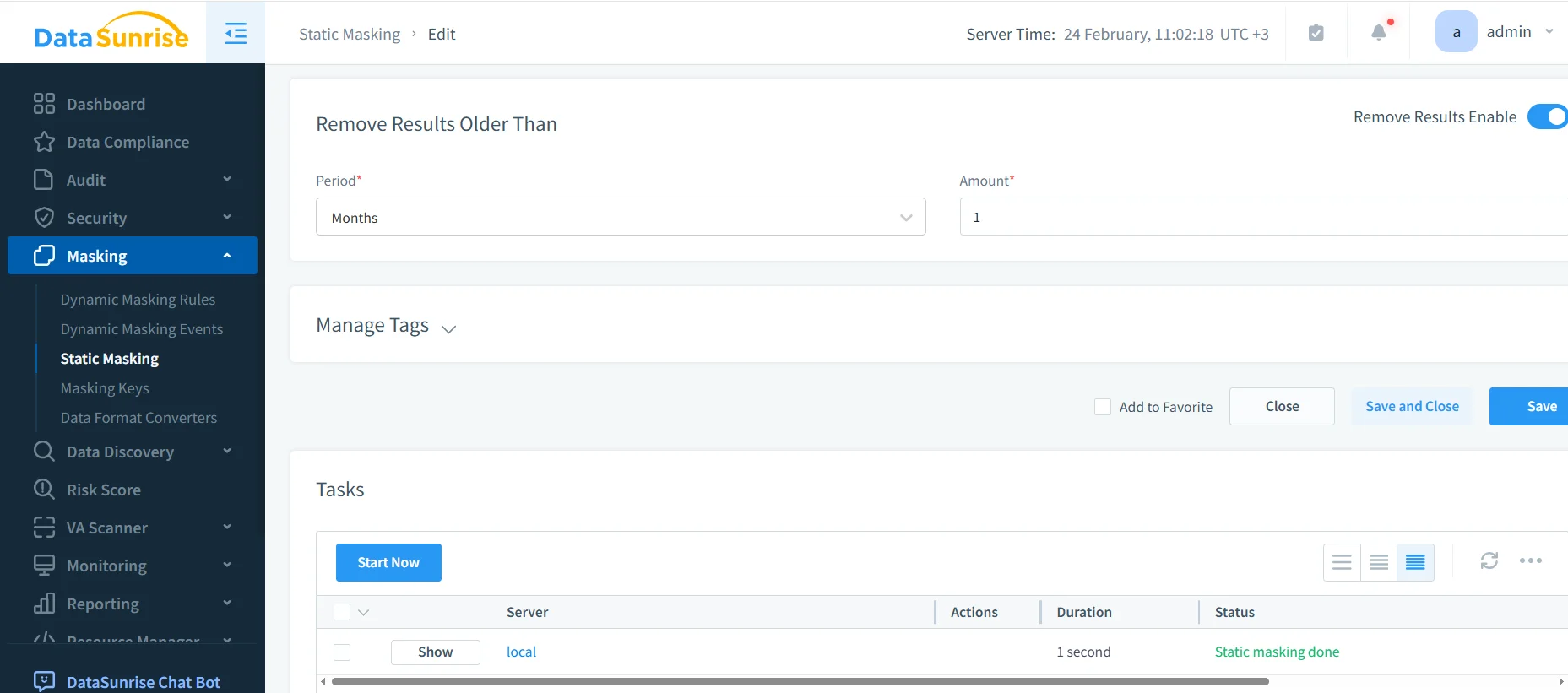
Use retention settings to manage old task results where appropriate, especially if you run masking frequently as part of an environment refresh cycle.
5) Validate the Masked Output with SQL
Validation is non-negotiable. Query the target dataset and confirm sensitive fields are transformed while the data remains usable for joins, filtering, and testing.

-- Query the masked target dataset (schema/database depends on your configuration)
SELECT *
FROM masking_static.employee_sensitive
LIMIT 50;

-- Compare with source (only in secure/admin context)
SELECT *
FROM masking_test.employee_sensitive
LIMIT 50;
A good validation checklist: (1) sensitive fields are transformed, (2) joins still work, (3) uniqueness/constraints aren’t silently broken, and (4) the app/test suite still behaves normally.
Operational Best Practices for Static Masking in PostgreSQL
Static masking usually becomes a pipeline, not a one-off. Treat it like production engineering:
- Least privilege: Limit who can run masking tasks and access sources using the principle of least privilege.
- Role-based operational access: Use RBAC for access to security tooling and sensitive environments.
- Audit evidence: Maintain audit logs and a defensible audit trail, guided by the Audit Guide.
- Behavior visibility: Use Database Activity Monitoring to detect unusual access patterns or mis-scoped permissions.
- Hardening: Follow the Security Guide, run vulnerability assessments, and enforce database encryption where appropriate.
Static Masking in MySQL
Static masking in MySQL follows the same principles—mask a copy, preserve relationships, and validate usability—but a few details commonly trip teams up:
- Collation and formatting: Ensure masked strings still match expected length/charset/format.
- Strict modes: Avoid masked values that break inserts/updates under strict SQL modes.
- Realistic testing: Use synthetic data generation for addresses and descriptive fields so QA doesn’t test against nonsense data.
This is where static masking supports broader test data management and reliable data-driven testing. The goal isn’t just to hide data—it’s to keep systems testable without exposing real identities.
If your MySQL dev database is refreshed periodically, automate masking. Manual “we’ll remember later” steps get skipped, and unmasked data inevitably spreads.
Compliance and Reporting
Static masking reduces exposure outside production and supports compliance requirements across common frameworks. DataSunrise helps align masking controls to GDPR, HIPAA, PCI DSS, and SOX, with workflow support via the Compliance Manager.
Conclusion
Static masking in PostgreSQL is a reliable way to deliver realistic data to non-production environments without shipping real identities and regulated identifiers. The repeatable pattern is simple: discover sensitive fields, define masking rules, run a static masking task into a safe target, validate the output, and audit the process.
Protect Your Data with DataSunrise
Secure your data across every layer with DataSunrise. Detect threats in real time with Activity Monitoring, Data Masking, and Database Firewall. Enforce Data Compliance, discover sensitive data, and protect workloads across 50+ supported cloud, on-prem, and AI system data source integrations.
Start protecting your critical data today
Request a Demo Download Now