How to Audit Couchbase
Implementing robust auditing for NoSQL databases like Couchbase has become essential for security and compliance. According to Verizon's 2024 Data Breach Investigation Report, organizations with comprehensive database activity monitoring detect potential threats 91% faster and reduce breach costs by up to 64%. With average data breach costs reaching $4.88 million in 2024, establishing thorough audit trails is critical.
Couchbase Enterprise Edition provides native auditing capabilities, but organizations in regulated industries often require advanced solutions to meet GDPR, HIPAA, PCI DSS, and SOX requirements. This guide explores Couchbase's built-in audit tools and demonstrates how advanced solutions enhance security monitoring.
Native Couchbase Auditing Capabilities
Couchbase Enterprise Edition includes built-in auditing features for monitoring database activities, data access, and user authentication. Key components include:
1. Enabling Auditing via REST API
Configure auditing through the REST API:
# Enable auditing via REST API
curl -X POST -u Administrator:password \
  http://localhost:8091/settings/audit \
  -d auditdEnabled=true \
  -d rotateInterval=86400 \
  -d logPath=/opt/couchbase/var/lib/couchbase/logs

2. Enabling Auditing via Couchbase CLI
Alternatively, use the CLI:
couchbase-cli setting-audit \
  --cluster http://localhost:8091 \
  --username Administrator \
  --password password \
  --audit-enabled 1 \
  --audit-log-rotate-interval 86400
3. Couchbase Web Console for Audit Review
Access audit information through the web console:
- Navigate to Security → Audit for configuration
- Access Logs section for recent events
- Use Query Workbench for programmatic analysis
- Configure Alerts for suspicious activities
Limitations of Native Couchbase Auditing
While Couchbase's native auditing provides essential functionality, organizations with advanced compliance regulations requirements face limitations:
| Native Feature | Key Limitation | Business Impact |
|---|---|---|
| Audit Log Format | JSON files require manual parsing | Time-consuming investigations |
| Real-Time Alerting | No built-in notification system | Delayed threat detection |
| Sensitive Data Discovery | Manual identification required | Unaudited critical information |
| Compliance Reporting | No automated regulatory mapping | Labor-intensive audits |
| Cross-Platform Visibility | Limited to Couchbase only | Inconsistent security policies |
| Behavioral Analytics | Basic logging without pattern recognition | Missed sophisticated attacks |
Enhanced Couchbase Auditing with DataSunrise
DataSunrise significantly enhances Couchbase auditing through Zero-Touch Compliance Automation and sophisticated monitoring designed for NoSQL environments. Unlike basic logging, DataSunrise delivers enterprise-grade database security with comprehensive audit logs analysis and data protection.
Implementing DataSunrise for Couchbase Auditing
1. Connect to Couchbase Cluster
Establish a secure connection between DataSunrise and your Couchbase environment. DataSunrise supports both Couchbase Server and Couchbase Capella deployments.
2. Create NoSQL-Specific Audit Rules
Configure granular audit rules using No-Code Policy Automation to monitor specific document fields, track N1QL queries, capture administrative operations, and set alerts for suspicious activities.

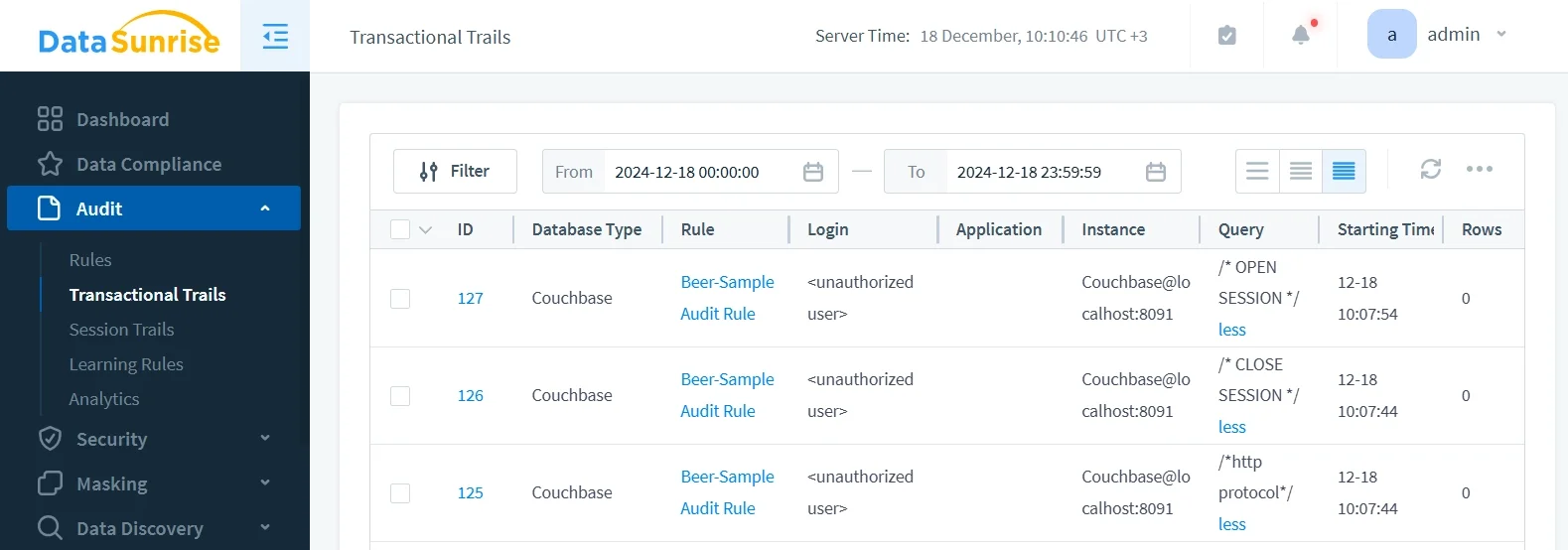
3. Review Comprehensive Audit Trails
Access detailed audit information through DataSunrise's unified dashboard with real-time monitoring and intelligent correlation.
Key Advantages of DataSunrise for Couchbase
Auto-Discover & Classify: Automatically identify sensitive data in JSON documents using NLP and machine learning for comprehensive audit coverage.
No-Code Policy Automation: Create sophisticated policies without complex code, reducing implementation time from weeks to hours.
Real-Time Notifications: Receive immediate alerts for suspicious activities with contextual information and response recommendations.
User Behavior Analysis: Establish baselines and detect anomalies using ML algorithms that adapt to changing patterns.
Automated Compliance Reporting: Generate pre-configured reports for GDPR, HIPAA, PCI DSS, and SOX compliance with the Compliance Manager.
Dynamic Data Masking: Protect sensitive fields with dynamic masking while maintaining application functionality.
Cross-Platform Visibility: Monitor SQL and NoSQL databases from one console with support for over 40 platforms.
Business Benefits of Comprehensive Couchbase Auditing
- Enhanced Security: Proactively identify security threats before they escalate into incidents
- Streamlined Compliance: Automate regulatory adherence with detailed documentation
- Operational Intelligence: Optimize performance and resource allocation across clusters
- Risk Mitigation: Address vulnerabilities through continuous monitoring and automated alerting
- Forensic Capabilities: Maintain detailed records for security investigations and incident response
Conclusion
As organizations rely on Couchbase for business-critical applications, robust auditing is essential for security and compliance. While native capabilities provide foundation functionality, DataSunrise delivers Comprehensive Sensitive Data Detection with Zero-Touch Data Masking, transforming auditing into strategic security intelligence.
With Surgical Precision Masking, Context-Aware Protection, and Compliance-First Architecture, DataSunrise provides the audit infrastructure needed across distributed NoSQL environments. By leveraging DataSunrise's flexible deployment modes, organizations can utilize Couchbase's capabilities while maintaining complete visibility and control.
Protect Your Data with DataSunrise
Secure your data across every layer with DataSunrise. Detect threats in real time with Activity Monitoring, Data Masking, and Database Firewall. Enforce Data Compliance, discover sensitive data, and protect workloads across 50+ supported cloud, on-prem, and AI system data source integrations.
Start protecting your critical data today
Request a Demo Download Now