How to Mask Sensitive Data in Apache Hive
Apache Hive is a widely used data warehouse built on Hadoop, designed to query massive datasets. Organizations use it to process sensitive data—including PII, financial records, and PHI. This makes data masking a core data security requirement. Consequently, IBM’s 2024 Data Breach Report puts the average breach cost at $4.88 million. Leaving sensitive data unprotected in big data environments is a costly risk.
This article covers Hive’s native masking options. It also shows how DataSunrise extends those capabilities with dynamic, policy-driven masking. For configuration details, refer to the official Apache Hive documentation.
Native Apache Hive Data Masking Capabilities
1. Column Masking with Hive Views
The most common native approach is creating views that expose only transformed versions of sensitive columns. The underlying tables are never altered. Notably, the source data stays intact. This makes views well suited for analysts who need read access to production schemas.
-- Create a masked view for analyst access
CREATE VIEW customer_data_masked AS
SELECT
    customer_id,
    SPLIT(full_name, ' ')[0]                           AS full_name,
    CONCAT(SUBSTR(email, 1, 2), '***@***.com')         AS email,
    '***-**-****'                                      AS ssn,
    CONCAT('****-****-****-', SUBSTR(credit_card, -4)) AS credit_card,
    ROUND(account_balance, -3)                         AS account_balance
FROM customer_data;
2. Column-Level Security with Apache Ranger
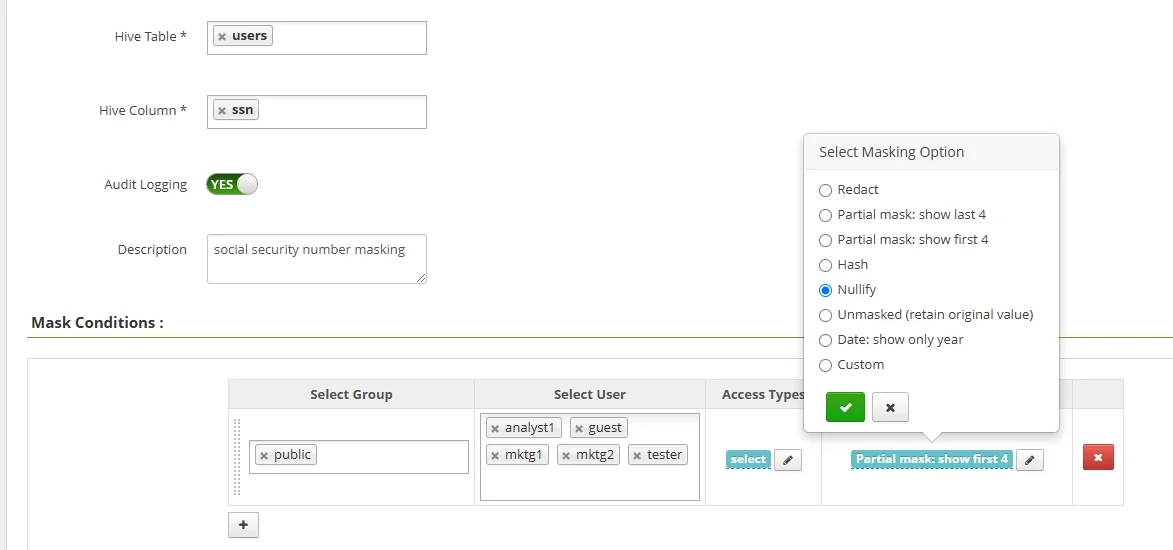
For Hive deployments using Apache Ranger, masking policies are applied centrally via the admin UI or REST API. Furthermore, this eliminates the need to manage per-table views manually:
curl -u admin:admin -X POST \
  http://ranger-host:6080/service/public/v2/api/policy \
  -H 'Content-Type: application/json' \
  -d '{
    "service": "hive_service",
    "name": "mask_ssn_policy",
    "policyType": 1,
    "resources": {
      "database": {"values": ["prod_db"]},
      "table":    {"values": ["customer_data"]},
      "column":   {"values": ["ssn", "credit_card"]}
    },
    "dataMaskPolicyItems": [{
      "dataMaskInfo": {"dataMaskType": "MASK"},
      "accesses": [{"type": "select", "isAllowed": true}],
      "users": ["analyst_role"]
    }]
  }'
Specifically, Ranger supports MASK, MASK_SHOW_LAST_4, MASK_SHOW_FIRST_4, MASK_HASH, MASK_NULL, and CUSTOM mask types.
3. Row-Level Filtering
Moreover, Ranger supports row-level filter policies that restrict which rows a user can access. This is useful in multi-tenant environments. Combined with role-based access controls, row filtering adds another layer of defense against unauthorized exposure.
Enhanced Data Masking for Apache Hive with DataSunrise
However, native tools have significant limits for enterprises with complex compliance demands. Therefore, DataSunrise deploys Autonomous Compliance Orchestration for Zero-Touch Data Masking. It adds no-code policy management with minimal performance impact, covering the full scope of database security needs.
1. Connect Apache Hive to DataSunrise
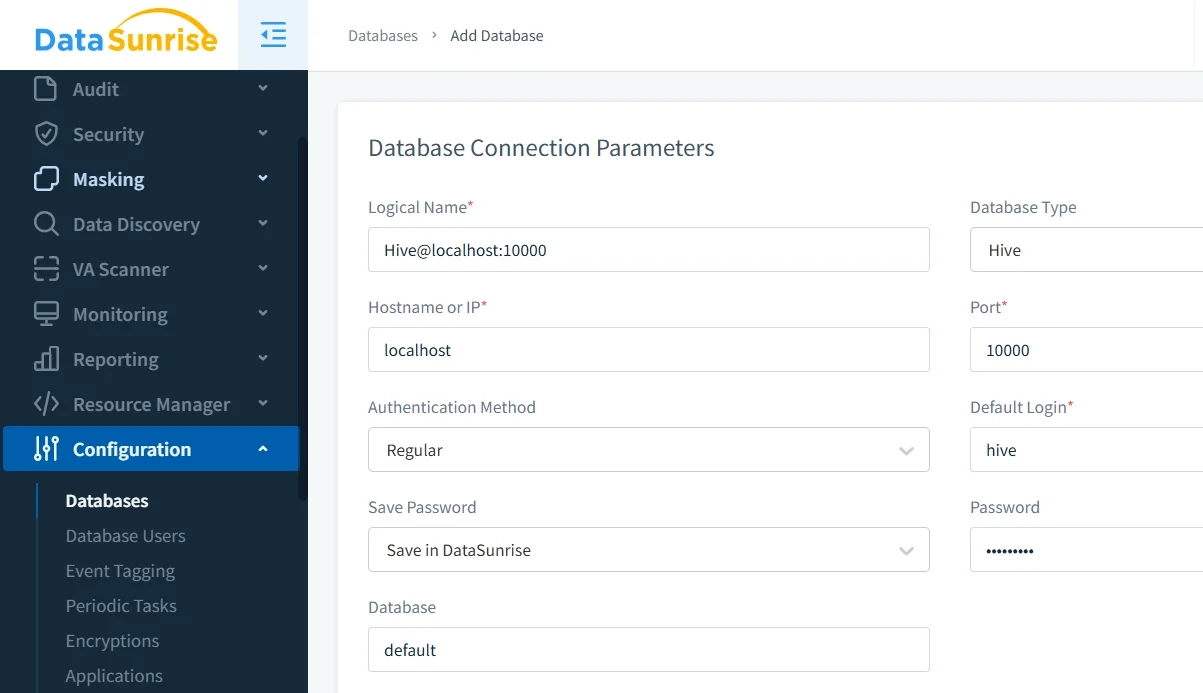
To begin with, connect your Hive instance via JDBC through the DataSunrise interface. DataSunrise supports non-intrusive deployment modes: sniffer, native log trailing, and proxy. No changes to existing applications or Hive configurations are needed.
2. Run Auto-Discovery to Identify Sensitive Columns
Subsequently, the Auto-Discover & Classify engine scans Hive using NLP and machine learning. It classifies sensitive columns across ORC, Parquet, Avro, and TextFile formats. Continuous Regulatory Calibration rescans periodically, so masking coverage never lags behind schema changes.
3. Create Dynamic Masking Rules
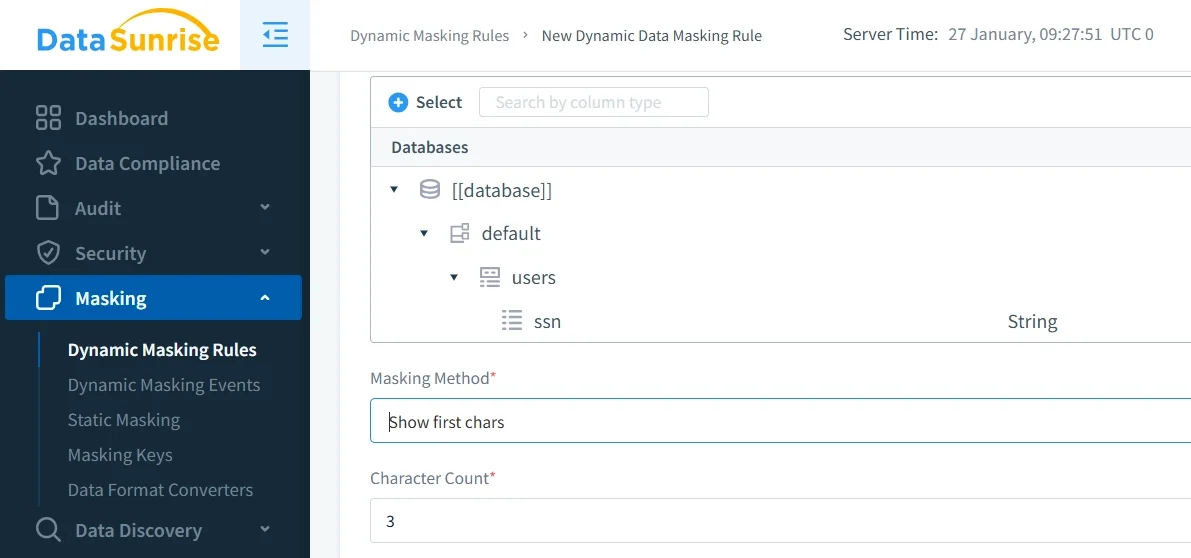
Next, configure masking rules through the No-Code Policy Automation interface. Define which columns to mask, which roles get masked results, and which masking format to apply. Transformations happen at query time. The underlying Hive data is never modified.
4. Review Masked Query Results in the Audit Trail
Finally, DataSunrise logs every query in a full audit trail. It records which users triggered which masking rules and what results they received. This visibility is essential for compliance investigations and forensic analysis.
Key Advantages of DataSunrise for Apache Hive Data Masking
- Dynamic Data Masking: Real-time, role-aware masking at query time with no application changes required.
- Static Data Masking: Create sanitized Hive dataset copies for development and testing, or use in-place masking to overwrite sensitive values directly.
- Automated Compliance Reporting: One-click reports mapped to GDPR, HIPAA, PCI DSS, and SOX frameworks.
- Behavioral Analytics: UBA baselines normal query patterns and flags anomalous access automatically.
- Centralized Policy Management: Manage masking for Hive and 40+ other platforms from a single console.
- Real-Time Notifications: Instant alerts via Slack, email, or MS Teams on suspicious activity.
- Synthetic Data Generation: Produce realistic fictitious Hive datasets for non-production environments.
Business Benefits of Data Masking for Apache Hive
| Benefit | Description |
|---|---|
| Regulatory Compliance | Meet GDPR, HIPAA, PCI DSS, and SOX requirements without re-architecting your Hive environment. |
| Reduced Breach Impact | Masked results are useless to attackers, limiting exposure during a data breach. |
| Safe Non-Production Environments | Give dev and QA teams masked datasets for test data management, preventing sensitive data leakage. |
| Operational Efficiency | Automated discovery and No-Code Policy Automation remove the manual effort of updating static views as schemas evolve. |
Conclusion
To summarize, Hive’s native tools—views, Ranger column policies, and row-level filtering—offer a useful starting point. However, they fall short for complex compliance requirements. In contrast, DataSunrise delivers real-time dynamic masking, automated discovery, and one-click compliance reporting. It forms a solid foundation for continuous data protection.
Protect Your Data with DataSunrise
Secure your data across every layer with DataSunrise. Detect threats in real time with Activity Monitoring, Data Masking, and Database Firewall. Enforce Data Compliance, discover sensitive data, and protect workloads across 50+ supported cloud, on-prem, and AI system data source integrations.
Start protecting your critical data today
Request a Demo Download Now