How to Mask Sensitive Data in Elasticsearch
Organizations increasingly rely on Elasticsearch to store and analyze operational, business, security, and customer information. While Elasticsearch delivers powerful search and analytics capabilities, it often contains sensitive information such as personally identifiable information (PII), financial records, healthcare data, authentication details, and proprietary business content.
Protecting this information is critical for meeting regulatory requirements and reducing the risk of unauthorized disclosure. Modern regulations including GDPR, HIPAA, PCI DSS, SOX, and CCPA require organizations to limit exposure of sensitive data while maintaining business usability. Organizations must also implement appropriate controls to support broader data compliance initiatives and protect regulated information across growing data ecosystems.
This article explains how to mask sensitive data in Elasticsearch using native capabilities and how DataSunrise extends these controls through automated policy orchestration, Compliance Autopilot, Zero-Touch Data Masking, and centralized compliance management. By combining Elasticsearch security features with advanced dynamic data masking capabilities, organizations can reduce compliance risk while preserving access to valuable business data.
What is Sensitive Data and Masking?
Sensitive data is information that could cause financial, legal, or reputational harm if exposed to unauthorized users. In Elasticsearch, this often includes personally identifiable information (PII), healthcare records, payment card details, authentication credentials, and confidential business data.
Data masking protects this information by replacing sensitive values with obfuscated or partially hidden data while preserving usability. For example, an email address such as [email protected] may appear as j@company.com, while a credit card number may be displayed as ***** **** **** 1111.
Masking helps organizations enforce the principle of least privilege by ensuring users only see the information necessary for their role. It also supports compliance with regulations such as GDPR, HIPAA, PCI DSS, and other privacy frameworks.
Unlike encryption, which protects data at rest or in transit, dynamic masking protects information when it is accessed. Organizations often combine masking with access controls and database security measures to reduce exposure risks while maintaining business productivity.
Native Elasticsearch Data Protection Capabilities
Elasticsearch includes several built-in security features that help organizations restrict access to sensitive information and implement basic data protection controls. These capabilities allow administrators to manage access at both the document and field level while enforcing user permissions through centralized role management.
Field-Level Security
Field-level security enables administrators to control which document fields specific users or roles can view. This is particularly useful when different teams need access to the same index but should not see sensitive fields such as email addresses, payment information, or personal identifiers.
Example role configuration:
{
  "indices": [
    {
      "names": [ "customer_data" ],
      "privileges": [ "read" ],
      "field_security": {
        "grant": [
          "customer_id",
          "city",
          "country"
        ]
      }
    }
  ]
}
With this configuration, users can access only approved fields while restricted data remains hidden from view.
Document-Level Security
Document-level security limits access to documents based on predefined query conditions. Instead of controlling individual fields, this feature determines which documents a user can see within an index.
Example:
{
  "query": {
    "term": {
      "department": "sales"
    }
  }
}
In this scenario, users can view only documents associated with the sales department. This approach is commonly used to separate business units, regions, or departments within shared Elasticsearch environments.
Role-Based Access Control
Elasticsearch also provides comprehensive access management through role-based access controls. Administrators can assign privileges based on job responsibilities, ensuring users receive only the permissions necessary to perform their tasks.
Roles can define access to specific indices, clusters, APIs, fields, and documents, helping organizations implement the principle of least privilege and reduce the risk of unauthorized data exposure.
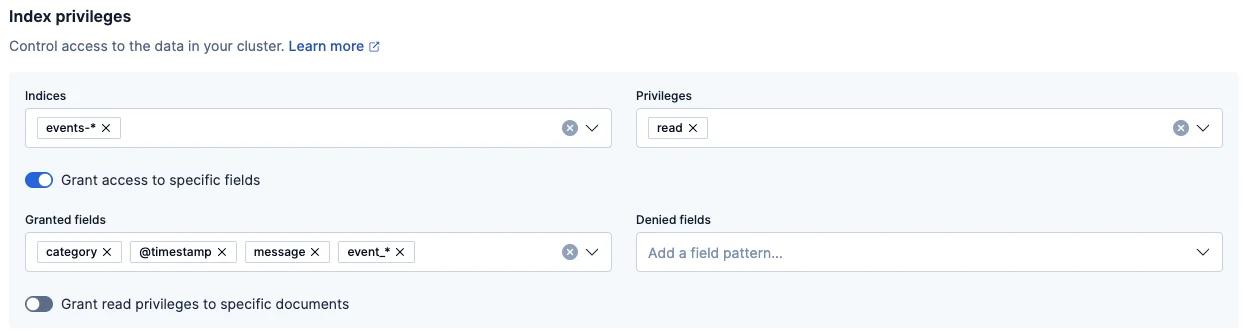
Together, these native capabilities provide a solid security foundation for Elasticsearch deployments. However, organizations that must comply with strict privacy regulations often require additional controls such as dynamic masking, automated compliance enforcement, sensitive data discovery, and centralized policy management.
How DataSunrise Masks Sensitive Data in Elasticsearch
DataSunrise deploys Zero-Touch Data Masking to deliver seamless protection with minimal operational overhead. Through flexible deployment modes and non-intrusive integration, organizations can protect Elasticsearch data without modifying applications or disrupting business workflows. Unlike traditional masking solutions that require continuous tuning and manual administration, DataSunrise provides centralized policy management, intelligent automation, and real-time protection across Elasticsearch environments.
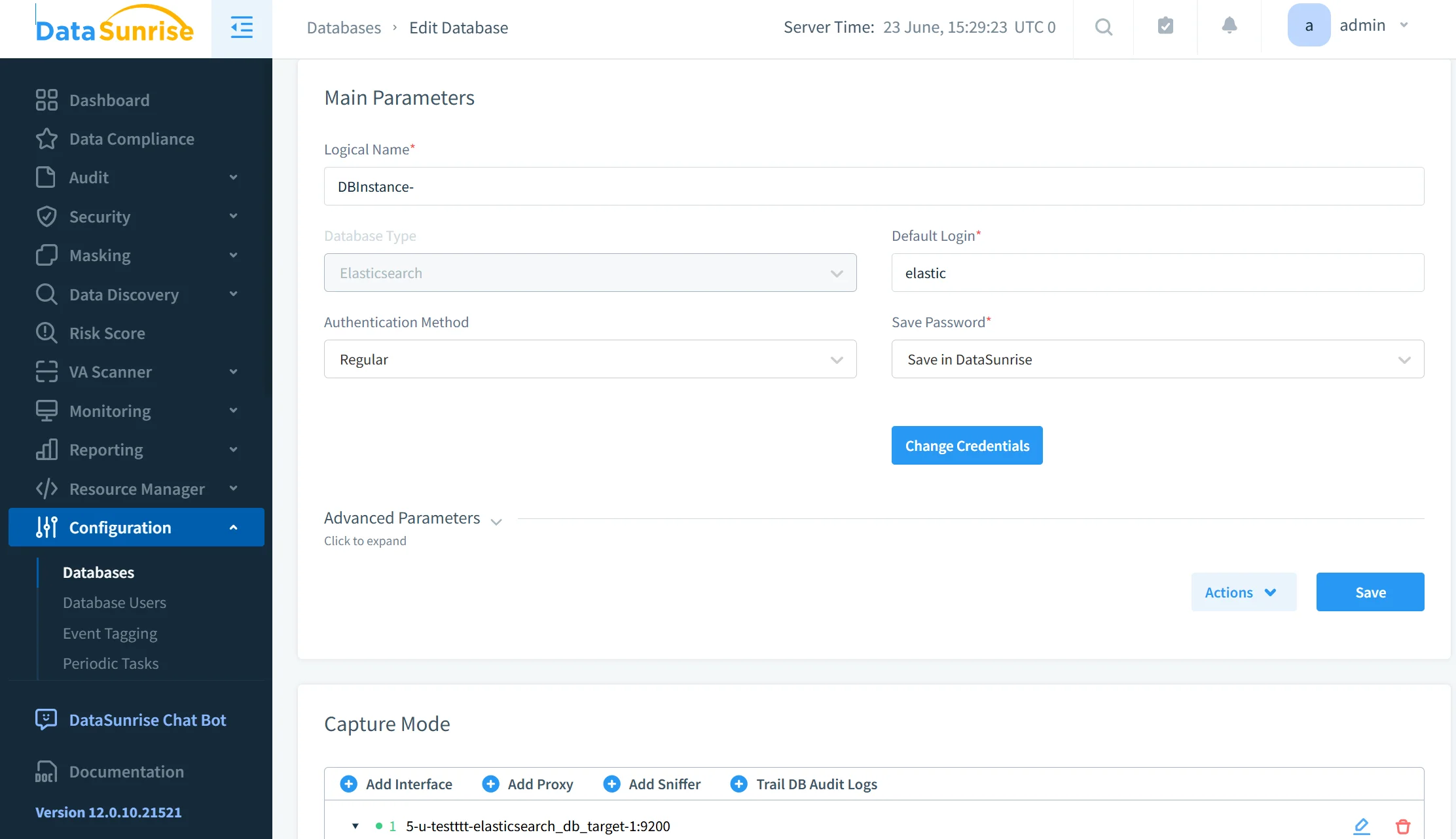
Step 1: Connect Elasticsearch to DataSunrise
The process begins by connecting the Elasticsearch instance to DataSunrise. The platform supports cloud deployments, on-premises environments, hybrid architectures, and multi-cloud infrastructures, allowing organizations to implement consistent protection regardless of where their Elasticsearch clusters operate.
Example Elasticsearch connection settings include the database type, host address, port number, authentication method, and administrative credentials used to establish a secure connection between Elasticsearch and DataSunrise.
Once connected, DataSunrise establishes a centralized security layer for monitoring and protecting sensitive information.
Step 2: Discover Sensitive Information
DataSunrise automatically scans Elasticsearch repositories to identify sensitive information. Using Sensitive Data Discovery, NLP-based analysis, OCR image scanning, and pattern recognition technologies, the platform can locate personally identifiable information (PII), protected health information (PHI), payment card data, authentication credentials, and custom business-sensitive fields.
For example, a discovered document may contain customer names, email addresses, payment card numbers, and location information. DataSunrise automatically identifies these sensitive elements and prepares them for protection through masking policies.
This Auto-Discover & Mask approach significantly reduces manual effort and accelerates security deployments.
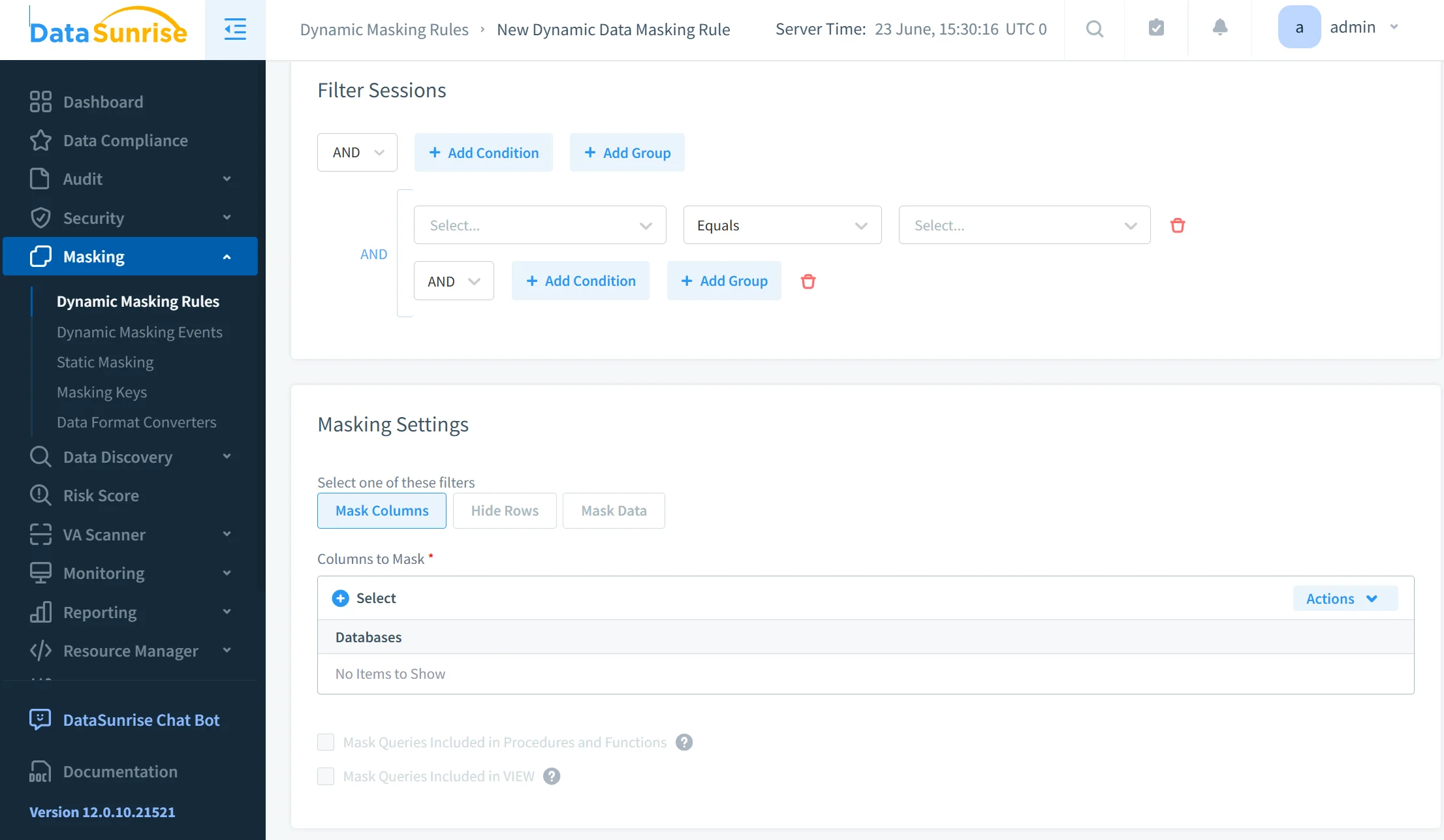
Step 3: Create Dynamic Masking Rules
After sensitive data is identified, administrators can create masking policies through a no-code interface. Different masking methods can be applied depending on the type of information being protected. For example, email addresses may use partial masking, payment card numbers can be tokenized, social security numbers may be fully masked, names can be replaced through randomized substitution, and API keys can be completely obfuscated.
A typical masking policy specifies the protected object, the field to be masked, the masking method, and the users or groups to which the policy applies.
Policies can be configured based on user roles, group membership, application source, IP address, geographic location, or specific compliance requirements. This flexibility allows organizations to implement highly granular protection policies without affecting authorized access.
Step 4: Apply Real-Time Dynamic Masking
When users query Elasticsearch, DataSunrise evaluates masking policies in real time. Authorized users continue to see original values, while restricted users receive masked results.
For example, an email address such as [email protected] may be displayed as j**@company.com* for users who do not have sufficient privileges to view the original value.
Because masking occurs dynamically during data access, applications and analytics workflows continue functioning normally while sensitive information remains protected from unauthorized exposure.
Step 5: Monitor Policy Effectiveness
DataSunrise continuously monitors masking operations to ensure policies remain effective. The platform leverages Machine Learning Audit Rules, User Behavior Monitoring, Suspicious Behavior Detection, and audit-ready reporting to provide visibility into data access activity and policy enforcement.
Audit records can capture details such as the user who accessed the data, the action performed, the protected field involved, whether masking was applied, and the exact time of the event.
Security teams can track how protected data is accessed, identify unusual behavior patterns, verify compliance controls, and generate evidence for auditors. This continuous monitoring helps organizations strengthen security posture while maintaining regulatory compliance.
Comparison Table: Native Elasticsearch vs DataSunrise
| Capability | Native Elasticsearch | DataSunrise |
|---|---|---|
| Field-level restrictions | Yes | Yes |
| Dynamic data masking | Limited | Yes |
| Auto-discovery of sensitive data | No | Yes |
| Compliance Autopilot | No | Yes |
| Continuous Regulatory Calibration | No | Yes |
| Automatic Policy Generation | No | Yes |
| ML Audit Rules | No | Yes |
| Multi-environment coverage | Limited | Yes |
| Centralized policy management | No | Yes |
| Audit-ready reporting | Limited | Yes |
This heading format matches the style commonly used in your audit/history articles.
Conclusion
Elasticsearch provides useful security controls through field-level security, document-level restrictions, and role-based access management. These capabilities establish a strong foundation for protecting sensitive information.
However, modern compliance requirements frequently demand automated governance, centralized policy management, dynamic masking, sensitive data discovery, and broader regulatory coverage.
DataSunrise enhances Elasticsearch masking through Zero-Touch Data Masking, Compliance Autopilot, Continuous Regulatory Calibration, Automatic Policy Generation, Machine Learning Audit Rules, Sensitive Data Discovery, OCR-enabled scanning, and centralized security management.
The platform delivers seamless protection across structured, semi-structured, and unstructured data while supporting cloud, on-premises, and hybrid environments. Integrated Compliance Manager capabilities help organizations maintain continuous regulatory alignment while reducing manual oversight.
The result is an enterprise-ready security platform that minimizes compliance gaps, strengthens privacy protection, reduces operational overhead, and accelerates compliance readiness for Elasticsearch deployments.
Learn more about DataSunrise's Data Masking, Compliance Manager, Database Activity Monitoring, Database Firewall, and deployment options, or schedule a live demo to see how sensitive data masking works in Elasticsearch.
Protect Your Data with DataSunrise
Secure your data across every layer with DataSunrise. Detect threats in real time with Activity Monitoring, Data Masking, and Database Firewall. Enforce Data Compliance, discover sensitive data, and protect workloads across 50+ supported cloud, on-prem, and AI system data source integrations.
Start protecting your critical data today
Request a Demo Download Now