How to Apply Dynamic Masking in Elasticsearch
Organizations increasingly rely on Elasticsearch to store and analyze operational data, application logs, customer records, and security information. While Elasticsearch delivers powerful search and analytics capabilities, it can also expose sensitive information to users who do not require full visibility into protected data.
Dynamic masking addresses this challenge by protecting sensitive fields at query time. Instead of modifying stored data, masking transforms results before they are returned to users, allowing organizations to maintain operational access while reducing privacy and compliance risks. Elasticsearch provides several native security mechanisms, including field-level security, which can serve as a foundation for controlling access to sensitive information.
This approach is particularly important for organizations subject to regulations such as GDPR, HIPAA, PCI DSS, SOX, and CCPA. Dynamic masking enables teams to limit exposure of personally identifiable information (PII), financial records, healthcare data, and other regulated information while preserving business workflows. Organizations often combine masking with comprehensive data compliance initiatives and centralized dynamic data masking solutions to simplify regulatory compliance across their data infrastructure.
This article explains how to apply dynamic masking in Elasticsearch using native capabilities and how DataSunrise extends masking with automation, centralized governance, and compliance-driven protection.
What is Dynamic Masking?
Dynamic masking is a security technique that hides or obfuscates sensitive information when users query a database or search platform. Unlike static masking, which permanently replaces original values, dynamic masking preserves the underlying data and only alters what unauthorized users see during query execution.
For example, a customer support employee may view only the last four digits of a payment card number, while a security administrator can access the complete value. This allows organizations to protect confidential information without disrupting applications or creating duplicate datasets for different user groups.
Dynamic masking is commonly used to safeguard personally identifiable information (PII), financial records, healthcare data, authentication credentials, and other regulated information. Combined with role-based access controls (RBAC), it helps enforce the principle of least privilege while reducing the risk of accidental exposure or insider misuse.
For Elasticsearch environments, dynamic masking provides an additional protection layer beyond native access controls by ensuring that sensitive fields remain readable only to authorized users while other users receive masked values. This approach supports compliance with regulations such as GDPR, HIPAA, PCI DSS, SOX, and CCPA without affecting search performance or modifying indexed documents.
Native Elasticsearch Approaches to Dynamic Masking
Elasticsearch does not include a dedicated dynamic masking engine comparable to specialized database security platforms. Instead, organizations typically combine several native security features to limit the exposure of sensitive information. These methods can reduce data visibility for unauthorized users, but they generally require additional configuration, custom scripting, or application logic to achieve behavior similar to dynamic masking.
Field-Level Security
Field-level security allows administrators to specify which document fields a user or role can access. Rather than masking values, Elasticsearch simply prevents unauthorized users from seeing selected fields.
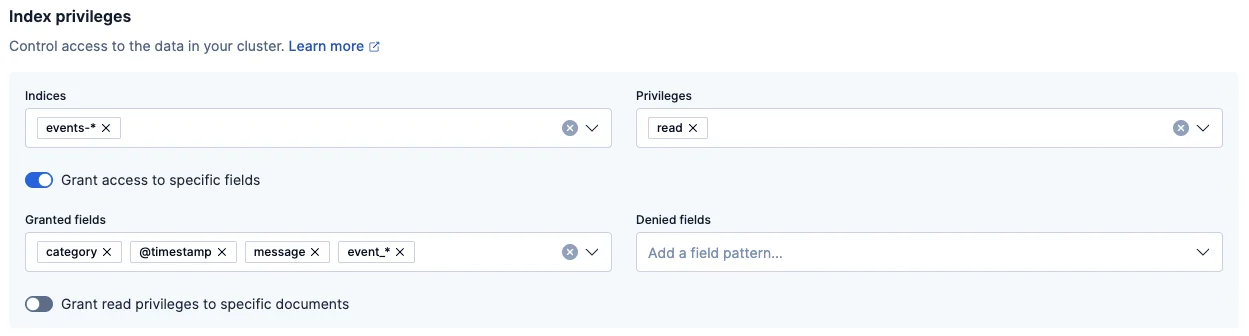
This configuration grants access only to the listed fields. Sensitive attributes such as email addresses, phone numbers, or payment information are completely hidden from users assigned to this role. While effective for access control, this approach cannot display partially masked values, which many business workflows require.
Runtime Fields
Runtime fields make it possible to generate calculated or transformed values during query execution. Administrators can create virtual fields that return masked versions of sensitive information without modifying the indexed documents.
Example:
GET customer_data/_search
{
  "runtime_mappings": {
    "masked_email": {
      "type": "keyword",
      "script": {
        "source": """
          String email = doc['email.keyword'].value;
          emit(email.substring(0,1) + "***");
        """
      }
    }
  }
}
The query generates a masked email address at runtime while preserving the original value inside the index. Although this technique provides greater flexibility than field-level security, it often requires custom Painless scripts and separate runtime mappings for every protected field.
Application-Layer Masking
Another common strategy is to implement masking directly within the application that queries Elasticsearch. After receiving search results, the application determines whether a user has permission to view sensitive information and masks the response if necessary.
Example pseudocode:
if user_role != "security_admin":
    email = mask(email)
Application-layer masking offers significant flexibility because developers can implement different masking rules for various business scenarios. However, this approach also introduces operational complexity. Every application, API, dashboard, or reporting service that accesses Elasticsearch must implement and maintain consistent masking logic, increasing development effort and the risk of inconsistent security policies across the environment.
How DataSunrise Applies Dynamic Masking in Elasticsearch
DataSunrise deploys Zero-Touch Data Masking to protect sensitive Elasticsearch data with minimal administrative effort. Using flexible deployment modes and non-intrusive integration, organizations can implement masking policies without modifying existing applications, changing indexed documents, or redesigning database architecture. Unlike native approaches that often require custom scripts or application-level logic, DataSunrise centralizes masking management through a unified interface while maintaining consistent protection across cloud, on-premises, hybrid, and multi-cloud environments.
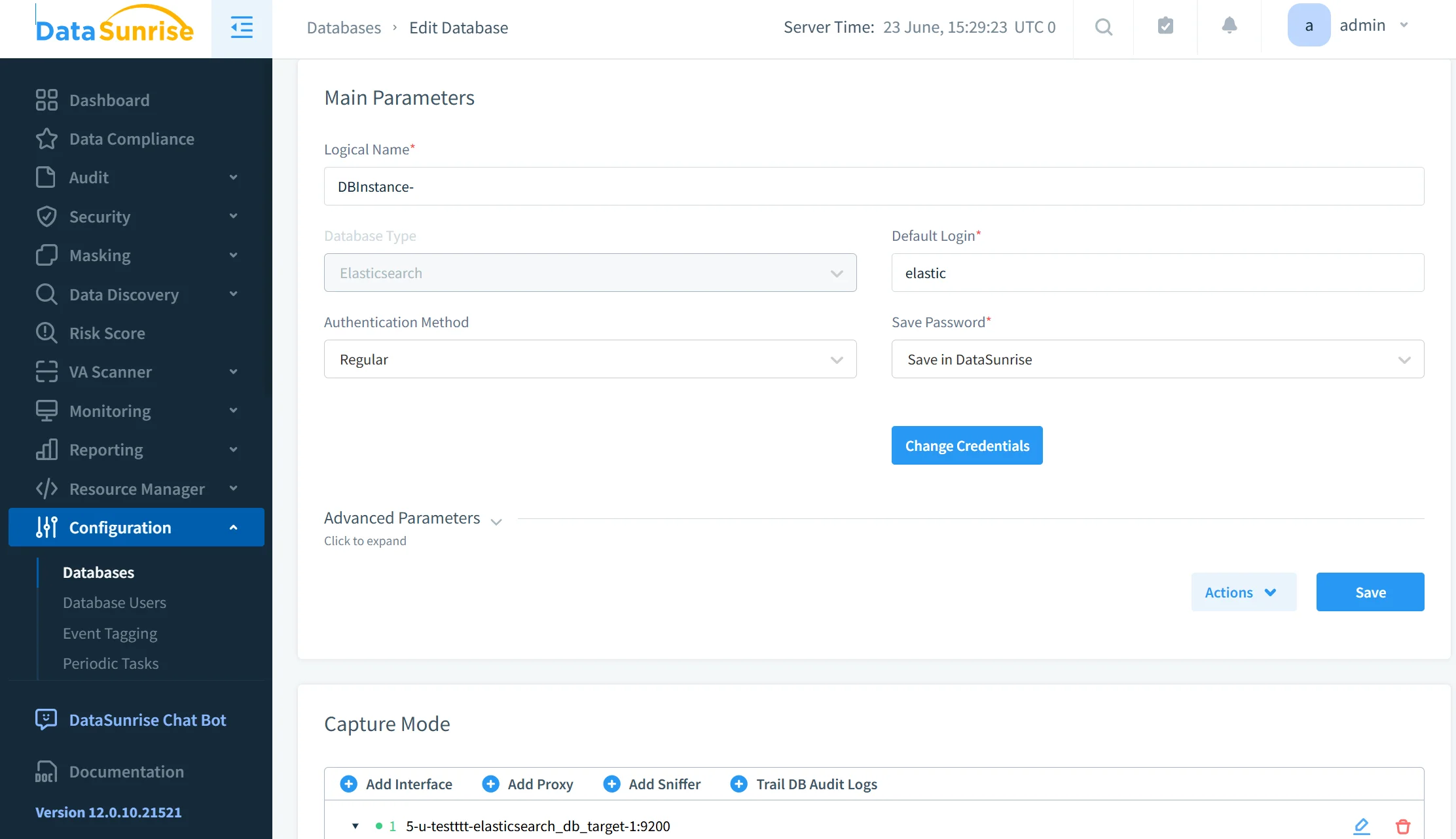
Step 1: Connect Elasticsearch to DataSunrise
The process begins by connecting an Elasticsearch instance to DataSunrise. After the connection is established, the platform becomes an additional security layer that evaluates database traffic and user requests before data is returned. The connection process supports various deployment models, allowing organizations to secure production, development, and testing environments without interrupting existing workloads.
Step 2: Discover Sensitive Information
Once the connection is complete, DataSunrise automatically scans Elasticsearch indexes using Sensitive Data Discovery. The platform identifies personally identifiable information (PII), payment card numbers, healthcare records, authentication credentials, financial information, and custom business-specific data. Discovery supports structured, semi-structured, and unstructured data, enabling organizations to locate sensitive information without manually inspecting every index or document.
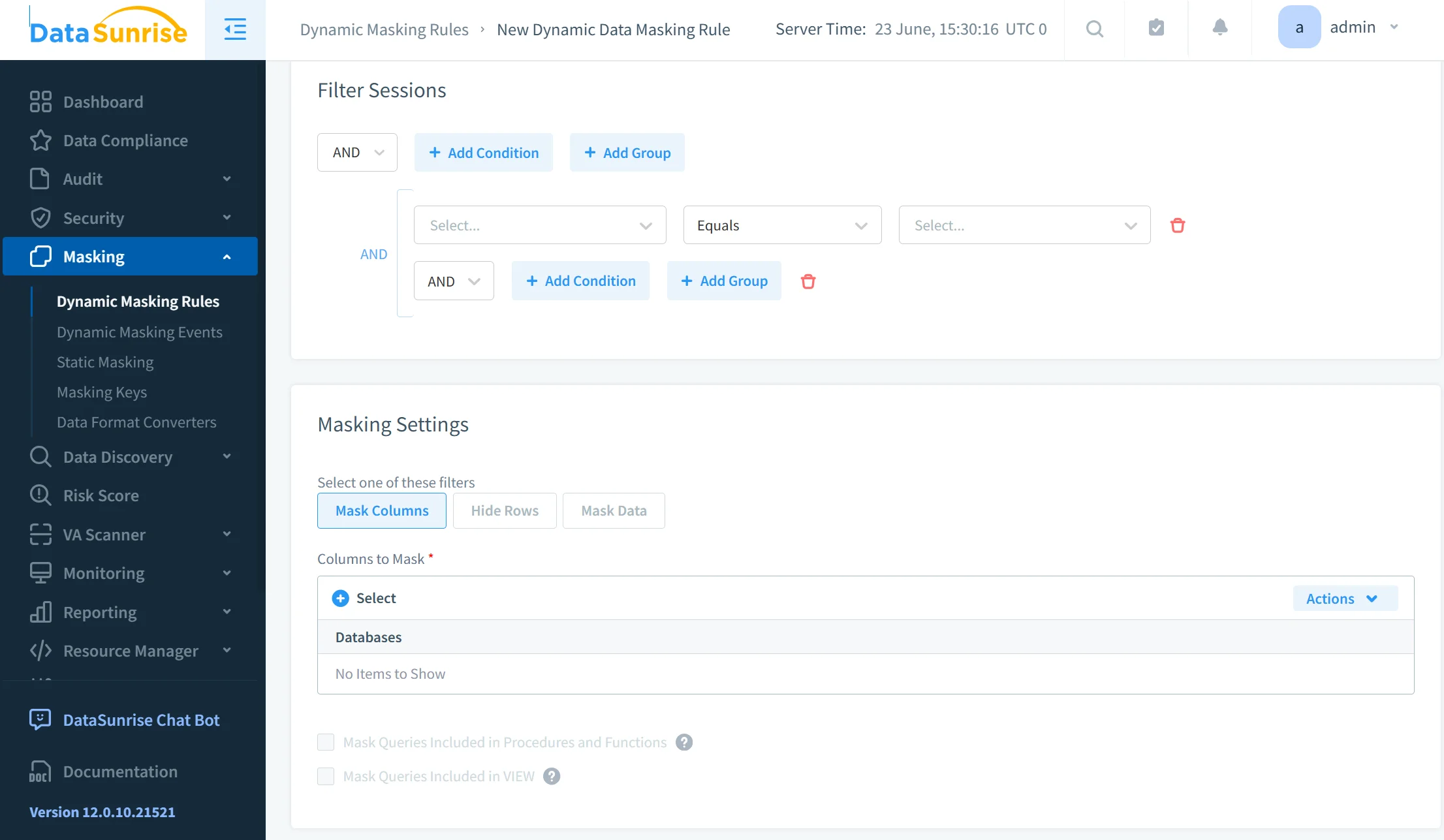
Step 3: Create Dynamic Masking Rules
After sensitive fields have been identified, administrators create dynamic masking policies through the centralized management console. Policies can target individual fields, indexes, users, user groups, roles, applications, or entire business units. Multiple masking methods—including partial masking, full masking, substitution, randomization, and custom masking algorithms—can be applied depending on business requirements and regulatory obligations.
Step 4: Apply Context-Aware Protection
When users submit search requests, DataSunrise evaluates their permissions, roles, and security policies before Elasticsearch returns the results. Authorized users continue to receive original values, while restricted users automatically receive masked versions of protected fields. This context-aware approach ensures that sensitive information remains available only to personnel with the appropriate privileges, while applications continue to operate normally without requiring any modifications.
Step 5: Monitor and Audit Masked Access
Every masking event can be recorded through DataSunrise's auditing capabilities. Security teams receive complete visibility into who accessed protected information, when the request occurred, which Elasticsearch indexes were involved, which masking policy was applied, and which application initiated the request. These detailed audit records simplify incident investigations, support forensic analysis, and provide audit-ready evidence for regulatory compliance with standards such as GDPR, HIPAA, PCI DSS, SOX, and CCPA.
Native Elasticsearch vs DataSunrise
The following comparison highlights the key differences between Elasticsearch's native capabilities and DataSunrise's enterprise-grade dynamic masking platform.
| Capability | Native Elasticsearch | DataSunrise |
|---|---|---|
| Dynamic masking | Limited | Yes |
| Sensitive data discovery | No | Yes |
| Centralized policy management | No | Yes |
| Automated compliance | No | Yes |
| Audit-ready reporting | Limited | Yes |
| Cloud, hybrid & on-prem support | Limited | Yes |
Conclusion
Elasticsearch provides useful security mechanisms through field-level controls, role-based access management, and runtime field transformations. These features help organizations reduce exposure of sensitive information and establish a baseline protection strategy.
However, modern compliance requirements often demand centralized governance, automated policy management, continuous monitoring, sensitive data discovery, and scalable masking across diverse environments.
DataSunrise enhances Elasticsearch dynamic masking through Zero-Touch Data Masking, Compliance Autopilot, Automatic Policy Generation, Continuous Regulatory Calibration, Machine Learning Audit Rules, Sensitive Data Discovery, and centralized policy management. The platform delivers seamless coverage across cloud, on-premises, and hybrid infrastructures while protecting structured, semi-structured, and unstructured data.
The result is an enterprise-ready security platform that strengthens privacy protection, minimizes compliance risk, reduces manual effort, and provides scalable dynamic masking for Elasticsearch environments.
Learn more about DataSunrise's Data Masking, Data Audit, Compliance Manager, and Database Activity Monitoring, or schedule a live demo to see dynamic masking in Elasticsearch in action.
Protect Your Data with DataSunrise
Secure your data across every layer with DataSunrise. Detect threats in real time with Activity Monitoring, Data Masking, and Database Firewall. Enforce Data Compliance, discover sensitive data, and protect workloads across 50+ supported cloud, on-prem, and AI system data source integrations.
Start protecting your critical data today
Request a Demo Download Now