Sensitive Data Protection in PostgreSQL
PostgreSQL runs some of the most critical workloads in modern organizations—customer platforms, billing systems, HR tools, healthcare apps, and analytics pipelines. That also means PostgreSQL frequently stores sensitive data such as Personally Identifiable Information (PII), financial identifiers, authentication artifacts, and confidential internal records. Protecting this data is not just a compliance exercise; it’s essential for reducing breach impact, controlling insider risk, and keeping non-production environments from turning into accidental data leaks.
Effective protection requires more than one control. Access rules alone don’t prevent exposure once a user can run a query, and “just don’t export production data” falls apart the moment Dev/Test or analytics teams need realistic datasets. The IBM Cost of a Data Breach Report is a straightforward reminder that the cost of getting this wrong is substantial—especially when exposure happens through common operational paths like shared dumps or stale staging databases.
This article presents a practical, layered approach to sensitive data protection in PostgreSQL. You’ll learn how to combine discovery, role-based access, dynamic data masking for production reads, auditing and monitoring, and static masking for safe non-production datasets—including practical insights for static masking in MySQL.
What Counts as Sensitive Data in PostgreSQL?
Sensitive data is not limited to obvious “PII columns.” In PostgreSQL, it commonly includes:
- Direct identifiers: names, emails, phone numbers, government IDs
- Financial data: salary, banking details, IBANs, payment-related fields
- Health and HR data: medical notes, diagnosis codes, employment records
- Security data: credentials, tokens, secrets, access logs
- Business-sensitive data: contracts, pricing, customer segmentation, proprietary metrics
A reliable way to avoid blind spots is to start with automated discovery. DataSunrise provides Data Discovery to locate sensitive fields across schemas and environments and align protection policies to real data locations.
Treat discovery as a recurring process, not a one-time audit. New tables and fields appear constantly—especially in fast-moving product teams.
Defense-in-Depth for PostgreSQL Data Protection
Sensitive data protection works best as a layered model. For PostgreSQL, a pragmatic baseline typically includes:
- Access governance: Role-Based Access Control (RBAC) and the principle of least privilege
- Masking: data masking for reducing visibility of sensitive fields
- Monitoring and evidence: Database Activity Monitoring and centralized Audit Logs
- Threat prevention: policy enforcement via Database Firewall and hardened rules
- Hardening: Vulnerability Assessment and complementary Database Encryption
Masking is central because it limits what data is exposed even when access is granted. DataSunrise describes common techniques (redaction, partial masking, hashing/tokenization) in masking types.
Masking is not a replacement for permissions. If a role is over-privileged, masking can reduce exposure, but it won’t fix an access model that’s already broken.
Dynamic Data Masking in PostgreSQL
Dynamic data masking transforms sensitive values at query time while leaving stored data unchanged. This is especially useful in production PostgreSQL where support, analysts, and internal teams need access to datasets—but do not need full visibility into sensitive fields.
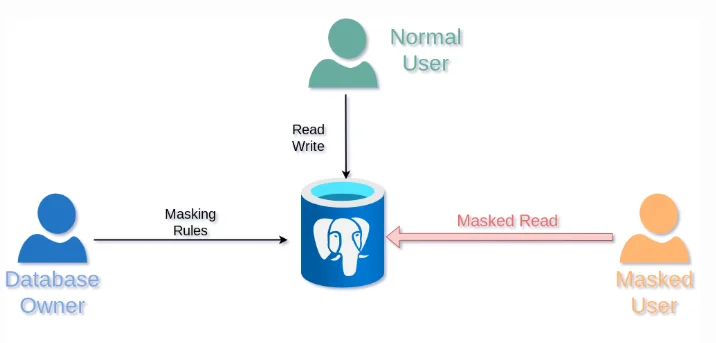
Dynamic masking returns masked query results for restricted users while preserving full access for authorized roles.
Step-by-Step: Create a Dynamic Masking Rule in DataSunrise
DataSunrise supports multiple deployment options; select the model that best fits your architecture using Deployment Modes of DataSunrise. Once connected to your PostgreSQL instance, you can implement dynamic masking in a repeatable workflow.
- Open the rule editor: Navigate to Masking → Dynamic Masking Rules and create a new rule for PostgreSQL.
- Select scope: Choose the database instance, then select schemas/tables/columns that contain sensitive fields.
- Assign masking methods: Use redaction or partial masking for identifiers; use hashing/tokenization where stable matching is needed.
- Define conditions: Apply masking by user/role/group/application context, aligned to your RBAC model.
- Test and iterate: Validate behavior from the same client tools your users run (BI tools, ORMs, service accounts).
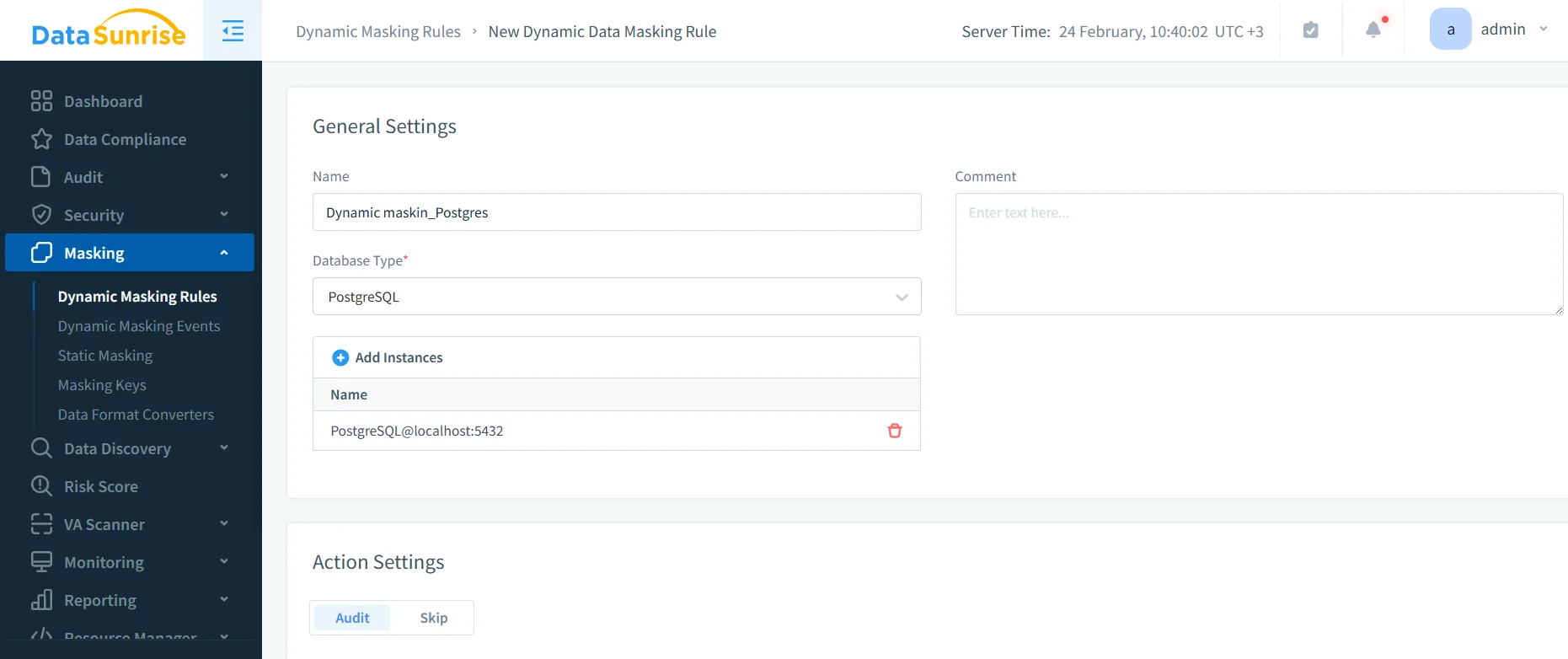
Creating a dynamic masking rule in DataSunrise for a PostgreSQL instance.
Start small: mask a handful of high-risk columns first, validate application behavior, then expand coverage based on discovery results and audit evidence.
Validate Dynamic Masking with a Controlled Query
Validation should prove two things: (1) sensitive columns are transformed for restricted users, and (2) the dataset remains usable for filtering, aggregation, and troubleshooting.
SELECT * FROM masking_test.employee_sensitive

Masked query output showing transformed values across sensitive columns.
Always validate masking using the same tools and connection paths your users use. A policy that looks correct in one client can behave differently in another if access context changes.
If you also enforce row-level visibility rules, keep them aligned with masking logic. PostgreSQL Row Level Security documentation is available here: PostgreSQL Row Security Policies.
Auditing and Monitoring: Proving Control Effectiveness
Masking reduces exposure, but auditing answers the operational questions: who accessed what, when, and from where. For sensitive PostgreSQL environments, capture evidence through Audit Logs, monitor activity patterns using Database Activity Monitoring, and follow the structured recommendations in the Audit Guide. For long-term accountability, maintain a defensible audit trail across environments.
To reduce risk from malicious queries or unsafe behaviors, layer in policy enforcement using the Database Firewall and harden detection and blocking rules with security rules against SQL injections, guided by the broader Security Guide.
Static Masking for Safe Non-Production Copies
Dynamic masking protects production reads. Static masking protects everything that leaves production. Static data masking permanently transforms sensitive fields in a copy—ideal for Dev/Test refreshes, sandboxes, training environments, and downstream analytics.
If you must sanitize datasets in place (for example, tightly constrained environments), DataSunrise also supports in-place masking, but masking into a separate target is usually the safer operational pattern.
Static masking is most effective when automated as part of environment provisioning. If masking is manual, it eventually gets skipped.
Practical Static Masking Insights for MySQL
Many organizations run PostgreSQL in production but use MySQL for legacy apps, staging, analytics, or Dev/Test. The same static masking principles apply in MySQL: sanitize a copy, preserve relationships, and validate usability. In practice, the “gotchas” tend to be operational:
- Preserve integrity: Deterministic masking helps keep relationships stable across tables.
- Respect formats: Keep lengths and patterns compatible with application validation.
- Keep realism: Use synthetic data generation for safe but realistic values in Dev/Test.
- Test at scale: Pair masking with Test Data Management and data-driven testing to ensure masked datasets remain useful.
Avoid creating “masked data” that breaks application logic. Masking that destroys referential integrity or violates constraints creates false failures and slows delivery.
Compliance Alignment and Reporting
Strong protection programs map controls to regulatory requirements. DataSunrise supports alignment with GDPR, HIPAA, PCI DSS, and SOX. For centralized control management and reporting workflows, use the DataSunrise Compliance Manager. Combine that with regular Vulnerability Assessment and complementary Database Encryption to strengthen overall posture.
Conclusion
Sensitive data protection in PostgreSQL is most effective when implemented as layered controls: discover sensitive fields, enforce least-privilege access, apply dynamic masking for production reads, audit and monitor activity, and use static masking for every non-production copy. This approach reduces exposure without blocking legitimate work—and it scales across mixed environments that include both PostgreSQL and MySQL.
Protect Your Data with DataSunrise
Secure your data across every layer with DataSunrise. Detect threats in real time with Activity Monitoring, Data Masking, and Database Firewall. Enforce Data Compliance, discover sensitive data, and protect workloads across 50+ supported cloud, on-prem, and AI system data source integrations.
Start protecting your critical data today
Request a Demo Download Now