What Is IBM Informix Audit Trail
As organizations increasingly depend on data-driven operations, the ability to track who accessed what, when, and how becomes critical for both security and compliance. For users of IBM Informix, implementing an effective audit trail is a fundamental practice for ensuring accountability and regulatory alignment.
An audit trail in Informix records database events such as logins, queries, updates, and schema changes, giving administrators a clear history of user and system activity. However, while Informix provides built-in tools for managing these logs, many enterprises enhance visibility and automation by integrating solutions like DataSunrise, which offers intelligent auditing, compliance automation, and advanced threat detection.
This article explores how to set up and interpret the Informix audit trail using its native tools and how DataSunrise extends these capabilities for modern security and compliance environments.
What Is Audit Trail?
An audit trail is a chronological record that provides documented evidence of database operations. It captures the details of actions performed by users, applications, and system processes. These records include information such as who made the change, what was changed, when it happened, and from which location or client it originated.
The primary goal of an audit trail is to ensure accountability and traceability across systems. In the context of IBM Informix, audit trails are essential for:
- Monitoring database usage and user activities.
- Identifying unauthorized access or data manipulation.
- Supporting forensic investigations and compliance reviews.
- Verifying the integrity of business-critical data.
A robust audit trail enables administrators to reconstruct events, detect irregular behavior, and validate compliance with security standards like GDPR, HIPAA, and SOX.
In regulated industries such as finance, healthcare, and telecommunications, maintaining a complete audit trail is a mandatory practice to prevent data breaches and demonstrate adherence to internal and external controls.
Understanding the Informix Audit Trail
The Informix audit trail is a chronological record of database activities collected through the onaudit subsystem. These logs form a reliable foundation for detecting policy violations, verifying data integrity, and supporting forensic investigations.
Each record contains detailed fields such as timestamps, user identifiers, event types, and affected database objects:
Event_Type | Timestamp | Database | User | ProcessID | Action_Detail | Result
The default storage format is binary, but administrators can easily view human-readable logs using the onshowaudit command.
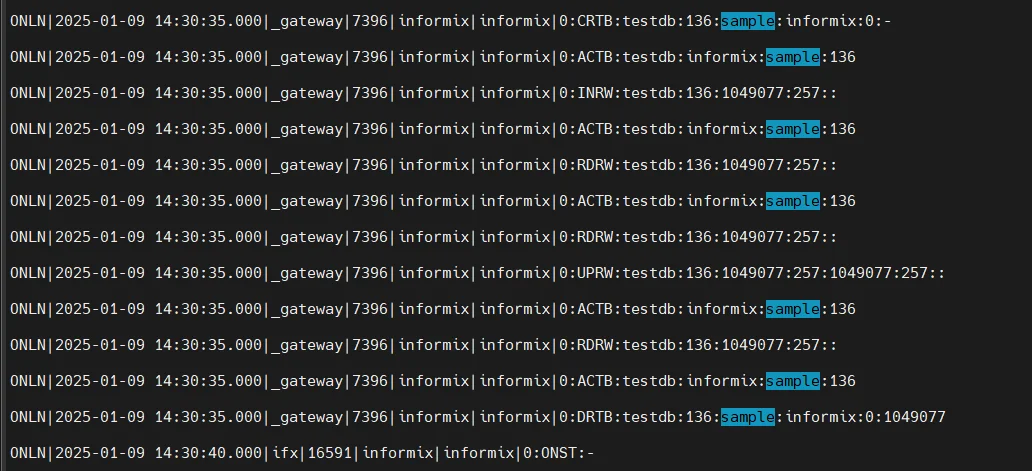
By maintaining a continuous, verifiable chain of activity, the Informix audit trail provides the transparency required by frameworks such as GDPR, HIPAA, and SOX.
Configuring the Informix Audit Trail
Setting up an Informix audit trail involves enabling the onaudit utility and defining which events should be recorded. Here’s how to configure it.
Step 1: Enable Auditing
Activate the audit subsystem and specify the desired logging level:
onaudit -L 1    # Enable logging level
onaudit -A 1    # Apply auditing to all users
onaudit -n      # Start a new audit log file
These commands initialize the audit process and ensure that all relevant database activity is captured.
Step 2: Perform Test Actions
Execute several SQL statements to generate audit records:
CREATE TABLE employee (id SERIAL PRIMARY KEY, name VARCHAR(100), department VARCHAR(50));
INSERT INTO employee (name, department) VALUES ('Alice Green', 'Finance');
UPDATE employee SET department = 'Operations' WHERE name = 'Alice Green';
SELECT * FROM employee;
DROP TABLE employee;
Each action produces an entry in the audit trail that can be reviewed through onshowaudit.
Step 3: Review and Filter Logs
Use the following command to display all audit records:
onshowaudit
You can narrow the output to specific event types or users using filters, simplifying log analysis and reporting.
For more detail on configuration parameters, refer to the official IBM Informix documentation.
Limitations of Native Informix Audit Trail
While Informix’s native auditing tools are powerful, they come with several constraints:
| Challenge | Description |
|---|---|
| Localized Scope | Each Informix instance maintains separate audit logs, complicating multi-instance monitoring. |
| Basic Alerting | No built-in mechanism for real-time alerts or behavior-based anomaly detection. |
| Manual Analysis | Logs are stored in raw text or binary, requiring additional tools for SIEM integration. |
| Performance Overhead | Detailed logging configurations may impact database performance in high-load environments. |
These factors often prompt organizations to adopt centralized auditing solutions that provide broader visibility and automation.
Enhancing Informix Audit Trails with DataSunrise
DataSunrise extends Informix’s auditing features into a unified, automated compliance framework. Its audit management system centralizes activity tracking, reduces manual analysis, and ensures full traceability across all database environments.
Centralized Monitoring
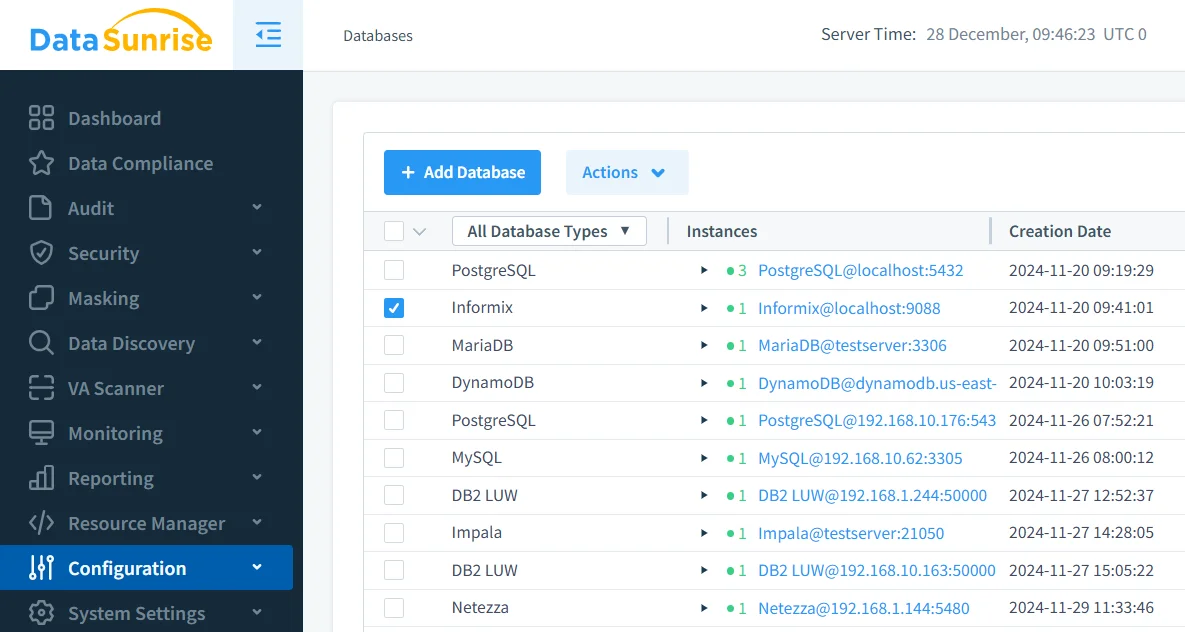
With DataSunrise Database Activity Monitoring, administrators gain a unified view of all audit trails from multiple Informix instances.
Instead of managing separate logs per instance, DataSunrise consolidates them into a single, real-time dashboard that allows:
- Cross-database comparison and correlation of audit events.
- Rapid detection of anomalies or unauthorized access attempts.
- Streamlined compliance reviews through centralized access control.
This holistic visibility reduces complexity and ensures consistent enforcement of audit policies across distributed Informix environments.
By unifying data from multiple databases, organizations can achieve full transparency, which simplifies internal investigations and regulatory reporting.
Automated Compliance Reporting
Through DataSunrise Compliance Manager, organizations can automatically generate comprehensive reports that align with frameworks such as GDPR, HIPAA, PCI DSS, and SOX.
These reports consolidate audit data, track access violations, and summarize compliance posture across all connected databases.
Key advantages include:
- Automatic evidence collection for external auditors.
- One-click generation of audit summaries with detailed event histories.
- Continuous compliance alignment through periodic scans and rule recalibration.
This reduces manual reporting efforts, shortens audit preparation time, and ensures that all audit trails remain ready for inspection at any time.
Behavior Analytics
Behavior Analytics leverages advanced machine learning to analyze user activity patterns within Informix.
By building behavioral baselines, DataSunrise identifies deviations that might indicate insider threats, misuse, or compromised accounts.
For example, if a user suddenly executes queries outside their typical working hours or accesses unauthorized tables, the system automatically flags it as suspicious.
Behavior analytics delivers:
- Early detection of potential breaches.
- Contextual risk assessment with event correlation.
- Reduction of false positives compared to rule-based systems.
This intelligent monitoring not only strengthens data security but also enables continuous learning as usage patterns evolve, improving accuracy over time.
Real-Time Notifications
Real-Time Notifications ensure that security teams are immediately informed of critical database events.
Administrators can configure instant alerts through Slack, email, or SIEM integrations for events such as unauthorized logins, privilege escalations, or data exfiltration attempts.
Each notification includes essential metadata—user, IP address, timestamp, and event details—helping analysts respond quickly to potential security incidents.
Integration with SIEM systems such as Splunk or QRadar provides an additional layer of defense, enabling unified monitoring of Informix and other platforms.
These proactive alerts minimize response time, reduce incident impact, and keep audit teams continuously informed.
Business Impact
Implementing an audit trail with DataSunrise delivers measurable benefits:
| Benefit | Description |
|---|---|
| Reduced Compliance Overhead | Automates data collection and reporting for faster, easier audits, saving significant administrative time. |
| Increased Transparency | Provides complete visibility into database activity across all environments and simplifies compliance reviews. |
| Enhanced Security Posture | Detects and mitigates risks in real time, preventing unauthorized data exposure and security breaches. |
| Operational Efficiency | Minimizes manual log review, improving workflow efficiency while ensuring consistent regulatory alignment. |
| Regulatory Readiness | Maintains continuous adherence to frameworks like GDPR, HIPAA, and SOX, keeping audit documentation always up-to-date. |
Conclusion
IBM Informix’s native onaudit tool lays a solid foundation for tracking database events and ensuring accountability. Yet, enterprises operating across multiple systems and compliance frameworks need a more intelligent and centralized approach.
DataSunrise provides this next level of control—combining real-time monitoring, masking, and automated reporting to create a comprehensive audit environment for Informix and beyond.
Protect Your Data with DataSunrise
Secure your data across every layer with DataSunrise. Detect threats in real time with Activity Monitoring, Data Masking, and Database Firewall. Enforce Data Compliance, discover sensitive data, and protect workloads across 50+ supported cloud, on-prem, and AI system data source integrations.
Start protecting your critical data today
Request a Demo Download Now