Amazon Redshift Data Compliance Automation
Modern analytical environments change continuously. New users receive access, schemas expand, sensitive information moves between workloads, and security configurations evolve. For organizations using Amazon Redshift, these changes make manual compliance checks difficult to sustain.
Amazon Redshift Data Compliance Automation combines native AWS monitoring, configuration assessment, event processing, and scheduled operations to reduce repetitive compliance work. Amazon Redshift can generate database audit records, while surrounding AWS services can evaluate configuration state and react to important infrastructure events. ([AWS Documentation][2])
However, native AWS services form a collection of individual controls rather than a single automated compliance workflow. Organizations still need to connect data classification, activity monitoring, policy management, protection, and regulatory evidence.
DataSunrise extends this foundation with automated Data Discovery, compliance policy management, intelligent monitoring, masking, and reporting for Amazon Redshift.
Importance of Data Compliance Automation for Amazon Redshift
Amazon Redshift often contains information consolidated from operational applications, business systems, analytics pipelines, and external sources. These environments may therefore contain personal, financial, healthcare, authentication, and payment information governed by regulations such as GDPR, HIPAA, PCI DSS, and SOX.
Manual compliance administration becomes increasingly fragile as the environment grows. Administrators must repeatedly answer questions such as:
- Is database auditing still enabled?
- Are Redshift clusters encrypted?
- Has a cluster become publicly accessible?
- Which users recently performed sensitive operations?
- Has new regulated information appeared?
- Do existing security controls still cover newly created objects?
- Is sufficient evidence available for the next audit?
Automation transforms these tasks from occasional inspections into repeatable controls. It can detect configuration drift, trigger notifications or remediation workflows, schedule recurring checks, and maintain evidence without requiring administrators to perform every step manually.
Native Amazon Redshift Data Compliance Automation
Amazon Redshift works with several AWS services that can automate different parts of a compliance program. Rather than operating as a single compliance engine, these services provide separate building blocks for audit collection, configuration assessment, security monitoring, event processing, scheduled checks, and administrative tracking.
1. Automate Audit Evidence Collection
Amazon Redshift database audit logging records connection information, user activity, and database operations. Audit records can be exported to Amazon S3 or CloudWatch Logs, allowing organizations to retain activity evidence outside the database for later investigation and compliance review.
For provisioned clusters, administrators can enable user activity logging through the Redshift parameter group by setting enable_user_activity_logging to true. After logging is enabled, CloudWatch Logs or Amazon S3 can store the generated records for longer-term analysis.
Amazon Redshift Serverless can also export connection, user, and user-activity logs to CloudWatch Logs. These records can then be reviewed, analyzed, or connected to monitoring and alerting workflows.
Automating log collection reduces dependence on manually querying short-lived system history whenever compliance evidence is required.
2. Detect Compliance Drift with AWS Config
AWS Config can continuously evaluate Amazon Redshift resource configurations against predefined requirements.
For example, the managed redshift-cluster-configuration-check rule can identify clusters that do not meet configured requirements related to encryption or audit logging.
AWS Config also provides the REDSHIFT_AUDIT_LOGGING_ENABLED rule, which checks whether audit logging is enabled. A Redshift resource can be marked as noncompliant when audit logging is disabled or when logs are sent to a destination that does not match the configured requirement.
Another managed rule, REDSHIFT_CLUSTER_PUBLIC_ACCESS_CHECK, evaluates whether a Redshift cluster is publicly accessible. If public access is enabled, AWS Config can report the resource as noncompliant.
Together, these controls automate an important part of configuration compliance by continuously comparing actual Redshift settings against expected security requirements.
3. Centralize Findings with AWS Security Hub CSPM
AWS Security Hub CSPM can consolidate security findings from AWS services and evaluate Redshift resources against supported security controls.
For Amazon Redshift, these controls can include checks related to audit logging and other security configurations. For example, Security Hub can identify clusters where audit logging is not enabled.
This gives security teams a centralized view of configuration-related findings instead of requiring them to inspect every Redshift cluster independently.
Security Hub therefore supports continuous posture monitoring by showing which Redshift resources currently violate supported security expectations. However, it does not replace data-level classification, database access policies, or other compliance controls that must be managed separately.
4. Create Event-Driven Compliance Workflows
Amazon EventBridge can receive Redshift-related events generated through AWS CloudTrail and route them to other AWS services.
Administrators can create EventBridge rules that match Redshift events using the aws.redshift event source. When a matching event occurs, EventBridge can forward it to automation targets such as AWS Lambda.
For example, a compliance workflow can begin when a Redshift or CloudTrail event is generated. EventBridge receives the event and passes it to Lambda, where custom logic can validate the affected resource, compare its configuration against organizational requirements, record the result, send a notification, or initiate an approved remediation action.
Redshift Data API events can also be delivered through EventBridge, allowing applications to respond to database-related operations.
This event-driven approach enables organizations to react to relevant changes automatically instead of waiting for the next manual compliance review.
5. Schedule Recurring Compliance Queries
Amazon Redshift Query Editor v2 supports scheduled SQL queries. These queries are triggered through EventBridge and executed using the Redshift Data API.
Scheduled queries can automate recurring database-level inspections. For example, administrators can periodically review the SVV_USER_GRANTS system view to examine assigned roles, users, and administrative options.
They can also query SVV_RELATION_PRIVILEGES to review privileges assigned to database objects, including schemas, relations, identities, and privilege types.
These recurring checks can support regular access control reviews and help identify permissions that may conflict with the Principle of Least Privilege.
Scheduled SQL does not automatically decide whether each permission is appropriate. Instead, it automates the collection and review of privilege information while organizational policy determines which results require investigation or remediation.
6. Preserve Administrative Evidence with CloudTrail
AWS CloudTrail records API operations performed against Amazon Redshift by users, IAM roles, and AWS services. These records can show who initiated a request, when it occurred, and which administrative operation was performed.
CloudTrail complements Redshift database audit logging because the two mechanisms provide visibility at different layers. Redshift database audit logs focus on database connections and SQL activity, while Redshift system views provide operational database history.
CloudTrail records AWS API and administrative operations. AWS Config evaluates resource configuration and compliance state, while Security Hub CSPM consolidates security findings. EventBridge provides the event-routing layer that can connect these services to automated workflows.
Together, these native AWS services create a useful foundation for Amazon Redshift data compliance automation. However, the functionality remains distributed across several services, requiring administrators to configure integrations, maintain automation logic, and correlate findings between separate AWS components.
Automated Amazon Redshift Compliance with DataSunrise
Native AWS services provide important infrastructure, logging, and configuration controls for Amazon Redshift. DataSunrise extends this foundation with a data-centric compliance layer that combines sensitive data discovery, activity monitoring, policy management, protection, and reporting within a centralized workflow.
1. Connect Amazon Redshift
The first step is to connect the Amazon Redshift environment to DataSunrise. The platform supports standard Redshift database connections as well as IAM-based authentication.
DataSunrise can also work with Redshift native audit data collected through Amazon S3, CloudWatch, or Redshift Spectrum. This allows organizations to preserve existing AWS logging while centralizing subsequent monitoring and compliance analysis.
Native log trailing is particularly useful when direct traffic interception is unnecessary or when the existing Redshift audit infrastructure should remain unchanged.
2. Automate Sensitive Data Discovery
Compliance automation becomes more effective when organizations continuously understand where regulated information is stored.
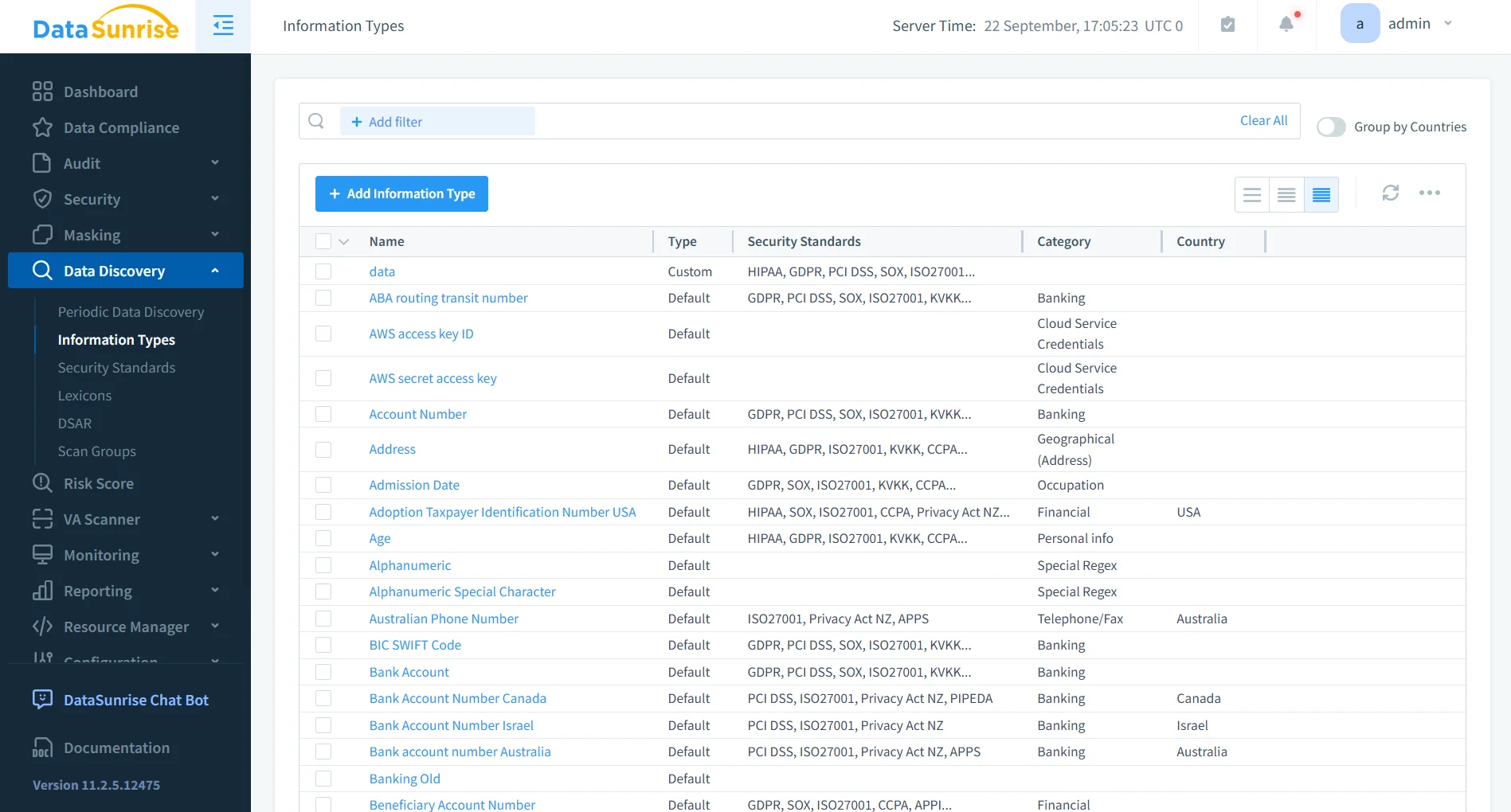
DataSunrise Sensitive Data Discovery can scan Amazon Redshift objects and identify different categories of sensitive information. These categories can include personal identifiers, contact information, financial records, payment data, healthcare information, authentication details, and organization-specific sensitive data.
Discovery tasks can run periodically, allowing newly created or modified database objects to be evaluated without requiring administrators to repeat classification manually.
This approach turns sensitive data inventory from a one-time exercise into an ongoing compliance process.
3. Apply Compliance Autopilot
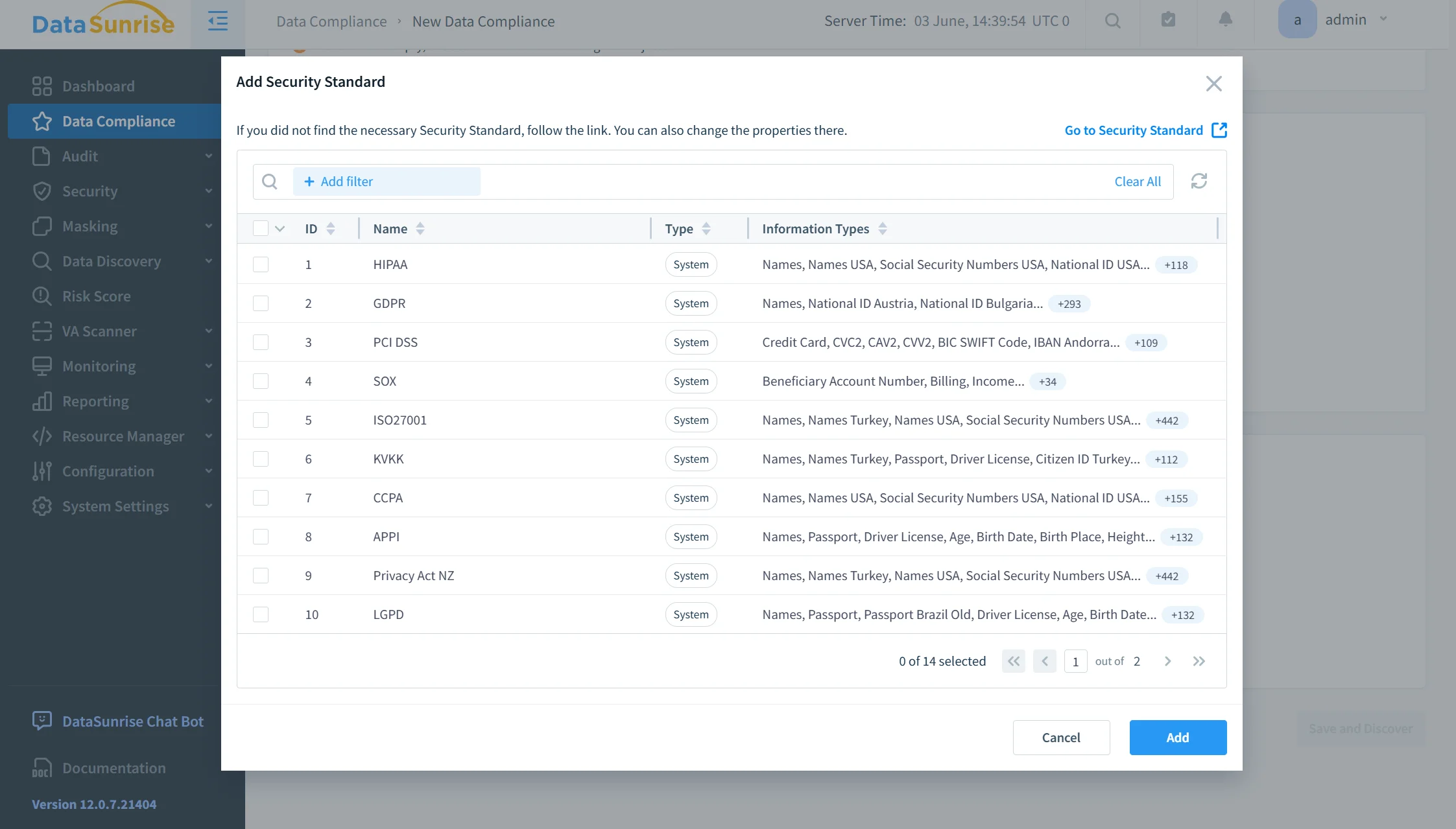
DataSunrise Compliance Autopilot helps connect discovered sensitive information with applicable regulatory requirements.
Instead of manually translating every compliance requirement into individual database policies, administrators can organize controls around regulations such as GDPR, HIPAA, PCI DSS, and SOX.
Automatic Policy Generation and No-Code Policy Automation reduce repetitive configuration work while preserving granular control over audit, security, and masking policies.
This becomes particularly useful as Redshift schemas change. Newly introduced sensitive objects can otherwise remain outside policies created earlier, increasing the risk of compliance gaps.
4. Continuously Reassess Compliance Coverage
Compliance requirements must be reassessed as the Redshift environment changes.
A policy that previously provided adequate coverage may become incomplete after new tables appear, sensitive columns are added, user responsibilities change, new applications begin accessing Redshift, or existing data is copied into additional schemas.
DataSunrise addresses this problem through recurring discovery and Continuous Regulatory Calibration workflows. Periodic tasks can identify newly introduced sensitive information and reveal areas where existing compliance controls may require adjustment.
Administrators can then update audit, security, or masking coverage without rebuilding the entire compliance framework manually.
This creates a continuous compliance process rather than relying on occasional configuration reviews.
5. Automate Activity Monitoring
DataSunrise Database Activity Monitoring centralizes Amazon Redshift activity and allows administrators to apply detailed audit policies to selected users, operations, and database objects.
Machine Learning Audit Rules can complement conventional static rules by analyzing activity patterns and helping reduce dependence on manually maintained monitoring configurations.
As a result, compliance teams can focus on relevant activity instead of repeatedly reviewing large volumes of raw audit information.
Monitoring can also be combined with sensitive data context. This makes it easier to determine whether a database event involved regulated information rather than treating every SQL operation as equally significant.
6. Automate Sensitive Data Protection
Monitoring identifies how data is accessed, but compliance programs often also require controls that reduce unnecessary exposure.
DataSunrise can apply Dynamic Data Masking to Amazon Redshift query results according to configured rules and conditions. Applications can continue using the required datasets while sensitive values are transformed for users who should not receive the original information.
Static Data Masking can additionally create protected copies of datasets for development, testing, analytics, and other environments where real production values are unnecessary.
Combining Sensitive Data Discovery with masking simplifies the process of identifying protected columns and applying appropriate controls to them.
7. Generate Compliance Evidence
Compliance automation must also provide evidence that controls are operating as intended.
DataSunrise centralizes database activity, discovery results, security events, policy information, and compliance-related records. Its report generation capabilities allow administrators and auditors to review this information through a consistent reporting workflow.
Reports can provide evidence related to regulated data locations, database activity, triggered policies, access to sensitive information, security events, masking coverage, and compliance assessments.
Centralized reporting reduces the recurring effort required to collect and correlate evidence from separate native services and database views before an audit.
Native AWS Services vs. DataSunrise Compliance Automation
| Compliance Area | Native Amazon Redshift / AWS | DataSunrise |
|---|---|---|
| Activity Monitoring | Audit logs, CloudWatch, S3 | Centralized Real-Time Audit and native log trailing |
| Configuration & Risk | AWS Config, Security Hub CSPM | Risk Scoring and compliance visibility |
| Event Automation | EventBridge, Lambda, scheduled queries | Automated compliance workflows and policy-driven monitoring |
| Sensitive Data Discovery | Requires a separate classification workflow | Automated Sensitive Data Discovery |
| Policy Automation | Primarily administrator-defined | Compliance Autopilot and Automatic Policy Generation |
| Audit Intelligence | Custom automation required | Machine Learning Audit Rules |
| Data Protection | Native Redshift controls | Dynamic and Static Data Masking |
| Regulatory Alignment | Coordinated across multiple AWS services | Continuous Regulatory Calibration |
| Compliance Reporting | Evidence collected across AWS services | Centralized audit-ready reporting |
Conclusion
Amazon Redshift provides useful native components for automating data compliance. Database audit logging supplies activity evidence, AWS Config detects configuration drift, Security Hub CSPM consolidates findings, CloudTrail records administrative actions, and EventBridge with Lambda or scheduled queries can automate recurring compliance workflows.
However, native automation remains distributed across several AWS services. Organizations still need to coordinate data classification, database activity monitoring, regulatory policies, protection controls, and compliance evidence as Redshift environments change.
DataSunrise extends Amazon Redshift Data Compliance Automation with Sensitive Data Discovery, Compliance Autopilot, Automatic Policy Generation, No-Code Policy Automation, Machine Learning Audit Rules, Continuous Regulatory Calibration, centralized Database Activity Monitoring, Risk Scoring, Dynamic Data Masking, Static Data Masking, and audit-ready reporting.
By connecting discovery, monitoring, policy management, protection, and evidence within a unified workflow, organizations can reduce repetitive compliance work while maintaining more consistent control over sensitive Amazon Redshift data.
Organizations can review available deployment modes or schedule a live demonstration to evaluate DataSunrise compliance automation for Amazon Redshift.
Protect Your Data with DataSunrise
Secure your data across every layer with DataSunrise. Detect threats in real time with Activity Monitoring, Data Masking, and Database Firewall. Enforce Data Compliance, discover sensitive data, and protect workloads across 50+ supported cloud, on-prem, and AI system data source integrations.
Start protecting your critical data today
Request a Demo Download Now