Automating Data Compliance for Amazon Redshift
Automating data compliance for Amazon Redshift helps organizations maintain regulatory controls as users, permissions, workloads, and sensitive datasets continuously change. Manual reviews can identify individual issues, but they become difficult to sustain across expanding analytical environments.
Amazon Redshift provides native capabilities that can support automated compliance workflows. Scheduled queries can perform recurring permission checks, AWS Config can detect configuration drift, Security Hub CSPM can consolidate security findings, and database audit logs provide evidence of user activity. AWS CloudTrail adds visibility into administrative actions affecting Redshift resources. ([AWS Documentation][1])
However, these mechanisms operate across several AWS services. Organizations still need to connect sensitive-data context, database activity, regulatory requirements, protection policies, and compliance evidence.
This article explains how to automate data compliance for Amazon Redshift using native AWS capabilities and how DataSunrise can establish a more centralized compliance workflow.
Why Automate Amazon Redshift Compliance?
A Redshift environment rarely remains static. New schemas appear, privileges change, users gain additional roles, and analytical applications access new datasets.
For regulations such as GDPR, HIPAA, PCI DSS, and SOX, organizations therefore need more than periodic manual reviews.
Compliance automation can help teams:
- identify configuration drift;
- repeatedly validate database permissions;
- collect database activity evidence;
- detect changes affecting protected resources;
- maintain recurring compliance checks;
- reduce repetitive administrative work;
- prepare evidence for regulatory assessments.
The objective is not to eliminate human oversight. Instead, automation makes recurring controls easier to execute consistently and allows teams to focus attention on exceptions and higher-risk findings.
Native Amazon Redshift Compliance Automation
AWS provides several native services that can be combined to automate recurring compliance checks, configuration reviews, activity monitoring, and evidence collection for Amazon Redshift. Rather than relying only on periodic manual assessments, organizations can use Redshift system views together with EventBridge, AWS Config, Security Hub CSPM, CloudWatch, and CloudTrail to build repeatable compliance workflows.
Automate Recurring Permission Reviews
Amazon Redshift system views provide detailed information about user, role, and object privileges. Administrators can query views such as SVV_USER_GRANTS and SVV_RELATION_PRIVILEGES to review assigned roles, administrative permissions, and access to database objects.
For example, the following query reviews role assignments for Redshift users:
SELECT
    user_name,
    role_name,
    admin_option
FROM svv_user_grants
ORDER BY user_name, role_name;
Object-level permissions can be reviewed separately:
SELECT
    identity_name,
    identity_type,
    namespace_name,
    relation_name,
    privilege_type
FROM svv_relation_privileges
ORDER BY namespace_name, relation_name;
These checks do not need to be executed manually each time. Amazon Redshift Query Editor v2 supports scheduled queries that can run SQL statements at predefined intervals. Scheduled queries use Amazon EventBridge for scheduling and the Redshift Data API for execution.
This makes it possible to automate recurring permission reviews, privilege inventories, metadata checks, and other database-level compliance tasks. For example, an organization can schedule a weekly review of direct grants on sensitive schemas and store the results in a dedicated table for later analysis.
A simple compliance evidence table could look like this:
CREATE TABLE IF NOT EXISTS compliance_privilege_review (
    review_time TIMESTAMP DEFAULT GETDATE(),
    identity_name VARCHAR(128),
    identity_type VARCHAR(64),
    namespace_name VARCHAR(128),
    relation_name VARCHAR(128),
    privilege_type VARCHAR(64)
);
The results of a recurring privilege review can then be inserted into the table:
INSERT INTO compliance_privilege_review (
    identity_name,
    identity_type,
    namespace_name,
    relation_name,
    privilege_type
)
SELECT
    identity_name,
    identity_type,
    namespace_name,
    relation_name,
    privilege_type
FROM svv_relation_privileges;
Schedule Compliance Checks with EventBridge
Amazon EventBridge can trigger Redshift Data API operations according to a defined schedule. This allows organizations to create recurring compliance routines for both provisioned Redshift clusters and Redshift Serverless environments.
The workflow typically follows this pattern:
EventBridge Schedule
        ↓
Redshift Data API
        ↓
Compliance SQL
        ↓
Compliance Evidence
This approach can support recurring privilege reviews, metadata inventories, administrative account checks, monitoring of sensitive schemas, and periodic collection of compliance-related information.
For example, a Redshift Data API request can execute a predefined compliance query against a provisioned cluster:
aws redshift-data execute-statement \
    --cluster-identifier my-redshift-cluster \
    --database dev \
    --db-user admin \
    --sql "SELECT user_name, role_name, admin_option FROM svv_user_grants;"
For Redshift Serverless, the same approach can be applied through a workgroup:
aws redshift-data execute-statement \
    --workgroup-name compliance-workgroup \
    --database dev \
    --sql "SELECT identity_name, relation_name, privilege_type FROM svv_relation_privileges;"
Because scheduled queries interact with several AWS services, appropriate IAM permissions must be configured for EventBridge and the Redshift Data API.
Detect Configuration Drift with AWS Config
Database permissions represent only one part of Amazon Redshift compliance. Infrastructure and security configurations can also change over time and drift away from an approved baseline.
AWS Config can automatically evaluate Redshift resources against predefined configuration requirements. Managed rules are available for controls such as audit logging, encryption, and other Redshift security settings.
For example, organizations can use the AWS Config managed rule for Redshift audit logging:
redshift-audit-logging-enabled
This rule evaluates whether audit logging is enabled for a Redshift cluster and whether the expected destination is configured.
Another useful managed rule is:
redshift-cluster-configuration-check
It can evaluate additional cluster requirements, including encryption and audit logging.
A typical automated compliance flow therefore becomes:
Redshift Configuration Change
            ↓
        AWS Config
            ↓
   Compliance Evaluation
            ↓
 COMPLIANT / NON_COMPLIANT
With these checks in place, AWS Config can continuously reassess Redshift resources as their configuration changes. This allows security teams to identify noncompliant settings without waiting for the next manual infrastructure review.
Consolidate Findings with Security Hub CSPM
AWS Security Hub CSPM can aggregate security and configuration findings related to Amazon Redshift.
Its Redshift controls can evaluate areas such as encryption, network exposure, audit logging, and other important security settings. Redshift Serverless also has controls addressing public access, SSL configuration, KMS encryption, enhanced VPC routing, and CloudWatch log exports.
Conceptually, the workflow becomes:
AWS Config
    +
Redshift Security Controls
    +
Other AWS Findings
        ↓
Security Hub CSPM
        ↓
Centralized Security Findings
Centralizing these findings helps security teams review Redshift security posture without manually collecting results from multiple AWS services.
However, these controls primarily evaluate infrastructure and configuration posture. They do not independently determine where regulated data is located or whether a particular database interaction violates an organization-specific compliance requirement.
Automate Activity Evidence Collection
Amazon Redshift database audit logging provides another important component of compliance automation by recording database connections and user activity.
Audit information can be exported to Amazon S3 or Amazon CloudWatch Logs, where it can be retained and analyzed as part of recurring compliance processes.
When detailed user activity logging is required, the corresponding Redshift parameter must be enabled:
enable_user_activity_logging = true
Administrators can also query Redshift system views to inspect user activity directly.
For example:
SELECT
    userid,
    username,
    starttime,
    query,
    aborted
FROM stl_query
ORDER BY starttime DESC
LIMIT 100;
Connection activity can be reviewed with:
SELECT
    event,
    recordtime,
    remotehost,
    remoteport,
    username,
    database
FROM stl_connection_log
ORDER BY recordtime DESC
LIMIT 100;
CloudWatch can centralize these logs and make them available for operational analysis and longer-term evidence collection.
A simple CloudWatch Logs Insights query can narrow activity to suspicious or important operations:
fields @timestamp, @message
| filter @message like /CREATE|DROP|ALTER|GRANT|REVOKE/
| sort @timestamp desc
| limit 100
AWS CloudTrail complements database audit logging by recording API operations performed against Amazon Redshift resources by users, IAM roles, and AWS services.
For example, CloudTrail records can be filtered for Redshift-related API activity such as cluster modifications, snapshot operations, or logging changes.
Together, Redshift audit logs and CloudTrail provide visibility into both database-level activity and administrative actions affecting the surrounding AWS environment.
Automated Amazon Redshift Compliance with DataSunrise
DataSunrise extends native Amazon Redshift compliance capabilities by connecting sensitive data discovery, activity monitoring, regulatory policies, data protection, and reporting within a centralized workflow. Instead of managing discovery, auditing, masking, and compliance as separate processes, organizations can create a recurring cycle in which newly identified sensitive data becomes part of subsequent monitoring and protection controls.
Connect Amazon Redshift
The first step is registering the Amazon Redshift environment in DataSunrise. This creates the foundation for centralized monitoring, auditing, discovery, and compliance management.
DataSunrise can work with Redshift through supported database connections and native audit collection paths. Depending on the selected configuration, Redshift audit information can be collected from sources such as Amazon S3 and Amazon CloudWatch.
This approach allows organizations to centralize compliance-related monitoring while continuing to use existing AWS logging infrastructure.
Automate Sensitive Data Discovery
Effective compliance automation begins with identifying which information requires protection.
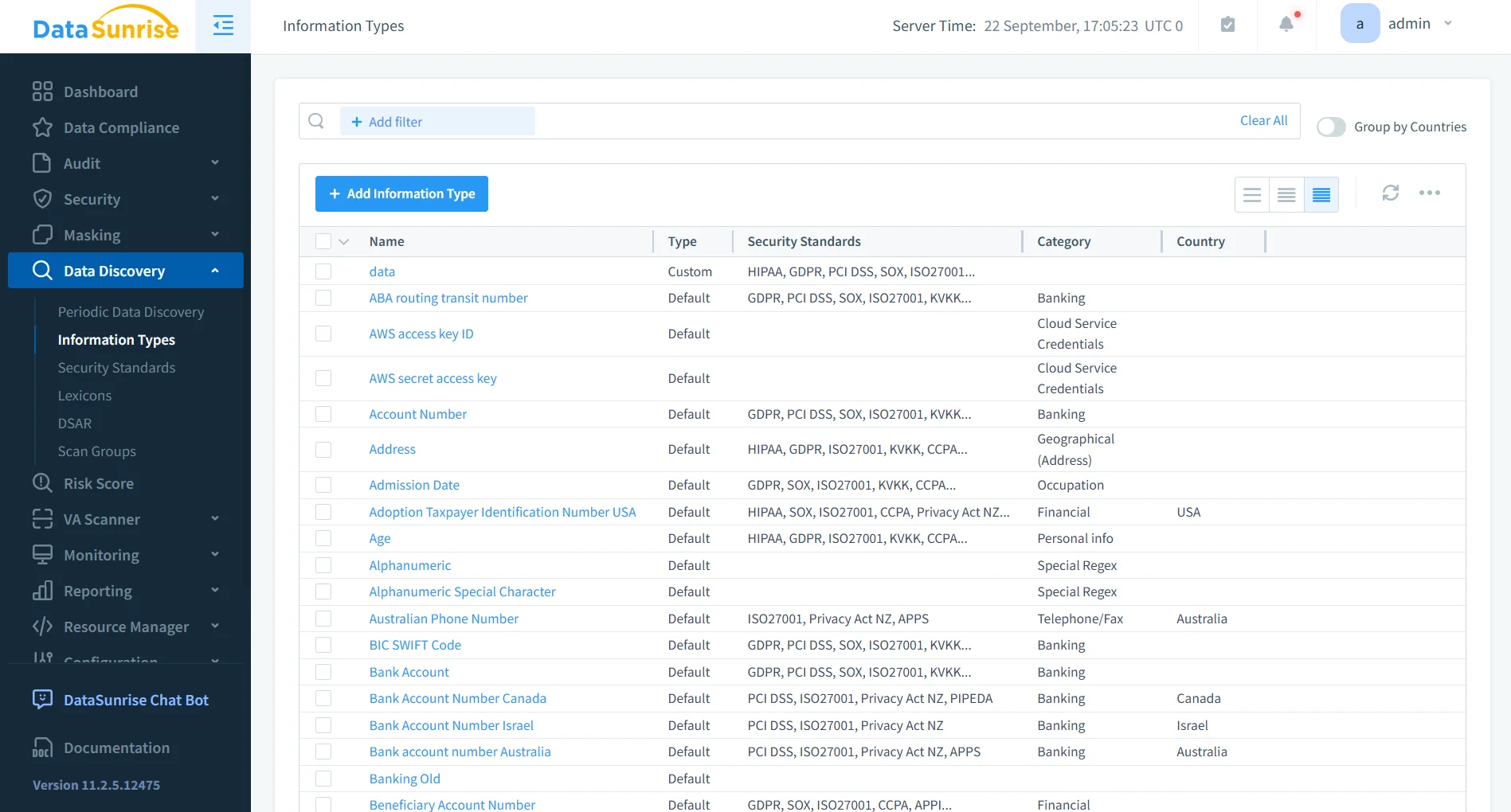
DataSunrise Data Discovery can scan Redshift schemas and classify sensitive information according to predefined and organization-specific categories. These categories can include personal information, contact details, financial records, payment data, healthcare information, authentication data, and other sensitive business information.
Discovery can be executed periodically rather than as a one-time assessment. This helps organizations identify newly created or modified sensitive data before it remains outside established compliance controls.
As a result, compliance automation goes beyond checking whether a Redshift cluster is configured correctly. It also considers which regulated information exists in the environment and which controls should apply to it.
Apply Compliance Autopilot
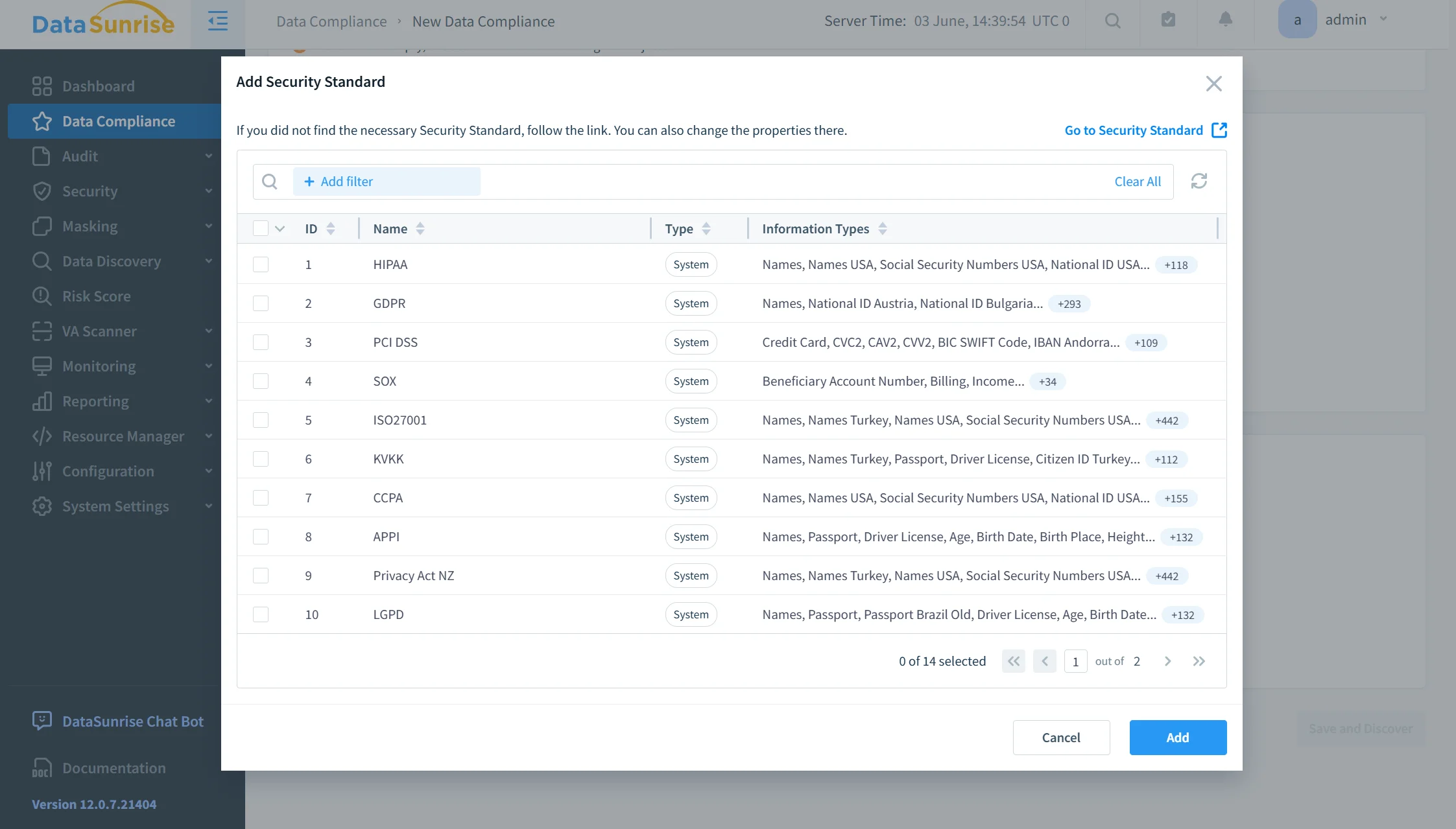
DataSunrise Compliance Autopilot helps connect discovered sensitive information with regulatory requirements such as GDPR, HIPAA, PCI DSS, and SOX.
Combined with Automatic Policy Generation and No-Code Policy Automation, this approach can reduce repetitive manual configuration as Redshift schemas, users, and sensitive datasets change. Policies can be created around identified sensitive objects instead of requiring administrators to rebuild compliance controls manually for every new dataset.
Continuous Regulatory Calibration and scheduled discovery tasks support recurring reassessment of the environment. This helps organizations identify new sensitive data, changing compliance requirements, and potential policy gaps as the Redshift environment evolves.
Adapt Audit Coverage
A technically compliant configuration does not automatically mean that database activity remains compliant.
DataSunrise provides centralized Database Activity Monitoring together with configurable Audit Rules for tracking relevant Redshift activity.
Audit policies can focus on specific users, objects, operations, or sensitive data areas. Machine Learning Audit Rules can complement static configurations by helping organizations adapt monitoring to meaningful activity patterns without repeatedly adjusting every rule manually.
The collected audit information can then be analyzed alongside sensitive data classifications and compliance policies. This gives security teams more context than isolated database log records and helps them understand how protected Redshift data is actually being accessed.
Automate Sensitive Data Protection
Once sensitive information has been discovered and classified, organizations can apply appropriate protection controls to reduce unnecessary exposure.
DataSunrise Dynamic Data Masking can protect sensitive query results according to configured masking policies while allowing applications and authorized workflows to continue using the underlying Redshift data.
Static masking can be used when organizations need protected copies of production information for development, testing, analytics, or other non-production workflows.
Connecting discovery with masking creates a more practical compliance process. Sensitive data is not only identified and documented but can also become the target of appropriate protection policies.
Produce Audit-Ready Compliance Evidence
Compliance automation also requires evidence that controls remain operational.
DataSunrise reporting capabilities can consolidate audit information and compliance-related records into repeatable reports. This reduces the need to manually assemble evidence from separate Redshift logs, AWS configuration findings, activity records, and security systems before each assessment.
Automated compliance reporting can therefore complement continuous monitoring by producing consistent evidence for internal reviews, compliance teams, and regulatory preparation.
By combining recurring discovery, policy generation, activity monitoring, data protection, and reporting, DataSunrise helps organizations maintain a more continuous Amazon Redshift compliance workflow while reducing repetitive administrative effort.
Native AWS Automation vs. DataSunrise
| Compliance Area | Amazon Redshift and AWS | DataSunrise |
|---|---|---|
| Recurring checks | Scheduled queries | Automated compliance workflows |
| Configuration posture | AWS Config, Security Hub CSPM | Continuous compliance reassessment |
| Sensitive Data Discovery | Separate workflow required | Automated Sensitive Data Discovery |
| Policy management | Administrator-defined | Compliance Autopilot and Automatic Policy Generation |
| Activity monitoring | Redshift logs, S3, CloudWatch | Centralized Database Activity Monitoring |
| Data protection | Native controls configured separately | Dynamic and Static Data Masking |
| Compliance evidence | Distributed across AWS services | Centralized audit-ready reporting |
AWS provides strong building blocks for compliance automation, while DataSunrise connects discovery, monitoring, policy management, protection, and reporting within a centralized workflow.
Conclusion
Amazon Redshift provides useful native mechanisms for compliance automation. Scheduled queries can automate recurring database checks, AWS Config can identify configuration drift, Security Hub CSPM can consolidate security findings, audit logging can preserve database activity, and CloudTrail records administrative operations. Together, these services provide a flexible foundation for organizations willing to coordinate multiple AWS workflows. ([AWS Documentation][1])
However, automating data compliance requires more than repeatedly checking infrastructure configuration. Organizations must also discover regulated information, determine which controls apply, observe how sensitive data is accessed, adjust policies as environments evolve, protect exposed values, and maintain evidence.
DataSunrise extends Amazon Redshift compliance automation with Sensitive Data Discovery, Compliance Autopilot, Automatic Policy Generation, No-Code Policy Automation, Machine Learning Audit Rules, Continuous Regulatory Calibration, centralized Database Activity Monitoring, Dynamic and Static Data Masking, and audit-ready reporting.
By connecting discovery, policy management, monitoring, protection, and evidence within a unified workflow, organizations can reduce repetitive compliance work while maintaining more consistent control over sensitive Amazon Redshift data.
Organizations can review available deployment modes or schedule a live demonstration to evaluate DataSunrise compliance automation for Amazon Redshift.
Protect Your Data with DataSunrise
Secure your data across every layer with DataSunrise. Detect threats in real time with Activity Monitoring, Data Masking, and Database Firewall. Enforce Data Compliance, discover sensitive data, and protect workloads across 50+ supported cloud, on-prem, and AI system data source integrations.
Start protecting your critical data today
Request a Demo Download Now