How to Apply Dynamic Masking in Apache Cloudberry
In today's data-driven landscape, protecting sensitive information while maintaining data accessibility is critical for organizations using Apache Cloudberry. According to IBM's 2024 Cost of a Data Breach Report, organizations implementing comprehensive data masking strategies reduce breach-related costs by up to 62%.
Apache Cloudberry, an open-source Massively Parallel Processing (MPP) database derived from Greenplum, provides powerful analytical capabilities for data warehousing and large-scale analytics. Implementing effective dynamic data masking is essential to protect personally identifiable information (PII) and maintain regulatory compliance.
This guide explores native approaches and advanced solutions for implementing dynamic masking in Apache Cloudberry environments, with detailed security architecture considerations.
Understanding Dynamic Masking in Apache Cloudberry
Dynamic masking in Apache Cloudberry refers to real-time obfuscation of sensitive data during query execution. Unlike static masking, which permanently alters data, dynamic masking applies transformation rules on-the-fly based on user context and roles.
Key considerations for Cloudberry's MPP architecture include:
- Distributed Processing: Masking policies must execute efficiently across segment hosts
- Analytical Workloads: Complex queries need intelligent masking preserving analytical value
- Role-Based Access: Different user roles require varying data visibility levels through role-based access controls
- Compliance: Organizations must satisfy GDPR, HIPAA, and PCI DSS requirements
Native Approaches to Dynamic Masking in Apache Cloudberry
Apache Cloudberry, being PostgreSQL-compatible, inherits several mechanisms for implementing dynamic masking. While these require manual configuration, they provide foundational data protection capabilities for database security.
1. View-Based Masking with CASE Expressions
Create database views that apply masking logic through CASE expressions:
-- Create a masked view for customer data
CREATE OR REPLACE VIEW customer_masked AS
SELECT
    customer_id,
    CASE
        WHEN current_user IN ('analyst', 'reporting_user')
        THEN regexp_replace(email, '(.{3})(.*)(@.*)', '\1***\3')
        ELSE email
    END AS email,
    CASE
        WHEN current_user IN ('analyst', 'reporting_user')
        THEN 'XXX-XX-' || substring(ssn from 8 for 4)
        ELSE ssn
    END AS ssn,
    full_name,
    address_city
FROM customer_data;

GRANT SELECT ON customer_masked TO analyst, reporting_user;
2. Row-Level Security with Masking Functions
Combine RLS with custom masking functions:
-- Create masking function
CREATE OR REPLACE FUNCTION mask_email(email TEXT, user_role TEXT)
RETURNS TEXT AS $$
BEGIN
    IF user_role = 'admin' THEN
        RETURN email;
    ELSE
        RETURN regexp_replace(email, '(.{2})(.*)(@.*)', '\1***\3');
    END IF;
END;
$$ LANGUAGE plpgsql IMMUTABLE;

-- Create masked view
CREATE OR REPLACE VIEW payment_transactions_masked AS
SELECT
    transaction_id,
    mask_email(customer_email, current_setting('app.user_role', true)) AS customer_email,
    transaction_amount
FROM payment_transactions;
3. Testing Native Masking Implementation
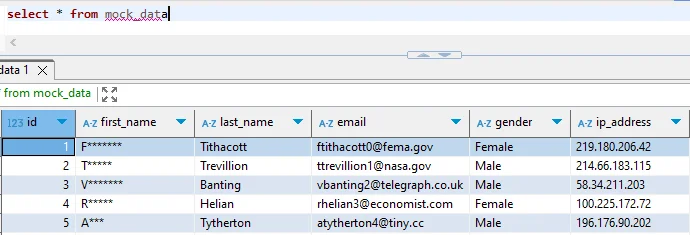
Verify masking with different user contexts:
-- Analyst sees masked data
SET app.user_role = 'analyst';
SELECT * FROM customer_masked LIMIT 3;
-- Output: joh***@example.com, XXX-XX-5678

-- Admin sees unmasked data
SET app.user_role = 'admin';
SELECT * FROM customer_masked LIMIT 3;
-- Output: [email protected], 123-45-5678
Limitations of Native Cloudberry Masking
While native approaches provide foundational masking capabilities, they present several challenges for enterprise data security:
- View-Based Masking: Manual view creation for each table leads to high administrative overhead
- Custom Functions: Performance degradation with complex logic results in slower analytical queries
- RLS Policies: Limited column-level granularity provides inflexible protection for access controls
- Audit Trails: No built-in masking logging creates compliance challenges
Enhanced Dynamic Masking with DataSunrise
DataSunrise significantly enhances dynamic masking through Zero-Touch Data Protection and Auto-Discover & Mask capabilities. Unlike manual view-based approaches, DataSunrise delivers enterprise-grade database security with Surgical Precision Masking and comprehensive database firewall protection.
Setting Up DataSunrise for Apache Cloudberry
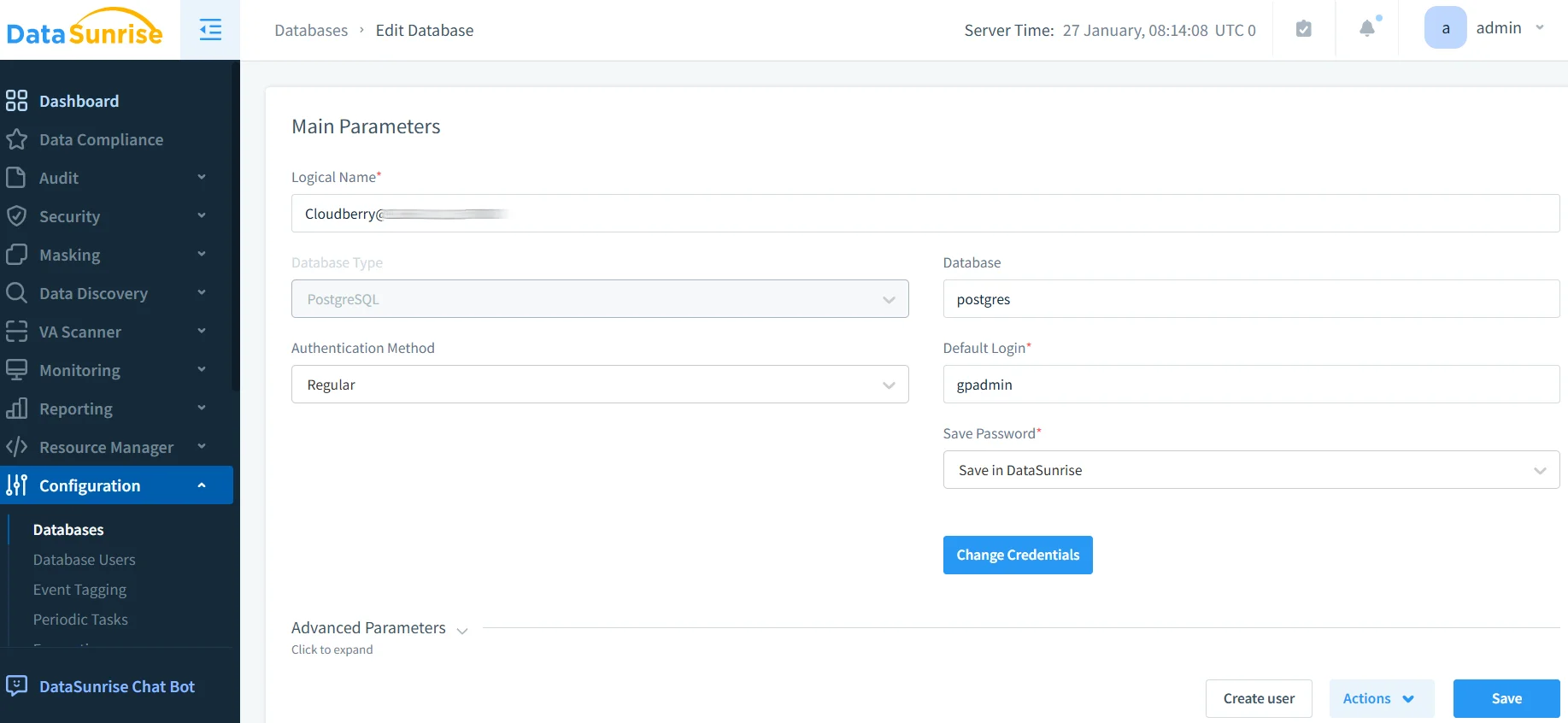
1. Connect to Apache Cloudberry Instance
Establish a secure connection through DataSunrise's administrative interface. DataSunrise supports proxy mode and sniffer mode for non-intrusive integration with flexible deployment modes.
2. Configure Auto-Discovery for Sensitive Data
DataSunrise's Auto-Discover & Classify engine automatically scans Cloudberry using NLP algorithms and machine learning. This data discovery identifies patterns like emails, SSNs, credit cards, and phone numbers, classifying data according to GDPR, HIPAA, and PCI DSS requirements while implementing security policies for threat detection.
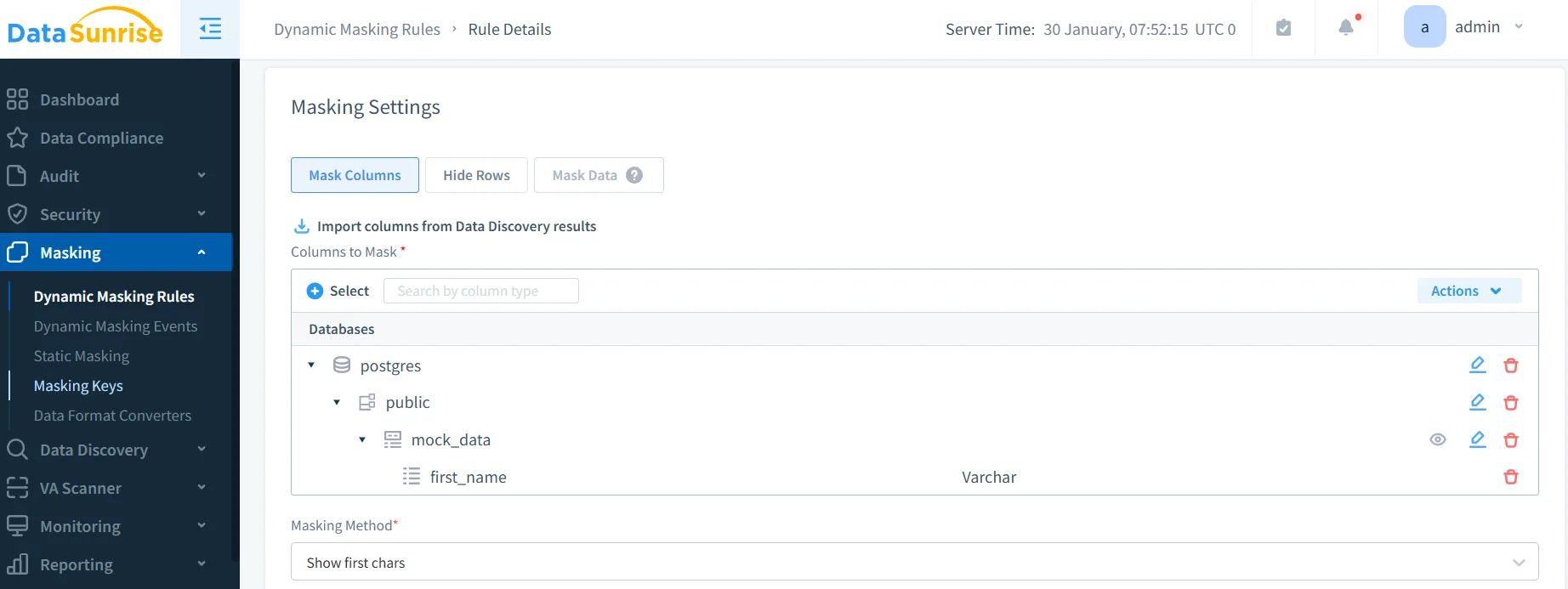
3. Create Dynamic Masking Rules with No-Code Interface
Configure masking policies through DataSunrise's intuitive No-Code Policy Automation interface. Choose from multiple masking types (substitution, shuffling, encryption, nulling), apply user-based rules, select columns for masking, and implement conditional logic while preserving analytical properties.
4. Monitor Masking Activity and Compliance
DataSunrise provides comprehensive audit trails for all masking operations. The database activity monitoring dashboard tracks which users accessed masked data, what queries triggered rules, and any violations through detailed audit logs.
Key Advantages of DataSunrise for Apache Cloudberry
| Advantage | Description |
|---|---|
| Zero-Touch Implementation | Deploys with minimal configuration, achieving full production implementation in days rather than weeks, with support for on-premise, cloud, and hybrid architectures |
| Surgical Precision Masking | Context-Aware Protection delivers granular control with query-aware masking, time-based rules, application-specific policies, and conditional masking based on business context |
| Performance Optimization | Masking at the proxy layer ensures zero query overhead, preserved MPP performance, optimized analytics, and scalable high-throughput workloads |
| Continuous Compliance Posture | Compliance Autopilot provides automated GDPR, HIPAA, PCI DSS, and SOX alignment with audit-ready documentation |
| Centralized Policy Management | Manage policies across multiple Cloudberry instances and over 40 data storage platforms from a unified interface with policy templates and version control |
| Advanced Threat Detection | Beyond masking, provides behavioral analytics, real-time alerts, and SQL injection prevention |
Conclusion
As organizations rely on Apache Cloudberry for large-scale analytical processing, implementing robust dynamic masking is essential for protecting sensitive data while maintaining analytical capabilities. While native PostgreSQL-compatible approaches provide foundational protection, they require significant manual effort and lack enterprise sophistication.
DataSunrise transforms dynamic masking through Zero-Touch Data Protection, No-Code Policy Automation, and Surgical Precision Masking. Organizations can confidently leverage Apache Cloudberry's powerful analytics while satisfying regulatory requirements including GDPR, HIPAA, PCI DSS, and SOX.
Protect Your Data with DataSunrise
Secure your data across every layer with DataSunrise. Detect threats in real time with Activity Monitoring, Data Masking, and Database Firewall. Enforce Data Compliance, discover sensitive data, and protect workloads across 50+ supported cloud, on-prem, and AI system data source integrations.
Start protecting your critical data today
Request a Demo Download Now