How to Apply Static Masking in Microsoft SQL Server
Static masking in Microsoft SQL Server exists for one reason: production data keeps leaking into places where it absolutely should not exist. Test environments, analytics sandboxes, outsourced QA systems, and developer workstations regularly receive production copies containing sensitive information.
The problem is straightforward. Teams need realistic datasets for development, analytics, and testing, while compliance and security teams must prevent exposure of sensitive information. Unfortunately, cloning production databases without sanitization remains one of the most common causes of accidental data exposure. According to the IBM Cost of a Data Breach Report, compromised sensitive data continues to generate major operational and financial consequences for organizations worldwide.
Microsoft SQL Server provides enough native functionality to build static masking workflows manually. However, these approaches usually depend on custom scripts, duplicated tables, update statements, partial substitutions, and ongoing maintenance every time schemas or business logic change. Microsoft documents several native masking and protection approaches in the official Microsoft SQL Server documentation, but enterprise-scale environments often require additional orchestration and centralized governance.
Static masking replaces sensitive values inside copied datasets while preserving database structure and application functionality. As a result, organizations can safely use production-like environments without exposing personally identifiable information, financial records, healthcare data, or confidential business information. This process plays an important role in broader Data Security strategies and supports modern Static Data Masking workflows across development and analytics infrastructures.
This article explains how to apply static masking in Microsoft SQL Server using native methods and how DataSunrise extends masking into a centralized autonomous security framework with Compliance Autopilot, Zero-Touch Data Masking, and Continuous Compliance Posture management across hybrid infrastructures.
What Is Static Masking in Microsoft SQL Server
Static masking permanently replaces sensitive values with sanitized substitutes inside a copied dataset. Unlike dynamic masking, the original values are physically transformed before the database is shared with developers, analysts, contractors, or third-party systems.
The masked copy preserves application structure and relational integrity while removing exposure risks associated with personally identifiable information (PII), payment records, healthcare data, or confidential business information.
Static masking commonly protects:
- Customer records
- Financial information
- HR databases
- Healthcare datasets
- Analytics environments
- QA and testing systems
- AI and ML training datasets
This approach helps organizations align with frameworks such as:
Because apparently regulators dislike companies emailing production Social Security numbers to contractors. Very unreasonable of them.
Native Static Masking in Microsoft SQL Server
Microsoft SQL Server does not include a dedicated enterprise-grade static masking engine out of the box. Instead, administrators usually build masking workflows manually using cloned tables, update operations, substitution logic, and randomized transformations.
For small environments this approach can work reasonably well. However, as databases grow larger and schemas evolve, maintaining masking scripts quickly becomes difficult. Every schema modification, new column, or application dependency introduces another opportunity for masking logic to fail silently.
Still, native SQL Server functionality provides enough flexibility to create basic static masking workflows for development, analytics, testing, and staging environments.
Preparing a Sample Database
First, create a sample table containing sensitive information:
CREATE TABLE Customers (
    CustomerID INT PRIMARY KEY,
    FullName NVARCHAR(100),
    EmailAddress NVARCHAR(255),
    CreditCardNumber NVARCHAR(32),
    Salary DECIMAL(12,2)
);

INSERT INTO Customers VALUES
(1,'John Carter','[email protected]','4111111111111111',95000),
(2,'Sarah Miller','[email protected]','5555444433331111',105000);
This example simulates a small production-style dataset containing personally identifiable information and financial records. In enterprise environments, similar tables often contain customer accounts, healthcare information, payroll data, and payment records.
Static masking workflows typically begin with identifying which columns contain sensitive data and determining which masking strategy should apply to each field.
Creating a Masked Copy
Static masking usually operates against cloned environments instead of production systems directly. The original production database remains untouched while a separate sanitized copy is prepared for downstream use.
Create a duplicate table:
SELECT *
INTO Customers_Masked
FROM Customers;
This operation copies both structure and data into a new table. At this stage, however, the copied environment still contains real sensitive values.
Organizations commonly create masked copies for:
- QA environments
- developer sandboxes
- analytics systems
- outsourced testing
- machine learning pipelines
- reporting platforms
Without masking, these non-production systems can become weak points in the overall security architecture.
Applying Static Masking Rules
Now replace sensitive values with sanitized substitutes.
The objective is not encryption. The goal is preserving usability while removing direct exposure of confidential information. Effective masking should maintain realistic formatting, relational integrity, and application compatibility wherever possible.
Mask Email Addresses
The following query partially obfuscates email addresses while preserving recognizable formatting:
UPDATE Customers_Masked
SET EmailAddress =
    CONCAT(
        LEFT(FullName, 2),
        '***@masked.local'
    );
This technique keeps the dataset readable for testing purposes while preventing exposure of real email addresses.
Mask Credit Card Numbers
Sensitive payment data should never appear in non-production systems unprotected.
The following masking rule hides most digits while preserving the final four characters:
UPDATE Customers_Masked
SET CreditCardNumber =
    CONCAT(
        'XXXX-XXXX-XXXX-',
        RIGHT(CreditCardNumber,4)
    );
This approach preserves formatting compatibility for applications that validate payment card structure while removing usable financial information.
Randomize Salary Values
Numerical data often requires randomized substitution instead of simple masking.
The following example generates replacement salary values within a controlled range:
UPDATE Customers_Masked
SET Salary =
    ROUND(
        (RAND(CHECKSUM(NEWID())) * 50000) + 50000,
        2
    );
This preserves realistic salary distributions while disconnecting the values from actual employee compensation records.
Randomization techniques are commonly applied to:
- salaries
- transaction amounts
- healthcare metrics
- analytical datasets
- financial reporting values
Verifying the Masked Dataset
After masking operations complete, validate the transformed dataset.
Run validation queries:
SELECT * FROM Customers_Masked;
Example output:
| CustomerID | FullName | EmailAddress | CreditCardNumber | Salary |
|---|---|---|---|---|
| 1 | John Carter | Jo***@masked.local | XXXX-XXXX-XXXX-1111 | 73451.22 |
| 2 | Sarah Miller | Sa***@masked.local | XXXX-XXXX-XXXX-1111 | 89220.54 |
The original production values remain untouched while the cloned dataset becomes significantly safer for testing, analytics, and development workflows.
Validation should not stop with visual inspection alone. Organizations should also verify:
- referential integrity
- application compatibility
- query execution behavior
- reporting functionality
- statistical consistency
- compliance coverage
Poorly implemented masking can break downstream applications, invalidate analytics results, or unintentionally expose sensitive information through overlooked columns and relationships.
Autonomous Static Masking with DataSunrise
Traditional static masking workflows often become difficult to maintain in enterprise environments. Manual scripts, fragmented masking logic, and inconsistent policy enforcement create operational overhead and increase the risk of exposing sensitive information in non-production systems.
DataSunrise addresses these limitations through centralized masking orchestration, automated discovery, and policy-driven protection designed for modern hybrid infrastructures. Instead of maintaining isolated masking scripts for every environment, organizations can manage security, compliance, and masking operations from a unified platform.
Zero-Touch Data Masking Architecture
DataSunrise Overview deploys Autonomous Compliance Orchestration to deliver enterprise-grade static masking across Microsoft SQL Server, cloud platforms, and hybrid infrastructures.
Unlike fragmented masking workflows that require continuous manual tuning, DataSunrise centralizes masking operations and automates sensitive data governance across multiple environments. The platform includes Zero-Touch Data Masking, Compliance Autopilot, Continuous Regulatory Calibration, Auto-Discover & Mask workflows, Centralized Policy Management, Unified Security Framework integration, Machine Learning Audit Rules, NLP Data Discovery, OCR Image Scanning, and Context-Aware Protection.
These capabilities help organizations reduce administrative overhead while maintaining consistent masking and compliance policies across distributed systems. DataSunrise supports structured, semi-structured, and unstructured data across SQL databases, cloud storage, enterprise file systems, data warehouses, and data lakes.
The platform supports deployment across on-premise environments, AWS, Microsoft Azure, Google Cloud, Kubernetes, and hybrid architectures. This flexibility allows organizations to apply consistent masking policies without redesigning infrastructure or modifying production applications.
Applying Static Masking with DataSunrise
DataSunrise simplifies static masking through automated discovery, centralized policy management, and autonomous masking workflows inside a unified security platform. Instead of maintaining separate scripts for every database and environment, organizations can apply reusable masking policies across large hybrid infrastructures from a single interface. This approach reduces operational overhead while improving consistency across development, analytics, testing, and reporting systems. DataSunrise combines masking with broader Data Security capabilities and centralized Database Activity Monitoring for unified governance.
Step 1 — Connect SQL Server Instance
The first step is connecting the Microsoft SQL Server instance to DataSunrise through the centralized management interface.
DataSunrise supports several integration methods, including:
- Proxy mode
- Sniffer mode
- Native log trailing
- Agent-based integrations
These Flexible Deployment Modes allow organizations to implement masking and security controls without intrusive modifications to the underlying infrastructure. This approach is especially useful in environments where production downtime, schema changes, or application rewrites are not acceptable.
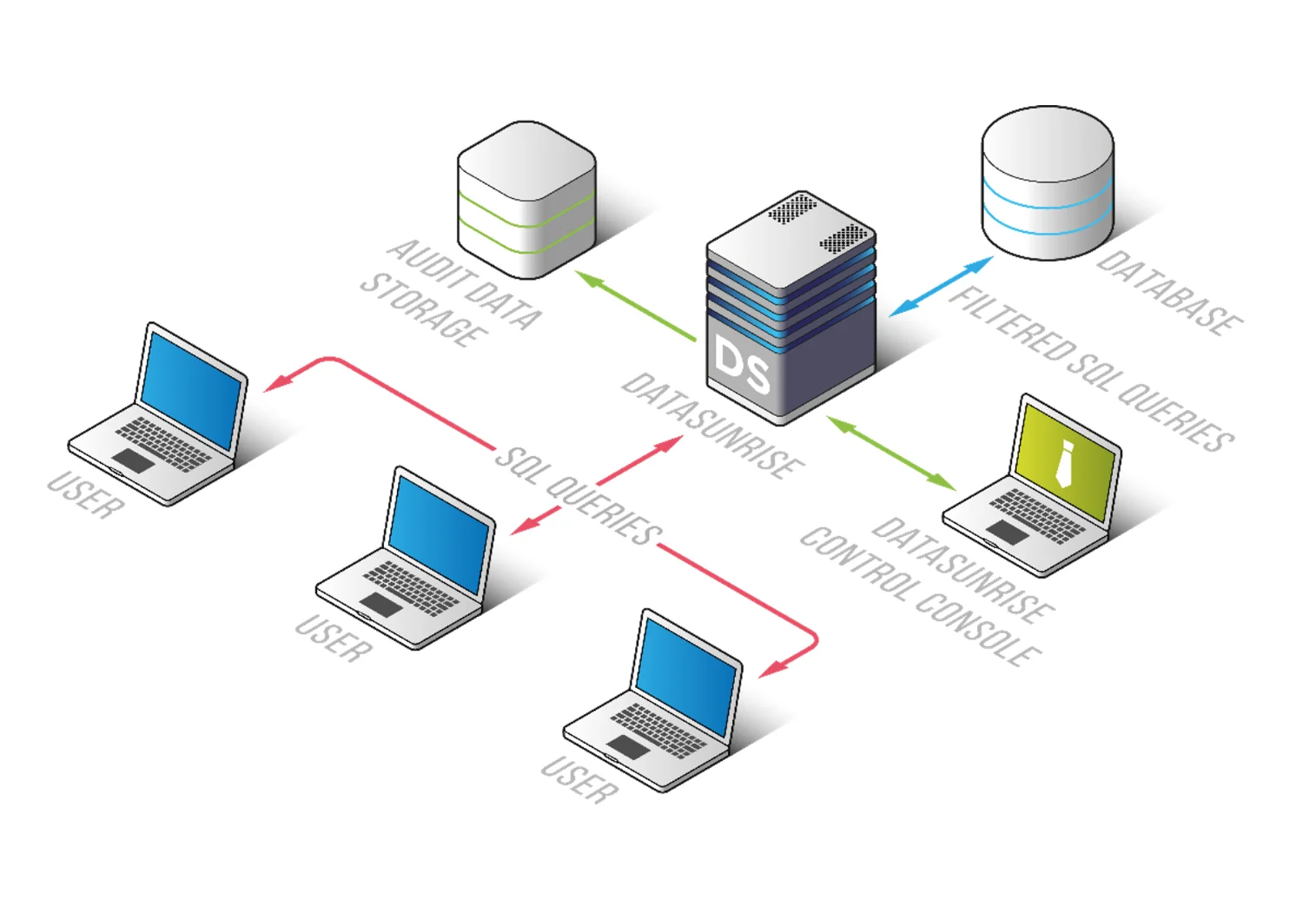
Once connected, DataSunrise can begin monitoring database activity, analyzing metadata, and preparing masking workflows without requiring direct application modifications. This simplifies deployment across both cloud and on-premise infrastructures while integrating with broader Database Firewall protections and Data Audit workflows.
Step 2 — Discover Sensitive Data Automatically
After the instance is connected, DataSunrise launches automated Sensitive Data Discovery scans across:
- tables
- columns
- files
- cloud storage
- OCR-readable documents
The platform automatically identifies:
- personally identifiable information (PII)
- protected health information (PHI)
- PCI-related records
- financial identifiers
- confidential business data
Detection mechanisms include ML classification, NLP discovery, pattern analysis, and compliance templates. Automated discovery significantly reduces the manual effort required to locate sensitive data across large environments and helps prevent newly added columns or assets from remaining unprotected.
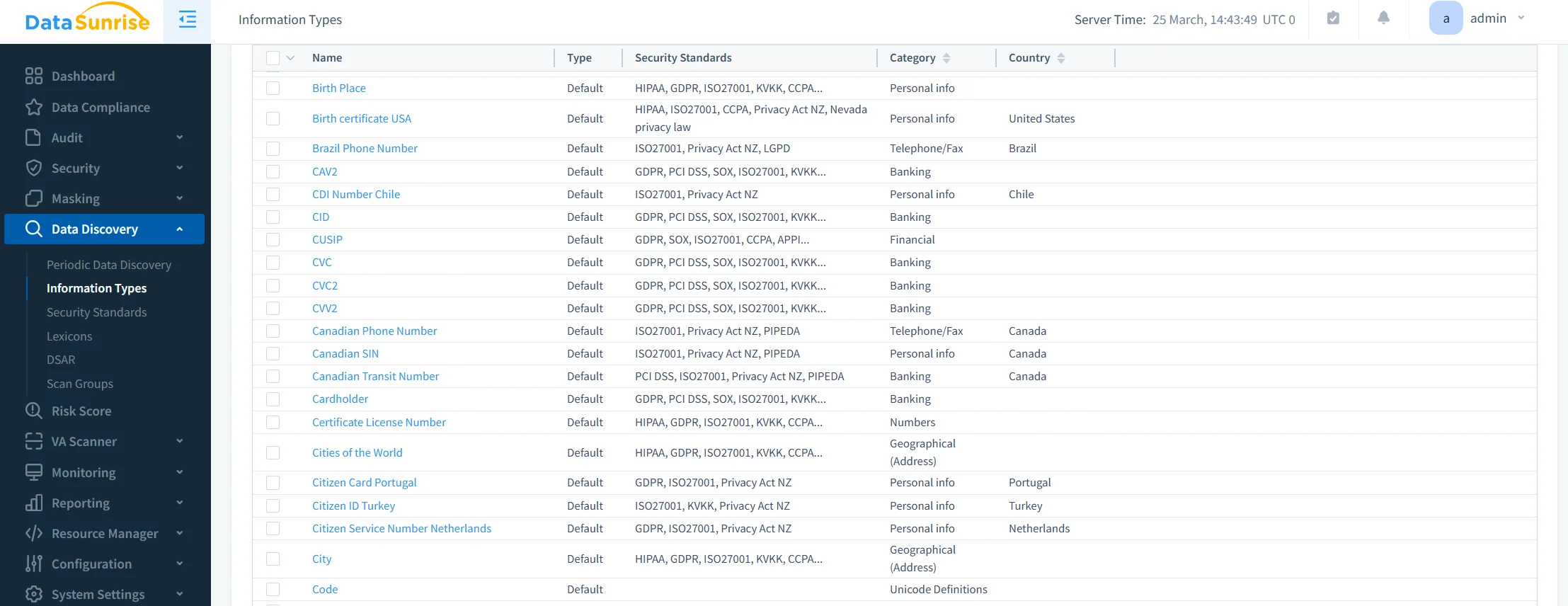
In enterprise environments containing thousands of tables and continuously changing schemas, automated discovery helps maintain visibility into sensitive data locations without requiring constant manual review. These capabilities integrate directly with Data Discovery workflows and support broader Compliance Manager automation initiatives.
Step 3 — Configure Static Masking Policies
Once sensitive data is identified, administrators configure masking policies through a centralized no-code interface.
DataSunrise supports multiple masking techniques, including:
- substitution masking
- shuffling
- hashing
- deterministic masking
- partial masking
- randomization
- custom transformation logic
Policies can target:
- schemas
- applications
- users
- environments
- compliance zones
This centralized model allows organizations to maintain consistent masking standards across development, analytics, testing, and reporting systems without managing separate masking scripts for every database.
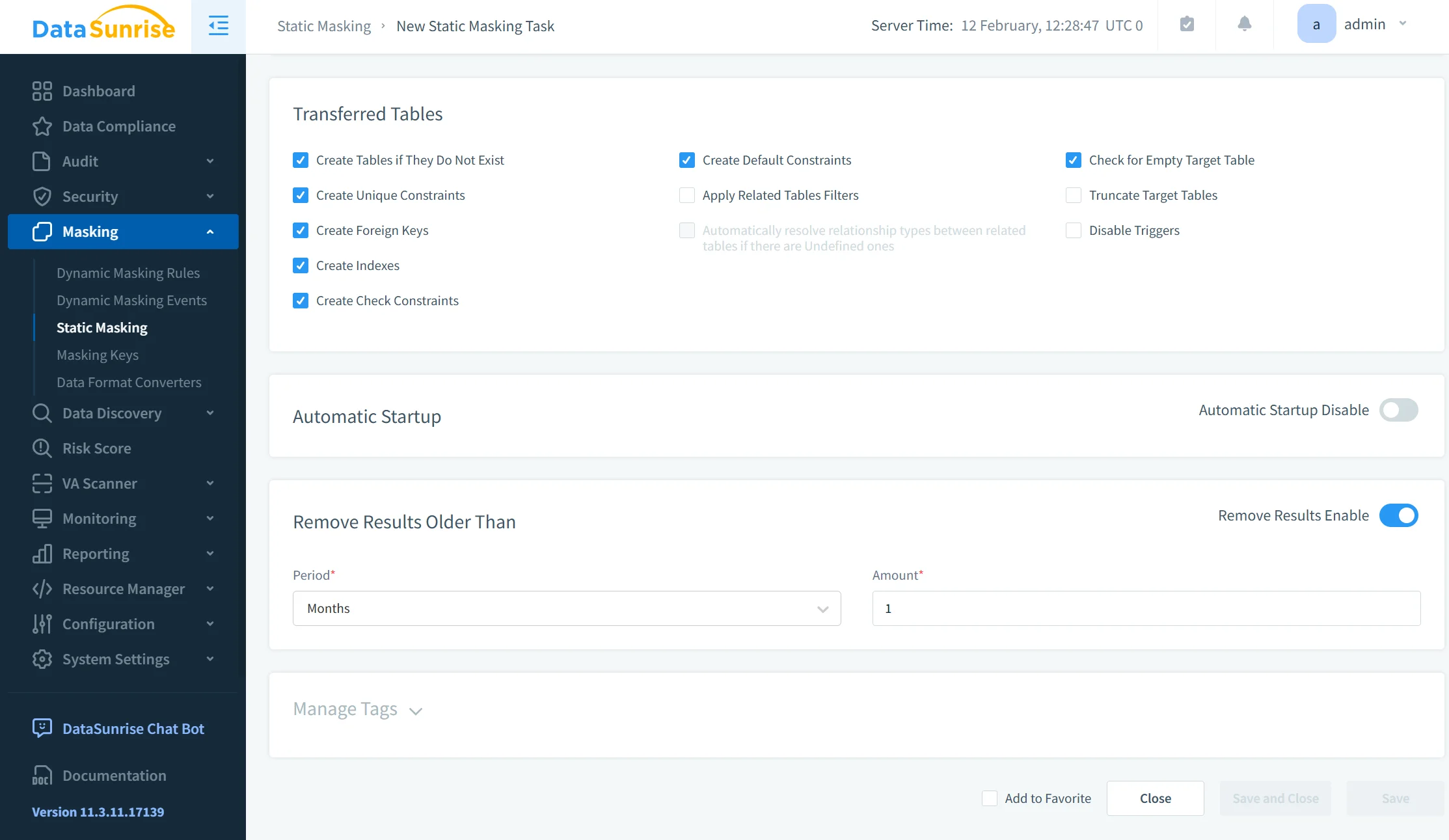
Centralized governance also simplifies policy administration as infrastructures scale across cloud platforms, hybrid environments, and multiple database technologies. Additional masking capabilities are available through Static Data Masking technologies and complementary Dynamic Data Masking controls.
Step 4 — Execute Autonomous Masking Workflows
After policies are configured, DataSunrise executes masking workflows automatically while preserving:
- referential integrity
- application compatibility
- testing realism
- relational consistency
The platform continuously adapts masking operations through:
- Compliance Drift Detection
- Continuous Compliance Posture management
- Automatic Compliance Policy Generation
- Intelligent Policy Orchestration
This autonomous approach helps organizations maintain consistent compliance coverage even as schemas, cloud assets, and application environments evolve over time.
Instead of rebuilding masking logic whenever infrastructure changes, administrators can rely on centralized orchestration and automated policy management to maintain protection across hybrid ecosystems.
Business Impact of Static Masking
| Benefit | Operational Impact |
|---|---|
| Reduced Exposure Risk | Prevents sensitive production leakage |
| Faster Compliance Audits | Simplifies audit preparation |
| Lower Administrative Overhead | Reduces manual scripting effort |
| Safer Development Environments | Protects non-production systems |
| Cross-Environment Governance | Standardizes masking globally |
| Improved Regulatory Alignment | Supports GDPR, HIPAA, PCI DSS, SOX |
| Faster Provisioning | Accelerates test data preparation |
| Quantifiable Risk Reduction | Limits insider and third-party exposure |
Organizations increasingly require Continuous Compliance Alignment across databases, storage systems, AI workflows, and analytics platforms. Static masking becomes significantly more valuable when integrated into a broader autonomous compliance ecosystem instead of isolated SQL scripts maintained independently across disconnected environments.
Modern enterprises also rely on centralized Data Compliance frameworks, automated Compliance Regulations management, and enterprise-wide Database Security controls to maintain consistent governance across cloud and hybrid infrastructures.
As organizations expand analytics, AI, and testing ecosystems, static masking increasingly works alongside Data Discovery technologies and broader Data Protection strategies to reduce exposure risks while preserving operational efficiency.
Conclusion
Static masking in Microsoft SQL Server provides a practical method for protecting sensitive information before datasets leave production environments. Native SQL approaches can work for small isolated systems, but maintaining scalable masking workflows across enterprise infrastructures quickly becomes operationally expensive.
DataSunrise transforms static masking into a centralized autonomous compliance platform through Zero-Touch Data Masking, Compliance Autopilot, Unified Security Framework integration, and Intelligent Policy Orchestration.
Unlike solutions that require constant scripting adjustments and fragmented workflows, DataSunrise delivers Continuous Compliance Posture management across cloud, hybrid, and on-premise infrastructures while minimizing operational complexity and reducing compliance gaps.
The platform combines enterprise-grade policy enforcement with the fine-grained controls security teams demand, delivering scalable protection across structured, semi-structured, and unstructured data environments. These capabilities integrate directly with Static Data Masking solutions, centralized Data Security frameworks, automated Compliance Manager workflows, and enterprise-wide Database Activity Monitoring for unified governance and continuous protection across hybrid infrastructures.
Protect Your Data with DataSunrise
Secure your data across every layer with DataSunrise. Detect threats in real time with Activity Monitoring, Data Masking, and Database Firewall. Enforce Data Compliance, discover sensitive data, and protect workloads across 50+ supported cloud, on-prem, and AI system data source integrations.
Start protecting your critical data today
Request a Demo Download Now