How to Audit Azure Cosmos DB for NoSQL
Implementing robust auditing mechanisms for Azure Cosmos DB has become essential for modern enterprises. According to IBM's 2024 Data Breach Report, organizations with comprehensive NoSQL audit implementations detect security threats 91% faster and reduce breach costs by up to 68%.
Azure Cosmos DB provides native auditing capabilities, but organizations often require advanced solutions to meet compliance regulations and protect sensitive data in distributed NoSQL environments.
This guide explores Azure Cosmos DB's built-in audit tools and demonstrates how DataSunrise can enhance data security monitoring and streamline compliance for NoSQL databases.
Native Azure Cosmos DB Auditing Capabilities
Azure Cosmos DB includes several built-in auditing features that allow administrators to monitor NoSQL database activities such as document operations, query executions, and user authentication attempts across multiple API interfaces. Understanding proper database security practices is essential for implementing effective audit strategies. The key components of Azure Cosmos DB auditing include:
1. Azure Monitor Diagnostic Settings Configuration
Before implementing comprehensive auditing, you'll need to configure diagnostic settings through Azure CLI or the Azure Portal:
# Enable comprehensive auditing via Azure CLI
az monitor diagnostic-settings create \
  --name "CosmosDB-NoSQL-Audit" \
  --resource "/subscriptions/{subscription-id}/resourceGroups/{resource-group}/providers/Microsoft.DocumentDB/databaseAccounts/{account-name}" \
  --logs '[{
    "category": "DataPlaneRequests",
    "enabled": true,
    "retentionPolicy": {"enabled": true, "days": 365}
  }, {
    "category": "QueryRuntimeStatistics",
    "enabled": true,
    "retentionPolicy": {"enabled": true, "days": 180}
  }, {
    "category": "PartitionKeyStatistics",
    "enabled": true,
    "retentionPolicy": {"enabled": true, "days": 90}
  }]' \
  --workspace "/subscriptions/{subscription-id}/resourceGroups/{resource-group}/providers/Microsoft.OperationalInsights/workspaces/{workspace-name}"
These settings capture audit data across SQL API, MongoDB API, Cassandra API, and other interfaces, routing information to Azure Storage, Log Analytics workspace, or Event Hub for analysis.
2. Analyzing Audit Logs with KQL Queries
Once your operations are complete, examine the captured audit logs using Azure Monitor's Kusto Query Language (KQL):
// Comprehensive audit analysis for the past 24 hours
AzureDiagnostics
| where ResourceProvider == "MICROSOFT.DOCUMENTDB"
| where Category == "DataPlaneRequests"
| where TimeGenerated > ago(24h)
| extend OperationType = case(
    OperationName == "Create", "Document Creation",
    OperationName == "Query", "Data Retrieval",
    OperationName == "Replace", "Document Update",
    OperationName == "Delete", "Document Deletion",
    "Administrative Operation"
)
| extend RiskLevel = case(
    RequestCharge_s > 50.0, "High Resource Usage",
    Duration_s > 3000, "Long Running Query",
    StatusCode_s != "200", "Failed Operation",
    "Normal Activity"
)
| project TimeGenerated, OperationType, RiskLevel,
    ResourceId, StatusCode_s, RequestCharge_s,
    Duration_s, ClientIpAddress_s, ActivityId_g
| order by TimeGenerated desc
3. Azure Portal Web Interface for Audit Review
The Azure Portal provides an intuitive interface for accessing NoSQL audit information without requiring specialized query language expertise:
- Metrics Dashboard: View real-time performance data and operation counts across all API interfaces
- Activity Log: Review administrative operations and configuration changes
- Logs Interface: Run custom KQL queries with advanced filtering capabilities
- Insights Panel: Access pre-built monitoring workbooks with audit visualizations
- Alerts Configuration: Set up automated notifications for suspicious activities
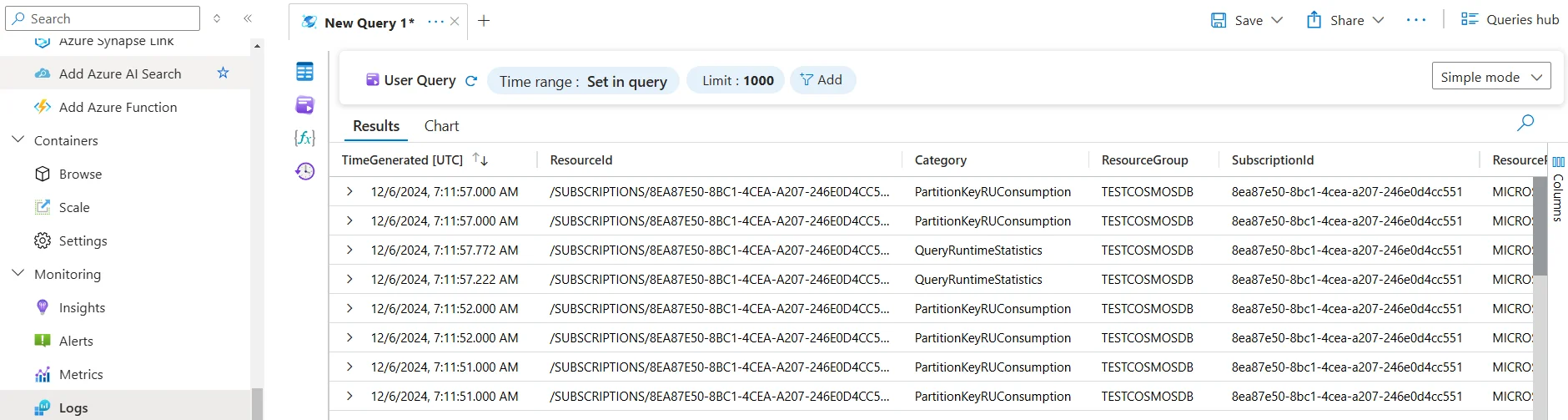
This web-based interface enables security teams to monitor NoSQL database activities without specialized technical expertise.
Enhanced NoSQL Auditing with DataSunrise
While Azure Cosmos DB's native auditing features provide essential monitoring functionality, DataSunrise enhances NoSQL audit capabilities with Zero-Touch Compliance Automation and sophisticated monitoring designed specifically for distributed database environments. Unlike basic logging approaches, DataSunrise delivers enterprise-grade database activity monitoring with intelligent policy orchestration and automated compliance reporting while implementing robust data protection measures.
Advantages of DataSunrise for Azure Cosmos DB
Auto-Discovery & Classification: DataSunrise's proprietary algorithms automatically scan your Azure Cosmos DB environment to identify and classify sensitive data according to regulatory frameworks like GDPR, HIPAA, and PCI DSS using NLP and machine learning technologies.
No-Code Policy Automation: Create sophisticated audit rules through an intuitive interface without writing complex code, reducing implementation time from weeks to hours while ensuring consistent enforcement across NoSQL environments.
Real-Time Threat Detection: DataSunrise provides real-time notifications with immediate alerts for suspicious NoSQL activities, enabling security teams to respond quickly to potential threats before they escalate.
Advanced User Behavior Analytics: Leverage sophisticated behavior analytics to establish baselines for normal NoSQL access patterns and automatically detect anomalies using ML algorithms that adapt to changing usage patterns. Understanding security threats is crucial for effective anomaly detection.
Centralized Multi-Database Monitoring: DataSunrise provides unified database security across more than 40 data storage platforms, ensuring consistency in security policies across all your database environments including both SQL and NoSQL systems.
Implementing DataSunrise for Azure Cosmos DB Auditing
Here's a comprehensive overview of how DataSunrise can be configured to audit Azure Cosmos DB for NoSQL, providing enhanced monitoring and compliance capabilities.
Step 1: Connect Azure Cosmos DB Instance to DataSunrise
Establishing a connection between DataSunrise and your Azure Cosmos DB environment is straightforward. The platform supports all Cosmos DB API types including SQL API, MongoDB API, Cassandra API, Gremlin API, and Table API for comprehensive audit coverage.
Step 2: Configure NoSQL-Specific Audit Rules
DataSunrise offers flexible audit rules that provide extensive customization options for NoSQL environments. You can create rules to monitor specific collections, track document-level changes, and establish different monitoring levels based on data sensitivity and business requirements. Implementing proper audit storage strategies ensures optimal performance while maintaining comprehensive coverage.
Step 3: Review Comprehensive Audit Results
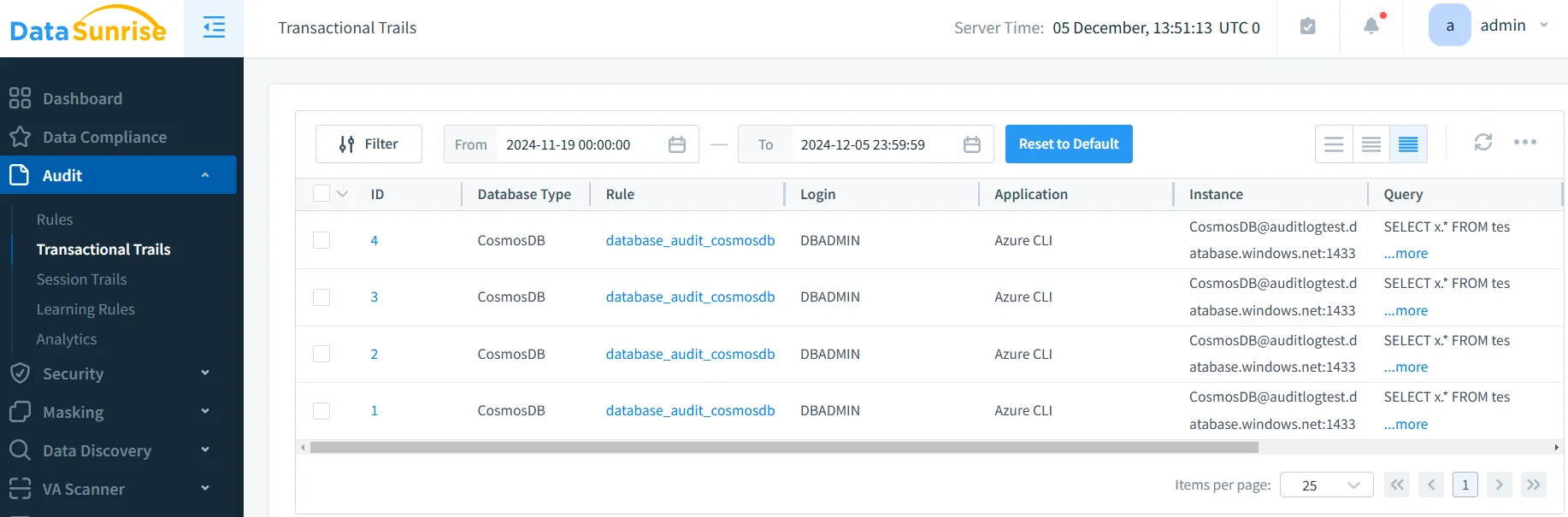
DataSunrise captures detailed audit trails that provide complete visibility into all NoSQL operations. The platform's Transaction Trails feature provides comprehensive insights into database activities, enabling security teams to investigate potential issues and demonstrate compliance with regulatory requirements. Effective audit logs management ensures long-term compliance and forensic capabilities.
Key Features of DataSunrise for Azure Cosmos DB
DataSunrise enhances Azure Cosmos DB's native audit capabilities through several advanced features specifically designed for NoSQL environments:
Comprehensive Data Discovery: Automatically identify and classify sensitive data within NoSQL documents using advanced algorithms that understand complex document structures and nested data relationships.
Dynamic Data Masking: Protect sensitive NoSQL document fields in real-time while maintaining application functionality and user productivity across distributed database operations.
Automated Compliance Reporting: Generate pre-configured reports for major regulatory frameworks including GDPR, HIPAA, PCI DSS, and SOX with automated compliance mapping.
Cross-Platform Integration: Monitor heterogeneous environments that include both SQL and NoSQL databases from a single management console, ensuring consistent security policies across your entire data infrastructure.
Intelligent Alerting: Receive instant notifications about suspicious activities through various communication channels including email, Slack, and Microsoft Teams.
Best Practices for Azure Cosmos DB NoSQL Auditing
Performance-Optimized Strategy
- Align audit strategies with partition key design to minimize performance impact
- Apply detailed auditing to sensitive collections, use sampling for high-volume operations
- Balance comprehensive auditing with RU consumption for cost-effective operations
Data-Centric Security
- Focus auditing on collections containing PII, financial data, or regulated information
- Monitor complex queries and cross-partition operations for unauthorized access
- Implement field-specific audit rules for sensitive document attributes
Compliance Integration
- Map audit collection to regulatory requirements and retention periods
- Implement tamper-evident storage with encryption for regulatory evidence
- Schedule regular compliance checks for audit completeness
Enhanced Security with DataSunrise
- Deploy DataSunrise's security suite for advanced threat detection
- Leverage machine learning for behavioral analytics and anomaly detection
- Enable cross-database correlation for comprehensive security analysis
Business Benefits of Robust Azure Cosmos DB Auditing
Implementing comprehensive auditing for Azure Cosmos DB provides significant business advantages:
| Benefit | Description |
|---|---|
| Enhanced Security Posture | Proactively identify unauthorized access attempts and suspicious query patterns before they escalate into serious security incidents |
| Streamlined Compliance | Automate regulatory adherence with detailed audit documentation that satisfies requirements for multiple frameworks |
| Operational Intelligence | Gain insights into NoSQL usage patterns, helping optimize performance and resource allocation across global regions |
| Risk Mitigation | Address potential vulnerabilities through continuous monitoring and automated alerting mechanisms |
| Forensic Capabilities | Maintain detailed records of all NoSQL operations to support security investigations and incident response |
| Stakeholder Trust | Demonstrate commitment to data protection and compliance, building confidence with customers and partners |
Conclusion
Azure Cosmos DB's native audit capabilities provide essential monitoring functionality, but organizations with complex security requirements benefit significantly from enhanced solutions like DataSunrise. DataSunrise offers comprehensive NoSQL security with advanced audit capabilities, real-time monitoring, and automated compliance reporting through flexible deployment options.
Protect Your Data with DataSunrise
Secure your data across every layer with DataSunrise. Detect threats in real time with Activity Monitoring, Data Masking, and Database Firewall. Enforce Data Compliance, discover sensitive data, and protect workloads across 50+ supported cloud, on-prem, and AI system data source integrations.
Start protecting your critical data today
Request a Demo Download Now