How to Mask Sensitive Data in Amazon OpenSearch
How to mask sensitive data in Amazon OpenSearch is one of those tasks that sounds optional… right up until your “harmless” log index contains customer emails, phone numbers, IP addresses, or even payment-related fragments. OpenSearch is often used for observability and security analytics, which means it naturally becomes a magnet for regulated data. The safest move is to assume sensitive data will show up eventually and implement masking before an audit (or an incident) forces the issue.
AWS provides the managed platform for Amazon OpenSearch Service, but compliance accountability stays with the organization operating the data. Masking helps you keep OpenSearch usable for search, dashboards, and investigations while reducing what users can actually see in query results.
Why Masking Matters in OpenSearch
Access control is necessary, but it’s not sufficient. Many teams give broad read access to avoid breaking dashboards, alerting pipelines, or incident response workflows. The result is predictable: too many users can retrieve too much raw data. Masking solves a different problem than authentication/authorization—it enforces least-visibility at the result level.
If your indices contain PII, you’re already in scope for governance programs driven by data compliance regulations. In practice, masking is a fast and defensible control for frameworks such as GDPR, HIPAA, and PCI DSS.
Dynamic Masking for Amazon OpenSearch
For Amazon OpenSearch, masking is typically implemented at query time so that users can continue searching and investigating while sensitive fields are protected in the response payload. This approach is commonly referred to as dynamic data masking.
A practical way to think about dynamic masking in OpenSearch is to decide how much of a sensitive value a role should see in results. Common patterns include:
| Dynamic masking pattern | What users see | Typical OpenSearch use case |
|---|---|---|
| Full redaction | Value removed or replaced with masked placeholder | SSNs, card-like fields, secrets, high-risk identifiers |
| Partial masking | Only a portion remains visible (e.g., last 4 digits) | Support workflows, troubleshooting, identity confirmation |
| Normalization | Value transformed to a safer representation while preserving meaning | Analytics and dashboards that require grouping without exposure |
What You Need Before You Start
If you want masking to be effective (and not a fragile demo), get these basics right first:
- Traffic path: ensure user queries flow through the masking control point, not directly to OpenSearch.
- Discovery: identify which indices/fields are sensitive, including unstructured payloads.
- Role model: define who should see full values vs. masked values.
- Evidence: capture logs that prove masking was enforced.
DataSunrise supports multiple deployment modes, so you can choose an architecture that fits your OpenSearch topology and operational constraints.
Step 1: Discover Sensitive Fields in OpenSearch
You cannot mask what you cannot find. OpenSearch documents are semi-structured and often contain sensitive data inside nested JSON or “message” fields. This is why manual reviews fail at scale.
Start with automated data discovery to classify sensitive fields across indices. Discovery results become your governance inventory—what is sensitive, where it lives, and what must be protected.
Step 2: Define Access Policy and Scope
Masking is most effective when it is role-aware. For example, an incident responder may need to search for an email domain, but they don’t need full emails for every record. A support analyst may need to confirm that a customer exists, but not retrieve full SSNs or payment data.
Design your policy around:
- Role-based access control (RBAC) for consistent enforcement
- Centralized access controls across environments
- The principle of least privilege applied to visibility (not just endpoint permissions)
In DataSunrise, masking and compliance policies can be managed as part of a unified governance program using Compliance Manager.
Step 3: Create a Dynamic Masking Rule
Once you know which fields are sensitive and which roles require restricted visibility, create a dynamic masking rule. This is where you define which fields are masked and which masking method is used (redaction, partial masking, normalization—depending on your policy model).
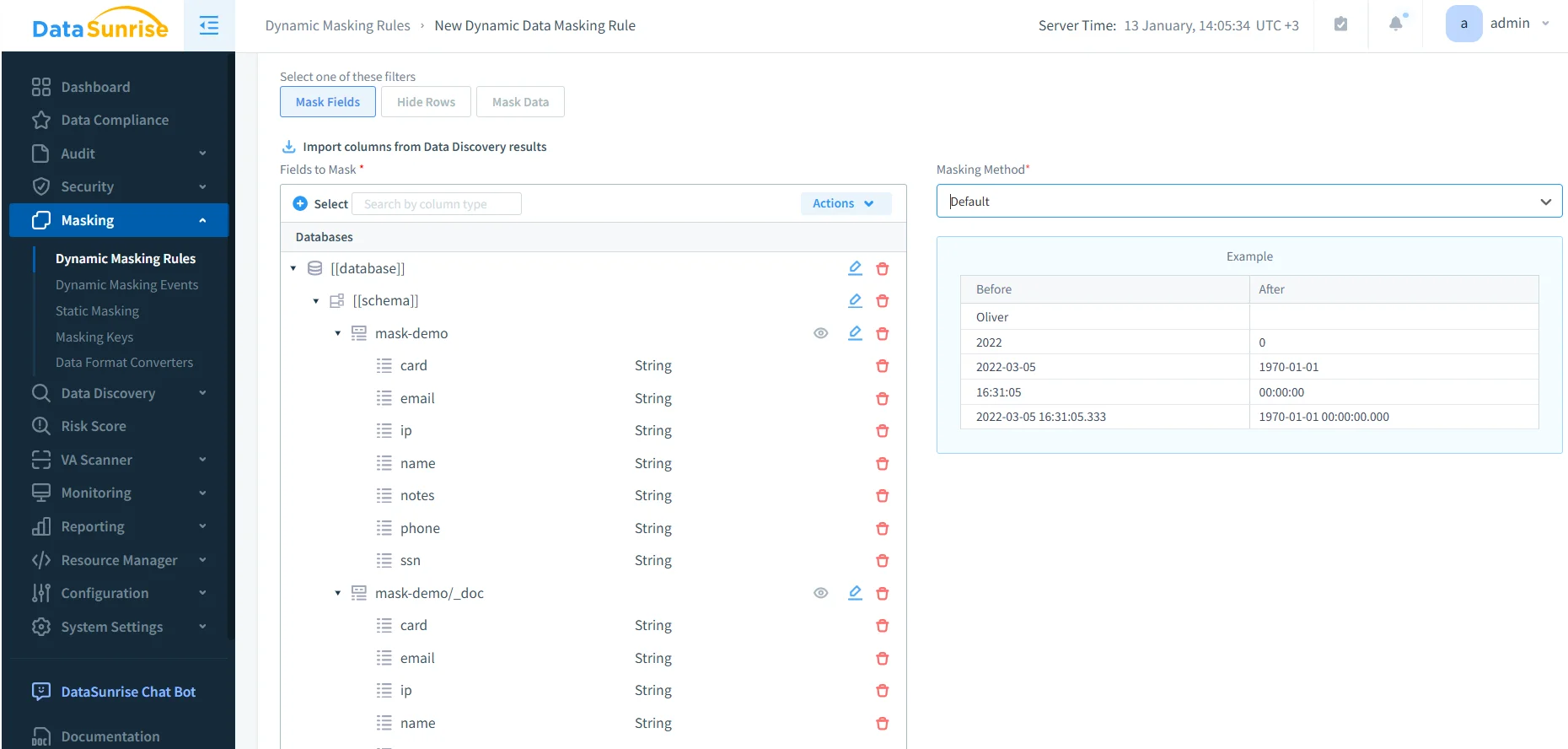
Practical guidance for OpenSearch:
- Mask the minimum necessary: protect PII fields first (email, phone, SSN, card-like fields, IPs).
- Keep analytics usable: masking should preserve operational meaning (for example, partial masking may be enough).
- Avoid policy chaos: if multiple rules can apply, keep outcomes deterministic with rules priority.
Step 4: Validate Results: Before vs. After Masking
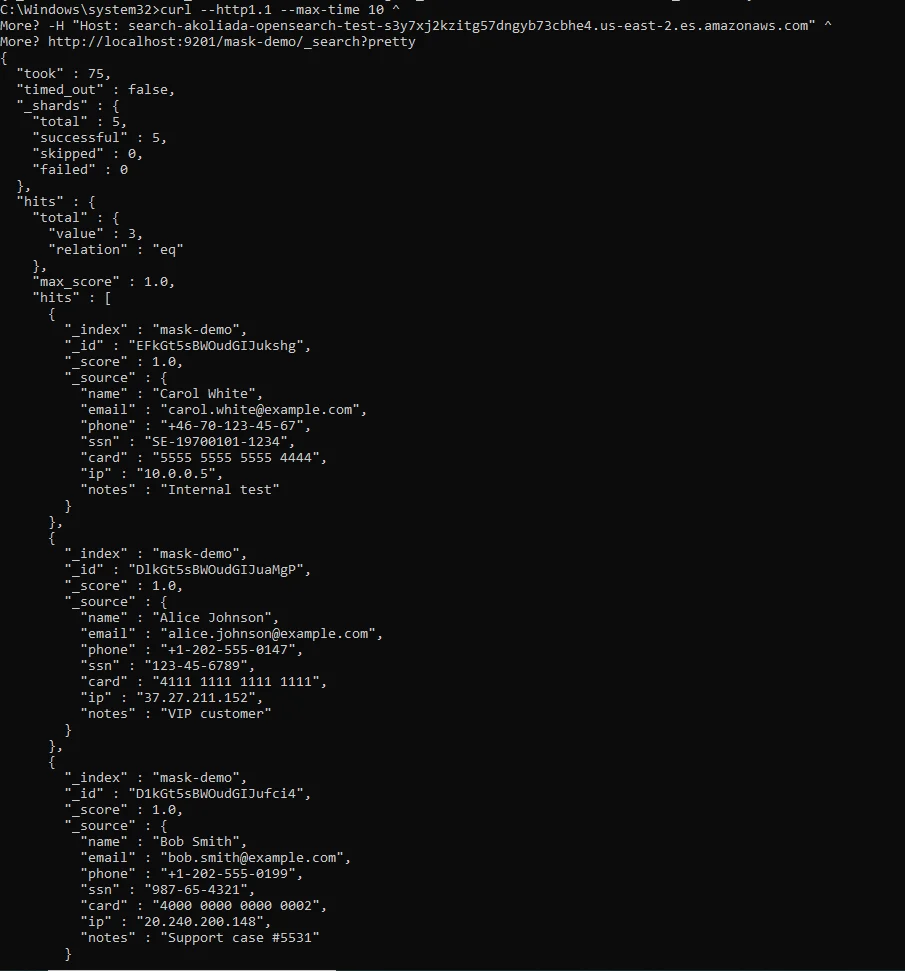
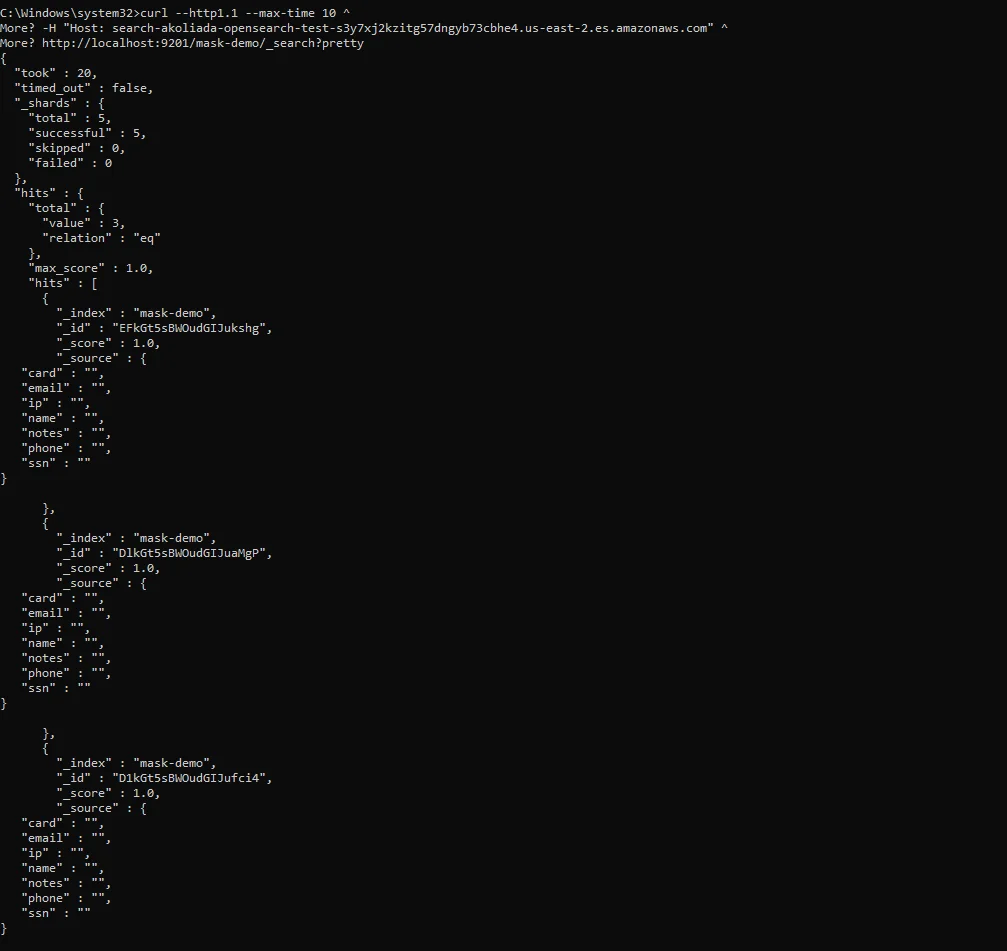
You should verify masking in the most brutally honest way possible: run the same query before and after enabling the masking rule and compare the results. Your goal is not “it works in the UI.” Your goal is “the sensitive values are not exposed in real output.”
Below is an example of an unmasked query result showing sensitive fields returned in plaintext.
After enabling masking, the same query should return protected values while preserving usefulness for troubleshooting and analytics.
Step 5: Audit Masked Access and Preserve Evidence
Masking is not “done” until you can prove it stayed on. Compliance programs and incident investigations require traceability: who accessed the index, what query ran, and what policy was applied.
DataSunrise provides evidence collection via:
- Data Audit for centralized auditing controls
- Audit logs suitable for compliance reviews and investigations
- Audit trails for immutable evidence and accountability
- Database activity monitoring to detect abnormal access patterns over time
AWS also supports service-level logging as a baseline reference: Amazon OpenSearch audit logs. In practice, teams often prefer a centralized evidence plane so audit outputs are consistent across environments and access paths.
Hardening: Combine Masking with Preventive Controls
Masking reduces exposure, but it is not a complete security strategy. Strong implementations pair masking with preventive guardrails:
- Database firewall rules to block abusive query patterns and suspicious access
- Vulnerability assessment to catch configuration drift and security gaps
- Continuous data protection to keep controls effective as indices and pipelines evolve
- User behavior analysis to surface anomalous access activity beyond simple allow/deny logic
Operational Pitfalls (and How to Avoid Them)
- Bypass paths: if users can query OpenSearch directly, they can bypass masking. Enforce the controlled access path.
- Unscoped masking: masking everything can break dashboards. Scope policies to sensitive indices/fields first.
- Nested field blind spots: sensitive data often hides inside JSON payloads. Discovery is how you catch it.
- No evidence: masking without auditing is a future audit finding waiting to happen.
Start with discovery and mask the highest-risk fields first (email, phone, SSN, card-like fields, IPs). Then expand coverage based on real usage and audit evidence—not assumptions.
Do not index secrets (API keys, session tokens, passwords) into OpenSearch and assume masking will rescue you later. Searchable secrets are a fast exfiltration path. Block them at ingestion, scope access tightly, and keep auditing always-on.
Conclusion
If you want to know how to mask sensitive data in Amazon OpenSearch without breaking operations, the winning pattern is straightforward: discover sensitive fields continuously, scope masking to the right objects, apply dynamic masking by role, validate output before/after, and keep audit evidence always-on. Done right, masking becomes a quiet control that reduces exposure every day—not a one-off compliance project.
To explore implementation options, review the data masking overview and the DataSunrise platform overview, then evaluate with a demo or a download.
Protect Your Data with DataSunrise
Secure your data across every layer with DataSunrise. Detect threats in real time with Activity Monitoring, Data Masking, and Database Firewall. Enforce Data Compliance, discover sensitive data, and protect workloads across 50+ supported cloud, on-prem, and AI system data source integrations.
Start protecting your critical data today
Request a Demo Download Now