How to Mask Sensitive Data in IBM Db2
As organizations depend on IBM Db2 to manage mission-critical data, protecting sensitive information from unauthorized exposure has become a top priority. Data masking is one of the most effective techniques for reducing exposure risk without disrupting application functionality.
According to IBM's 2024 Cost of a Data Breach Report, the average breach cost reached $4.88 million — with insider threats and misconfigured access controls among the leading causes. For enterprises storing PII, financial records, or health data in Db2, robust masking controls are both a compliance regulations obligation and a business necessity.
This guide covers IBM Db2's native masking capabilities and how DataSunrise extends them with enterprise-grade dynamic masking and automated compliance reporting.
Native IBM Db2 Data Masking Capabilities
IBM Db2 provides built-in data concealment through its Row and Column Access Control (RCAC) framework, which lets administrators define column masks that rewrite query results based on the user's role — without altering stored values. This forms a core part of any solid database security strategy and helps enforce data security policies at the query level.
1. Enabling Row and Column Access Control
ALTER TABLE hr.employees ACTIVATE COLUMN ACCESS CONTROL;
ALTER TABLE hr.employees ACTIVATE ROW ACCESS CONTROL;
For a full overview of how RCAC works, see the IBM Db2 RCAC documentation.
2. Creating Column Masks for Sensitive Fields
-- Mask SSN for non-admin users
CREATE MASK ssn_mask ON hr.employees
    FOR COLUMN ssn RETURN
    CASE WHEN VERIFY_ROLE_FOR_USER(SESSION_USER, 'HR_ADMIN') = 1
         THEN ssn
         ELSE 'XXX-XX-' || SUBSTR(ssn, 8, 4)
    END
ENABLE;

-- Mask credit card number, revealing only last 4 digits
CREATE MASK cc_mask ON finance.transactions
    FOR COLUMN card_number RETURN
    CASE WHEN VERIFY_ROLE_FOR_USER(SESSION_USER, 'FINANCE_ADMIN') = 1
         THEN card_number
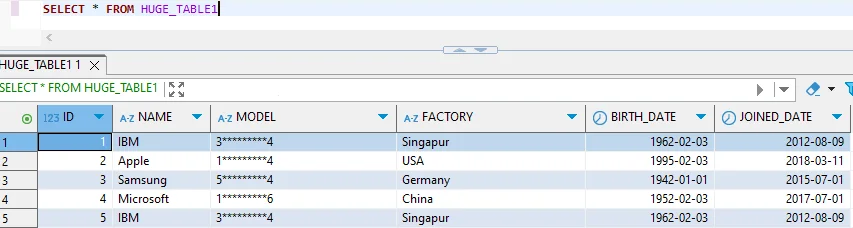
         ELSE REPEAT('*', 12) || RIGHT(card_number, 4)
    END
ENABLE;
Limitations of Native Db2 Masking
| Feature | Limitation | Business Impact |
|---|---|---|
| Column Masks | Logic written in SQL CASE expressions only | Complex scenarios require significant DBA effort |
| Mask Management | No centralized UI; all changes require DDL | High risk of human error during updates |
| Multi-Instance Coverage | Masks defined per table, per database | Inconsistent protection across environments |
| Compliance Reporting | No built-in report generation for masking activity | Manual effort to demonstrate GDPR, HIPAA, PCI DSS adherence |
| Audit Integration | Masking activity not linked to audit trails | Forensic investigations require cross-referencing multiple catalogs |
Enhanced IBM Db2 Data Masking with DataSunrise
DataSunrise extends Db2's native RCAC with a no-code masking platform that integrates seamlessly across IBM Db2 and over 40 data storage systems.
Step 1: Connect IBM Db2 to DataSunrise
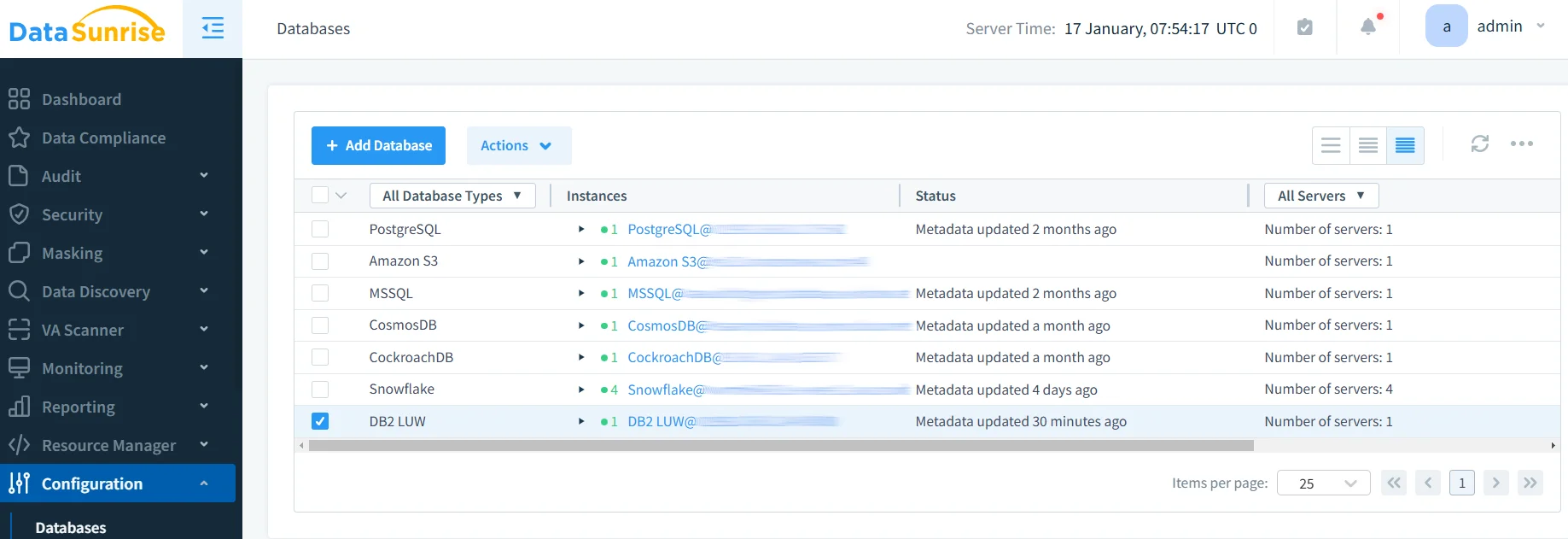
Connect your Db2 instance via the DataSunrise administrative interface by providing host, port, and credentials. DataSunrise establishes a secure proxy connection that enforces masking policies on all outbound query results with no application-side changes required.
Step 2: Run Sensitive Data Discovery
DataSunrise's Data Discovery engine automatically scans your Db2 schema and classifies sensitive columns — PII, financial data, health information — using NLP and pattern-matching algorithms, eliminating the manual inventory work that RCAC requires.
Step 3: Create Dynamic Masking Rules
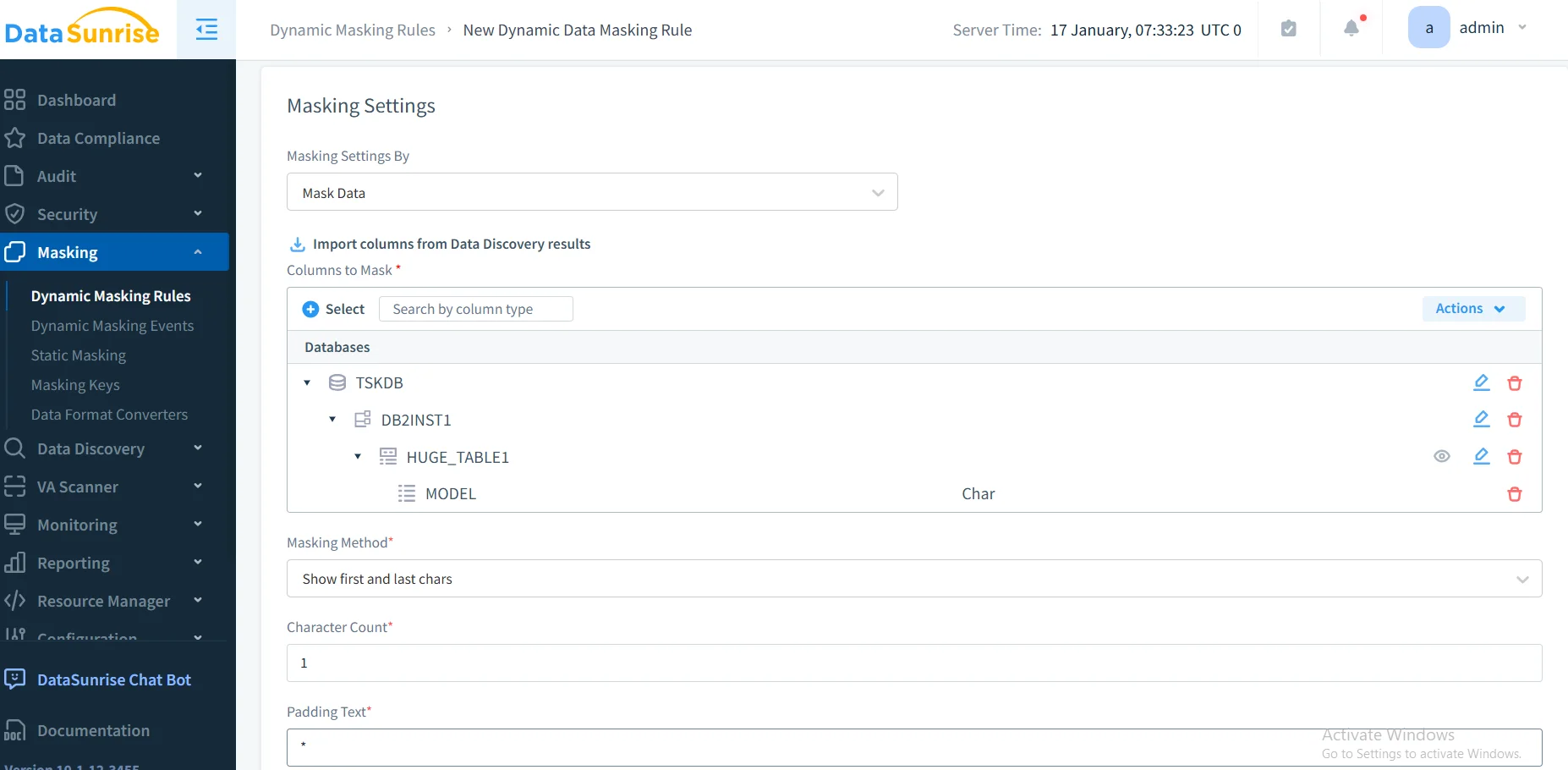
Configure dynamic masking rules scoped by user role, application, IP address, or session context. This approach aligns with the principle of least privilege and works alongside role-based access controls to ensure users only see data they are authorized to access. Multiple masking types are supported — full redaction, partial masking, substitution, and format-preserving masking — keeping application logic intact while protecting sensitive values.
Step 4: Apply Static Masking for Non-Production Environments
For development and testing, DataSunrise supports static masking and in-place masking to produce sanitized copies of production data, so QA and analytics teams work with realistic but safe datasets. This can be further complemented with synthetic data generation for scenarios where even masked real data should not leave a controlled environment.
Step 5: Monitor Masking Activity in Real Time
DataSunrise logs every masked query — user identity, timestamp, query text, and affected columns. These audit logs feed into the compliance engine, enabling one-click evidence packages for GDPR, HIPAA, PCI DSS, and SOX auditors.
Key Advantages of DataSunrise for IBM Db2 Data Masking
- No-Code Policy Automation: Create and update masking rules through an intuitive UI without writing DDL statements, reducing DBA overhead significantly.
- Dynamic, Context-Aware Masking: Apply different transformations based on user role, application context, and behavioral signals in real time.
- Automated Compliance Reporting: Pre-built reports for GDPR, HIPAA, PCI DSS, and SOX generated automatically.
- Centralized Policy Management: Uniform masking policies across Db2 and 40+ platforms from a single console.
- Behavioral Analytics: Detect anomalous access patterns and trigger real-time alerts before exfiltration occurs.
- Flexible Deployment: On-premises, cloud, or hybrid — with no configuration complexity.
- Database Firewall: Block unauthorized queries before they reach sensitive data, complementing masking with an additional layer of active protection.
Conclusion
IBM Db2's native RCAC framework is a solid starting point, but the manual effort required to manage SQL-based policies — and the absence of centralized reporting and cross-instance coverage — makes it insufficient for complex compliance requirements.
Protect Your Data with DataSunrise
Secure your data across every layer with DataSunrise. Detect threats in real time with Activity Monitoring, Data Masking, and Database Firewall. Enforce Data Compliance, discover sensitive data, and protect workloads across 50+ supported cloud, on-prem, and AI system data source integrations.
Start protecting your critical data today
Request a Demo Download Now