Azure Cloud Storage Data Audit Trail
In today's cloud-centric world, audit trails implementation is an essential practice for maintaining data security and compliance across distributed storage environments. Microsoft Azure Storage, a comprehensive cloud storage solution, offers native audit tools that can be configured to track activities, identify unauthorized access, and ensure adherence to regulatory requirements.
The importance of proper cloud storage auditing is underscored by recent security trends – according to cybersecurity research from CISA, cloud storage misconfigurations and inadequate monitoring represent major attack vectors across industries, making robust audit trail implementation more crucial than ever for protecting structured, semi-structured, and unstructured data. Azure Storage monitoring best practices emphasize comprehensive logging strategies for enterprise environments.
Azure Cloud Storage Data Audit Trail with Native Tools: A Brief Overview
The Storage provides a native auditing solution through Azure Monitor and Storage Analytics, designed to log storage activities and enforce security policies. These cloud-native tools capture various storage events and can be configured to set granular logging policies for specific storage containers, file types, and operations.
The Azure Monitor integration generates logs in JSON format with structured data fields. By default, Azure Storage stores audit records in a standardized format, which can be accessed through Azure Monitor Logs or exported for analysis using various tools.
Native Azure Cloud Storage Audit Trail Implementation
Azure Storage provides comprehensive audit trail capabilities through multiple interfaces and tools, making it accessible for different user preferences and technical expertise levels.
Command-Line Configuration
You can enable audit trail functionality programmatically using Azure CLI or PowerShell:
# Enable comprehensive audit trail via Azure CLI
az monitor diagnostic-settings create \
  --name "AzureStorage-AuditTrail" \
  --resource "/subscriptions/{subscription-id}/resourceGroups/{rg}/providers/Microsoft.Storage/storageAccounts/{account}" \
  --logs '[{"category": "StorageRead", "enabled": true}, {"category": "StorageWrite", "enabled": true}, {"category": "StorageDelete", "enabled": true}]' \
  --workspace "/subscriptions/{subscription-id}/resourceGroups/{rg}/providers/Microsoft.OperationalInsights/workspaces/{workspace}"
You can also query existing audit trail data using KQL in Azure Monitor:
StorageBlobLogs
| where TimeGenerated > ago(24h)
| where OperationName in ("PutBlob", "GetBlob", "DeleteBlob")
| project TimeGenerated, OperationName, CallerIpAddress, Uri, StatusCode
| order by TimeGenerated desc
Azure Portal Web Interface for Audit Trail Management
The Azure Portal provides an intuitive interface for audit trail management:
- Navigate to your storage account and select "Monitoring" → "Diagnostic settings"
- Configure log categories (StorageRead, StorageWrite, StorageDelete) and destinations
- Use "Logs" section to query audit data with KQL queries
- Access "Activity log" for administrative operations and set up automated alerts
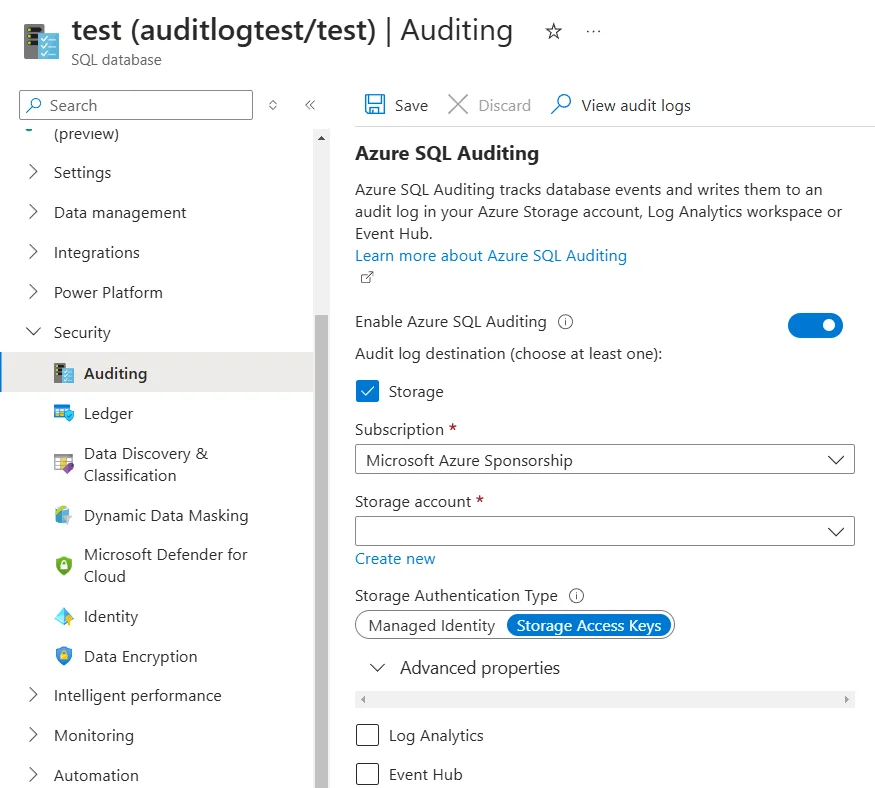
This web interface simplifies audit trail configuration and monitoring without requiring command-line expertise.
Key Features and Limitations of Azure Storage Analytics
| Feature | Description | Limitation |
|---|---|---|
| Activity Tracking | Logs storage operations including blob access, file uploads/downloads, container modifications, and authentication events for comprehensive monitoring | Performance overhead in high-transaction environments with large file operations |
| Customizable Logging Levels | Enables setting specific operations or users to be logged, allowing focused auditing of critical storage areas | Limited granularity compared to specialized third-party solutions |
| Real-Time Monitoring | Captures events as they occur within the storage system across multiple data types and formats | Basic auditing capabilities may not match detailed features needed for complex content analysis |
| Centralized Log Access | Provides utilities through Azure Monitor for reviewing and analyzing audit logs with advanced filtering capabilities | Complex advanced setup – while basic configuration is straightforward, custom audit policies require careful planning and expertise |
| Log Storage | Native integration with Azure Monitor and storage analytics | Audit logs can grow significantly across diverse data types, requiring proper storage management strategies |
Extensive Azure Cloud Storage Data Audit Trail with DataSunrise
Azure Storage's native auditing capabilities provide a solid foundation. However, integrating DataSunrise significantly boosts your cloud storage security with Zero-Touch Data Masking and Autonomous Compliance Orchestration. DataSunrise offers centralized control, detailed reporting, and real-time alerts, streamlining your auditing processes across heterogeneous cloud environments.
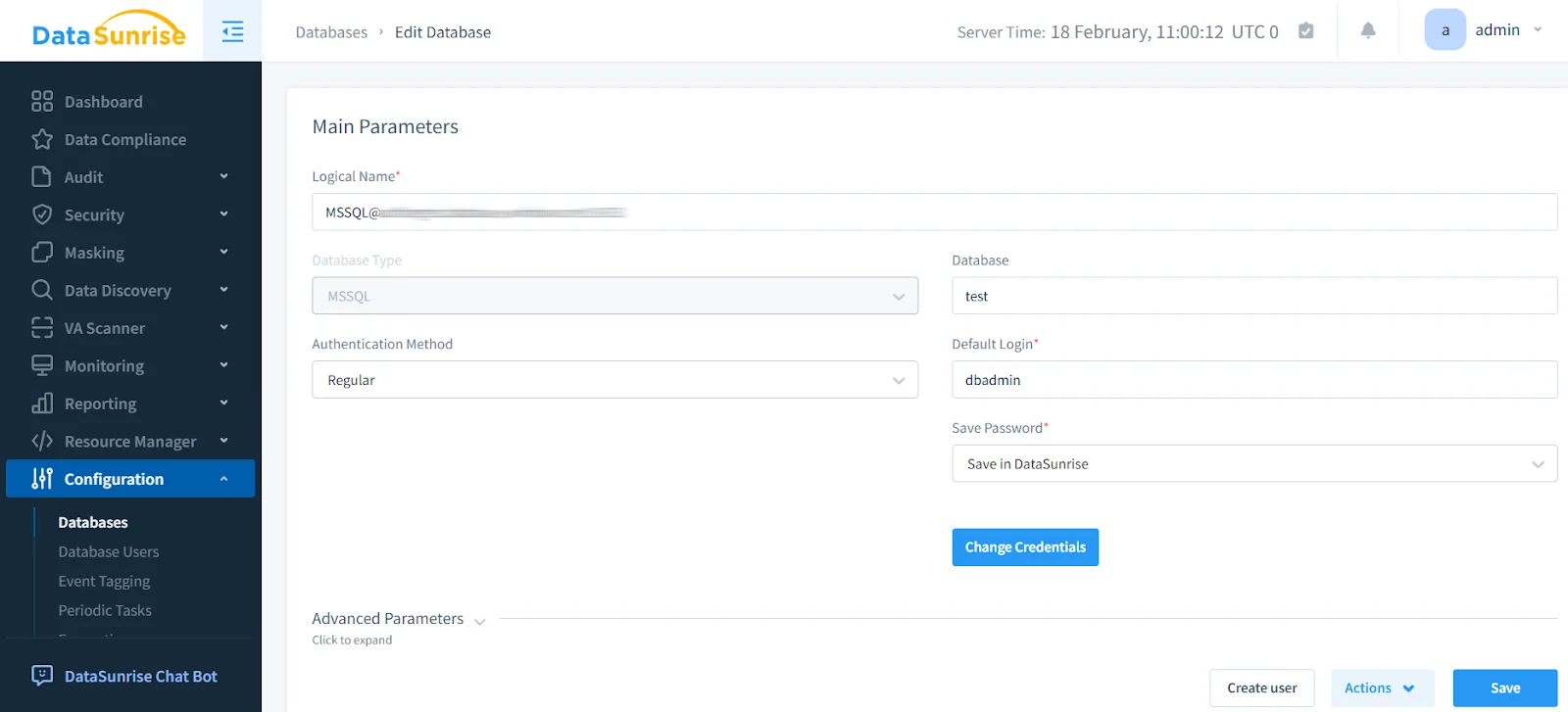
1. Connect to DataSunrise:
Begin by connecting your Azure Storage instance to DataSunrise. This allows the tool to monitor and analyze storage activity in real time across all data formats.
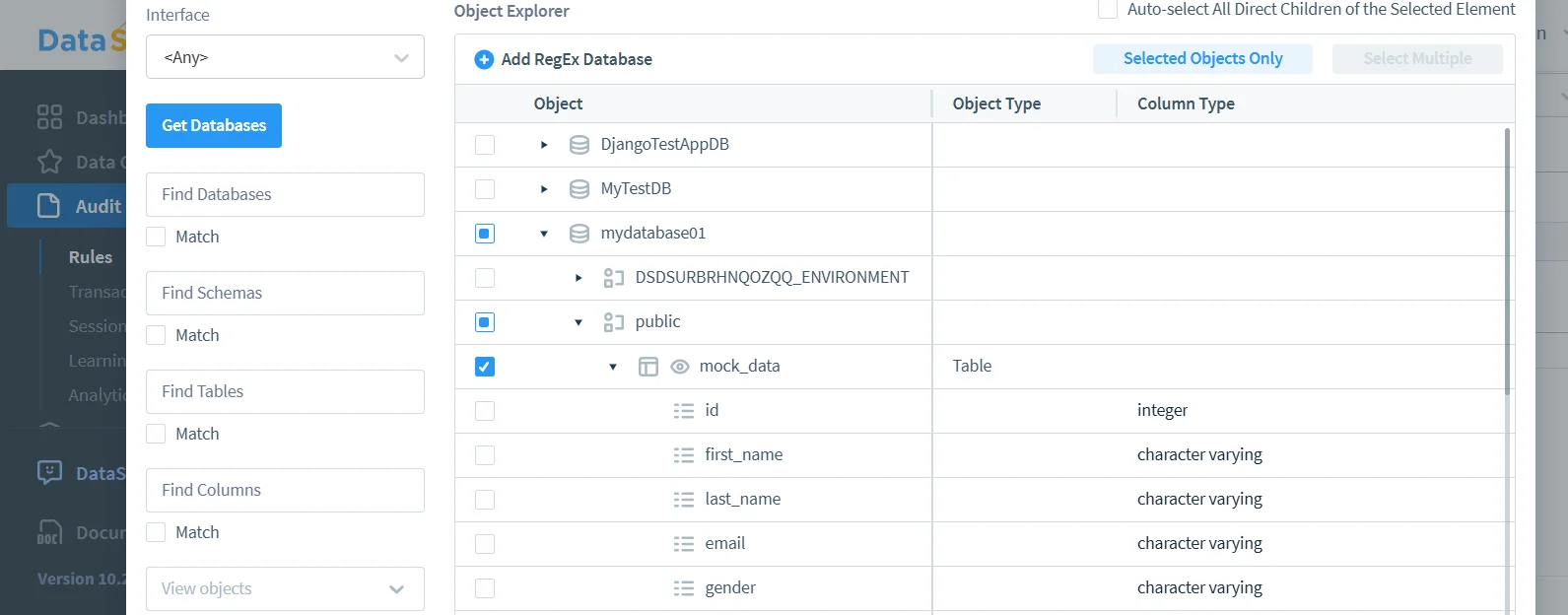
2. Create an Audit Rule:
This step allows you to specify the actions, users, and containers to track. As a result, you ensure that all relevant storage activity is captured across structured, semi-structured, and unstructured data with comprehensive audit rules.
3. View Transactional Trails:
After configuring your audit rules, you can easily view the transactional audit trails through DataSunrise's intuitive interface. This provides clear insights into user actions and storage changes, helping you maintain a comprehensive security audit trail with advanced database activity monitoring capabilities.
DataSunrise: Streamlined Azure Cloud Storage Data Audit Trail
DataSunrise equips your cloud storage with advanced security tools. In contrast to basic logging and native audit facilities, these features provide sophisticated monitoring capabilities. As a result, your Azure Storage benefits from robust enterprise-grade protection with thorough monitoring of all storage activities across diverse data types.
- Unified Monitoring Platform: Seamlessly monitor and manage activity across more than 40 data storage platforms through a single interface, streamlining security operations and compliance reporting.
- Versatile Implementation: Deploy with confidence across any infrastructure configuration – whether cloud-based, on-premises, or hybrid environments – ensuring consistent security coverage throughout your organization.
- Intelligent Data Protection: Implement dynamic data masking to protect sensitive information while maintaining full application functionality and user productivity.
- Proactive Security Controls: Stay ahead of threats with advanced detection and prevention capabilities, maintaining robust storage security with threat detection mechanisms.
- Advanced User Analytics: Leverage sophisticated behavior analytics to identify suspicious patterns and potential security incidents.
Conclusion
Although Microsoft Azure Storage provides built-in auditing capabilities through Azure Monitor and Storage Analytics, modern enterprises often require more sophisticated tools to address evolving security challenges and compliance requirements across diverse data types.
DataSunrise serves as a powerful enhancement to Azure Storage's native functionality, delivering comprehensive auditing, real-time monitoring, and precise control over cloud storage security. Implementing DataSunrise alongside Azure Storage creates a robust security framework that simplifies compliance, strengthens data protection, and provides actionable intelligence.
Protect Your Data with DataSunrise
Secure your data across every layer with DataSunrise. Detect threats in real time with Activity Monitoring, Data Masking, and Database Firewall. Enforce Data Compliance, discover sensitive data, and protect workloads across 50+ supported cloud, on-prem, and AI system data source integrations.
Start protecting your critical data today
Request a Demo Download Now