How to Apply Dynamic Masking in Apache Hive
Apache Hive is one of the most widely deployed data warehouse solutions built on Hadoop, often serving as the backbone for large-scale analytics workloads. Yet the sensitive data it processes — from PII to financial records — demands rigorous access controls.
Dynamic data masking intercepts query results in real time and substitutes sensitive values with masked equivalents without modifying the underlying data. Unlike static masking, which creates a separate sanitized copy of a dataset, dynamic masking enforces policies at query execution time based on who is asking and what they are permitted to see. You can read more about the different masking types available to understand which approach fits your use case.
According to IBM's 2024 Cost of a Data Breach Report, the average breach now costs $4.88 million — making robust data protection a business-critical priority. This guide covers Apache Hive's native masking mechanisms and how DataSunrise can extend those capabilities for enterprise-grade compliance.
Native Dynamic Masking in Apache Hive
Apache Hive implements column masking and row filtering through its integration with Apache Ranger. When configured together, they allow administrators to apply masking rules transparently to query results without altering stored data. This is a key component of a broader database security strategy, working alongside role-based access controls to ensure users only see data appropriate for their role.
Prerequisites
- A running Apache Hive instance (version 2.x or later)
- Apache Ranger configured as the Hive authorization provider
- Administrative access to the Ranger UI or REST API
1. Configure Hive to Delegate Authorization to Ranger
Add the following to hive-site.xml and restart HiveServer2:
<property>
  <n>hive.security.authorization.enabled</n>
  <value>true</value>
</property>
<property>
  <n>hive.security.authorization.manager</n>
  <value>org.apache.ranger.authorization.hive.authorizer.RangerHiveAuthorizerFactory</value>
</property>
<property>
  <n>hive.security.authenticator.manager</n>
  <value>org.apache.hadoop.hive.ql.security.SessionStateUserAuthenticator</value>
</property>
sudo systemctl restart hiveserver2
2. Create a Sample Table with Sensitive Data
CREATE TABLE customer_records (
    customer_id     INT,
    full_name       STRING,
    email           STRING,
    ssn             STRING,
    credit_card     STRING,
    account_balance DECIMAL(12,2)
)
STORED AS ORC;

INSERT INTO customer_records VALUES
(1001, 'Alice Monroe',   '[email protected]',  '123-45-6789', '4111111111111111', 58200.00),
(1002, 'Bob Harrington', '[email protected]',    '987-65-4321', '5500005555555559', 12450.75);
3. Define Masking Policies in Apache Ranger
In the Ranger Admin UI, navigate to Access Manager → Resource Based Policies → [Your Hive Service] → Masking and create a new policy. Ranger supports several built-in masking types:
| Masking Type | Behavior | Example Output |
|---|---|---|
Redact |
Replaces chars with x / n |
xxx-nn-nnnn |
Partial mask: show last 4 |
Shows only the final 4 characters | xxxxxxxxxxxx1111 |
Hash |
Applies SHA-256 hashing | e3b0c44298fc... |
Nullify |
Returns NULL | NULL |
Custom |
User-defined HiveQL expression | Any valid HiveQL |
Example policy via REST API — applying last-4 masking for analysts and hashing for support_staff:
curl -u admin:rangerpassword -X POST \
  -H "Content-Type: application/json" \
  http://ranger-host:6080/service/public/v2/api/policy \
  -d '{
    "name": "mask-sensitive-columns",
    "service": "hive_service",
    "policyType": 1,
    "resources": {
      "database": {"values": ["analytics_db"]},
      "table":    {"values": ["customer_records"]},
      "column":   {"values": ["ssn", "credit_card", "email"]}
    },
    "dataMaskPolicyItems": [
      {
        "groups": ["analysts"],
        "dataMaskInfo": {"dataMaskType": "MASK_SHOW_LAST_4"}
      },
      {
        "groups": ["support_staff"],
        "dataMaskInfo": {"dataMaskType": "MASK_HASH"}
      }
    ]
  }'
4. Verify Masking with Test Queries
Run a SELECT as an analysts group member to confirm masked output:
SELECT customer_id, full_name, ssn, credit_card, email
FROM   analytics_db.customer_records;
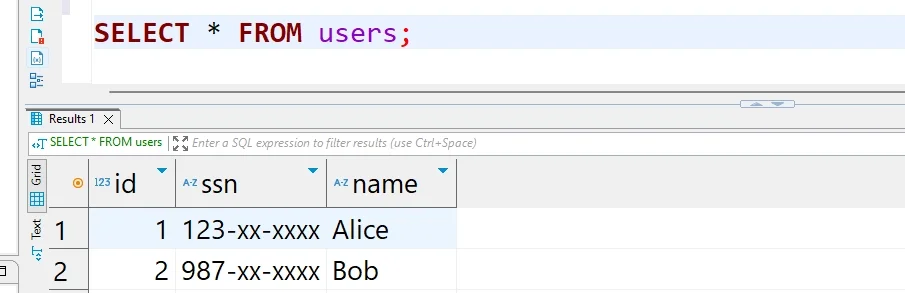
Privileged users see unmasked data; the masking logic is invisible to the querying application. For full configuration options, refer to the Apache Ranger documentation.
Enhanced Dynamic Masking for Apache Hive with DataSunrise
While Ranger-based masking handles the basics, enterprises managing Hive alongside heterogeneous environments need a unified, intelligent masking layer. DataSunrise delivers Zero-Touch Data Masking for Apache Hive through a non-intrusive proxy — intercepting queries transparently without changes to existing applications, schemas, or Hadoop configurations. It is purpose-built to help organizations meet compliance regulations and enforce consistent data security policies across the entire data estate.
Setting Up DataSunrise for Apache Hive Dynamic Masking
1. Connect Your Hive Instance to DataSunrise
Add your HiveServer2 endpoint in the DataSunrise interface, specifying the host, port, and authentication method (Kerberos or LDAP). DataSunrise establishes a secure proxy connection that captures all query traffic with no performance impact.
2. Run Automated Sensitive Data Discovery
DataSunrise's Data Discovery engine scans your Hive databases and identifies columns containing PII, financial data, and other regulated content using NLP and machine learning — eliminating the need to manually enumerate sensitive columns across hundreds of tables.
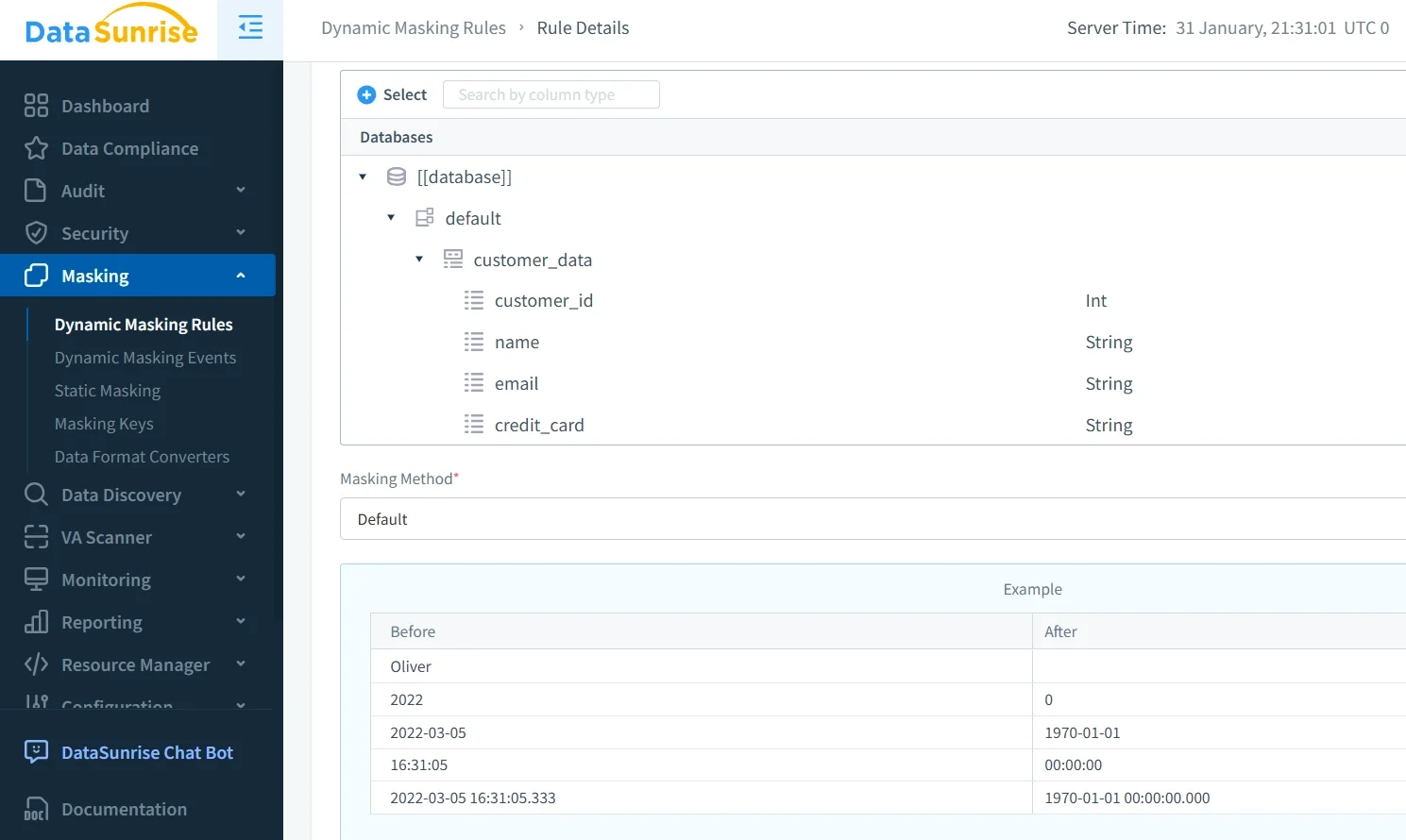
3. Create Dynamic Masking Rules
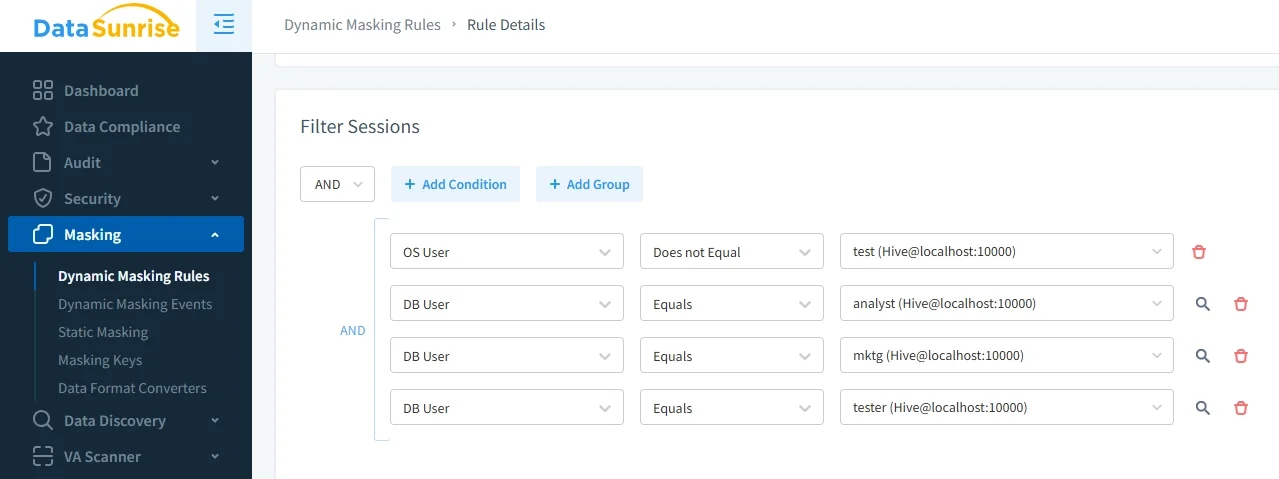
Through the No-Code Policy Automation interface, define masking rules specifying which objects to protect, which users receive masked output, which masking method to apply, and any contextual conditions such as time-of-day or application source. Properly configured rules are a direct line of defence against security threats targeting sensitive columns in production environments.
4. Validate and Monitor Masking in Real Time
Run test queries through the DataSunrise proxy and review results in the Transactional Trails view. Every masked query is recorded with full context — user, rule applied, columns affected, and original query text — building a complete audit log for compliance verification. This feeds directly into DataSunrise's data audit capabilities, giving teams a single source of truth for all masking and access events.
Key Advantages of DataSunrise for Apache Hive
| Advantage | Description |
|---|---|
| Auto-Discover & Classify | Automatically identifies sensitive columns, including newly created tables, so no field goes unprotected due to a missed manual step. |
| Surgical Precision Masking | Apply fine-grained rules at the column, row, user, role, or application level — with stacking and priority logic for complex multi-tenant environments. |
| Behavioral Analytics | Establishes normal Hive query baselines and flags deviations, enabling proactive response before data breaches escalate. |
| Automated Compliance Reporting | One-click reports mapped to GDPR, HIPAA, PCI DSS, and SOX requirements. |
| Real-Time Notifications | Instant alerts via Slack, MS Teams, or email when suspicious access patterns are detected. |
| Centralized Multi-Platform Management | Manage Hive masking policies alongside over 40 supported data platforms from a single console. |
| Non-Intrusive Deployment Modes | Proxy, sniffer, and native log-trailing modes require zero changes to HiveServer2 or connected applications. Go live in days, not months. |
Conclusion
Apache Hive's native masking capabilities through Apache Ranger provide a functional foundation, but manual overhead and limited scope create growing gaps as environments scale. DataSunrise closes those gaps with intelligent, automated dynamic masking — combining No-Code Policy Automation, ML-powered data discovery, real-time behavioral analytics, and automated compliance reporting in a single non-intrusive platform. Paired with DataSunrise's database firewall, it delivers end-to-end data protection for your Hive environment.
Protect Your Data with DataSunrise
Secure your data across every layer with DataSunrise. Detect threats in real time with Activity Monitoring, Data Masking, and Database Firewall. Enforce Data Compliance, discover sensitive data, and protect workloads across 50+ supported cloud, on-prem, and AI system data source integrations.
Start protecting your critical data today
Request a Demo Download Now