How to Audit Elasticsearch

Modern enterprises rely on Elasticsearch for indexing and analyzing massive datasets in real time. Yet, as these systems grow, so does the need for transparency and accountability. An effective audit process allows organizations to understand who accessed the system, what data was viewed or changed, and how configurations evolved over time.
Elasticsearch includes a native auditing feature within X-Pack Security, enabling comprehensive tracking of authentication, authorization, and access events. In this article, we’ll explore native Elasticsearch audit capabilities and show how DataSunrise extends those functions for advanced compliance, reporting, and threat analytics.
What is Audit?
An audit is the systematic collection of evidence showing who did what, when, and how within a system. In databases and data platforms, it captures every meaningful user and administrative action—from logins and queries to configuration changes and index modifications.
In Elasticsearch, an audit provides visibility into:
- User Authentication and Access — recording every successful or failed login attempt.
- Authorization Decisions — showing whether access to specific indices or documents was granted or denied.
- Configuration Changes — tracking cluster, node, and role modifications.
- Operational Context — linking each event to user identity, IP address, time, and request type.
Auditing is essential for compliance with frameworks like GDPR, HIPAA, PCI DSS, and SOX. It enables organizations to maintain accountability, investigate incidents, and demonstrate control over sensitive data.
Learn more in What is Data Audit Used For and Aim of a DB Audit Trail.
Native Elasticsearch Auditing Capabilities
The Elasticsearch audit trail records all significant security-related events: user logins, index reads and writes, and configuration changes. These records are written to logs or dedicated audit indices depending on your configuration.
Enabling Elasticsearch Audit Logging
Audit logging is configured in elasticsearch.yml under the xpack.security.audit.logfile section. To enable it, use:
xpack.security.audit.enabled: true
xpack.security.audit.logfile.events.include: ["access_granted", "access_denied", "authentication_success", "authentication_failed"]
xpack.security.audit.logfile.events.exclude: ["run_as_granted", "anonymous_access_denied"]
xpack.security.audit.logfile.prefix: "audit"
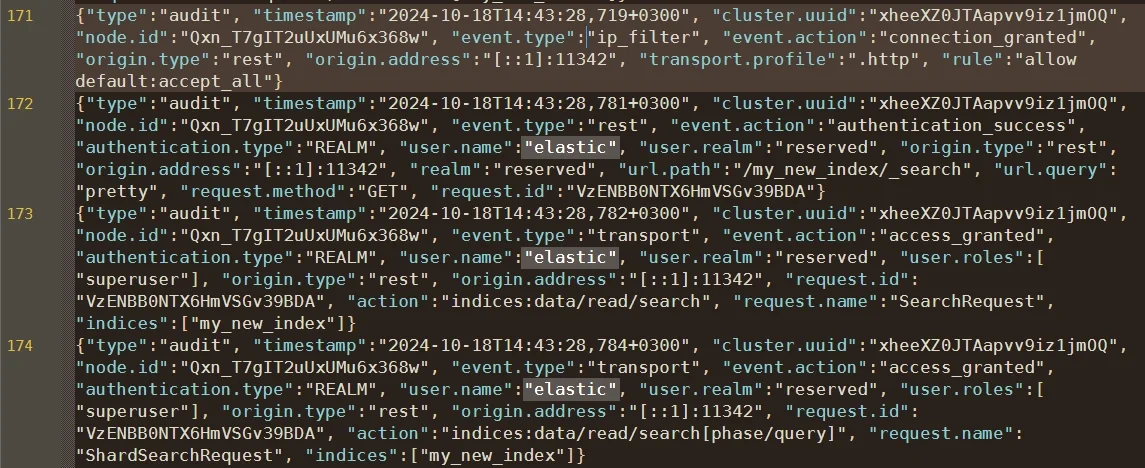
Once restarted, Elasticsearch begins recording audit events to files like:
logs/audit.log
Each event includes structured JSON fields describing the event type, timestamp, action, username, and indices involved.
Filtering and Customization
Elasticsearch enables fine-tuning of audit outputs through include and exclude event lists. You can tailor which activities appear in the audit trail:
xpack.security.audit.logfile.events.include: ["access_denied", "authentication_failed"]
xpack.security.audit.logfile.events.exclude: ["authentication_success"]
Filtered audit data can then be ingested into Elastic Stack components or exported via Logstash and Beats for centralized analysis and long-term retention. Learn more about Audit Storage and how to manage high-volume log rotation effectively.
Auditing Elasticsearch with DataSunrise
DataSunrise extends Elasticsearch’s native audit functionality into a centralized compliance platform with zero-touch integration and continuous regulatory calibration. The system automatically captures, enriches, and classifies audit data across multiple Elasticsearch clusters and integrates it into a unified compliance view.
Granular Audit Rules
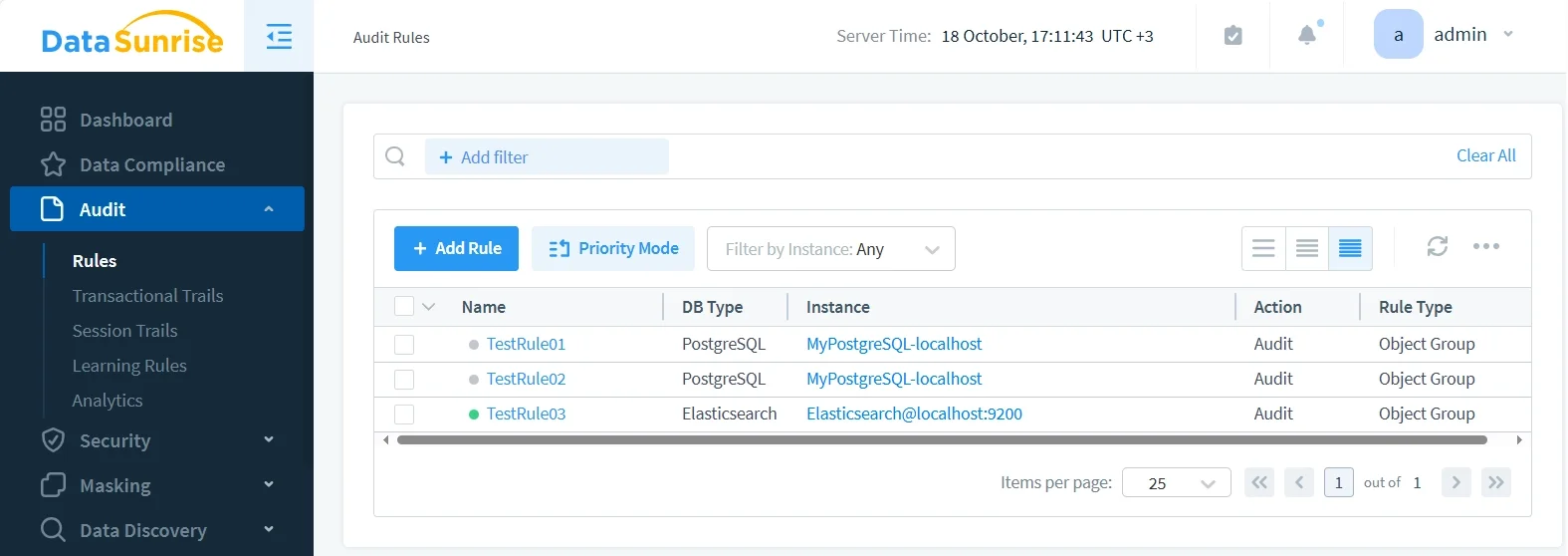
With Granular Audit Rules, administrators can define precise policies that control what actions are logged and under which conditions. You can:
- Assign auditing scopes to specific users, roles, or applications.
- Track individual indices or document types containing sensitive data, such as financial transactions or healthcare records.
- Monitor write operations (insert, update, delete) to detect unauthorized modifications.
- Exclude non-critical background processes to reduce log noise.
For deeper customization, see Audit Rules Priority and how to optimize log filtering.
Centralized Activity Monitoring
Centralized Activity Monitoring provides a unified dashboard to observe activity across all Elasticsearch clusters and nodes. Administrators can:
- View all active sessions and executed queries in real time.
- Filter activities by username, client IP, or index name for rapid investigation.
- Correlate audit data across different nodes or clusters to detect anomalies.
- Integrate with external monitoring tools and SIEM platforms for unified visibility.
To learn more about maintaining oversight, refer to Database Activity History and Data Activity History.
Automated Compliance Reporting
With Automated Compliance Reporting, organizations can generate verifiable audit evidence aligned with global standards such as GDPR, HIPAA, SOX, and PCI DSS. DataSunrise automatically:
- Compiles detailed audit trails showing access, modification, and administrative actions.
- Creates ready-to-submit compliance reports in structured, auditor-friendly formats.
- Detects policy deviations or gaps in security configurations.
- Provides evidence mapping for specific regulatory controls and internal policies.
Explore the Data Compliance overview for details about supported frameworks.
Behavior Analytics
Behavior Analytics uses machine learning to analyze how users interact with Elasticsearch data over time. It learns normal activity patterns and highlights deviations that may indicate a security issue. For example:
- Detecting mass data exports outside typical business hours.
- Identifying unusual queries executed by administrative accounts.
- Flagging repeated authentication failures from unknown IPs.
- Correlating behaviors across databases to expose insider threats.
This layer integrates seamlessly with Data-inspired Security for contextual risk assessment.
Real-Time Notifications
Real-Time Notifications enable immediate awareness of critical security or compliance events. DataSunrise integrates seamlessly with communication tools and SIEM systems to deliver alerts via:
- Slack or Microsoft Teams for instant collaboration among security teams.
- Email for structured reporting of daily or hourly summaries.
- Syslog or SIEM Connectors (e.g., Splunk, QRadar, ArcSight) for centralized alert management.
- Custom webhook integrations for integration with ticketing or automation platforms.
See also MS Teams Notifications for extended alerting options.
How DataSunrise Enhances Elasticsearch Auditing
By integrating directly with the Elasticsearch cluster, DataSunrise operates in proxy mode or native log trailing mode, offering non-intrusive capture of user queries, results, and configurations. Its Compliance Autopilot feature continuously evaluates data against relevant regulations, automatically adjusting policies to maintain compliance.
Example Workflow
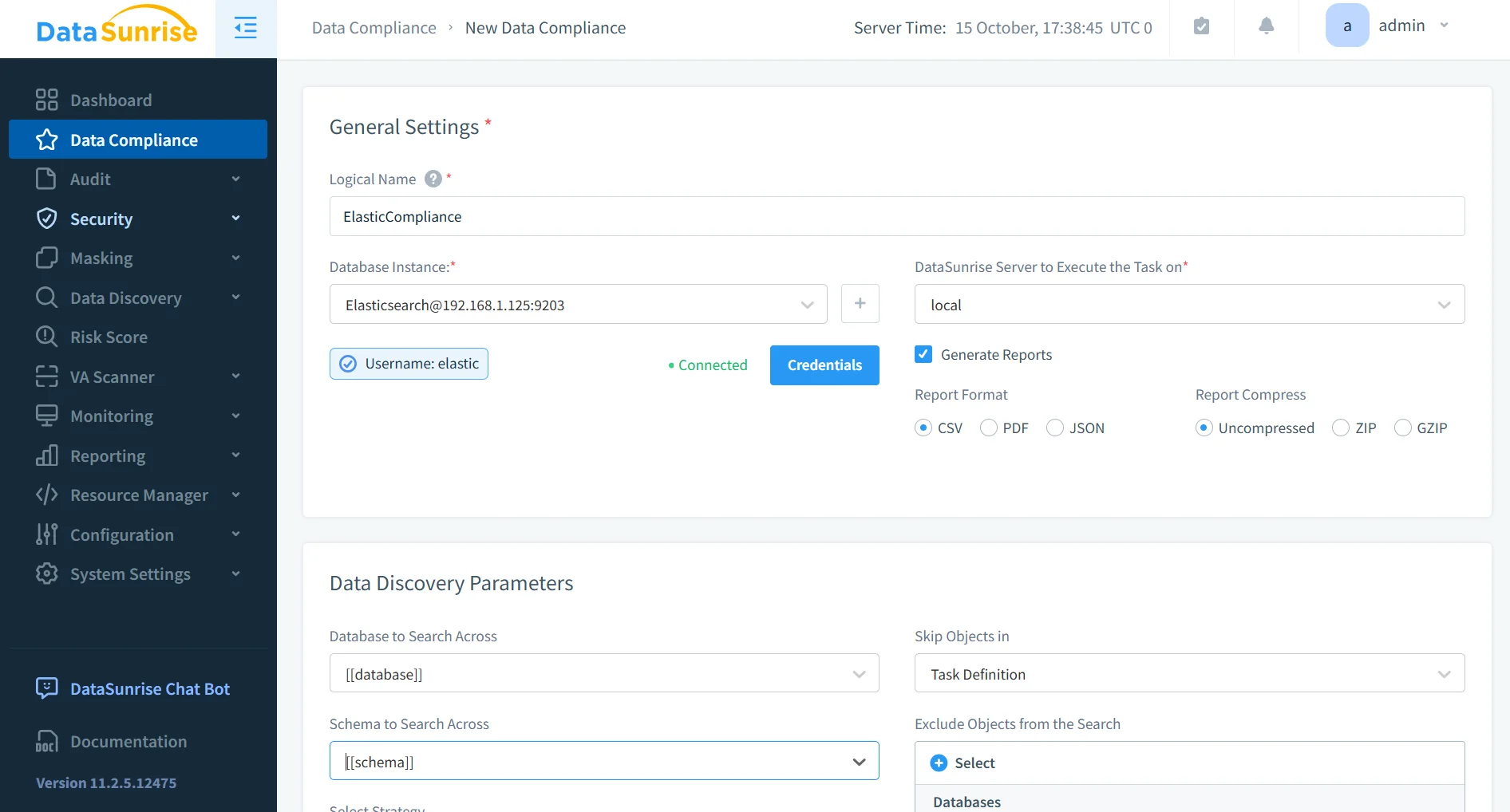
- Connect Elasticsearch Cluster: Configure DataSunrise to monitor the cluster via its management console.
- Create Audit Rules: Define event filters for specific indices or users.
- Monitor in Real-Time: View aggregated audit logs through a unified dashboard.
- Generate Reports: Export compliance-ready reports with one click.
This zero-touch integration ensures consistent visibility without disrupting existing workloads.
Business Impact
| Business Objective | Benefit |
|---|---|
| Regulatory Readiness | Automated GDPR, HIPAA, and SOX alignment with minimal manual oversight |
| Incident Response | Rapid identification of unauthorized queries or index modifications |
| Cost Efficiency | Centralized log retention reduces manual maintenance |
| Risk Mitigation | Continuous monitoring prevents undetected access and data leakage |
| Operational Transparency | Unified visibility across hybrid Elasticsearch deployments |
Conclusion
Auditing in Elasticsearch is critical for maintaining transparency, accountability, and compliance. While the native X-Pack auditing framework offers strong baseline functionality, enterprises handling sensitive data require deeper control and automation.
By integrating DataSunrise, organizations can extend Elasticsearch auditing to deliver centralized oversight, intelligent policy orchestration, and real-time compliance automation. The result is a fully traceable, compliant, and secure search infrastructure.
Protect Your Data with DataSunrise
Secure your data across every layer with DataSunrise. Detect threats in real time with Activity Monitoring, Data Masking, and Database Firewall. Enforce Data Compliance, discover sensitive data, and protect workloads across 50+ supported cloud, on-prem, and AI system data source integrations.
Start protecting your critical data today
Request a Demo Download Now