
How to Mask Sensitive Data in Amazon Athena
Amazon Athena is excellent at turning data in S3 into something analysts can query almost immediately. It is a bit less excellent when that same convenience exposes raw email addresses, IPs, account identifiers, and note fields to every dashboard, notebook, and support workflow that touches the lake. In practice, Athena security is not only about whether a user can run a query. It is also about what they should actually see once the result set comes back.
That is where data masking becomes useful. In Athena environments, masking should usually be part of a larger program that starts with data discovery, classification of Personally Identifiable Information (PII), and a clear decision about which teams truly need full production truth in the first place. Analysts may need recognizable patterns. Support engineers may need enough context to troubleshoot. Very few people need the raw value of everything, all the time.
This guide walks through the practical options for masking sensitive data in Athena, what AWS gives you natively, and how DataSunrise can enforce query-time protection without turning the dataset into a decorative pile of asterisks. For Athena-specific references, the DataSunrise masking page for Amazon Athena, the Athena masking overview, and the dynamic masking article for Amazon Athena are useful starting points.
Masking in Athena: what you are actually protecting
Direct identifiers
Email addresses, phone numbers, payment fields, national identifiers, IP addresses, and customer account values that can directly expose a person or organization.
Quasi-identifiers
Fields that become identifying when combined with other columns, such as timestamps, ZIP codes, device identifiers, geographic hints, or free-text notes.
Operational utility
The masked result still needs enough structure for filtering, grouping, troubleshooting, joins, and downstream reporting to keep working.
That distinction matters because masking is not the same thing as denying access. A support team may need to recognize that two tickets came from the same domain without seeing the full address. An analyst may need the first three octets of an IP to spot a pattern without exposing the full host value. Whatever transformation you choose, it should work alongside access controls, role-based access control, and the principle of least privilege. Permissions decide who can reach the table. Masking decides what a person sees after the query returns.
Where masking belongs in the Athena workflow
Athena teams usually need masking in three places:
- Live query access for SQL editors, BI tools, and shared analytics paths. This is where dynamic masking is most useful.
- Copied environments such as QA, development, training, and vendor testing. This is where static masking often makes more sense.
- Special-case transformations when teams intentionally rewrite stored values in controlled scenarios. That is where in-place masking may apply.
A sensible rollout maps those use cases to internal policies and broader data compliance regulations before anyone starts creating rules. That step is not glamorous, but it prevents the usual chaos later, where one team wants analytics fidelity, another wants zero exposure, and a third wants both by Tuesday.
Start with the fields that create the most operational risk in Athena: email, phone, IP address, account identifiers, addresses, and free-text note columns. That first pass usually removes the biggest exposure problem without breaking dashboards or ad-hoc SQL.
Native Athena options that cover part of the job
Athena views are logical tables defined by a SELECT query, which makes them a practical way to present transformed columns to a specific audience. For a small number of datasets, you can use SQL expressions to partially mask sensitive values while keeping the raw table behind the scenes.
CREATE VIEW analytics.masked_users AS
SELECT
  id,
  first_name,
  last_name,
  REGEXP_REPLACE(email, '(^...).+(@.*$)', '$1***$2') AS email,
  REGEXP_REPLACE(ip_address, '(\\d+\\.\\d+\\.\\d+)\\.\\d+', '$1.***') AS ip_address
FROM raw.users;
Lake Formation data filters add another native layer by enforcing column-level, row-level, and cell-level restrictions. That is helpful for least-privilege access control, but it is not the same thing as a reusable masking program. Views can become tedious to maintain across many tables and audiences, while permission filters do not automatically solve every “show me a useful value, but not the raw one” requirement.
| Technique | Best Fit in Athena | Main Trade-Off |
|---|---|---|
| SQL view transformations | Small number of tables and one or two known audiences | Manual upkeep grows quickly as schemas and users multiply |
| Lake Formation filters | Fine-grained permission boundaries for columns, rows, and cells | Strong for access control, but not a complete masking workflow by itself |
| Dynamic masking | Shared analytics environments where the same data must look different to different users | Needs centralized policy management in the query path |
| Static masking | Copied datasets for QA, development, and training | Requires dataset preparation and refresh discipline |
Applying masking with DataSunrise in Amazon Athena
A practical Athena masking workflow is straightforward: create the rule, target the right objects, assign the masking behavior, and validate the result in a real query path. The step-by-step DataSunrise guide for masking data in Amazon Athena is useful here because it reflects how teams actually work — not in abstract architecture sketches, but in rules, selected columns, and returned result sets.
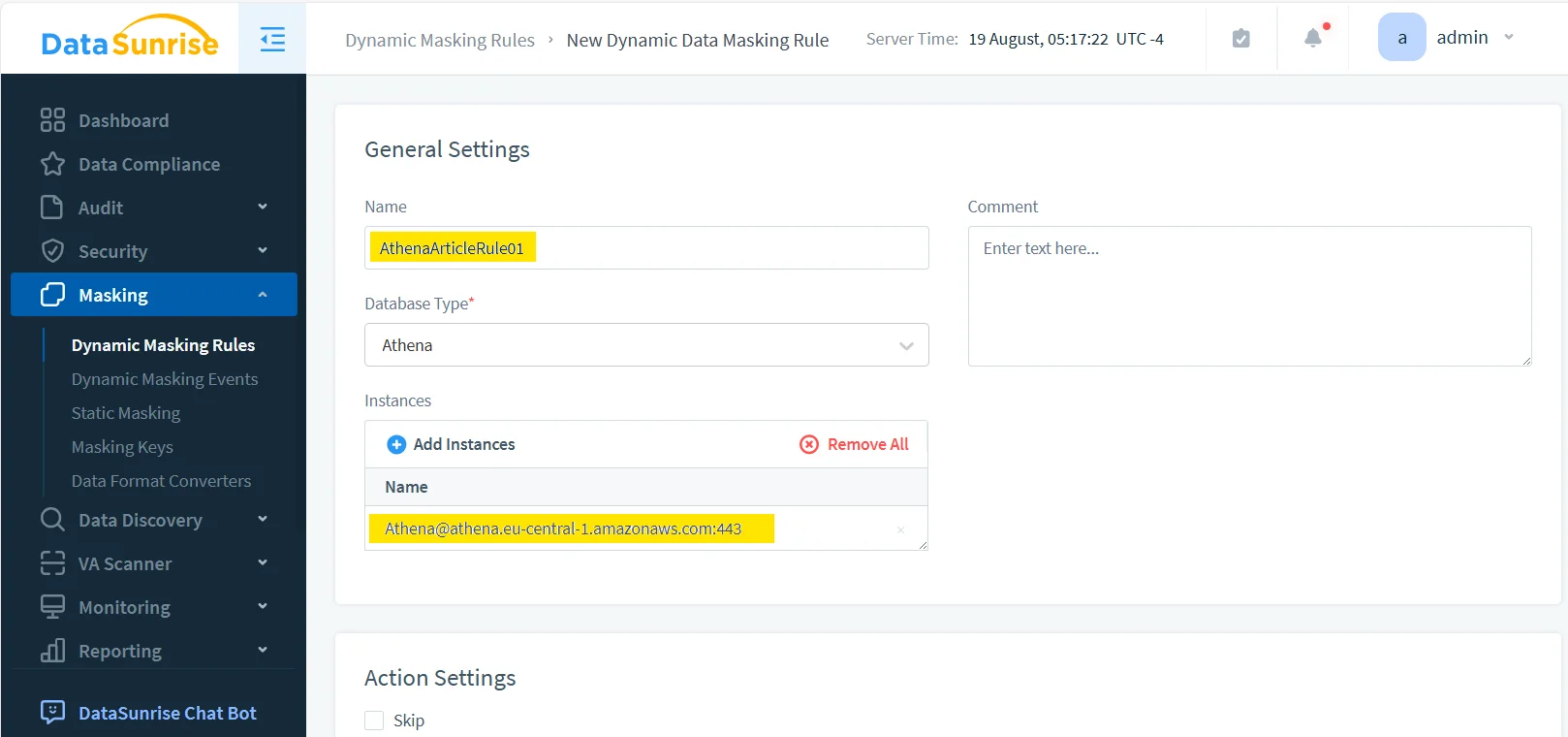
1. Create the masking rule
Start by defining a new dynamic masking rule for the Athena instance. Use a name that reflects the data domain or audience rather than something heroic and mysterious like Rule_Final_v9. Once a policy set grows, understandable names stop being a clerical preference and become basic survival for the team maintaining it.
2. Select the risky objects and columns
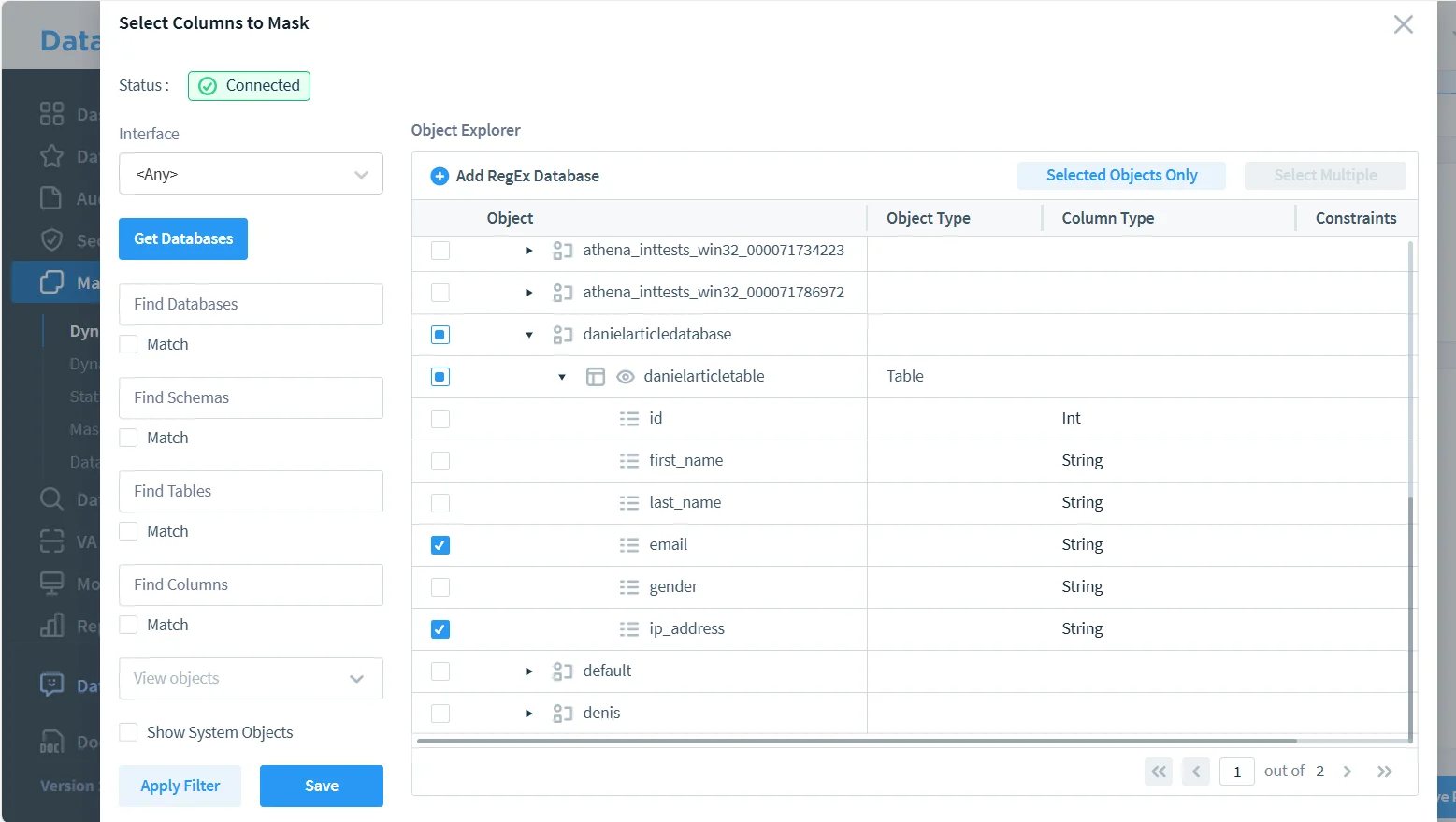
Next, choose the Athena database, table, and the specific fields that should be transformed. In this example, the sensitive columns are email and ip_address. That is a sensible first pass because both fields are highly identifying while still appearing frequently in analytics, support, and troubleshooting workflows.
3. Validate the masked output with real SQL
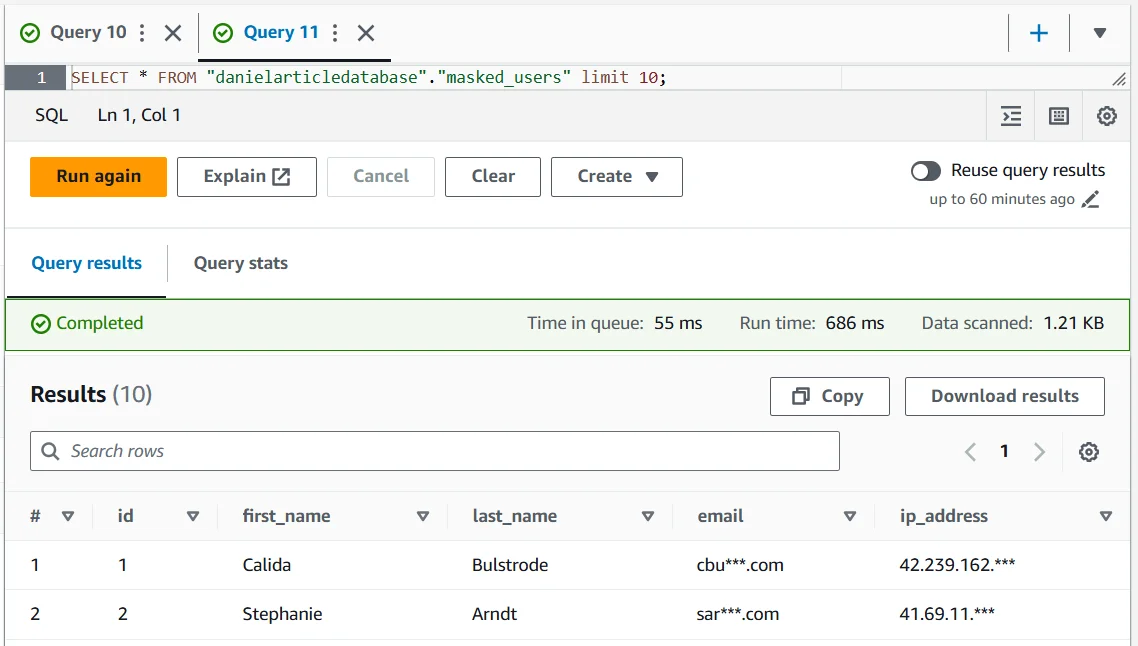
Once the rule is active, run the same type of query your users would normally execute and inspect the returned values. The point is not to admire the policy in the admin console. The point is to confirm that the result is still useful where actual work happens — in SQL clients, dashboards, and exported query outputs.
SELECT *
FROM "danielarticledatabase"."masked_users"
LIMIT 10;
The result below shows the balance you usually want: names remain available for operational context, while the sensitive values are partially obscured before they reach the user. That is the practical win in Athena masking — keep the dataset usable, but stop broadcasting the raw version to anyone who happens to have query access.
At this stage, it helps to pair masking with database activity monitoring, detailed audit logs, and a defensible audit trail. That gives security teams evidence of who queried what, when the masking rule applied, and whether the access pattern deserves a second look.
A masking rollout can still fail even when the rule executes correctly. If the protected output breaks joins, dashboards, filters, or downstream ETL jobs, teams will bypass it. If the transformed values are too easy to reverse or correlate back to real people, the control is too weak. Test both utility and privacy risk before declaring the rollout done.
DataSunrise: the practical masking layer for Amazon Athena
DataSunrise works best when masking is treated as one part of a broader protection model rather than a lonely checkbox in a database console. For Athena environments, that broader model usually includes:
- Data Audit and broader database security controls so query activity is visible, reviewable, and tied to policy decisions.
- Database Firewall protection and periodic vulnerability assessment checks so one weak route does not quietly undo your masking program.
- Compliance Manager for evidence collection and reporting across 40+ supported data platforms, which matters because Athena is rarely the only place your sensitive data lives.
If you need a higher-level reference for structuring those controls, the broader security guide is a useful way to frame Athena masking inside a larger security program instead of treating it as a one-off query trick.
The Compliance Imperative
| Framework | Common Athena Exposure | How Masking Helps |
|---|---|---|
| GDPR | Personal data appears in analytics views, shared query tools, and copied data lake outputs | Supports controlled disclosure and reduces unnecessary exposure of personal data |
| HIPAA | Healthcare-related identifiers spread into non-clinical reporting and support workflows | Limits visibility of protected data while preserving operational usefulness |
| PCI DSS | Payment-related fields leak into analyst queries, exports, or lower environments | Reduces exposure of cardholder-related values and associated risk |
| SOX | Financial datasets become too broadly visible across reporting and testing workflows | Improves accountability and controlled handling of sensitive financial information |
Conclusion: keeping Athena useful without leaking the raw version
Masking sensitive data in Amazon Athena usually comes down to four layers:
- Discovery of risky fields before users start querying them
- Native controls such as views and fine-grained access restrictions where they fit
- Dynamic masking for live result sets and static masking for copied environments
- Audit and governance so the control is visible, testable, and defensible
Tools like DataSunrise turn those layers into an operational workflow rather than a pile of disconnected good intentions. You keep the data useful for analytics, testing, and support, while making it much harder for raw sensitive values to wander into places they never should have reached. That is the real point of Athena masking: not to make the data prettier, but to keep useful access from turning into careless exposure.
Protect Your Data with DataSunrise
Secure your data across every layer with DataSunrise. Detect threats in real time with Activity Monitoring, Data Masking, and Database Firewall. Enforce Data Compliance, discover sensitive data, and protect workloads across 50+ supported cloud, on-prem, and AI system data source integrations.
Start protecting your critical data today
Request a Demo Download Now