
Oracle Database Audit Log
In today's data landscape, implementing robust audit log systems for Oracle Database is critical for security and compliance. According to Verizon's 2024 Data Breach Investigation Report, the average data breach cost reached $4.88 million in 2023, with unauthorized database access being a primary attack vector.
Oracle Database provides comprehensive native audit logging capabilities for tracking user sessions, queries, and administrative changes. However, organizations with complex compliance requirements often need enhanced functionality to ensure comprehensive data security.
This article explores Oracle Database's built-in audit log capabilities and how DataSunrise enhances these features for improved security and compliance monitoring.
Native Oracle Database Audit Log Capabilities
Oracle Database includes built-in features for generating and accessing audit logs through database activity monitoring. These capabilities provide a foundation for tracking user activities and security threats.
1. Unified Audit Trail
Oracle Database 12c+ introduced Unified Auditing, consolidating audit records into a single trail in the AUDITD tablespace:
-- Create audit policy for sensitive operations
CREATE AUDIT POLICY sensitive_data_access
ACTIONS SELECT ON hr.employees,
        UPDATE ON hr.employees,
        DELETE ON hr.employees;

-- Enable the policy for specific users
AUDIT POLICY sensitive_data_access BY scott, hr_admin;
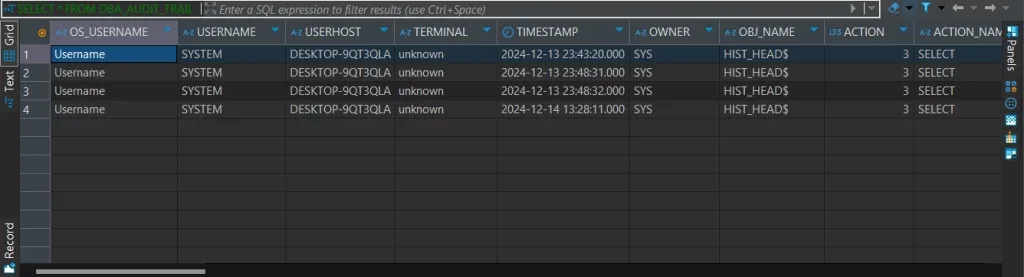
2. Viewing Unified Audit Records
Query the UNIFIED_AUDIT_TRAIL view for audit data:
-- Query audit logs for the past 24 hours
SELECT
    EVENT_TIMESTAMP,
    DBUSERNAME,
    ACTION_NAME,
    OBJECT_NAME,
    SQL_TEXT
FROM
    UNIFIED_AUDIT_TRAIL
WHERE
    EVENT_TIMESTAMP >= SYSTIMESTAMP - INTERVAL '24' HOUR
ORDER BY
    EVENT_TIMESTAMP DESC;
3. Oracle Enterprise Manager for Audit Review
Oracle Enterprise Manager provides a web interface for audit log access with compliance dashboards, security reports, real-time monitoring, and audit data export capabilities.
Limitations of Native Oracle Audit Logging
| Limitation | Impact |
|---|---|
| Complex Configuration | Requires deep Oracle expertise and careful planning |
| Storage Management | Rapid growth requires audit storage optimization strategies |
| Limited Analytics | Lacks pattern recognition for threat detection and insider threats |
| Cross-Platform Gaps | Difficult to correlate with other database platforms |
| Manual Reporting | GDPR, HIPAA, SOX reports require manual effort |
| Alert Fatigue | High volumes of false positives without intelligent filtering |
Enhanced Oracle Audit Logging with DataSunrise
DataSunrise enhances Oracle Database's native capabilities with a comprehensive, centralized solution for monitoring and compliance management. The platform's Database Firewall protects against unauthorized access and SQL injection attacks.
Setting Up DataSunrise for Oracle Audit Logging
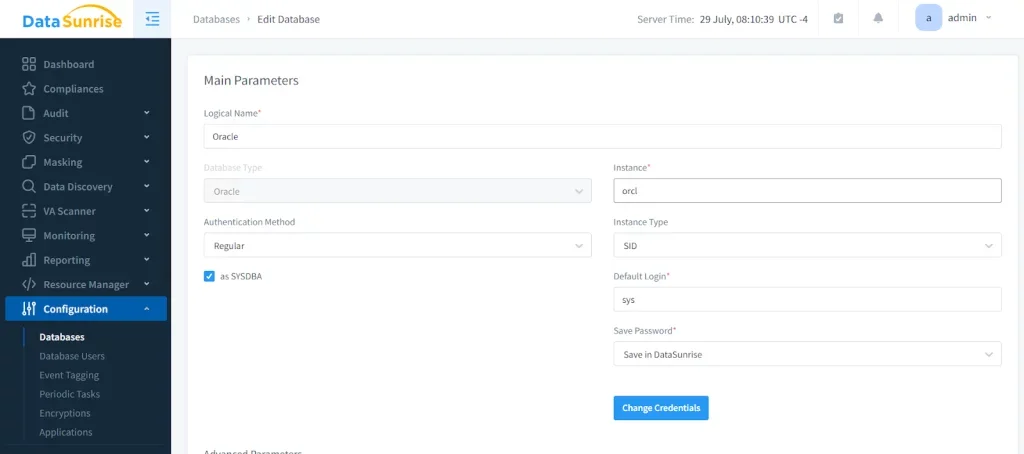
1. Connect to Oracle Database Instance
Establish a secure connection between DataSunrise and your Oracle environment through the web interface. DataSunrise supports flexible deployment modes including direct connections, proxy mode, and sniffer mode for non-intrusive monitoring.
2. Configure Comprehensive Audit Rules
Create customized audit rules using No-Code Policy Automation:
- User-based auditing for specific accounts
- Object-level monitoring for sensitive tables
- Query pattern detection for suspicious activities
- Time-based policies for different schedules
- Source IP filtering for network monitoring
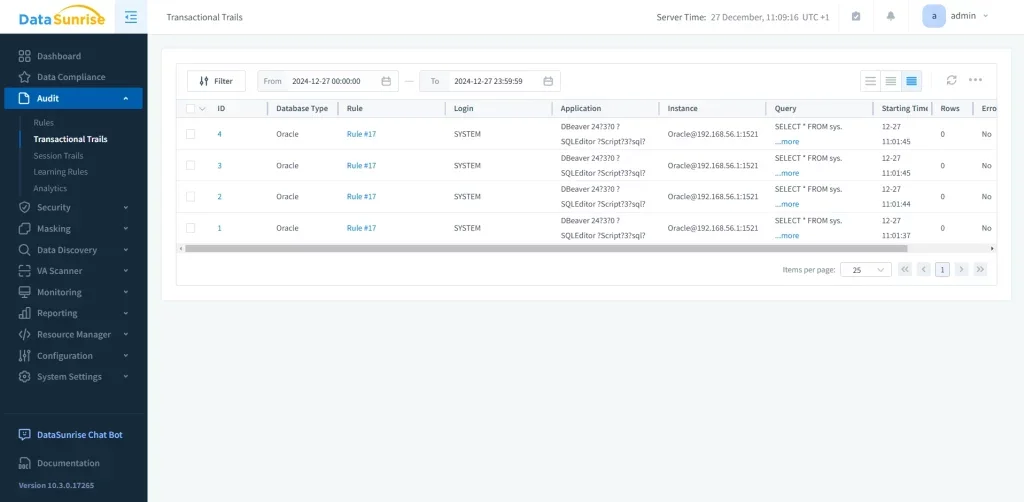
3. Monitor Real-Time Audit Events
Access comprehensive audit logs through the dashboard with real-time visibility into query executions, authentication events, data modifications, and security violations.
Key Benefits of DataSunrise for Oracle Audit Logging
Comprehensive Audit Trails: Capture detailed database activity history including successful and failed operations with complete transaction context, providing data audit trails for forensic analysis.
Real-Time Monitoring and Alerting: Receive immediate notifications through Slack, email, or MS Teams, reducing false positives with contextual intelligence.
User Behavior Analysis: Leverage behavioral analytics with machine learning algorithms to establish baselines and detect anomalies indicating compromised accounts or insider threats.
Automated Compliance Reporting: Generate reports for GDPR, HIPAA, PCI DSS, and SOX with automated compliance mapping, significantly reducing documentation time.
Cross-Platform Consistency: Apply uniform audit policies across over 40 data storage systems including Oracle, SQL Server, PostgreSQL, and MySQL.
Dynamic Data Masking: Combine audit logging with dynamic data masking to protect sensitive information while maintaining audit visibility.
Implementation Best Practices for Oracle Audit Logging
1. Define Clear Audit Objectives
Determine what activities and data require auditing based on security policies and compliance regulations. Focus on high-value targets such as financial data and personally identifiable information.
2. Implement Tiered Logging Strategy
Apply different audit levels based on data sensitivity: detailed auditing for sensitive tables, standard monitoring for operational databases, and minimal logging for development environments.
3. Establish Retention Policies
Keep recent logs (30-90 days) in high-performance storage, archive historical data for 1-7 years, and define procedures for legal hold requirements following data protection best practices.
4. Leverage Enhanced Solutions
Deploy DataSunrise for comprehensive audit trail capabilities with automated alerting and ML-powered threat detection.
Conclusion
As organizations rely on Oracle Database for critical applications, robust audit logging is essential for security and compliance. While Oracle's Unified Auditing provides valuable functionality, organizations with complex requirements benefit from enhanced solutions like DataSunrise.
DataSunrise's comprehensive database security features deliver Zero-Touch Compliance Automation, No-Code Policy Automation, and Continuous Regulatory Calibration. With flexible deployment modes for cloud, on-premises, and hybrid environments, DataSunrise integrates seamlessly without performance impact.
Protect Your Data with DataSunrise
Secure your data across every layer with DataSunrise. Detect threats in real time with Activity Monitoring, Data Masking, and Database Firewall. Enforce Data Compliance, discover sensitive data, and protect workloads across 50+ supported cloud, on-prem, and AI system data source integrations.
Start protecting your critical data today
Request a Demo Download Now