
How to Apply Dynamic Masking in Amazon Athena
Amazon Athena environments are built for speed. Teams can point Athena at data in S3, run standard SQL, and feed the results into dashboards, notebooks, or support workflows without standing up a traditional data warehouse first. That flexibility is great for analytics and slightly less great when raw customer emails, identifiers, and internal notes start traveling through tools that were never meant to expose them broadly.
That is exactly where data masking becomes practical instead of theoretical. More specifically, dynamic masking protects sensitive values at query time. The source data stays intact, but the person running the query sees a transformed version based on policy. In an Athena workflow, that is often a better fit than moving data into a separate sanitized copy every time an analyst, contractor, or support engineer needs access.
A strong rollout usually begins before the first masking rule is created. You identify risky columns through data discovery, confirm where PII actually appears, and decide which users need full values versus useful but obscured values. That decision should sit alongside access controls, because the real question is not only who may query Athena, but also what each person should be allowed to see in the result set.
Quick answer: what “apply dynamic masking” means in Athena
In practice, applying dynamic masking in Athena means placing a policy layer in the query path, selecting the columns that need protection, assigning a masking method, and validating that the returned results remain useful for the workload. With DataSunrise masking for Amazon Athena, the process is operational rather than improvised: define the rule, bind it to the Athena instance, pick the objects to protect, choose the masking algorithm, and test the live query output.
The detailed workflow is documented in the Athena masking setup guide, and the broader rationale is covered in the dynamic masking for Amazon Athena and data masking for Amazon Athena articles. The short version is simple: live users get protected data, while the original values remain untouched underneath.
Begin with the columns that combine high sensitivity with high visibility in Athena workloads: email, phone number, customer ID, IP address, account references, and free-text notes. A narrow first rule is easier to validate and far less likely to break downstream queries.
Why dynamic masking fits Athena particularly well
Athena is often shared across analytics, engineering, and support teams. That makes it a poor place to assume everyone who can run a query should receive raw values. Dynamic masking is useful here because it protects production data without forcing every legitimate user into a separate copied environment. That is the main difference from static masking, which creates a masked copy for testing, development, or external sharing. Static masking remains important, but it solves a different problem.
| Approach | Best Use in Athena | Main Benefit |
|---|---|---|
| Dynamic masking | Live query access for analysts, support teams, and shared reporting tools | Protects results at runtime without changing stored data |
| Static masking | Dev, QA, vendor handoffs, and training datasets | Creates a safer copy that can leave production boundaries |
| Native views and filters | Smaller Athena deployments or narrowly scoped access patterns | Useful for simple transformations and fine-grained restrictions |
AWS already provides useful native building blocks. Athena views let teams present transformed query results, while Lake Formation data filters help enforce row-, column-, and cell-level restrictions. Those controls are valuable, but dynamic masking remains the cleaner pattern when the requirement is: “let the query run, but do not reveal the raw value to this audience.”
That is also where policy discipline matters. Dynamic masking should support role-based access control and the principle of least privilege. Permissions decide who gets through the door. Dynamic masking decides what they see once they are inside.
Step-by-step: applying a dynamic masking rule in DataSunrise
1. Create the rule and bind it to the Athena instance
Start in the Dynamic Masking Rules section and create a dedicated rule for the Athena environment you want to protect. Use a name that makes sense later, when your rule list is no longer tiny and cheerful. A naming pattern such as environment plus data domain or environment plus table family is usually easier to maintain than vague labels that made sense only on the day they were created.
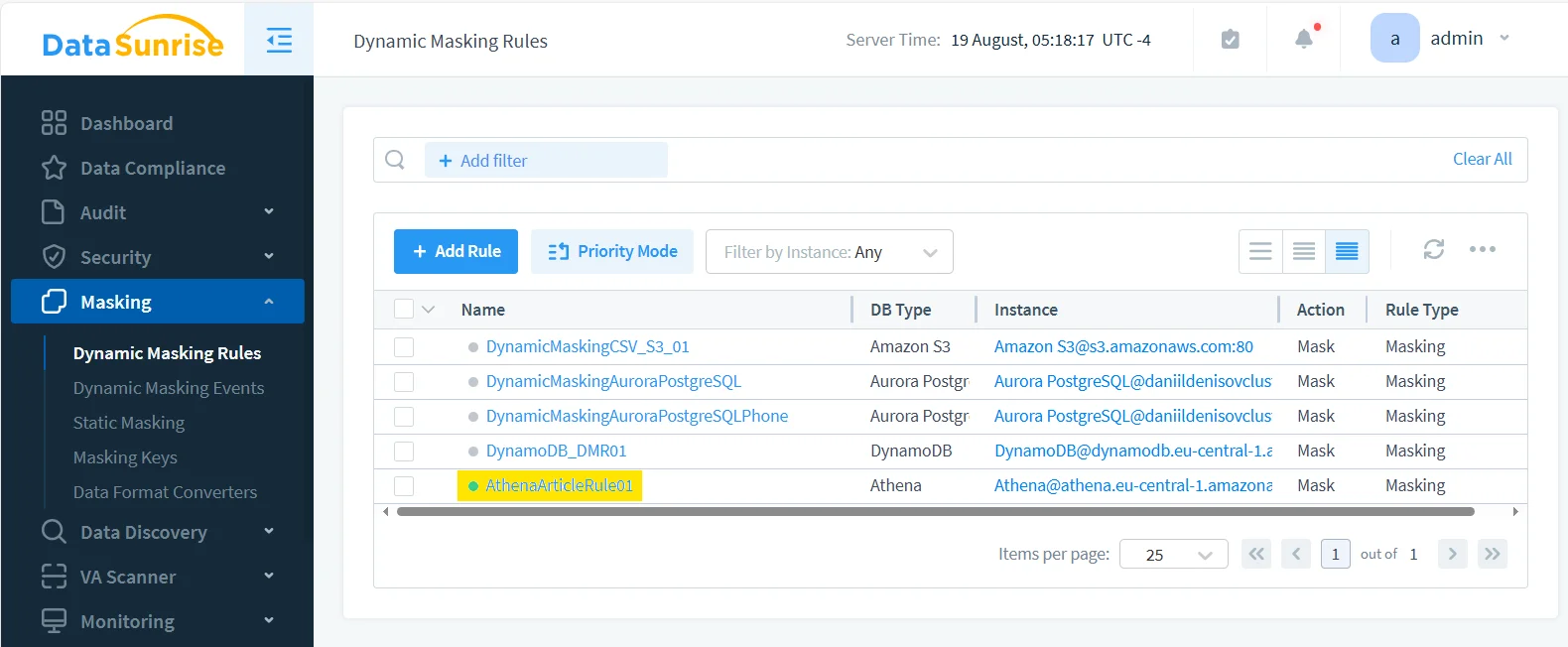
2. Select the protected object and the exact column to mask
Once the rule exists, open it and choose the Athena catalog, database, table, and column that actually need protection. In the example here, the masking target is the email field inside the Athena table. That kind of narrow scope is a good starting point because email addresses are easy to validate, highly sensitive, and common across dashboards, support views, and notebook queries.
Column-level precision matters. Teams often talk about “masking Athena” as if it were a single toggle, but real deployments are much more selective. You may want raw timestamps and genders visible, partially masked emails, and untouched surrogate keys, all in the same result set. Dynamic masking works well because it lets you protect only the values that actually create exposure.
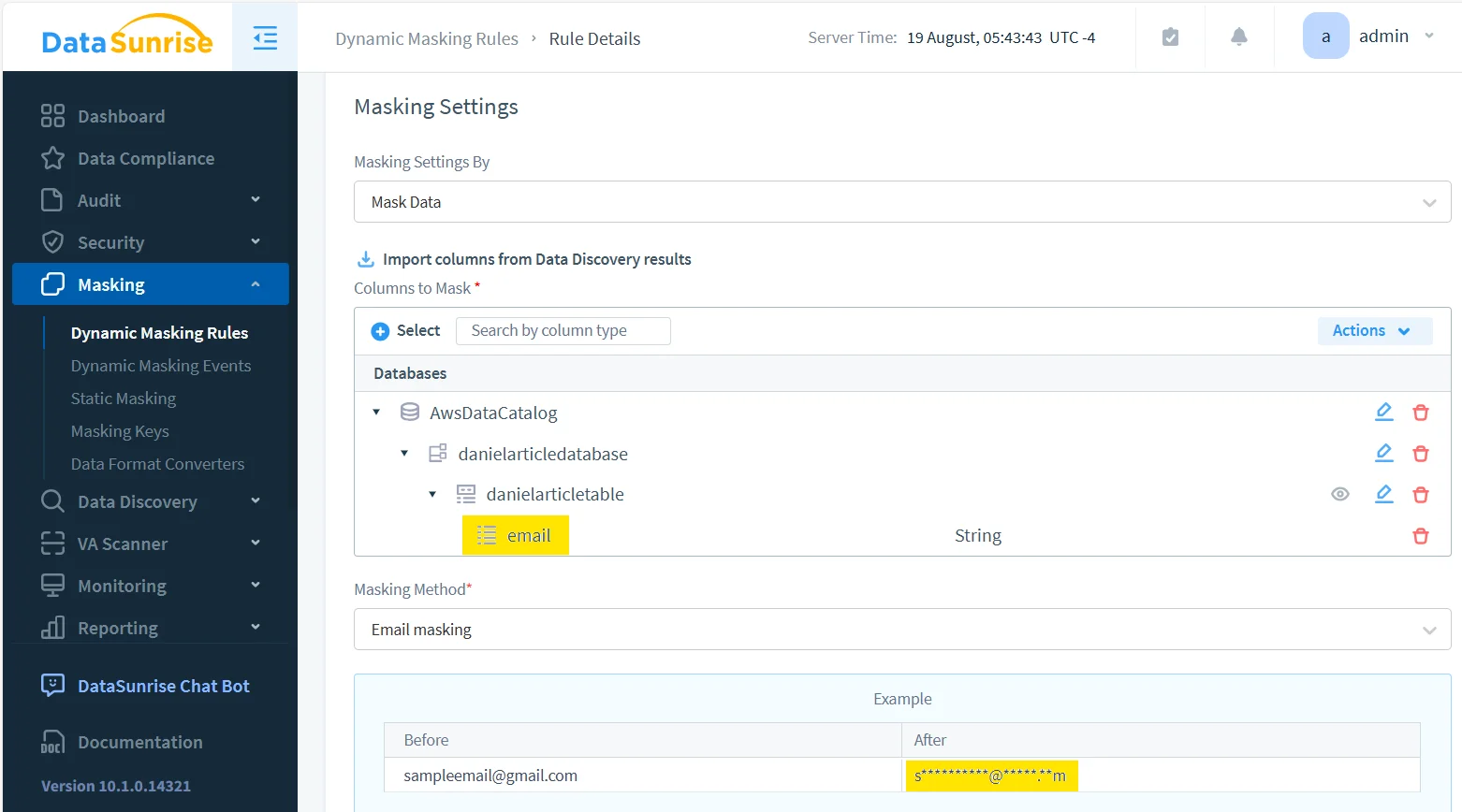
3. Choose a masking method that preserves utility
A good dynamic masking rule does not turn every value into nonsense. It should reduce exposure while leaving enough structure for the workload to continue. For email, that usually means preserving a recognizable pattern while hiding the actual address. For phone numbers, it may mean keeping separators or a country code. For account identifiers, it may mean showing only a prefix or suffix.
The right choice depends on the workload. Support teams often need pattern recognition. Analysts often need grouping and uniqueness cues. External viewers usually need stronger protection. That is why the masking method should match the use case instead of following one blanket rule across every table and user type.
4. Run a real query through the protected path
After the rule is active, validate it with the same tools your users already rely on. Do not stop at the admin UI and assume the configuration equals a working result. Athena masking is successful only when the protected output still behaves correctly in the places that matter: notebooks, BI tools, exports, ad-hoc SQL, and troubleshooting workflows.
SELECT
  id,
  first_name,
  last_name,
  email,
  gender,
  ip_address
FROM "danielarticledatabase"."danielarticletable"
LIMIT 5;
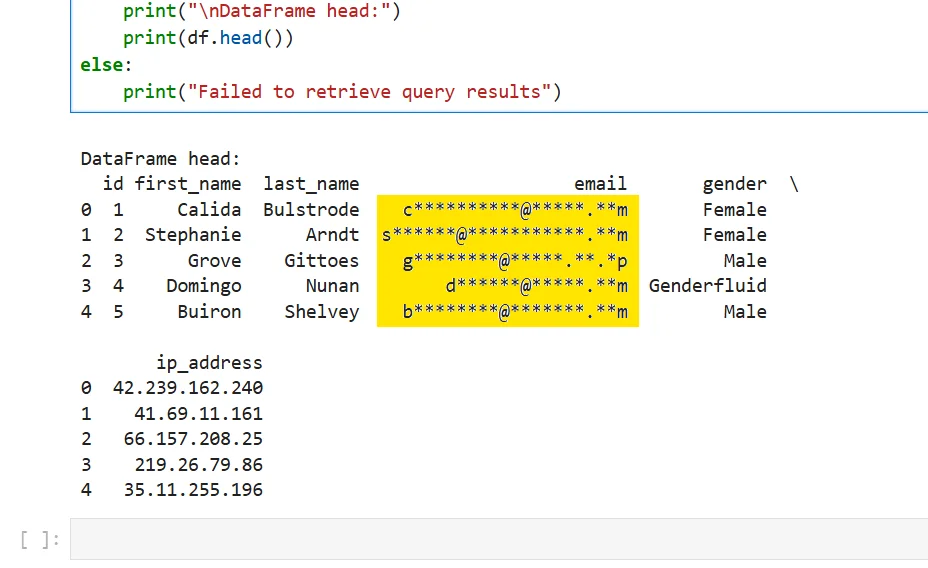
The result below is the kind of outcome you want. The email values are masked on the fly, while the rest of the dataset remains usable for review and analysis. That balance is what makes dynamic masking valuable in Athena: protect the sensitive part without destroying the usefulness of the whole query.
What to validate before calling the rollout finished
Dynamic masking is not done just because a screenshot looks good. Validate the result against the actual behaviors that matter:
- Can analysts still filter, group, and troubleshoot with the transformed values?
- Do dashboards and notebooks render the protected column correctly?
- Are joins, exports, and downstream transformations still behaving as expected?
- Does the rule apply consistently across the clients and users it is supposed to cover?
This is also the point where masking should connect to broader visibility. Pair it with database activity monitoring, keep audit logs, and maintain a defensible audit trail. When teams need to show what happened and why, those surrounding controls matter as much as the masking rule itself. They also fit naturally into a broader data audit program.
A dynamic masking project can fail in two opposite ways. The first is weak masking that still allows easy re-identification. The second is over-aggressive masking that breaks filters, joins, reports, or support workflows until users work around it. Test both privacy risk and data utility before you treat the rule as production-ready.
Supporting controls that make dynamic masking stronger
In Athena, masking should sit inside a bigger operating model instead of standing alone. The security guide is useful here because it frames masking as one layer in a wider database protection strategy. Many teams also pair masking with a database firewall, periodic vulnerability assessment, and evidence collection through Compliance Manager.
That broader view matters because Athena rarely exists in isolation. Sensitive data often moves across multiple engines, pipelines, and reporting layers. A platform that supports 40+ data platforms gives teams a better chance of applying similar masking and governance logic beyond a single service.
Why dynamic masking helps with compliance in Athena
| Framework | Typical Athena Risk | Dynamic Masking Benefit |
|---|---|---|
| GDPR | Personal data appears in shared analytics and broad SQL access | Reduces unnecessary exposure of personal identifiers |
| HIPAA | Protected health-related records surface in non-clinical workflows | Limits visibility of sensitive values while preserving operational access |
| PCI DSS | Payment-related values spread into query outputs and reports | Helps restrict disclosure of high-risk fields |
| SOX | Financial data becomes too widely visible across reporting paths | Supports tighter handling and clearer accountability |
Conclusion
Applying dynamic masking in Amazon Athena is less about hiding everything and more about showing the right version of the data to the right audience at the right time. The process is manageable: identify the risky fields, create the rule, scope it precisely, choose a masking method that preserves utility, and validate the real query output.
With a controlled setup in DataSunrise, Athena users can keep working with live data while exposure of raw sensitive values drops sharply. That is the real payoff: the query still runs, the analysis still works, and the people who do not need the full truth never receive it in the first place.
Protect Your Data with DataSunrise
Secure your data across every layer with DataSunrise. Detect threats in real time with Activity Monitoring, Data Masking, and Database Firewall. Enforce Data Compliance, discover sensitive data, and protect workloads across 50+ supported cloud, on-prem, and AI system data source integrations.
Start protecting your critical data today
Request a Demo Download Now