How to Apply Data Governance for Amazon Redshift
As Amazon Redshift environments expand, organizations must control not only who can query data, but also how sensitive information is identified, accessed, shared, protected, and monitored. How to Apply Data Governance for Amazon Redshift therefore becomes an operational question rather than simply a matter of assigning database privileges.
Effective data management requires consistent controls across users, schemas, tables, analytical workloads, and shared datasets. Amazon Redshift provides native mechanisms for role-based permissions, row-level security, column permissions, Dynamic Data Masking, audit logging, and controlled administration. Together, these features provide the technical foundation for implementing governance directly within the warehouse. ([AWS Documentation][1])
However, applying governance continuously becomes more difficult as schemas, users, workloads, and sensitive datasets change. The following sections demonstrate a practical native governance workflow and show how DataSunrise can extend it with discovery, centralized monitoring, risk analysis, automated policies, and data protection.
Importance of Data Governance
Amazon Redshift often consolidates analytical information from multiple applications, departments, and business processes. As data volumes grow, organizations need a governance framework that determines how information is classified, accessed, protected, monitored, and retained.
Effective data management helps organizations maintain visibility into sensitive datasets while preventing excessive or unnecessary access. Governance also establishes clear responsibilities for database administrators, security teams, analysts, and application users.
For Amazon Redshift environments, strong data governance helps organizations:
- Control Data Access: Apply role-based permissions and the principle of least privilege to limit unnecessary access.
- Protect Sensitive Information: Use masking, row-level restrictions, and other controls to reduce exposure of regulated data.
- Maintain Data Visibility: Identify where personal, financial, authentication, and other sensitive information resides.
- Strengthen Accountability: Record database activity to understand who accessed specific data and which operations were performed.
- Support Regulatory Requirements: Maintain controls relevant to GDPR, HIPAA, PCI DSS, SOX, and other compliance regulations.
- Reduce Governance Drift: Regularly reassess permissions and policies as schemas, users, and workloads change.
Without continuous governance, access privileges can accumulate, newly created tables may remain unclassified, and sensitive information can become exposed through analytical or operational workflows. Combining access control, classification, monitoring, and data protection therefore provides a more sustainable approach to governing Amazon Redshift environments.
Building an Amazon Redshift Data Governance Framework
Applying data governance in Amazon Redshift requires several controls to work together rather than operating as isolated security features. Access permissions determine who can reach database resources, while row-level restrictions and masking policies limit which information authorized users can actually view. Audit logging then provides evidence of how these controls are being used in practice.
A structured governance framework should therefore combine access controls, data protection, monitoring, and regular policy reviews. This approach helps organizations maintain consistent oversight as users, schemas, analytical workloads, and sensitive datasets change over time.
The following native Amazon Redshift capabilities provide a practical foundation for implementing these governance requirements.
1. Organize Access with Role-Based Access Control
A practical governance model begins with clearly defined access boundaries. Instead of granting permissions directly to numerous individual users, organizations can group privileges according to job functions and operational responsibilities.
Amazon Redshift role-based access control allows administrators to assign permissions to roles and then grant those roles to users. Roles can also inherit other roles, which makes it possible to build layered access structures for analysts, administrators, developers, and other groups.
For example, an organization can maintain a read-only role for finance analysts and a separate management role for employees who also need permission to modify financial information. The management role can inherit basic analytical privileges while receiving additional permissions for approved data changes.
CREATE ROLE finance_reader;
CREATE ROLE finance_manager;

GRANT USAGE ON SCHEMA finance TO ROLE finance_reader;
GRANT SELECT ON ALL TABLES IN SCHEMA finance TO ROLE finance_reader;

GRANT ROLE finance_reader TO ROLE finance_manager;

GRANT INSERT, UPDATE
ON ALL TABLES IN SCHEMA finance
TO ROLE finance_manager;

GRANT ROLE finance_reader TO analyst_user;
GRANT ROLE finance_manager TO finance_admin;
This structure reduces repetitive permission management and makes access policies easier to review. Administrators should periodically examine existing role assignments and remove permissions that are no longer required. Following the principle of least privilege helps reduce unnecessary exposure and keeps access aligned with current responsibilities.
2. Restrict Data at Row Level
Role-based permissions determine which database resources users can access, but governance often requires more precise control over the records contained within those resources.
Amazon Redshift Row-Level Security allows administrators to restrict which rows users or roles can retrieve from a table. This is useful when multiple departments or business units work with the same dataset but should only receive information associated with their own responsibilities.
For example, regional analysts can work with a centralized sales table while accessing only records associated with their assigned geographic area. Instead of creating and maintaining separate tables for every region, administrators can enforce row-level policies directly against the shared dataset.
CREATE RLS POLICY region_access
WITH (region VARCHAR(30))
USING (region = current_setting('app.region'));

ALTER TABLE sales.transactions
ROW LEVEL SECURITY ON;

ATTACH RLS POLICY region_access
ON sales.transactions
TO ROLE regional_analyst;
Row-Level Security can also complement column-level privileges. Together, these controls allow organizations to define both which records and which attributes users can access. Governance teams should regularly review these policies as organizational structures, user responsibilities, and analytical requirements change.
3. Protect Sensitive Columns with Dynamic Data Masking
Access to a table does not necessarily mean that every authorized user needs to see the original value stored in each column.
Amazon Redshift Dynamic Data Masking provides an additional governance layer by transforming sensitive values when query results are returned. The underlying information remains unchanged in the database, while users covered by a masking policy receive a protected representation.
This capability is useful for payment information, personal identifiers, contact details, authentication data, and other sensitive values. For example, customer-support employees may need to recognize the last digits of a payment card without receiving access to the complete card number.
CREATE MASKING POLICY mask_card
WITH (card_number VARCHAR(32))
USING (
    '****-****-****-' || RIGHT(card_number, 4)
);

ATTACH MASKING POLICY mask_card
ON payments.transactions(card_number)
TO ROLE support_user;
Dynamic Data Masking can be combined with role-based permissions and Row-Level Security. This allows administrators to construct layered policies where users can reach only approved database objects, retrieve only permitted records, and view protected representations of sensitive columns when full values are unnecessary.
Such layered controls support data protection while allowing legitimate analytical and operational workflows to continue.
4. Establish Governance Evidence Through Audit Logging
Access controls define how users are expected to interact with information, but governance also requires evidence showing what actually occurred inside the environment.
Amazon Redshift automatically records operational information through system tables and views. Administrators can use this information to review queries, users, database operations, execution times, and other details associated with warehouse activity.
For example, recent query history can be reviewed through the SYS_QUERY_HISTORY system view:
SELECT
    user_id,
    query_id,
    transaction_id,
    database_name,
    query_type,
    start_time,
    end_time
FROM sys_query_history
ORDER BY start_time DESC
LIMIT 50;
Administrators can also inspect role assignments and granted privileges to verify that current access remains aligned with governance requirements:
SELECT *
FROM svv_role_grants
ORDER BY role_name, identity_name;
Database audit logging can provide additional visibility by exporting activity information to Amazon CloudWatch Logs or Amazon S3. Depending on the configured logging options, organizations can retain records of connection events, user activity, and executed database operations.
AWS CloudTrail provides another layer of visibility by recording Amazon Redshift API activity. This helps governance teams correlate administrative actions with changes made to the Redshift environment through AWS users, IAM roles, and services.
Together, database activity records and AWS-level administrative logs create a stronger governance evidence trail. They can support access reviews, security investigations, internal controls, and regulatory assessments.
Organizations should also define how long governance evidence needs to be retained. Native system views may provide only a limited historical window, while long-term requirements can require audit information to be transferred to dedicated storage.
A clearly defined retention strategy helps preserve important historical context and supports reliable database activity monitoring over longer periods.
How to Apply Data Governance for Amazon Redshift with DataSunrise
Native Amazon Redshift controls can establish strong governance boundaries within an individual environment. However, governance becomes increasingly difficult when administrators must repeatedly identify sensitive data, review changing access conditions, correlate user activity with data sensitivity, and maintain protection policies as schemas and workloads evolve.
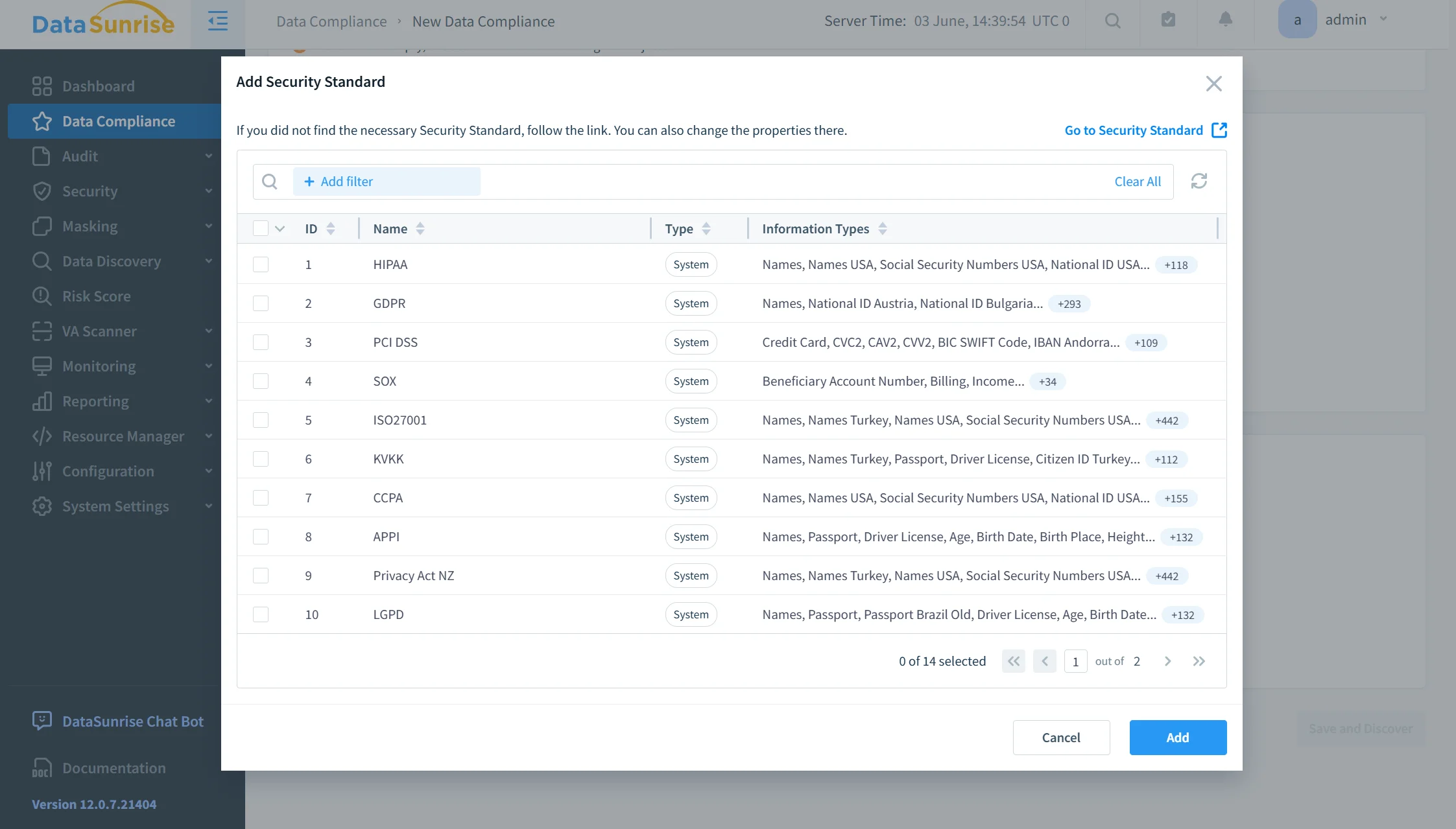
DataSunrise extends these capabilities through a centralized workflow that combines discovery, risk analysis, monitoring, masking, security controls, and compliance management. This approach helps organizations maintain governance policies more consistently while reducing repetitive administrative work.
1. Connect the Amazon Redshift Environment
The first step is to connect the Amazon Redshift environment to DataSunrise. Once the instance is registered, administrators can begin applying centralized discovery, auditing, masking, security, and compliance capabilities.
DataSunrise supports Amazon Redshift connections and IAM-based authentication. It can also work with native Redshift audit collection, including configurations where audit information is collected through Amazon S3. This makes it possible to integrate DataSunrise into existing Redshift environments without replacing native AWS controls.
After the connection is established, security teams can manage governance-related functionality from a single interface instead of maintaining separate workflows for sensitive data identification, activity monitoring, and protection policies.
2. Discover and Classify Sensitive Redshift Data
Effective governance depends on understanding which database objects actually contain sensitive information. Without this visibility, administrators may apply broad controls to low-risk datasets while leaving important regulated information insufficiently protected.
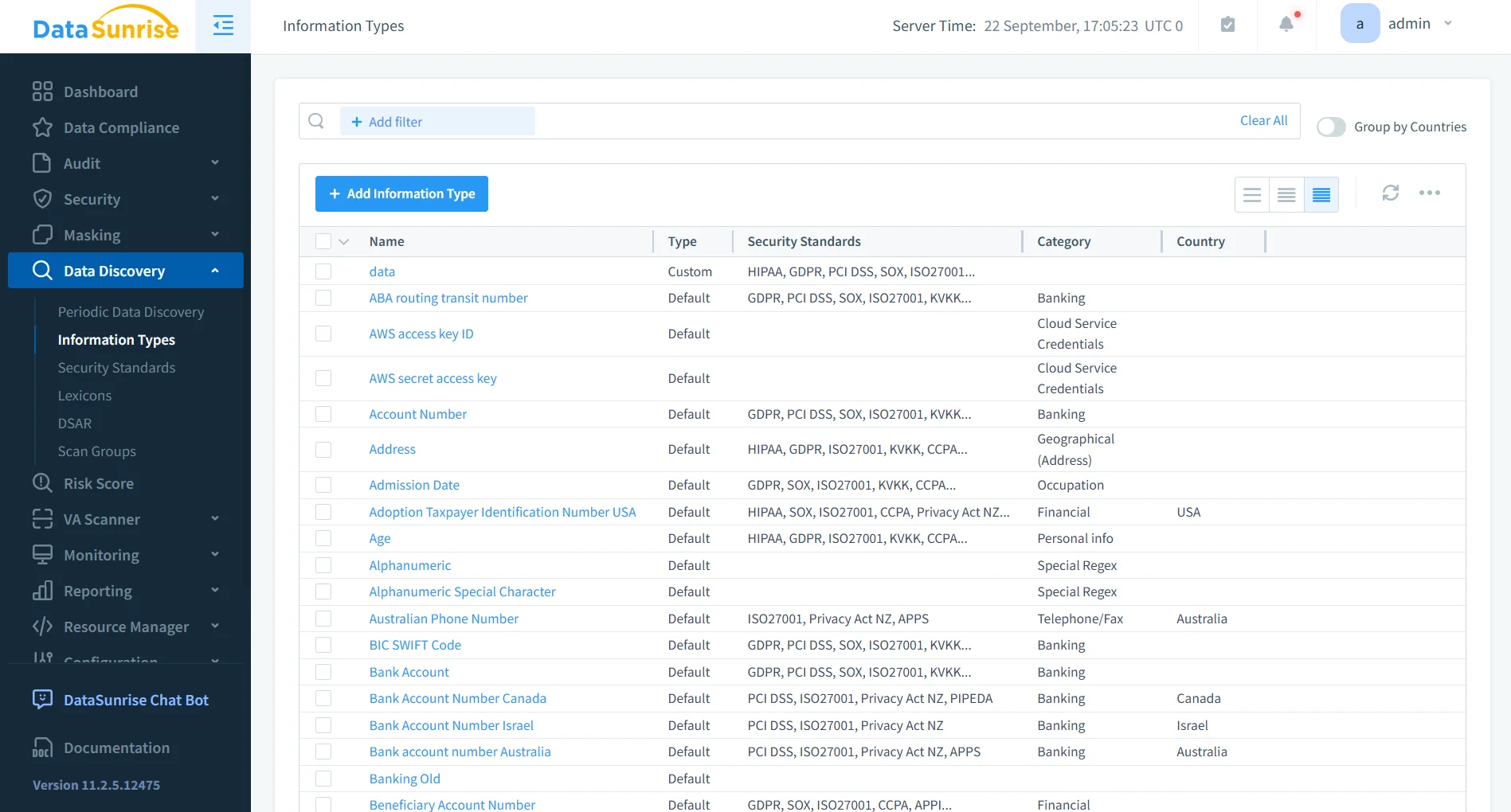
DataSunrise Sensitive Data Discovery scans Redshift schemas, tables, and columns to identify categories such as personal identifiers, contact information, financial records, payment data, authentication credentials, healthcare information, and organization-specific sensitive values.
Discovery results provide additional context about where sensitive information resides and which database objects require stronger governance controls. Administrators can then use this information to determine where additional auditing, masking, security policies, or access restrictions are necessary.
This data-aware approach improves governance because policies can be aligned with the actual sensitivity of stored information rather than being based only on database structure or user permissions.
3. Prioritize Governance with Risk Scoring
Not every database object or user represents the same level of governance risk. A frequently accessed table containing sensitive financial information generally requires more attention than a reference table containing non-sensitive operational data.
DataSunrise Database Risk Score Analytics helps prioritize governance efforts by evaluating factors such as sensitive data presence, user access, activity frequency, audit or protection coverage, and data volume.
The resulting risk context allows administrators to identify database objects and users that require more immediate review. For example, a heavily accessed Redshift table containing payment information and broad user permissions may receive higher priority than a rarely queried internal table.
Risk-based prioritization helps governance teams focus their resources on areas where excessive access, insufficient monitoring, or weak protection could create greater business impact.
4. Apply Governance Policies to Sensitive Data
Once sensitive information has been identified and prioritized, DataSunrise can apply governance policies according to the organization's protection requirements.
Audit Rules can record access to selected database objects and operations, creating detailed evidence of how governed information is being used. Dynamic Data Masking can protect sensitive values in query results while preserving the original data stored in Amazon Redshift.
Static Data Masking can be used when protected copies of production information are required for testing, development, or other non-production workflows. Security Rules can restrict prohibited or suspicious database operations, while Database Activity Monitoring provides centralized visibility into ongoing interactions with governed data.
These policies can target specific database objects, operations, and conditions rather than applying identical controls across the entire environment. This allows governance enforcement to reflect actual data sensitivity and business requirements.
5. Monitor Governance Continuously
Governance policies need continuous verification because technically permitted activity can still represent unnecessary or suspicious access.
DataSunrise centralized activity monitoring provides visibility into users, sessions, executed queries, accessed objects, and policy events. Security teams can therefore correlate database behavior with known sensitive-data locations instead of reviewing audit information without additional context.
Behavior Analytics and Machine Learning Audit Rules can further support governance by identifying activity that differs from established patterns.
Examples can include an analyst accessing a sensitive schema that is not normally used by that role, a service account retrieving substantially more records than usual, new access to payment or authentication information, administrative activity outside expected working periods, or previously inactive users beginning to access governed datasets.
This additional context helps administrators identify cases where access may technically be permitted but still requires investigation or policy adjustment.
6. Automate Governance Maintenance
Amazon Redshift environments continuously change as new tables appear, schemas evolve, users receive different responsibilities, and sensitive information moves into new database objects. Governance policies therefore require regular maintenance rather than a one-time configuration.
DataSunrise supports Sensitive Data Discovery, No-Code Policy Automation, Automatic Policy Generation, Compliance Autopilot, and Continuous Regulatory Calibration to reduce repeated manual governance work. These capabilities can support governance and compliance requirements associated with GDPR, HIPAA, PCI DSS, SOX, and other regulatory frameworks.
Periodic discovery can identify newly introduced sensitive information, while automated policy workflows can reduce the time between classification and the application of appropriate monitoring or protection controls.
By combining discovery, policy management, activity monitoring, masking, and compliance functionality within a unified security framework, DataSunrise helps organizations maintain Amazon Redshift governance as the environment evolves rather than relying entirely on periodic manual reviews.
Native Amazon Redshift Governance vs. DataSunrise
| Governance Area | Amazon Redshift | DataSunrise |
|---|---|---|
| Access Control | Native RBAC, privileges, and RLS | Centralized security policies |
| Data Protection | Column controls and Dynamic Data Masking | Dynamic and Static Data Masking |
| Sensitive Data Discovery | Separate identification workflow | Automated Sensitive Data Discovery |
| Risk Prioritization | Mainly administrator-driven | Database and user Risk Scoring |
| Activity Monitoring | System views, CloudWatch, and S3 | Centralized Database Activity Monitoring |
| Policy Automation | Mostly manual configuration | No-Code Policy Automation |
| Behavioral Analysis | Requires log analysis | Behavioral Analytics and ML Audit Rules |
| Governance Maintenance | Periodic manual review | Continuous discovery and policy calibration |
| Multi-Platform Governance | Focused on Redshift and AWS | Unified controls across heterogeneous platforms |
Amazon Redshift provides the native governance foundation, while DataSunrise extends it with centralized discovery, monitoring, risk analysis, masking, and policy automation.
Conclusion
Amazon Redshift provides a capable native foundation for data governance through RBAC, granular privileges, row-level security, Dynamic Data Masking, system metadata, database audit logging, CloudWatch, Amazon S3, and CloudTrail. Together, these mechanisms allow organizations to define access controls and retain visibility into activity affecting governed analytical data.
However, applying governance effectively requires more than configuring access once. Organizations must continuously understand where sensitive information resides, determine which users and objects present greater risk, observe how governed data is used, and adjust protection as Redshift environments evolve.
DataSunrise extends this framework with Sensitive Data Discovery, Database Risk Score Analytics, centralized Database Activity Monitoring, Dynamic and Static Data Masking, No-Code Policy Automation, Machine Learning Audit Rules, Compliance Autopilot, Continuous Regulatory Calibration, and Audit-Ready Reporting.
By connecting classification, risk analysis, activity visibility, and data protection, organizations can reduce manual governance effort while maintaining more consistent control over sensitive Amazon Redshift data.
Organizations can explore available deployment modes or schedule a live demonstration to evaluate DataSunrise governance capabilities for Amazon Redshift.
Protect Your Data with DataSunrise
Secure your data across every layer with DataSunrise. Detect threats in real time with Activity Monitoring, Data Masking, and Database Firewall. Enforce Data Compliance, discover sensitive data, and protect workloads across 50+ supported cloud, on-prem, and AI system data source integrations.
Start protecting your critical data today
Request a Demo Download Now